
Windows update settings and other questions

baumgrenze

New member
Member
VIP
Local time
3:33 AM
Messages
300
Location
Charlottesville, VA
I think I've created a similar mess. A CNET email prompted to check today and discovered that I've not installed any updates since mid-December 2015. I found I had Windows Update set to "Check for updates but let me choose whether to download and install them." Windows Update never told me it found updates nor asked if I wanted to download and install any. This seems a totally useless setting. Is it supposed to work differently?

I reset the setting to "Download updates but let me choose whether to install them." Then I ran Windows Update. It ran for a long time...

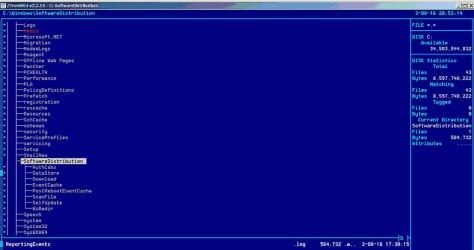
Now I appear to have a list of 43 files in Windows>SoftwareDistribution>Download that are ready to be installed; it is a random mix of critical and recommended updates. Belarc lists 30 "Microsoft security bulletins. Of course the file-names are uninformative letters and numbers Do I need to be concerned about a stealth Windows 10 install being among them?

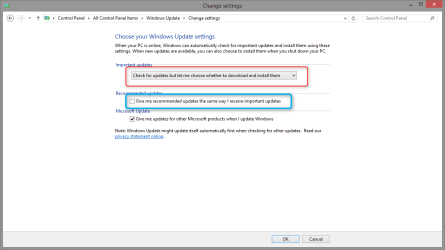
I also see my settings currently include "Give me recommended updates the same way I receive important updates" and "Give me updates for Microsoft products and check for new optional Microsoft software when I update Windows."

Should I turn one or both of these off before I reboot?

I'm confused about how to deal with these latter two categories. I'd like to be able to 'pick and choose' and perhaps even make notes and research some of them and then come back again and install some of them.

Thank you in advance for any suggestions what I should do next.

baumgrenze
 

My Computer My Computer

Computer type
PC/Desktop
Computer Manufacturer/Model Number
Custom built by GamePC/Solid Electric - Palo Alto - on 03/10/08
OS
Win 7 Pro 64
CPU
Intel Core 2 Quad Q6600 (2.4 GHz) Quad Core
Motherboard
Gigabyte GA-P35-DS3P Intel P35 ATX (rev. 2.1)
Memory
2 x Crucial 4GB Kit (2GBx2) DDR2 CT2KIT25664AA800
Graphics Card(s)
Sapphire Radeon HD 3870 PCIe 512 Mb
Sound Card
RealTek audio on MOBO + EDIROL UA-1EX
Monitor(s) Displays
Samsung S24A450BW 24" LED monitor
Screen Resolution
1600 x 1200 at 75 Hz
Hard Drives
2 Crucial 128 Gb SSD (CT128M550SSD1)
one mounted and running Win7/Pro x64
one disconnected containing only Win10/Pro upgrade - in process
1 1TB WD Caviar Black (WD1003FZEX-00MK2A0) (Data drive)
1 2TB Seagate 2TB (PN/ 9JB1N3-576 - ST2000DM001-1ER
PSU
Seasonic S12-HT 650W 80% Efficiency Power Supply
Case
Lian Li PC-B25B
Cooling
Gigabyte Silent-Pipe
Keyboard
Dell MS Comfort
Mouse
HP x4000 wireless
Internet Speed
Sonic FTTN @ 23 Mbps
Antivirus
Avast
Browser
SeaMonkey
Other Info
BIOS: Award Software International, Inc. F6 06/18/2009

System Specs - Updated on 09//16/19
I Persisted and Updates Are Being Installed

I persisted and finally reached a 'Select Updates to Install.' There were 48 'important updates' and 2 'optional' updates. Curiously one of the 'optional updates' came 'preselected' and I needed to uncheck it. It was the option to install Windows 10!

I'd still like to understand why Windows Update did not tell me there were critical security updates I needed to download and install. The application was set to "Check for updates...."

I am still confused why I needed to run "Check for Updates" twice in Windows Update before I reached the "Select Updates..." screen.

thanks

baumgrenze
 

My Computer My Computer

Computer type
PC/Desktop
Computer Manufacturer/Model Number
Custom built by GamePC/Solid Electric - Palo Alto - on 03/10/08
OS
Win 7 Pro 64
CPU
Intel Core 2 Quad Q6600 (2.4 GHz) Quad Core
Motherboard
Gigabyte GA-P35-DS3P Intel P35 ATX (rev. 2.1)
Memory
2 x Crucial 4GB Kit (2GBx2) DDR2 CT2KIT25664AA800
Graphics Card(s)
Sapphire Radeon HD 3870 PCIe 512 Mb
Sound Card
RealTek audio on MOBO + EDIROL UA-1EX
Monitor(s) Displays
Samsung S24A450BW 24" LED monitor
Screen Resolution
1600 x 1200 at 75 Hz
Hard Drives
2 Crucial 128 Gb SSD (CT128M550SSD1)
one mounted and running Win7/Pro x64
one disconnected containing only Win10/Pro upgrade - in process
1 1TB WD Caviar Black (WD1003FZEX-00MK2A0) (Data drive)
1 2TB Seagate 2TB (PN/ 9JB1N3-576 - ST2000DM001-1ER
PSU
Seasonic S12-HT 650W 80% Efficiency Power Supply
Case
Lian Li PC-B25B
Cooling
Gigabyte Silent-Pipe
Keyboard
Dell MS Comfort
Mouse
HP x4000 wireless
Internet Speed
Sonic FTTN @ 23 Mbps
Antivirus
Avast
Browser
SeaMonkey
Other Info
BIOS: Award Software International, Inc. F6 06/18/2009

System Specs - Updated on 09//16/19
A Few More Questions - Hijacking & WU Options and Files

Just for the record, did my insertion of a question into this thread constitute 'hijacking of the OP's thread?

It is sometimes hard for me to remember 'best practices' for a given forum. One that I use for questions about my 2012 Nissan Leaf wants as many posts on a given topic to all be in the same thread so that questions and answers found in a search aren't in a large number of uncoordinated threads.

I am still confused by the outcome of this Windows Update option: "Check for updates but let me choose whether to download and install them."

In my experience it was equivalent to there being no Windows Update running at all. To me the words suggest that WU should have kept track of any and all updates created by Microsoft that apply to my system. Also that when it found something I would be told that there were updates I should consider for downloading and installation. Ideally they should be grouped into 1) Critical security updates, 2) Perhaps useful but non-critical updates, and 3) Optional updates (like launching the installation of Windows 10.)

Is there a way to achieve this goal?

I was tired last night when I finally managed to download and find in WU the updates my system 'needed.' I could not readily distinguish between (1) and (2) above. I had no idea how long the installation would take. I'd seen threads where others reported two nights of hard work with multiple reboots. I experienced at least one reboot before I could shut down.

I really appreciate the insights that the experts at sevenforums offer. Thank you all for sharing your knowledge. You make it much clearer than Redmond.

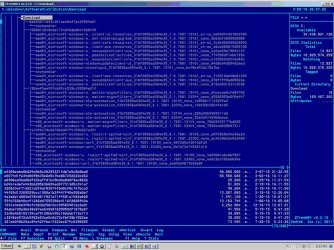
FWIW as part of yesterday's exercise I used ZTreeWin to look at C:\Windows\SoftwareDistribution and it helped m to appreciate just how complex a given download is. The screens below are just partial displays of the tree structure.

The files whose names begin 'amd64...' must be 'hidden' in a significant way since selection of any one returns "no files."


thanks


baumgrenze


Attachments

  • WindowsUpdateDownload_1.jpg
    WindowsUpdateDownload_1.jpg
    62 KB · Views: 1
  • WindowsUpdateDownload_2.jpg
    WindowsUpdateDownload_2.jpg
    204.2 KB · Views: 0

My Computer My Computer

Computer type
PC/Desktop
Computer Manufacturer/Model Number
Custom built by GamePC/Solid Electric - Palo Alto - on 03/10/08
OS
Win 7 Pro 64
CPU
Intel Core 2 Quad Q6600 (2.4 GHz) Quad Core
Motherboard
Gigabyte GA-P35-DS3P Intel P35 ATX (rev. 2.1)
Memory
2 x Crucial 4GB Kit (2GBx2) DDR2 CT2KIT25664AA800
Graphics Card(s)
Sapphire Radeon HD 3870 PCIe 512 Mb
Sound Card
RealTek audio on MOBO + EDIROL UA-1EX
Monitor(s) Displays
Samsung S24A450BW 24" LED monitor
Screen Resolution
1600 x 1200 at 75 Hz
Hard Drives
2 Crucial 128 Gb SSD (CT128M550SSD1)
one mounted and running Win7/Pro x64
one disconnected containing only Win10/Pro upgrade - in process
1 1TB WD Caviar Black (WD1003FZEX-00MK2A0) (Data drive)
1 2TB Seagate 2TB (PN/ 9JB1N3-576 - ST2000DM001-1ER
PSU
Seasonic S12-HT 650W 80% Efficiency Power Supply
Case
Lian Li PC-B25B
Cooling
Gigabyte Silent-Pipe
Keyboard
Dell MS Comfort
Mouse
HP x4000 wireless
Internet Speed
Sonic FTTN @ 23 Mbps
Antivirus
Avast
Browser
SeaMonkey
Other Info
BIOS: Award Software International, Inc. F6 06/18/2009

System Specs - Updated on 09//16/19
I am still confused by the outcome of this Windows Update option: "Check for updates but let me choose whether to download and install them."

In my experience it was equivalent to there being no Windows Update running at all. To me the words suggest that WU should have kept track of any and all updates created by Microsoft that apply to my system. Also that when it found something I would be told that there were updates I should consider for downloading and installation. Ideally they should be grouped into 1) Critical security updates, 2) Perhaps useful but non-critical updates, and 3) Optional updates (like launching the installation of Windows 10.)

Is there a way to achieve this goal?

I'll be honest, I'm not sure exactly what you want, but it sounds like you don't want W10 so I will reply with that in mind.

As for the update settings, that setting is what I would recommend, you are mistaken though, it's not like having no WU running at all.

It will check, and they will be shown in WU, you just have to do them manually.

If you want to avoid W10, unchecking the box for give me recommended updates the same as important, is another step.

2015-11-17_18h09_58.png

Those settings like in that screenshot will keep W10 from installing, if you want to go a bit further,

Upgrade to Windows 10 Update - Enable or Disable in Windows 7 or 8.1 - Windows 10 Forums

Will remove the option from WU.

If you are worried about the GWX icon or it's related updates there are plenty of other threads about that, it doesn't bother me personally.
 

My Computer My Computer

Computer type
PC/Desktop
Computer Manufacturer/Model Number
Self Built
OS
Win 10 Pro x64
CPU
Intel I5-2500K @3.3GHz
Motherboard
Asrock P67 Extreme4
Memory
16GB G.Skill Ripjaws X (4x4GB)
Graphics Card(s)
EVGA GeForce 750 Ti SC 2GB
Sound Card
ASUS Xonar DG 5.1 Channels 24-bit 96KHz PCI Interface Sound
Monitor(s) Displays
auria eq2367
Screen Resolution
1920 x 1080
Hard Drives
250GB Samsung 850 EVO SSD
1TB WD Blue
1TB Hitachi
PSU
SeaSonic X 650W 80 Plus Gold
Case
Corsair Obsidian 750D
Cooling
Corsair H60, Three 140mm case fans
Keyboard
Logitech Wireless Keyboard K520
Mouse
Logitech Wireless Mouse M310
Internet Speed
Wave Broadband ~ 100 dn 5 up
Antivirus
Windows Defender, Malwarebytes Premium
Browser
Edge, IE11, Chrome
Other Info
Laptop specs: HP g7-1365dx /
CPU: AMD A6-3420M APU with Radeon(tm) HD Graphics /
RAM: Crucial 8Gb (2x4Gb) /
SSD: Crucial M4-CT128M4SSD2 ATA Device/ FW 000F /
GFX: AMD Radeon HD 6520G /
OS: Windows 10 Pro x64
I plan to install Windows 10 sometime in 2016. I want to do so deliberately. My wife had her system 'hosed' by the process; all programs and data were deleted. I want to do a careful backup and also to understand what I'm getting. I've been busy with taxes (not a time to lose everything) and I need to plan around almost certain shoulder replacement surgery before 2015 is over. I was 'provoked' by the pre-selection of the option to install Win 10 as part of a major patching process. I see that as 'underhanded.'

How does WU tell me that it has found critical updates? I do not believe I've seen anything since early December (12/8/15) when the last updates were installed under WU. I do not clearly recall changing the option.

I apologize for being so 'dense' but I seemed to have to 'fight' with WU to get these updates downloaded and installed. It was the Belarc scan that prompted me to take persistent action. I tried using the list they created. I copied it and pasted it into an Excel spreadsheet and began locating each update on Microsoft's website. It did not take long for me to run into one that seemed balky. It seemed as though their servers were being overworked and I was being pulled in other directions at the same time. I concluded that I did not want to install the updates one-at-a-time.

Allow me to share an analogy. I see my PC as a tool, not a full time hobby. There are other things I want to/need to do. If I had to locate a new one and replace the handle on my hammer several times a year, I'd soon look for a 'better hammer.' Somehow I get the sense that Windows is the hammer of choice for me, given the alternative I've seen. Running Linux appears to be more than a full time job. Apple's Procrustean solution seems like a 'left-handed' hammer for a righty.

Thanks for helping me see and understand what I've somehow missed.

baumgrenze
 

My Computer My Computer

Computer type
PC/Desktop
Computer Manufacturer/Model Number
Custom built by GamePC/Solid Electric - Palo Alto - on 03/10/08
OS
Win 7 Pro 64
CPU
Intel Core 2 Quad Q6600 (2.4 GHz) Quad Core
Motherboard
Gigabyte GA-P35-DS3P Intel P35 ATX (rev. 2.1)
Memory
2 x Crucial 4GB Kit (2GBx2) DDR2 CT2KIT25664AA800
Graphics Card(s)
Sapphire Radeon HD 3870 PCIe 512 Mb
Sound Card
RealTek audio on MOBO + EDIROL UA-1EX
Monitor(s) Displays
Samsung S24A450BW 24" LED monitor
Screen Resolution
1600 x 1200 at 75 Hz
Hard Drives
2 Crucial 128 Gb SSD (CT128M550SSD1)
one mounted and running Win7/Pro x64
one disconnected containing only Win10/Pro upgrade - in process
1 1TB WD Caviar Black (WD1003FZEX-00MK2A0) (Data drive)
1 2TB Seagate 2TB (PN/ 9JB1N3-576 - ST2000DM001-1ER
PSU
Seasonic S12-HT 650W 80% Efficiency Power Supply
Case
Lian Li PC-B25B
Cooling
Gigabyte Silent-Pipe
Keyboard
Dell MS Comfort
Mouse
HP x4000 wireless
Internet Speed
Sonic FTTN @ 23 Mbps
Antivirus
Avast
Browser
SeaMonkey
Other Info
BIOS: Award Software International, Inc. F6 06/18/2009

System Specs - Updated on 09//16/19
I don't have any answers for you on why you weren't notified, I can tell you with those settings I pointed out I still get notified in WU.

I understand it's frustrating, there are countless threads here about messed up WU problems, I can only offer this suggestion,

http://www.sevenforums.com/windows-...4840-windows-update-posting-instructions.html

Hopefully someone can help with the info provided after following those instructions.

This section is quite busy, I like your analogy and I hope you get things sorted out with WU and your shoulder.
 

My Computer My Computer

Computer type
PC/Desktop
Computer Manufacturer/Model Number
Self Built
OS
Win 10 Pro x64
CPU
Intel I5-2500K @3.3GHz
Motherboard
Asrock P67 Extreme4
Memory
16GB G.Skill Ripjaws X (4x4GB)
Graphics Card(s)
EVGA GeForce 750 Ti SC 2GB
Sound Card
ASUS Xonar DG 5.1 Channels 24-bit 96KHz PCI Interface Sound
Monitor(s) Displays
auria eq2367
Screen Resolution
1920 x 1080
Hard Drives
250GB Samsung 850 EVO SSD
1TB WD Blue
1TB Hitachi
PSU
SeaSonic X 650W 80 Plus Gold
Case
Corsair Obsidian 750D
Cooling
Corsair H60, Three 140mm case fans
Keyboard
Logitech Wireless Keyboard K520
Mouse
Logitech Wireless Mouse M310
Internet Speed
Wave Broadband ~ 100 dn 5 up
Antivirus
Windows Defender, Malwarebytes Premium
Browser
Edge, IE11, Chrome
Other Info
Laptop specs: HP g7-1365dx /
CPU: AMD A6-3420M APU with Radeon(tm) HD Graphics /
RAM: Crucial 8Gb (2x4Gb) /
SSD: Crucial M4-CT128M4SSD2 ATA Device/ FW 000F /
GFX: AMD Radeon HD 6520G /
OS: Windows 10 Pro x64
Back
Top