Solved Windows Update won't run after new HDD installed

Peano

New member
Local time
5:57 PM
Messages
6
Location
Washington, DC
This is a Dell running Win 7 Pro 64. I recently switched out the 500 GB hard drive for a 1 TB drive. Everything seemed to work fine, but I discovered today that Windows Update won't run. Although the service is running, I get the error msg, "unable to check for updates because the service is not running."

I ran sfc /scannow and it found corrupted system files it couldn't repair. The log is attached.


Any ideas what I might do now?

I already tried this: 1) Stop update service, 2) delete all the files in C:\Windows\Software Distribution, 3) restarted the Update service. Still get the same error message.


I wanted to do a repair-install, but this is a Dell system with OEM software, so I can't to a repair-install from the Dell installation disk. I'd really like to avoid a clean install. I'm guessing the new hard drive is somehow at the bottom of this.

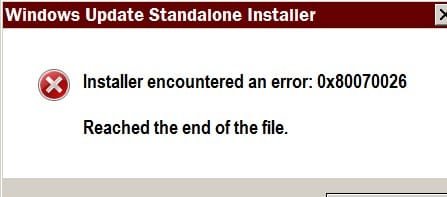
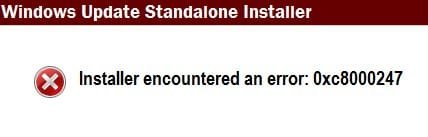
EDIT: I downloaded the System Update Readiness Tool. When I tried to install it, I got the attached error message1 [Sorry, I can't figure out how to make manage the attachments. I got two different error messages when trying to install the SURT. Both are attached.]


EDIT2: I downloaded the SURT again, just in case. This time when I tried to install, I got this error message:
 

Attachments
  • error message2.jpg
    error message2.jpg
    7.5 KB · Views: 12
  • error message1.jpg
    error message1.jpg
    10.3 KB · Views: 12
Last edited:

My Computer My Computer

At a glance

Win 7 x64Intel ie-750 (quad core)8 GB DDR3 SDRAM 1333MHz (4)Radeon HD 5450 - 1GB DDR3
Computer Manufacturer/Model Number
Dell XPS 8100
OS
Win 7 x64
CPU
Intel ie-750 (quad core)
Motherboard
Dell 0T568R A00
Memory
8 GB DDR3 SDRAM 1333MHz (4)
Graphics Card(s)
Radeon HD 5450 - 1GB DDR3
Sound Card
Realtek high def audio
Monitor(s) Displays
Dell 2209wa
Hard Drives
Western Digital 500 GB, 7200 (2 drives)
Where did the install disc come from ?

Did you make it ?

Is it retail ?

Is it OEM ?

Is windows activated with the key from the COA ?

How was windows installed to the new drive ?
 
Last edited:

My Computer My Computer

At a glance

Windows 10 Pro x64Intel Core i7 6700KGSkill TridentZ RGB 16GB 3600 16-16-16-36EVGA GTX 980 Ti SC x2
Computer type
PC/Desktop
Computer Manufacturer/Model Number
Skylake Special #666
OS
Windows 10 Pro x64
CPU
Intel Core i7 6700K
Motherboard
Asus Sabertooth Z170 Mark 1
Memory
GSkill TridentZ RGB 16GB 3600 16-16-16-36
Graphics Card(s)
EVGA GTX 980 Ti SC x2
Sound Card
Realtek High Definition
Monitor(s) Displays
AOC G2460PG
Screen Resolution
1920 x 1080 144Hz
Hard Drives
Samsung 860 Pro 256GB, Seagate Barracuda 4TB x2
PSU
EVGA 1000 P2, EVGA White Custom Braided Cables
Case
Corsair Vengeance C70 Gunmetal Black
Cooling
Corsair H100i v2, Corsair ML120 x2, Thermal Grizzly Kryonaut
Keyboard
Logitech G910 Orion Spectrum
Mouse
Logitech G700s
Internet Speed
Verizon Fios Quantum Gateway 75/75
Antivirus
Windows Defender, Malwarebytes Free 3.8.3
Browser
Chrome
Other Info
Corsair SP120 x4, LG Blu-ray Drive, Durabrand HT-395 100 Watt Dolby Digital Amp, Corsair H2100 Wireless 7.1 Headset
This could the result of one of three common errors.
In order of likelihood..
1) KB3004394 v1 is installed - uninstall it, reboot twice, and then do a Check for Updates and install the later version
2) IRST drivers (or other HD drivers as required - see if you can spot a problem in device manager)) - install the latest compatible with your system
3) a corrupt CATROOT2 folder - of neither of the above work, post back with/for details.

There are no problems with the SFC output.
(there are also other unknown causes for these errors)
 

My Computer My Computer

At a glance

Win 7 x64 Home Premium (and x86 VirtualBox VM...i3 370M/i7 6500U8GB - finally :)/8GBit's an i3, dude!/dual Intel&nVidia
Computer type
Laptop
Computer Manufacturer/Model Number
Asus K52F or Lenovo B51-80
OS
Win 7 x64 Home Premium (and x86 VirtualBox VM)/Win10
CPU
i3 370M/i7 6500U
Motherboard
Asus/Lenovo
Memory
8GB - finally :)/8GB
Graphics Card(s)
it's an i3, dude!/dual Intel&nVidia
Sound Card
onboard
Monitor(s) Displays
15.6" built-in
Screen Resolution
1366x768/1920x1080
Hard Drives
750GB Seagate internal
Sundry external drives attached to other computers on the local network
1TB SSD on the Lenovo
PSU
n/a
Internet Speed
as much as I can get - usually on a dongle/phone, so <1MB/s
Antivirus
MSE/Defender
Browser
IE11/12/Edge/Chrome/FF(if I must)
SOLVED: I updated the drivers for Intel Rapid Storage Technology, and all the problems vanished. As I suspected, the new (larger) hard drive was the problem.
 

My Computer My Computer

At a glance

Win 7 x64Intel ie-750 (quad core)8 GB DDR3 SDRAM 1333MHz (4)Radeon HD 5450 - 1GB DDR3
Computer Manufacturer/Model Number
Dell XPS 8100
OS
Win 7 x64
CPU
Intel ie-750 (quad core)
Motherboard
Dell 0T568R A00
Memory
8 GB DDR3 SDRAM 1333MHz (4)
Graphics Card(s)
Radeon HD 5450 - 1GB DDR3
Sound Card
Realtek high def audio
Monitor(s) Displays
Dell 2209wa
Hard Drives
Western Digital 500 GB, 7200 (2 drives)
Glad you got it sorted!

Good luck
 

My Computer My Computer

At a glance

Win 7 x64 Home Premium (and x86 VirtualBox VM...i3 370M/i7 6500U8GB - finally :)/8GBit's an i3, dude!/dual Intel&nVidia
Computer type
Laptop
Computer Manufacturer/Model Number
Asus K52F or Lenovo B51-80
OS
Win 7 x64 Home Premium (and x86 VirtualBox VM)/Win10
CPU
i3 370M/i7 6500U
Motherboard
Asus/Lenovo
Memory
8GB - finally :)/8GB
Graphics Card(s)
it's an i3, dude!/dual Intel&nVidia
Sound Card
onboard
Monitor(s) Displays
15.6" built-in
Screen Resolution
1366x768/1920x1080
Hard Drives
750GB Seagate internal
Sundry external drives attached to other computers on the local network
1TB SSD on the Lenovo
PSU
n/a
Internet Speed
as much as I can get - usually on a dongle/phone, so <1MB/s
Antivirus
MSE/Defender
Browser
IE11/12/Edge/Chrome/FF(if I must)
Back
Top