Hi,
See this
Windows Update will not update and I've tried multiple fixes
Although for a clean install these would be faster
It's a lot easier to clean install these days with the unofficial sp2
There are essentially 3 updates needed for a clean install of windows that will get you updated through April of 2016
Which version of windows do you have installed 32 bit or 64 bit,
System Type - 32-bit (x86) or 64-bit (x64)
KB3020369 & KB3125574 & KB3172605 all can be downloaded from the catalog using
internet explorer any browser now
 Microsoft Update Catalog
Related articles,
Simplifying updates for Windows 7 and 8.1
Simplifying updates for Windows 7 and 8.1 – Windows for IT Pros
1) Install windows without an internet connection and as soon as you get to your win-7
desktop switch the update settings to Never check for updates or it will clash with the stand alone installers
Windows Update Settings - Change
2) You will also need to ensure the built in windows update service is not running if it is Stop it and set to
manual or it will conflict with the stand alone installers.
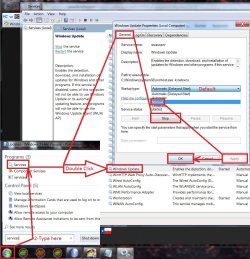
3) KB3125574 is a very large update and will take a while to install be sure switch hibernation to off and also sleep mode
Hibernate - Enable or Disable
Screen Saver - Turn On or Off
4) Manually install KB3020369 Required for the next 2 to be installed.
5) Manually install KB3125574 This one has all update through April 2016 in it so it will take a little time to
install considering there are 350 updates to date so it's a good thing to wait a while for it to install.
6) Manually install KB3172605 Newest update client included in this one to get the update system working.
7) Afterwards reset the windows updates service to what it was before/ Default and update settings to your preference and check for updates.
Should be only 50 or so updates left to install.
I have all three updates needed on my OneDrive too if you can't or don't want to deal with the catalog
https://1drv.ms/f/s!AsjD7o6P3KLKj2SkG8MEhiaxwiVZ
On another note
There have been some rollups issued not sure if any prerequisite updates are required to install either of them
The underlined is the security only rollup

Brds7t7 posted them on another thread it would be installed 4th after the other 3 anyway
If you want the Security Quality Rollup (which includes everything), then it's here:
https://support.microsoft.com/en-us/kb/3185330 these will eventually be cumulative sometime in 2017.
If you want the Security-only update then that's from here: https://support.microsoft.com/en-us/kb/3192391 this won't be cumulative.
Tip for cat and mouse updates on my Onedrive
Windows handles .zip folders just like any normal folder so you don't need 7-zip or any third party utility to open them...
After a clean install and once you get to the win-7 desktop connect the flash drive and move the 3 updates anywhere really downloads folder/ desktop/.... then right click one at a time in the order they are to be installed and use Extract all
The extract all location popup message will be in the same place as you moved them too
Plus the extracted file will also open in a new window
When it does it might show a folder just double click on it and again on the next item which will be the .msu file
You'll get a prompt do you want to install this item after a brief search approve and repeat for the other 2



