Windows UpdateProblem

mtebaldi

New member
Local time
4:56 PM
Messages
14
Hi All,

Well I just formatted and re-imaged my WDC Black Cavier 1tb HDD and all was going good updating security updates. Then for some reason i get and 0x80070005 restarting my system from a security update install. Have tried System Restore & System Repair. Checked services settngs tried to start windows update but gave me same error. I was able to access windows update but it took 3 to 4 minutes and when it did there was a X by the windows update header and it was RED. Could not view update history. Any help on this is appreciated
Attached Images
367842d1438482946-windows-update-installer-error-0x80070005-windows-update-error.png
367843d1438482946-windows-update-installer-error-0x80070005-os-info.png
 

My Computer

Computer type
PC/Desktop
Computer Manufacturer/Model Number
custom build
OS
Windows 7 Home Premium 32bit
CPU
Intel 860 I7
Motherboard
GA-P55-USB3
Memory
4g Gskill
Graphics Card(s)
asus Geforce GTX 660
Hard Drives
WD 1TB Caviar Black uninstalled.
WDC WD5000BPKT-00PK4T0 ATA Device
PSU
Corsair TX750w
Case
Cooler Master Storm Sniper
Keyboard
ZBoard wired
Mouse
Razer Diamondback wired
Internet Speed
Wired Broadband 178.48Mbps download & 12.16Mbps Upload
Antivirus
Norton 360
Browser
IE/Chrome
Please follow the Windows Update Posting Instructions and post the requested data

If the file is too large (8MB compressed), remove the older CBSPersist cab files until the final file is below the limit - you can always post them separately after zipping them. (the forum doesn't allow the upload of bare CAB files, for a number of reasons)

Please also post the C:\Windows\windowsudpate.log file
 

My Computer

Computer type
Laptop
Computer Manufacturer/Model Number
Asus K52F or Lenovo B51-80
OS
Win 7 x64 Home Premium (and x86 VirtualBox VM)/Win10
CPU
i3 370M/i7 6500U
Motherboard
Asus/Lenovo
Memory
8GB - finally :)/8GB
Graphics Card(s)
it's an i3, dude!/dual Intel&nVidia
Sound Card
onboard
Monitor(s) Displays
15.6" built-in
Screen Resolution
1366x768/1920x1080
Hard Drives
750GB Seagate internal
Sundry external drives attached to other computers on the local network
1TB SSD on the Lenovo
PSU
n/a
Internet Speed
as much as I can get - usually on a dongle/phone, so <1MB/s
Antivirus
MSE/Defender
Browser
IE11/12/Edge/Chrome/FF(if I must)
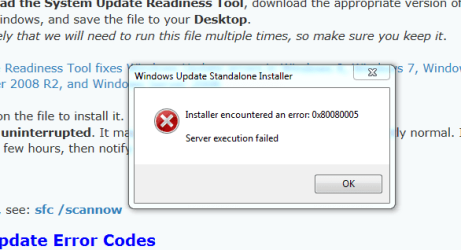
Followed instructions Windows Update Posting Instructions. Initiated SURT download this is the error I received. SURT download never completed. attached PNG of error
 

Attachments

  • Surt install error.PNG
    Surt install error.PNG
    14.1 KB · Views: 42

My Computer

Computer type
PC/Desktop
Computer Manufacturer/Model Number
custom build
OS
Windows 7 Home Premium 32bit
CPU
Intel 860 I7
Motherboard
GA-P55-USB3
Memory
4g Gskill
Graphics Card(s)
asus Geforce GTX 660
Hard Drives
WD 1TB Caviar Black uninstalled.
WDC WD5000BPKT-00PK4T0 ATA Device
PSU
Corsair TX750w
Case
Cooler Master Storm Sniper
Keyboard
ZBoard wired
Mouse
Razer Diamondback wired
Internet Speed
Wired Broadband 178.48Mbps download & 12.16Mbps Upload
Antivirus
Norton 360
Browser
IE/Chrome
Here is my windows update log file
 

My Computer

Computer type
PC/Desktop
Computer Manufacturer/Model Number
custom build
OS
Windows 7 Home Premium 32bit
CPU
Intel 860 I7
Motherboard
GA-P55-USB3
Memory
4g Gskill
Graphics Card(s)
asus Geforce GTX 660
Hard Drives
WD 1TB Caviar Black uninstalled.
WDC WD5000BPKT-00PK4T0 ATA Device
PSU
Corsair TX750w
Case
Cooler Master Storm Sniper
Keyboard
ZBoard wired
Mouse
Razer Diamondback wired
Internet Speed
Wired Broadband 178.48Mbps download & 12.16Mbps Upload
Antivirus
Norton 360
Browser
IE/Chrome
CBS.LOG file attached
 

Attachments

Last edited:

My Computer

Computer type
PC/Desktop
Computer Manufacturer/Model Number
custom build
OS
Windows 7 Home Premium 32bit
CPU
Intel 860 I7
Motherboard
GA-P55-USB3
Memory
4g Gskill
Graphics Card(s)
asus Geforce GTX 660
Hard Drives
WD 1TB Caviar Black uninstalled.
WDC WD5000BPKT-00PK4T0 ATA Device
PSU
Corsair TX750w
Case
Cooler Master Storm Sniper
Keyboard
ZBoard wired
Mouse
Razer Diamondback wired
Internet Speed
Wired Broadband 178.48Mbps download & 12.16Mbps Upload
Antivirus
Norton 360
Browser
IE/Chrome
Here's the SFC error data...
Code:
	Line 10983: 2015-08-20 11:16:41, Info                  CSI    00000215 [SR] Repairing 6 components
	Line 10984: 2015-08-20 11:16:41, Info                  CSI    00000216 [SR] Beginning Verify and Repair transaction
	Line 10985: 2015-08-20 11:16:41, Info                  CSI    00000217 [SR] Cannot verify component files for Microsoft-Windows-KernelStreaming-Video-Capture-Plug-Ins, Version = 6.1.7601.17514, pA = PROCESSOR_ARCHITECTURE_INTEL (0), Culture neutral, VersionScope = 1 nonSxS, PublicKeyToken = {l:8 b:31bf3856ad364e35}, Type neutral, TypeName neutral, PublicKey neutral, manifest is damaged (FALSE)
	Line 10986: 2015-08-20 11:16:41, Info                  CSI    00000218 [SR] Cannot verify component files for Microsoft-Windows-Kernel-CSD, Version = 6.1.7601.17514, pA = PROCESSOR_ARCHITECTURE_INTEL (0), Culture neutral, VersionScope = 1 nonSxS, PublicKeyToken = {l:8 b:31bf3856ad364e35}, Type neutral, TypeName neutral, PublicKey neutral, manifest is damaged (FALSE)
	Line 10987: 2015-08-20 11:16:41, Info                  CSI    00000219 [SR] Cannot verify component files for Microsoft-Windows-isoburn, Version = 6.1.7601.17514, pA = PROCESSOR_ARCHITECTURE_INTEL (0), Culture neutral, VersionScope = 1 nonSxS, PublicKeyToken = {l:8 b:31bf3856ad364e35}, Type neutral, TypeName neutral, PublicKey neutral, manifest is damaged (FALSE)
	Line 10988: 2015-08-20 11:16:41, Info                  CSI    0000021a [SR] Cannot verify component files for Microsoft-Windows-iTVData, Version = 6.1.7601.17514, pA = PROCESSOR_ARCHITECTURE_INTEL (0), Culture neutral, VersionScope = 1 nonSxS, PublicKeyToken = {l:8 b:31bf3856ad364e35}, Type neutral, TypeName neutral, PublicKey neutral, manifest is damaged (FALSE)

We need the CheckSUR date as well...
Please download and save the CheckSUR tool from http://support.microsoft.com/kb/947821
(you'll need to look in the details for Windows 7, downloading from the Microsoft Download Center)

Run it - The tool can take anywhere from 5 mins to a couple of hours to run (or 'Install') depending on how much it has to do, and may exit silently - it may appear to freeze for most of that time, but be patient.
The result is logged in the C:\Windows\Logs\CBS\CheckSUR.log file - and an archive …\checksur.persist.log file

Then zip the CheckSUR.log and upload it to your reply.
 

My Computer

Computer type
Laptop
Computer Manufacturer/Model Number
Asus K52F or Lenovo B51-80
OS
Win 7 x64 Home Premium (and x86 VirtualBox VM)/Win10
CPU
i3 370M/i7 6500U
Motherboard
Asus/Lenovo
Memory
8GB - finally :)/8GB
Graphics Card(s)
it's an i3, dude!/dual Intel&nVidia
Sound Card
onboard
Monitor(s) Displays
15.6" built-in
Screen Resolution
1366x768/1920x1080
Hard Drives
750GB Seagate internal
Sundry external drives attached to other computers on the local network
1TB SSD on the Lenovo
PSU
n/a
Internet Speed
as much as I can get - usually on a dongle/phone, so <1MB/s
Antivirus
MSE/Defender
Browser
IE11/12/Edge/Chrome/FF(if I must)
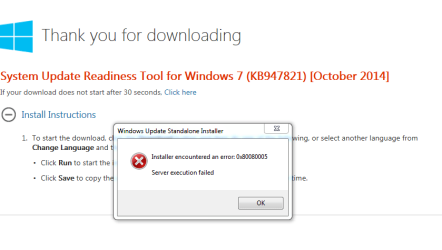
Followed tour instructions to download CheckSUR as you mention in your last reply. This is the error I received while installing on my PC.
 

Attachments

  • SURT ERROR.PNG
    SURT ERROR.PNG
    16.9 KB · Views: 1

My Computer

Computer type
PC/Desktop
Computer Manufacturer/Model Number
custom build
OS
Windows 7 Home Premium 32bit
CPU
Intel 860 I7
Motherboard
GA-P55-USB3
Memory
4g Gskill
Graphics Card(s)
asus Geforce GTX 660
Hard Drives
WD 1TB Caviar Black uninstalled.
WDC WD5000BPKT-00PK4T0 ATA Device
PSU
Corsair TX750w
Case
Cooler Master Storm Sniper
Keyboard
ZBoard wired
Mouse
Razer Diamondback wired
Internet Speed
Wired Broadband 178.48Mbps download & 12.16Mbps Upload
Antivirus
Norton 360
Browser
IE/Chrome
what AV is currently installed - what other AV's have EVER been installed on this machine?
 

My Computer

Computer type
Laptop
Computer Manufacturer/Model Number
Asus K52F or Lenovo B51-80
OS
Win 7 x64 Home Premium (and x86 VirtualBox VM)/Win10
CPU
i3 370M/i7 6500U
Motherboard
Asus/Lenovo
Memory
8GB - finally :)/8GB
Graphics Card(s)
it's an i3, dude!/dual Intel&nVidia
Sound Card
onboard
Monitor(s) Displays
15.6" built-in
Screen Resolution
1366x768/1920x1080
Hard Drives
750GB Seagate internal
Sundry external drives attached to other computers on the local network
1TB SSD on the Lenovo
PSU
n/a
Internet Speed
as much as I can get - usually on a dongle/phone, so <1MB/s
Antivirus
MSE/Defender
Browser
IE11/12/Edge/Chrome/FF(if I must)
By AV I assume you mean Anti Virus it is Norton the only AV I use since I built this PC 5 yrs ago. I never had issues like this until 6 or 8 months ago.
 
Last edited:

My Computer

Computer type
PC/Desktop
Computer Manufacturer/Model Number
custom build
OS
Windows 7 Home Premium 32bit
CPU
Intel 860 I7
Motherboard
GA-P55-USB3
Memory
4g Gskill
Graphics Card(s)
asus Geforce GTX 660
Hard Drives
WD 1TB Caviar Black uninstalled.
WDC WD5000BPKT-00PK4T0 ATA Device
PSU
Corsair TX750w
Case
Cooler Master Storm Sniper
Keyboard
ZBoard wired
Mouse
Razer Diamondback wired
Internet Speed
Wired Broadband 178.48Mbps download & 12.16Mbps Upload
Antivirus
Norton 360
Browser
IE/Chrome
Aaah! the beloved Norton! -
I hate to tell you this, but the chances are that all your problems are due to Norton!
Having said that - why did you wait 6-8 months to attempt to repair a problem?
This is likely to make what should have been a simple problem something like an iceberg....

I need to see your C:\windows\windowsupdate.log file.
 

My Computer

Computer type
Laptop
Computer Manufacturer/Model Number
Asus K52F or Lenovo B51-80
OS
Win 7 x64 Home Premium (and x86 VirtualBox VM)/Win10
CPU
i3 370M/i7 6500U
Motherboard
Asus/Lenovo
Memory
8GB - finally :)/8GB
Graphics Card(s)
it's an i3, dude!/dual Intel&nVidia
Sound Card
onboard
Monitor(s) Displays
15.6" built-in
Screen Resolution
1366x768/1920x1080
Hard Drives
750GB Seagate internal
Sundry external drives attached to other computers on the local network
1TB SSD on the Lenovo
PSU
n/a
Internet Speed
as much as I can get - usually on a dongle/phone, so <1MB/s
Antivirus
MSE/Defender
Browser
IE11/12/Edge/Chrome/FF(if I must)
I miss spoke the time frame about this problem specifically. It didn't start out to be the windows update problem. The original problem that 6 months the boot-up process stopped at the windows starting screen with the window logo. I saw that the HDD light would shut off at the same time. Telling me that the HDD had stopped. Ran Chkdsk and there were bad sectors that couldn't be fixed. But there were times when boot-up completed and as long as I didn't have to reboot system ran fine. Went on to this forum and may have started a thread concerning the problem was given some test but the test wouldn't run as specified. Short story I reimaged in my HDD in June and all was good until July when I couldn't get or check for updates. So now you know the real story!!!
 

My Computer

Computer type
PC/Desktop
Computer Manufacturer/Model Number
custom build
OS
Windows 7 Home Premium 32bit
CPU
Intel 860 I7
Motherboard
GA-P55-USB3
Memory
4g Gskill
Graphics Card(s)
asus Geforce GTX 660
Hard Drives
WD 1TB Caviar Black uninstalled.
WDC WD5000BPKT-00PK4T0 ATA Device
PSU
Corsair TX750w
Case
Cooler Master Storm Sniper
Keyboard
ZBoard wired
Mouse
Razer Diamondback wired
Internet Speed
Wired Broadband 178.48Mbps download & 12.16Mbps Upload
Antivirus
Norton 360
Browser
IE/Chrome
Ah!
In that case...
Open Event Viewer
click on the Windows logs entry in the left pane to expand it.
Now click on the Application entry - wait while it loads.
Click on 'File' in the menu bar and select Save...
Save the file as Appevt.evtx
Repeat for the System log
then zip both, and upload them.

Also...
Please download the Farbar Service Scanner from

Farbar Service Scanner Download

Right-click on the saved file and select 'Run as Administrator', and tick all the options, then click on the Scan button - copy and paste the report to your response.
 

My Computer

Computer type
Laptop
Computer Manufacturer/Model Number
Asus K52F or Lenovo B51-80
OS
Win 7 x64 Home Premium (and x86 VirtualBox VM)/Win10
CPU
i3 370M/i7 6500U
Motherboard
Asus/Lenovo
Memory
8GB - finally :)/8GB
Graphics Card(s)
it's an i3, dude!/dual Intel&nVidia
Sound Card
onboard
Monitor(s) Displays
15.6" built-in
Screen Resolution
1366x768/1920x1080
Hard Drives
750GB Seagate internal
Sundry external drives attached to other computers on the local network
1TB SSD on the Lenovo
PSU
n/a
Internet Speed
as much as I can get - usually on a dongle/phone, so <1MB/s
Antivirus
MSE/Defender
Browser
IE11/12/Edge/Chrome/FF(if I must)
Here are the requested files.
 

Attachments

My Computer

Computer type
PC/Desktop
Computer Manufacturer/Model Number
custom build
OS
Windows 7 Home Premium 32bit
CPU
Intel 860 I7
Motherboard
GA-P55-USB3
Memory
4g Gskill
Graphics Card(s)
asus Geforce GTX 660
Hard Drives
WD 1TB Caviar Black uninstalled.
WDC WD5000BPKT-00PK4T0 ATA Device
PSU
Corsair TX750w
Case
Cooler Master Storm Sniper
Keyboard
ZBoard wired
Mouse
Razer Diamondback wired
Internet Speed
Wired Broadband 178.48Mbps download & 12.16Mbps Upload
Antivirus
Norton 360
Browser
IE/Chrome
Hey Noel thanks for responding here are the updates you asked for in the reply above
 

My Computer

Computer type
PC/Desktop
Computer Manufacturer/Model Number
custom build
OS
Windows 7 Home Premium 32bit
CPU
Intel 860 I7
Motherboard
GA-P55-USB3
Memory
4g Gskill
Graphics Card(s)
asus Geforce GTX 660
Hard Drives
WD 1TB Caviar Black uninstalled.
WDC WD5000BPKT-00PK4T0 ATA Device
PSU
Corsair TX750w
Case
Cooler Master Storm Sniper
Keyboard
ZBoard wired
Mouse
Razer Diamondback wired
Internet Speed
Wired Broadband 178.48Mbps download & 12.16Mbps Upload
Antivirus
Norton 360
Browser
IE/Chrome
Sorry about that - missed the response initially. :(
I'll get back to you later o the event logs (Farbar indicates a problem with the wuauserv service, but not a cause)
 

My Computer

Computer type
Laptop
Computer Manufacturer/Model Number
Asus K52F or Lenovo B51-80
OS
Win 7 x64 Home Premium (and x86 VirtualBox VM)/Win10
CPU
i3 370M/i7 6500U
Motherboard
Asus/Lenovo
Memory
8GB - finally :)/8GB
Graphics Card(s)
it's an i3, dude!/dual Intel&nVidia
Sound Card
onboard
Monitor(s) Displays
15.6" built-in
Screen Resolution
1366x768/1920x1080
Hard Drives
750GB Seagate internal
Sundry external drives attached to other computers on the local network
1TB SSD on the Lenovo
PSU
n/a
Internet Speed
as much as I can get - usually on a dongle/phone, so <1MB/s
Antivirus
MSE/Defender
Browser
IE11/12/Edge/Chrome/FF(if I must)
Unfrotunately the event logs only contained a single item each.
Please try again, following the instructions closely.
 

My Computer

Computer type
Laptop
Computer Manufacturer/Model Number
Asus K52F or Lenovo B51-80
OS
Win 7 x64 Home Premium (and x86 VirtualBox VM)/Win10
CPU
i3 370M/i7 6500U
Motherboard
Asus/Lenovo
Memory
8GB - finally :)/8GB
Graphics Card(s)
it's an i3, dude!/dual Intel&nVidia
Sound Card
onboard
Monitor(s) Displays
15.6" built-in
Screen Resolution
1366x768/1920x1080
Hard Drives
750GB Seagate internal
Sundry external drives attached to other computers on the local network
1TB SSD on the Lenovo
PSU
n/a
Internet Speed
as much as I can get - usually on a dongle/phone, so <1MB/s
Antivirus
MSE/Defender
Browser
IE11/12/Edge/Chrome/FF(if I must)
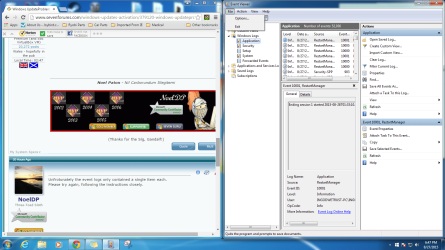
Noel unfortunately when i select File to save windows logs the is no SAVE action to use. I attached a screen capture of this. But I did get them both save using "Save selected Events" in event viewer. let me know if the information satisfies your requirements. Thank you again for helping me with this issue
 

Attachments

  • eventscreen capture.png
    eventscreen capture.png
    122.8 KB · Views: 0
  • Appevt.zip
    Appevt.zip
    1.8 MB · Views: 2
  • System.zip
    System.zip
    1.7 MB · Views: 1

My Computer

Computer type
PC/Desktop
Computer Manufacturer/Model Number
custom build
OS
Windows 7 Home Premium 32bit
CPU
Intel 860 I7
Motherboard
GA-P55-USB3
Memory
4g Gskill
Graphics Card(s)
asus Geforce GTX 660
Hard Drives
WD 1TB Caviar Black uninstalled.
WDC WD5000BPKT-00PK4T0 ATA Device
PSU
Corsair TX750w
Case
Cooler Master Storm Sniper
Keyboard
ZBoard wired
Mouse
Razer Diamondback wired
Internet Speed
Wired Broadband 178.48Mbps download & 12.16Mbps Upload
Antivirus
Norton 360
Browser
IE/Chrome
That's better ;)

You ran CHKDSK on 12th August - and it found rather a lot of errors. Please run another one now, and we'll see if it caught all of them (and hopefully this time get the final summary reported)
Post the new Applications event log once complete.
 

My Computer

Computer type
Laptop
Computer Manufacturer/Model Number
Asus K52F or Lenovo B51-80
OS
Win 7 x64 Home Premium (and x86 VirtualBox VM)/Win10
CPU
i3 370M/i7 6500U
Motherboard
Asus/Lenovo
Memory
8GB - finally :)/8GB
Graphics Card(s)
it's an i3, dude!/dual Intel&nVidia
Sound Card
onboard
Monitor(s) Displays
15.6" built-in
Screen Resolution
1366x768/1920x1080
Hard Drives
750GB Seagate internal
Sundry external drives attached to other computers on the local network
1TB SSD on the Lenovo
PSU
n/a
Internet Speed
as much as I can get - usually on a dongle/phone, so <1MB/s
Antivirus
MSE/Defender
Browser
IE11/12/Edge/Chrome/FF(if I must)
Back
Top