Solved windows updates are failing

forneli

New member
Local time
9:03 AM
Messages
29
I have Windows 7 x64 home edition, with service pack 1, on a Dell desktop. Windows updates have been failing for a long time now. The error code is 80070308. I have tried everything but can't seem to fix it. You're my last hope! Thanks!

forneli
 

My Computer My Computer

Computer type
PC/Desktop
Computer Manufacturer/Model Number
Dell
OS
Windows 7 x64 home premium with service pack 1
Antivirus
Kaspersky
Browser
IE11, Chrome
In elevated command prompt run:
Code:
sfc/scannow
post results
 

My Computer My Computer

Computer type
Laptop
Computer Manufacturer/Model Number
ACER ASPIRE 5742G
OS
Microsoft Windows 7 Home Premium 64-bits 7601 Multiprocessor Free Service Pack 1
CPU
Intel(R) Core(TM) i3 CPU M 370 @ 2.40GHz
Motherboard
Acer Aspire 5742G
Memory
4,00 GB
Graphics Card(s)
ATI Mobility Radeon HD 5400 Series
Sound Card
(1) AMD High Definition Audio Device (2) Realtek High Defi
Screen Resolution
1366 x 768 x 32 bits (4294967296 colors) @ 60 Hz
Hard Drives
WDC WD5000BEVT-22ZAT0

My Computer My Computer

Computer type
Laptop
Computer Manufacturer/Model Number
ACER ASPIRE 5742G
OS
Microsoft Windows 7 Home Premium 64-bits 7601 Multiprocessor Free Service Pack 1
CPU
Intel(R) Core(TM) i3 CPU M 370 @ 2.40GHz
Motherboard
Acer Aspire 5742G
Memory
4,00 GB
Graphics Card(s)
ATI Mobility Radeon HD 5400 Series
Sound Card
(1) AMD High Definition Audio Device (2) Realtek High Defi
Screen Resolution
1366 x 768 x 32 bits (4294967296 colors) @ 60 Hz
Hard Drives
WDC WD5000BEVT-22ZAT0
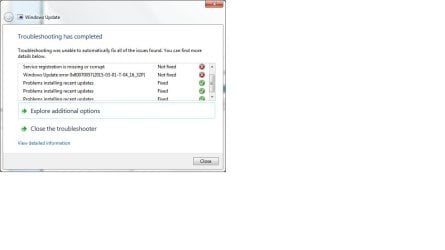
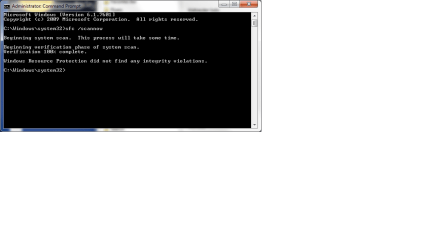
I have run the scannow and uploaded a screenshot of the results. I have also run the windows update troubleshooter and uploaded a screenshot of the results.

forneli
 

Attachments

  • scannow results.jpg
    scannow results.jpg
    25.3 KB · Views: 2
  • windows update troubleshooter result.jpg
    windows update troubleshooter result.jpg
    31.6 KB · Views: 2

My Computer My Computer

Computer type
PC/Desktop
Computer Manufacturer/Model Number
Dell
OS
Windows 7 x64 home premium with service pack 1
Antivirus
Kaspersky
Browser
IE11, Chrome
Please follow the Windows Update Posting Instructions and post the requested data

If the file is too large (8MB compressed), remove the older CBSPersist cab files until the final file is below the limit - you can always post them separately after zipping them. (the forum doesn't allow the upload of bare CAB files, for a number of reasons)

Please also post the C:\Windows\windowsudpate.log file
 

My Computer My Computer

Computer type
Laptop
Computer Manufacturer/Model Number
Asus K52F or Lenovo B51-80
OS
Win 7 x64 Home Premium (and x86 VirtualBox VM)/Win10
CPU
i3 370M/i7 6500U
Motherboard
Asus/Lenovo
Memory
8GB - finally :)/8GB
Graphics Card(s)
it's an i3, dude!/dual Intel&nVidia
Sound Card
onboard
Monitor(s) Displays
15.6" built-in
Screen Resolution
1366x768/1920x1080
Hard Drives
750GB Seagate internal
Sundry external drives attached to other computers on the local network
1TB SSD on the Lenovo
PSU
n/a
Internet Speed
as much as I can get - usually on a dongle/phone, so <1MB/s
Antivirus
MSE/Defender
Browser
IE11/12/Edge/Chrome/FF(if I must)
I have uploaded the windowsupdate.log file. I can't upload the CBS.log file because it's 140 mb and won't zip down to 8 mb.
 

My Computer My Computer

Computer type
PC/Desktop
Computer Manufacturer/Model Number
Dell
OS
Windows 7 x64 home premium with service pack 1
Antivirus
Kaspersky
Browser
IE11, Chrome
Ok, I split the CBS.log file into two and will upload separately. Unfortunately I have to do this in two separate replies. Here is the first file.
 

My Computer My Computer

Computer type
PC/Desktop
Computer Manufacturer/Model Number
Dell
OS
Windows 7 x64 home premium with service pack 1
Antivirus
Kaspersky
Browser
IE11, Chrome
Here is the second file.

Thanks for your help -- and your patience!

forneli
 

My Computer My Computer

Computer type
PC/Desktop
Computer Manufacturer/Model Number
Dell
OS
Windows 7 x64 home premium with service pack 1
Antivirus
Kaspersky
Browser
IE11, Chrome
Sorry, I forgot to upload the CbsPersist files. This is the only one small enough to upload.

forneli
 

My Computer My Computer

Computer type
PC/Desktop
Computer Manufacturer/Model Number
Dell
OS
Windows 7 x64 home premium with service pack 1
Antivirus
Kaspersky
Browser
IE11, Chrome
You still haven't provided the CheckSUR/SURT data the link requests.
There are a number of minor errors in the CBS data - but nothing really significant
 

My Computer My Computer

Computer type
Laptop
Computer Manufacturer/Model Number
Asus K52F or Lenovo B51-80
OS
Win 7 x64 Home Premium (and x86 VirtualBox VM)/Win10
CPU
i3 370M/i7 6500U
Motherboard
Asus/Lenovo
Memory
8GB - finally :)/8GB
Graphics Card(s)
it's an i3, dude!/dual Intel&nVidia
Sound Card
onboard
Monitor(s) Displays
15.6" built-in
Screen Resolution
1366x768/1920x1080
Hard Drives
750GB Seagate internal
Sundry external drives attached to other computers on the local network
1TB SSD on the Lenovo
PSU
n/a
Internet Speed
as much as I can get - usually on a dongle/phone, so <1MB/s
Antivirus
MSE/Defender
Browser
IE11/12/Edge/Chrome/FF(if I must)
Here are the checksur logs. Let me know if there are any other files I can provide. Thanks!

forneli
 

Attachments

My Computer My Computer

Computer type
PC/Desktop
Computer Manufacturer/Model Number
Dell
OS
Windows 7 x64 home premium with service pack 1
Antivirus
Kaspersky
Browser
IE11, Chrome
CheckSUR is clean.
Let's have a look at the services...

Please download the Farbar Service Scanner from

http://www.bleepingcomputer.com/download/farbar-service-scanner/

Right-click on the saved file and select 'Run as Administrator', and tick all the options, then click on the Scan button - copy and paste the report to your response.


My Computer My Computer

Computer type
Laptop
Computer Manufacturer/Model Number
Asus K52F or Lenovo B51-80
OS
Win 7 x64 Home Premium (and x86 VirtualBox VM)/Win10
CPU
i3 370M/i7 6500U
Motherboard
Asus/Lenovo
Memory
8GB - finally :)/8GB
Graphics Card(s)
it's an i3, dude!/dual Intel&nVidia
Sound Card
onboard
Monitor(s) Displays
15.6" built-in
Screen Resolution
1366x768/1920x1080
Hard Drives
750GB Seagate internal
Sundry external drives attached to other computers on the local network
1TB SSD on the Lenovo
PSU
n/a
Internet Speed
as much as I can get - usually on a dongle/phone, so <1MB/s
Antivirus
MSE/Defender
Browser
IE11/12/Edge/Chrome/FF(if I must)
Here is the file from the scan.

...forneli
 

Attachments

My Computer My Computer

Computer type
PC/Desktop
Computer Manufacturer/Model Number
Dell
OS
Windows 7 x64 home premium with service pack 1
Antivirus
Kaspersky
Browser
IE11, Chrome
What exact security software are you running? I would have expected Kaspersky to give different results to those that show in the report - namely, disabling Defender, but not the Firewall.

Code:
Firewall Disabled Policy: 
==================
[HKEY_LOCAL_MACHINE\SYSTEM\CurrentControlSet\Services\SharedAccess\Parameters\FirewallPolicy\StandardProfile]
"EnableFirewall"=DWORD:0
..is an unusual entry, but possibly OK if you're using a third-party firewall.
 

My Computer My Computer

Computer type
Laptop
Computer Manufacturer/Model Number
Asus K52F or Lenovo B51-80
OS
Win 7 x64 Home Premium (and x86 VirtualBox VM)/Win10
CPU
i3 370M/i7 6500U
Motherboard
Asus/Lenovo
Memory
8GB - finally :)/8GB
Graphics Card(s)
it's an i3, dude!/dual Intel&nVidia
Sound Card
onboard
Monitor(s) Displays
15.6" built-in
Screen Resolution
1366x768/1920x1080
Hard Drives
750GB Seagate internal
Sundry external drives attached to other computers on the local network
1TB SSD on the Lenovo
PSU
n/a
Internet Speed
as much as I can get - usually on a dongle/phone, so <1MB/s
Antivirus
MSE/Defender
Browser
IE11/12/Edge/Chrome/FF(if I must)
I am using Kaspersky Pure Total Security. I had version 2.0 when the updates stopped downloading in October of last year. I now have version 3.0, installed in January.

...forneli
 

My Computer My Computer

Computer type
PC/Desktop
Computer Manufacturer/Model Number
Dell
OS
Windows 7 x64 home premium with service pack 1
Antivirus
Kaspersky
Browser
IE11, Chrome
From the sound of it there was a fairly long period when you may have been unprotected.

It also sounds as if you may have a 'non-kosher' install of security software.

If that is the case, then you really need to rethink your protection scheme!

Let's start with a few basics...


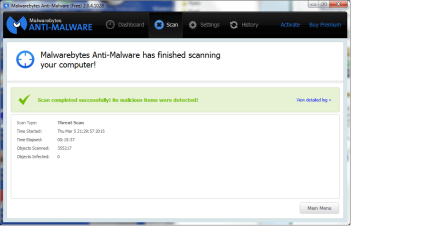
Please download and install Malwarebytes Anti-malware (free version) from http://www.malwarebytes.org/products/malwarebytes_free/ - UNtick 'Enable free trial of MBAM Premium' at the end of the installation - and update it, then run a full scan in your main account, and Quick scans in any other user accounts.

Quarantine everything it finds

Then...

Please run a full CHKDSK and SFC scan....
Click on Start > All Programs > Accessories
Right-click on the Command Prompt entry
Select Run as Administrator and accept the UAC prompt - the Elevated Command Prompt window should pop up.
At the Command prompt, type
CHKDSK C: /R
and hit the Enter key.
You will be told that the drive is locked, and the CHKDSK will run at the next boot - hit the Y key, and then reboot.
The CHKDSK will take a few hours depending on the size of the drive, so be patient!
After the CHKDSK has run, Windows should boot normally (possibly after a second auto-reboot) - then run the SFC.

SFC -System File Checker - Instructions
Click on Start > All Programs > Accessories
Right-click on the Command Prompt entry
Select Run as Administrator and accept the UAC prompt - the Elevated Command Prompt window should pop up.
At the Command prompt, type
SFC /SCANNOW
and hit the Enter key
Wait for the scan to finish - make a note of any error messages - and then reboot.

Upload the CBS.log file (compressed, please!) to your reply.
 

My Computer My Computer

Computer type
Laptop
Computer Manufacturer/Model Number
Asus K52F or Lenovo B51-80
OS
Win 7 x64 Home Premium (and x86 VirtualBox VM)/Win10
CPU
i3 370M/i7 6500U
Motherboard
Asus/Lenovo
Memory
8GB - finally :)/8GB
Graphics Card(s)
it's an i3, dude!/dual Intel&nVidia
Sound Card
onboard
Monitor(s) Displays
15.6" built-in
Screen Resolution
1366x768/1920x1080
Hard Drives
750GB Seagate internal
Sundry external drives attached to other computers on the local network
1TB SSD on the Lenovo
PSU
n/a
Internet Speed
as much as I can get - usually on a dongle/phone, so <1MB/s
Antivirus
MSE/Defender
Browser
IE11/12/Edge/Chrome/FF(if I must)
I bought Kaspersky from a large reputable store. It was good until late Nov when it expired and I installed a new version in early Jan. So I was covered when the Windows updates stopped working.

As requested, I have run and uploaded everything. Thanks again!

...forneli
 

Attachments

  • malwarebytes.png
    malwarebytes.png
    29.9 KB · Views: 0
  • scannow.png
    scannow.png
    11.7 KB · Views: 0

My Computer My Computer

Computer type
PC/Desktop
Computer Manufacturer/Model Number
Dell
OS
Windows 7 x64 home premium with service pack 1
Antivirus
Kaspersky
Browser
IE11, Chrome
Here's one of the instances of the problem ID's...
Code:
 Line 10811: 2015-03-06 08:47:35, Error                 CSI    0000004c (F) HRESULT_FROM_WIN32(ERROR_REQUEST_OUT_OF_SEQUENCE) #156912# from Windows::COM::CPendingTransaction::IStorePendingTransaction_Apply(...)[gle=0x80070308]
 Line 10812: 2015-03-06 08:47:35, Error                 CSI    0000004d (F) HRESULT_FROM_WIN32(ERROR_REQUEST_OUT_OF_SEQUENCE) #154971# from Windows::ServicingAPI::CCSITransaction::ICSITransaction2_AddFiles(Flags = 1, a = @0x1a21410, fn = @0x1a21c10, fp = @0x1a22410, disp = 0, op = 0)[gle=0x80070308]
 Line 10814: 2015-03-06 08:47:35, Error                 CBS    Failed to stage execution package: Package_2_for_KB3004361~31bf3856ad364e35~amd64~~6.1.1.0 [HRESULT = 0x80070308 - ERROR_REQUEST_OUT_OF_SEQUENCE]
 Line 10818: 2015-03-06 08:47:35, Error                 CBS    Failed to process single phase execution. [HRESULT = 0x80070308 - ERROR_REQUEST_OUT_OF_SEQUENCE]


Try this...
Open an Elevated Command Prompt, and run the following commands...

REG LOAD HKLM\COMPONENTS C:\Windows\System32\config\COMPONENTS
REG DELETE HKLM\COMPONENTS /V PendingRequired


reboot and then attempt Windows Update again.
 

My Computer My Computer

Computer type
Laptop
Computer Manufacturer/Model Number
Asus K52F or Lenovo B51-80
OS
Win 7 x64 Home Premium (and x86 VirtualBox VM)/Win10
CPU
i3 370M/i7 6500U
Motherboard
Asus/Lenovo
Memory
8GB - finally :)/8GB
Graphics Card(s)
it's an i3, dude!/dual Intel&nVidia
Sound Card
onboard
Monitor(s) Displays
15.6" built-in
Screen Resolution
1366x768/1920x1080
Hard Drives
750GB Seagate internal
Sundry external drives attached to other computers on the local network
1TB SSD on the Lenovo
PSU
n/a
Internet Speed
as much as I can get - usually on a dongle/phone, so <1MB/s
Antivirus
MSE/Defender
Browser
IE11/12/Edge/Chrome/FF(if I must)
Yes! That worked! Thank you very much! I appreciate all of the time you spent in helping me out! And I appreciate your patience as well.

Just out of curiosity, what was the problem? Were the updates trying to download out of order?

...forneli
 

Attachments

  • success.jpg
    success.jpg
    155.7 KB · Views: 1

My Computer My Computer

Computer type
PC/Desktop
Computer Manufacturer/Model Number
Dell
OS
Windows 7 x64 home premium with service pack 1
Antivirus
Kaspersky
Browser
IE11, Chrome
No - it was simply that something had prevented Windows Update from resetting a switch in the registry that told the OS that the last update had finished installing.
 

My Computer My Computer

Computer type
Laptop
Computer Manufacturer/Model Number
Asus K52F or Lenovo B51-80
OS
Win 7 x64 Home Premium (and x86 VirtualBox VM)/Win10
CPU
i3 370M/i7 6500U
Motherboard
Asus/Lenovo
Memory
8GB - finally :)/8GB
Graphics Card(s)
it's an i3, dude!/dual Intel&nVidia
Sound Card
onboard
Monitor(s) Displays
15.6" built-in
Screen Resolution
1366x768/1920x1080
Hard Drives
750GB Seagate internal
Sundry external drives attached to other computers on the local network
1TB SSD on the Lenovo
PSU
n/a
Internet Speed
as much as I can get - usually on a dongle/phone, so <1MB/s
Antivirus
MSE/Defender
Browser
IE11/12/Edge/Chrome/FF(if I must)
Back
Top