Windows Updates not downloading

Nikilet

New member
Member
Local time
11:39 PM
Messages
60
My Dell desktop was Vista Home Premium SP2 32bit. On 4/9 I did a clean install of 32bit Windows 7 Home Premium (Service Pack 1) with an OEM disk that I purhcased. I did not transfer any programs from the old system; have done all completely new installs on everything.

I ran Windows Update and it just ran and ran forever. It never said "Windows is up to date". I checked the View Updates and there were 2 that apparently installed on the date I did the installation, 4/9 (see screenshot).

I did the activation this morning and it was successful. I tried running Windows Update and again it keeps running without end. I finally shut it down.

Secunia psi reports that my Windows 7 is up to date; however, I ran Belarc Advisor and it shows 147 missing updates, most of them either Important or Critical.

sfc /scannow reports: Windows Resource Protection did not find any integrity errors.
I am attaching the CBS log asked for in the instructions I read. I have downloaded the SURT tool but haven't run it yet. Perhaps there is some little thing that I am not doing right so I will wait until I hear back from the forum.
 

Attachments

  • updates.PNG
    updates.PNG
    4.2 KB · Views: 3
Last edited:

My Computer

Computer type
PC/Desktop
Computer Manufacturer/Model Number
Dell XPS410
OS
Windows 7 Home Premium SP1
Memory
4 GB
Browser
Google Chrome

My Computer

Computer type
PC/Desktop
Computer Manufacturer/Model Number
Custom assembled by me :}
OS
Win-7-Pro64bit 7-H-Prem-64bit
CPU
i7-5930K 2nd i9-9940x both water blocked VRM's too
Motherboard
ASUS SABERTOOTH X99 2nd ASUS x299 Apex
Memory
Trident-z 3200C14 2nd Trident-z 3600C16
Graphics Card(s)
EVGA 1080ti ftw3 2nd Titan Xp both water blocked
Sound Card
Built-in Realtek
Monitor(s) Displays
1-AOC G2460PG 24"G-Sync 144Hz/ 2nd 1-ASUS VG248QE 24" 144Hz
Screen Resolution
1920 x 1080 144Hz
Hard Drives
2-Samsung M.2 Evo & Evo Plus
2-Samsung 850 EVO 500GB SSD's/ 3-2.5 W.D. Black 1tb-&3-1tb/3-3.5 WD Black 1tb hdd's
PSU
EVGA SuperNOVA 1000-P2 2nd 1200-P2
Case
2-Corsair Obsidian Series 450D Black ATX Mid Tower
Cooling
Custom water loops
Keyboard
Logitech G710+/ 2nd Logitech G910
Mouse
2-RedDragon M901 Perdition 16400 dpi Gaming mouse = wired
Internet Speed
Comcast Ping 19ms 89.31mbps download speed 6.12mbps upload
Antivirus
Malwarebytes Pro/ Superantispyware Pro
Browser
FireFox & Pale moon
Other Info
2nd ASUS X299 Apex/Intel i9-9940x with Custom water loop/7H-Prem-x64/Corsair 450D case/Ram Trident-z 3600C16 4x8gb / Samsung970Evo plus 500gb SSD/Dual ssd EZ swap evo/PSU EVGA SuperNova 1200w-P2 80+Platinum/GPU Titan Xp /8-ML-140 on push-pull on 2-280GTX rads
I installed that Net framework 4.6.1 and afterwards the pop up told me that the installation was successful. However, that update does not appear in Windows Update under View Updates. It also does not appear when I got to Programs and Featurs and click on view installed updates.

I am in the process of installing the other, KB3138612, right now and it looks like this might be a long process. It just keeps running and says it's "searching for updates on this computer."

I definitely do not want to start all over. I'd rather manually download and install every update that is needed, but it looks to me like the computer isn't recognizing the updates anyway. Net framework was successful, but where is it?

p.s. I started running that KB3138612 at around 3:30 I think. I had to leave the computer and just came back (6:30 p.m.) and it's still running so I assume something is wrong. I am going to cancel this and will run that SURT tool given by tom982 in the "Windows Update Posting Instructions" and see what happens. I'm confused because it appears to be the same tool but the number on that one is KB947821.
 
Last edited:

My Computer

Computer type
PC/Desktop
Computer Manufacturer/Model Number
Dell XPS410
OS
Windows 7 Home Premium SP1
Memory
4 GB
Browser
Google Chrome
You will find 4.6.1,
on Programs/features page, top left of screen click on features, new window opens please wait,

Roy
 

My Computer

Computer type
PC/Desktop
Computer Manufacturer/Model Number
medionl/Aspire 6930G/acer x55a
OS
W7 home premium 32bit/W7HP 64bit/w10 tp insider ring
CPU
E5300 dual core
Motherboard
medion MS7366
Memory
3gb
Graphics Card(s)
Nvidia Geforce 7100 Nforce 630i
Monitor(s) Displays
avixc
Internet Speed
n (isp resticted to 72)
Antivirus
mse/pands
Browser
palemoon
Other Info
Belkin Fd7050 n USB using Railink RT2870 drivers, more upto date
Hi,
Yep it is listed in Uninstall a program/ Programs and features as Microsoft Net.....

Restart the machine and manually check for updates
Or just restart and wait 24 hours and manually check

Windows should do a updates check on startup actually delayed startup
Look at the status of these services
Then click Start and type in the search box
services
Click the suggestion or the enter key
Make sure these services are running and on automatic or delayed start.
Double click the listings to get the options to change them.
Background intelligent transfer services
Cryptographic
Windows installer
Windows update
 

My Computer

Computer type
PC/Desktop
Computer Manufacturer/Model Number
Custom assembled by me :}
OS
Win-7-Pro64bit 7-H-Prem-64bit
CPU
i7-5930K 2nd i9-9940x both water blocked VRM's too
Motherboard
ASUS SABERTOOTH X99 2nd ASUS x299 Apex
Memory
Trident-z 3200C14 2nd Trident-z 3600C16
Graphics Card(s)
EVGA 1080ti ftw3 2nd Titan Xp both water blocked
Sound Card
Built-in Realtek
Monitor(s) Displays
1-AOC G2460PG 24"G-Sync 144Hz/ 2nd 1-ASUS VG248QE 24" 144Hz
Screen Resolution
1920 x 1080 144Hz
Hard Drives
2-Samsung M.2 Evo & Evo Plus
2-Samsung 850 EVO 500GB SSD's/ 3-2.5 W.D. Black 1tb-&3-1tb/3-3.5 WD Black 1tb hdd's
PSU
EVGA SuperNOVA 1000-P2 2nd 1200-P2
Case
2-Corsair Obsidian Series 450D Black ATX Mid Tower
Cooling
Custom water loops
Keyboard
Logitech G710+/ 2nd Logitech G910
Mouse
2-RedDragon M901 Perdition 16400 dpi Gaming mouse = wired
Internet Speed
Comcast Ping 19ms 89.31mbps download speed 6.12mbps upload
Antivirus
Malwarebytes Pro/ Superantispyware Pro
Browser
FireFox & Pale moon
Other Info
2nd ASUS X299 Apex/Intel i9-9940x with Custom water loop/7H-Prem-x64/Corsair 450D case/Ram Trident-z 3600C16 4x8gb / Samsung970Evo plus 500gb SSD/Dual ssd EZ swap evo/PSU EVGA SuperNova 1200w-P2 80+Platinum/GPU Titan Xp /8-ML-140 on push-pull on 2-280GTX rads
After I posted last I ran KB947821 as I said I would. Nothing was happening.
Are KB947821 and KB3138612 the same? Do I still need to install 3138612?

I looked in Programs and Features for the NDP461-KB3102436-x86-x64-AllOS-ENU.exe update in question and it was not there, It still isn't there, altho the KB947821 that finally just installed does show up in both places.

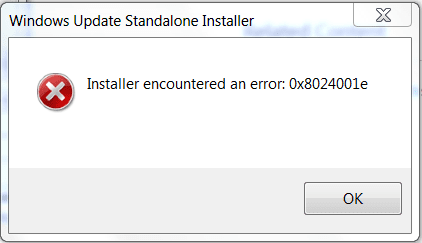
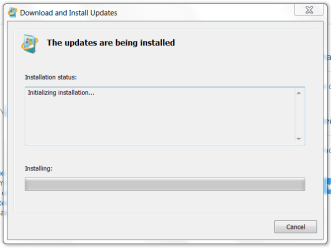
I got the idea to check in Services and see if Windows Update was running. I selected Restart and I immediately got an error window (attached). Then I opened properties of Services/Windows Update/Properties and stopped it, then started it. After I did that I immediately got another window (attached) indicating it was installing.

I went to Windows Update/View update history and as stated, KB947821 appears in both places. I tried to run the Windows Update again but still nothing.

I went back into Services and Windows Installer did not appear to be running so I started that, auto/delayed start. Cryptographic was started but was on manual; I changed it to auto/delayed. Background intelligent transfer services was on manual; I changed it to auto/delayed.

I was very hopeful this was fixed, but I downloaded one critical update which Belarc Advisor said was needed and when I clicked to install it, the Windows Update Standalone Installer opened and it's still running and still doing nothing. I'm going to try restarting.
 

Attachments

  • error 0x8024001e.PNG
    error 0x8024001e.PNG
    7.3 KB · Views: 76
  • installing.PNG
    installing.PNG
    11 KB · Views: 76

My Computer

Computer type
PC/Desktop
Computer Manufacturer/Model Number
Dell XPS410
OS
Windows 7 Home Premium SP1
Memory
4 GB
Browser
Google Chrome
I tried everything at this link: Code 80080005 Error on windows update with windows 7 home premimum - Microsoft Community

On this link I see it said for KB947821 to run as administrator and I don't think I did that. So tomorrow I will try running again.

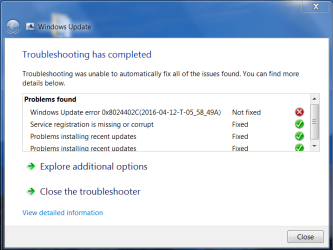
The first tool I ran on that link gave the report shown in #1 attached. The second tool I ran showed differently, #2 and #3 is the resulting report. I don't understand this stuff so am assuming you guys do and maybe you can see something about what's going on.

So far nothing has worked. It's strange because I finally got that one Hotfix to download and install, and there were two updates which apparently installed the day I installed Windows 7, and now nothing.

Meant to tell you also that I did find the Net framework in the actual program list. I was looking under installed updates.
 

Attachments

  • #1 WU Diagnostic.PNG
    #1 WU Diagnostic.PNG
    25 KB · Views: 2
  • #2 all not fixed.PNG
    #2 all not fixed.PNG
    29.7 KB · Views: 2
  • #3 results of diag.pdf
    #3 results of diag.pdf
    3.5 KB · Views: 2

My Computer

Computer type
PC/Desktop
Computer Manufacturer/Model Number
Dell XPS410
OS
Windows 7 Home Premium SP1
Memory
4 GB
Browser
Google Chrome
Hi,
Might try this
http://www.sevenforums.com/tutorials/91738-windows-update-reset.html

Usually it's a corrupt updates store have you ever run windows updates cleanup before ?
Try this first before resetting win updates
All I can say is make sure you have the latest Net framework 4.6.1 installed do it manually
https://www.microsoft.com/en-us/download/details.aspx?id=49982

And the most recent update client
https://support.microsoft.com/en-us/kb/3138612

Then if you feel up to it as a last resort before a clean install :)
Use winkey+R
Type in the Run box,
eventvwr
Windows logs on the left column and expanded them and right click and click on clear on the 4 entries below,
Applications
Security
Setup
System
Exit and restart the machine again

Make sure the services are running and hurry up and wait
https://support.microsoft.com/en-us/kb/971033
 

My Computer

Computer type
PC/Desktop
Computer Manufacturer/Model Number
Custom assembled by me :}
OS
Win-7-Pro64bit 7-H-Prem-64bit
CPU
i7-5930K 2nd i9-9940x both water blocked VRM's too
Motherboard
ASUS SABERTOOTH X99 2nd ASUS x299 Apex
Memory
Trident-z 3200C14 2nd Trident-z 3600C16
Graphics Card(s)
EVGA 1080ti ftw3 2nd Titan Xp both water blocked
Sound Card
Built-in Realtek
Monitor(s) Displays
1-AOC G2460PG 24"G-Sync 144Hz/ 2nd 1-ASUS VG248QE 24" 144Hz
Screen Resolution
1920 x 1080 144Hz
Hard Drives
2-Samsung M.2 Evo & Evo Plus
2-Samsung 850 EVO 500GB SSD's/ 3-2.5 W.D. Black 1tb-&3-1tb/3-3.5 WD Black 1tb hdd's
PSU
EVGA SuperNOVA 1000-P2 2nd 1200-P2
Case
2-Corsair Obsidian Series 450D Black ATX Mid Tower
Cooling
Custom water loops
Keyboard
Logitech G710+/ 2nd Logitech G910
Mouse
2-RedDragon M901 Perdition 16400 dpi Gaming mouse = wired
Internet Speed
Comcast Ping 19ms 89.31mbps download speed 6.12mbps upload
Antivirus
Malwarebytes Pro/ Superantispyware Pro
Browser
FireFox & Pale moon
Other Info
2nd ASUS X299 Apex/Intel i9-9940x with Custom water loop/7H-Prem-x64/Corsair 450D case/Ram Trident-z 3600C16 4x8gb / Samsung970Evo plus 500gb SSD/Dual ssd EZ swap evo/PSU EVGA SuperNova 1200w-P2 80+Platinum/GPU Titan Xp /8-ML-140 on push-pull on 2-280GTX rads
Installing those 2 updates is no help at all, windows update is being all temperamental again today, 1 PC works fine while the other is still checking, you just hafta keep waiting.

None of this ever happened until Windows 10 hit the fan.
 

My Computer

Computer type
PC/Desktop
Computer Manufacturer/Model Number
Skylake Special #666
OS
Windows 10 Pro x64
CPU
Intel Core i7 6700K
Motherboard
Asus Sabertooth Z170 Mark 1
Memory
GSkill TridentZ RGB 16GB 3600 16-16-16-36
Graphics Card(s)
EVGA GTX 980 Ti SC x2
Sound Card
Realtek High Definition
Monitor(s) Displays
AOC G2460PG
Screen Resolution
1920 x 1080 144Hz
Hard Drives
Samsung 860 Pro 256GB, Seagate Barracuda 4TB x2
PSU
EVGA 1000 P2, EVGA White Custom Braided Cables
Case
Corsair Vengeance C70 Gunmetal Black
Cooling
Corsair H100i v2, Corsair ML120 x2, Thermal Grizzly Kryonaut
Keyboard
Logitech G910 Orion Spectrum
Mouse
Logitech G700s
Internet Speed
Verizon Fios Quantum Gateway 75/75
Antivirus
Windows Defender, Malwarebytes Free 3.8.3
Browser
Chrome
Other Info
Corsair SP120 x4, LG Blu-ray Drive, Durabrand HT-395 100 Watt Dolby Digital Amp, Corsair H2100 Wireless 7.1 Headset
Course it is

PATCH TUESDAY

Roy
 

My Computer

Computer type
PC/Desktop
Computer Manufacturer/Model Number
medionl/Aspire 6930G/acer x55a
OS
W7 home premium 32bit/W7HP 64bit/w10 tp insider ring
CPU
E5300 dual core
Motherboard
medion MS7366
Memory
3gb
Graphics Card(s)
Nvidia Geforce 7100 Nforce 630i
Monitor(s) Displays
avixc
Internet Speed
n (isp resticted to 72)
Antivirus
mse/pands
Browser
palemoon
Other Info
Belkin Fd7050 n USB using Railink RT2870 drivers, more upto date
Cabbage Patch Tuesday :)

And only a few cabbages today, but yet the Gateway is still checking for updates :sleep:
 

Attachments

  • Nemesis.jpg
    Nemesis.jpg
    540.1 KB · Views: 0

My Computer

Computer type
PC/Desktop
Computer Manufacturer/Model Number
Skylake Special #666
OS
Windows 10 Pro x64
CPU
Intel Core i7 6700K
Motherboard
Asus Sabertooth Z170 Mark 1
Memory
GSkill TridentZ RGB 16GB 3600 16-16-16-36
Graphics Card(s)
EVGA GTX 980 Ti SC x2
Sound Card
Realtek High Definition
Monitor(s) Displays
AOC G2460PG
Screen Resolution
1920 x 1080 144Hz
Hard Drives
Samsung 860 Pro 256GB, Seagate Barracuda 4TB x2
PSU
EVGA 1000 P2, EVGA White Custom Braided Cables
Case
Corsair Vengeance C70 Gunmetal Black
Cooling
Corsair H100i v2, Corsair ML120 x2, Thermal Grizzly Kryonaut
Keyboard
Logitech G910 Orion Spectrum
Mouse
Logitech G700s
Internet Speed
Verizon Fios Quantum Gateway 75/75
Antivirus
Windows Defender, Malwarebytes Free 3.8.3
Browser
Chrome
Other Info
Corsair SP120 x4, LG Blu-ray Drive, Durabrand HT-395 100 Watt Dolby Digital Amp, Corsair H2100 Wireless 7.1 Headset

My Computer

Computer type
Laptop
Computer Manufacturer/Model Number
HP Presario CQ70
OS
windows 7 professional 64 bit
CPU
CPU Genuine Intel (R) CPU [email protected]
Motherboard
APCI x 64 - based PC
Memory
RAM 3 GB
Graphics Card(s)
Toshiba MK2555 GSX ATA
Sound Card
Conexant High Def Smart Audio 221,
Monitor(s) Displays
monitor Generic PnP.
Screen Resolution
?
Hard Drives
HDAUDIO Soft Data Fax Modern with smart CP
PSU
?
Keyboard
Standard PS/2 keyboard
Mouse
PS/2 Compatible mouse
Antivirus
Hyjackthis and Superanti spyware, Mamb Ccleaner
Browser
Google Chrome
Installing those 2 updates is no help at all, windows update is being all temperamental again today, 1 PC works fine while the other is still checking, you just hafta keep waiting.

None of this ever happened until Windows 10 hit the fan.

Got exactly the same problem. It's infuriating. Had the same dramas last month too. The laptop spends an eternity checking for updates. Been going for 2 hours now! Last month it took me three days to finally get the updates installed. I dislike patch Tuesday enough as it is (I don't trust MS QA and their potential to brick a machine with 'updates') without this drama all the time. And yes it seems to co incide with Windows 10.
 

My Computer

Computer type
Laptop
Computer Manufacturer/Model Number
Alienware M17RX3
OS
Windows 7 Ultimate 64 bit
CPU
Sandybridge 2820 QM 2.3 ghz
Memory
8 gb
Graphics Card(s)
AMD Radeon 6970m
Sound Card
Integrated
Monitor(s) Displays
Laptop 17"
Screen Resolution
1980x1080
Hard Drives
750 gb mechanical (7,200RPM) Seagate Momentous paired with OCZ Synapse 128 gb SSD cache drive
Internet Speed
55 mbits download, 12 mbits download
Antivirus
Microsoft Security Essentials
Browser
IE11, Mozilla
I've done most of the things mentioned here. When I did the manual reset of Windows Update Components, I skipped #4, as the instructions said to do. It didn't work and I didn't go back and do #4. Is this something I should mess with?

Apparently at this point my problem is specific because I have gotten the same diagnostic report and the same error code 4 times in a row that I have run the Windows Update Diagnostic. Could you be so kind as to look at this? I just don't know enough to know what it means or what I can or should do about it. If either of you can help me it would be so much appreciated.

P.S. At one point I did a clean boot and tried to install some updates that I had manually downloaded. It worked! I clicked on the first one and it installed like a dream. Thought for sure the problem had been solved. I clicked on the second update and the same old thing; Windows Update Installer just looking and looking on this computer for updates. I tried several of the updates I had downloaded, and even tried restarting again, but to no avail. It seems like a pretty strange deal to me.

Sorry, another edit. Please keep in mind that not only won't Windows Update download my updates, but I can't even install them after I download them manually.
 

Attachments

My Computer

Computer type
PC/Desktop
Computer Manufacturer/Model Number
Dell XPS410
OS
Windows 7 Home Premium SP1
Memory
4 GB
Browser
Google Chrome
@Nikilet:

Have you gone to the Windows Update distribution folder and deleted all the contents? Make sure to
also empty the recycle bin as well after you delete the contents of the folder,
BUT DO NOT DELETE THE FOLDER ITSELF!

Also are you using a proxy for your internet connection?

From Microsoft
The 0x8024402C or 0x8024502D error codes typically occur because an incorrect character exists in the proxy override settings.


Fix the 0x8024402C error

Let me fix it myself

To resolve these errors, remove characters from the proxy exception list, and then clear the proxy cache. To do this, follow these steps:
Open Internet Explorer.
On the Tools menu, click Internet Options.
Click the Connections tab, click LAN Settings, and then click Advance.
Delete any entry in the Exceptions section.
Quit Internet Explorer.
Click Start, click Run, type cmd, and then click OK.
Type the following commands. Press ENTER after each command.
proxycfg -d
net stop wuauserv
net start wuauserv
 

My Computer

Computer Manufacturer/Model Number
hp pavilion 6680t
OS
win 7 home premium 64 bit
CPU
core i5 760
Motherboard
iona (from MSI)
Memory
6 gb
Graphics Card(s)
ati 5450
Sound Card
real tek 888
My updates are flying now, done on the Gateway and it`s working perfectly, like I said just let the thing sit, forever if it has to, don`t let it go to sleep and they will come, especially now that Tuesday is over and most have updated by now.
 

My Computer

Computer type
PC/Desktop
Computer Manufacturer/Model Number
Skylake Special #666
OS
Windows 10 Pro x64
CPU
Intel Core i7 6700K
Motherboard
Asus Sabertooth Z170 Mark 1
Memory
GSkill TridentZ RGB 16GB 3600 16-16-16-36
Graphics Card(s)
EVGA GTX 980 Ti SC x2
Sound Card
Realtek High Definition
Monitor(s) Displays
AOC G2460PG
Screen Resolution
1920 x 1080 144Hz
Hard Drives
Samsung 860 Pro 256GB, Seagate Barracuda 4TB x2
PSU
EVGA 1000 P2, EVGA White Custom Braided Cables
Case
Corsair Vengeance C70 Gunmetal Black
Cooling
Corsair H100i v2, Corsair ML120 x2, Thermal Grizzly Kryonaut
Keyboard
Logitech G910 Orion Spectrum
Mouse
Logitech G700s
Internet Speed
Verizon Fios Quantum Gateway 75/75
Antivirus
Windows Defender, Malwarebytes Free 3.8.3
Browser
Chrome
Other Info
Corsair SP120 x4, LG Blu-ray Drive, Durabrand HT-395 100 Watt Dolby Digital Amp, Corsair H2100 Wireless 7.1 Headset
Hi AddRAM, I have been reading the whole of this thread and all the problems Niki is encountering after a reinstall are baffling me :rolleyes:

Am I gonna encounter all these problems as well when I do my reinstall ? :mad:
Don't know if I would be on hight enough to deal with it.

I hate updating, seams to be only asking for problems lately.

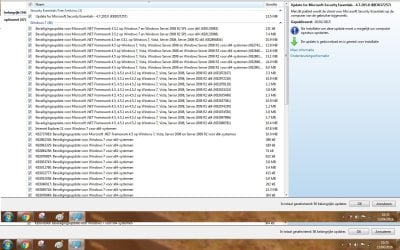
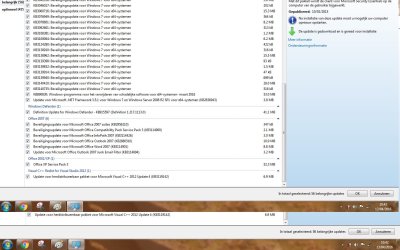
Have not done updates for ages, and laptop works fine ! There are 56 ( 509.6 MB) important updates waiting and 47 optional ones. They download OK but I don't install them.

I ask myself, do we really need them, seing that the PC runs fine ?:confused:

I will do a screenshot of the important updates(downloaded but not installed ) later and post it here.
 

My Computer

Computer type
Laptop
Computer Manufacturer/Model Number
HP Presario CQ70
OS
windows 7 professional 64 bit
CPU
CPU Genuine Intel (R) CPU [email protected]
Motherboard
APCI x 64 - based PC
Memory
RAM 3 GB
Graphics Card(s)
Toshiba MK2555 GSX ATA
Sound Card
Conexant High Def Smart Audio 221,
Monitor(s) Displays
monitor Generic PnP.
Screen Resolution
?
Hard Drives
HDAUDIO Soft Data Fax Modern with smart CP
PSU
?
Keyboard
Standard PS/2 keyboard
Mouse
PS/2 Compatible mouse
Antivirus
Hyjackthis and Superanti spyware, Mamb Ccleaner
Browser
Google Chrome
Sorry Niki :), I jump into your thread a bit, but we all learn from each others experiences here ;)

Cheers,
Thelma
 

My Computer

Computer type
Laptop
Computer Manufacturer/Model Number
HP Presario CQ70
OS
windows 7 professional 64 bit
CPU
CPU Genuine Intel (R) CPU [email protected]
Motherboard
APCI x 64 - based PC
Memory
RAM 3 GB
Graphics Card(s)
Toshiba MK2555 GSX ATA
Sound Card
Conexant High Def Smart Audio 221,
Monitor(s) Displays
monitor Generic PnP.
Screen Resolution
?
Hard Drives
HDAUDIO Soft Data Fax Modern with smart CP
PSU
?
Keyboard
Standard PS/2 keyboard
Mouse
PS/2 Compatible mouse
Antivirus
Hyjackthis and Superanti spyware, Mamb Ccleaner
Browser
Google Chrome
No one knows for sure if we need any of these updates, I`ve had computers run fine for years that have never been updated, but it`s not something I would recommend to anyone. The decision to update is totally up to the end user. You can avoid all this by simply upgrading to Windows 10 where updates are seamless and handled much better, in my opinion. Instead of constant updates you get a new build which I like.

And don`t let Windows 10 scare you, once you learn it, it`s just another operating system, and in my opinion it works great.

Now, if it only looked like Windows 7 :D

There is only major updating when you 1st install Windows 7 Thelma, because MS refused to make a Service Pack 2, but once your done the initial rounds it`s all down hill.

My theory is they put a 1 Mbps upload restriction on all 2 of the windows 7 update servers :shock:
 

My Computer

Computer type
PC/Desktop
Computer Manufacturer/Model Number
Skylake Special #666
OS
Windows 10 Pro x64
CPU
Intel Core i7 6700K
Motherboard
Asus Sabertooth Z170 Mark 1
Memory
GSkill TridentZ RGB 16GB 3600 16-16-16-36
Graphics Card(s)
EVGA GTX 980 Ti SC x2
Sound Card
Realtek High Definition
Monitor(s) Displays
AOC G2460PG
Screen Resolution
1920 x 1080 144Hz
Hard Drives
Samsung 860 Pro 256GB, Seagate Barracuda 4TB x2
PSU
EVGA 1000 P2, EVGA White Custom Braided Cables
Case
Corsair Vengeance C70 Gunmetal Black
Cooling
Corsair H100i v2, Corsair ML120 x2, Thermal Grizzly Kryonaut
Keyboard
Logitech G910 Orion Spectrum
Mouse
Logitech G700s
Internet Speed
Verizon Fios Quantum Gateway 75/75
Antivirus
Windows Defender, Malwarebytes Free 3.8.3
Browser
Chrome
Other Info
Corsair SP120 x4, LG Blu-ray Drive, Durabrand HT-395 100 Watt Dolby Digital Amp, Corsair H2100 Wireless 7.1 Headset
Updates part 1 and 2 :updates part 1 on 13 april 2016.jpg andupdates part2 13 april 2016.jpg
 

My Computer

Computer type
Laptop
Computer Manufacturer/Model Number
HP Presario CQ70
OS
windows 7 professional 64 bit
CPU
CPU Genuine Intel (R) CPU [email protected]
Motherboard
APCI x 64 - based PC
Memory
RAM 3 GB
Graphics Card(s)
Toshiba MK2555 GSX ATA
Sound Card
Conexant High Def Smart Audio 221,
Monitor(s) Displays
monitor Generic PnP.
Screen Resolution
?
Hard Drives
HDAUDIO Soft Data Fax Modern with smart CP
PSU
?
Keyboard
Standard PS/2 keyboard
Mouse
PS/2 Compatible mouse
Antivirus
Hyjackthis and Superanti spyware, Mamb Ccleaner
Browser
Google Chrome
Back
Top