
Windows Updates not downloading

Hi Niki,
Thats cool for the licence MS gave you a nice new one:)

For your drivers go to the dell site for your make/model > w7 any thing you need will be there.

Turn off driver updates by windows Conrolpanel>system>Advavanced system settings > hardware > untick.

Roy
 

My Computer My Computer

Computer type
PC/Desktop
Computer Manufacturer/Model Number
medionl/Aspire 6930G/acer x55a
OS
W7 home premium 32bit/W7HP 64bit/w10 tp insider ring
CPU
E5300 dual core
Motherboard
medion MS7366
Memory
3gb
Graphics Card(s)
Nvidia Geforce 7100 Nforce 630i
Monitor(s) Displays
avixc
Internet Speed
n (isp resticted to 72)
Antivirus
mse/pands
Browser
palemoon
Other Info
Belkin Fd7050 n USB using Railink RT2870 drivers, more upto date
Nikilet - Some times with lots of updates it may have some of them fail as one update makes a change that the other also would make or one update being needed before the other, and if a file that would be changed is in use the system needs to restart to make that file change. So if you get failures on some updates, restart and run windows update again.

I will run through this again, what about the 76 Windows Updates that had not yet been installed and are no longer appearing in Windows Updates? Will they download again?

I am getting a new error code now that seems more serious; 8024200d. According to ms site the first step is to run the System Update Readiness Tool first, and if that doesn't fix it move on to other options.

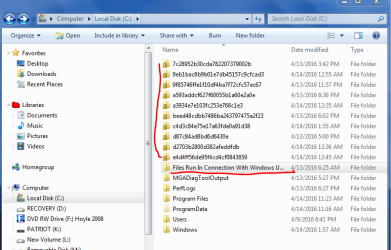
Also, what about all those entries I told you about that showed up on my C drive after all the monkeying around I did running the various fix-it files; the ones with the big long number/letter names? Can I delete those since they are taking up over 500 MB of space? I placed a whole bunch of them in a folder, which I have underlined on the screenshot, plus all the new ones that have popped up above the folder.
 

Attachments

  • files on C.PNG
    files on C.PNG
    39.5 KB · Views: 1
Last edited:

My Computer My Computer

Computer type
PC/Desktop
Computer Manufacturer/Model Number
Dell XPS410
OS
Windows 7 Home Premium SP1
Memory
4 GB
Browser
Google Chrome
Once you clear/rename that distribution folder the History is lost, you can check via the installed updates.
WU checks every time you run it for any "Missed" updates so no need to worry.

You can clear any unwanted data by using the disk cleanup prog from search, use both options.
Unless you know what your doing do NOT touch anything with a padlock on it.

Roy
 

My Computer My Computer

Computer type
PC/Desktop
Computer Manufacturer/Model Number
medionl/Aspire 6930G/acer x55a
OS
W7 home premium 32bit/W7HP 64bit/w10 tp insider ring
CPU
E5300 dual core
Motherboard
medion MS7366
Memory
3gb
Graphics Card(s)
Nvidia Geforce 7100 Nforce 630i
Monitor(s) Displays
avixc
Internet Speed
n (isp resticted to 72)
Antivirus
mse/pands
Browser
palemoon
Other Info
Belkin Fd7050 n USB using Railink RT2870 drivers, more upto date
Hi Niki,
Thats cool for the licence MS gave you a nice new one:)

For your drivers go to the dell site for your make/model > w7 any thing you need will be there.

Turn off driver updates by windows Conrolpanel>system>Advavanced system settings > hardware > untick.

Roy

Unless I'm doing something wrong (as usual) the Dell site tells me my system is only compatible with certain OS, up to Vista but not including 7. I know that's nuts. They gave only a few updates for Vista. I updated BIOS once a long time ago, but I am afraid of that nVidia GeForce driver, and the Samsung one too.
TEAC CA200 HH 13-1 Card Reader Driver
TEAC CA200 HH 13-1 Card Reader Firmware Update
nVidia GeForce 7300 LE 128, v.82.68, A01
This version driver can support 1440x900 60Hz display mode.
Samsung HD321KJ 320GB/HD501LJ 500GB Lead Free SATA2 HDD Firmware Update
Dell Dimension System BIOS, 2.5.1
Dell Dimension System BIOS, 2.5.3
 

My Computer My Computer

Computer type
PC/Desktop
Computer Manufacturer/Model Number
Dell XPS410
OS
Windows 7 Home Premium SP1
Memory
4 GB
Browser
Google Chrome

My Computer My Computer

Computer type
PC/Desktop
Computer Manufacturer/Model Number
medionl/Aspire 6930G/acer x55a
OS
W7 home premium 32bit/W7HP 64bit/w10 tp insider ring
CPU
E5300 dual core
Motherboard
medion MS7366
Memory
3gb
Graphics Card(s)
Nvidia Geforce 7100 Nforce 630i
Monitor(s) Displays
avixc
Internet Speed
n (isp resticted to 72)
Antivirus
mse/pands
Browser
palemoon
Other Info
Belkin Fd7050 n USB using Railink RT2870 drivers, more upto date
I agree, it's ridiculous.

With Win 7 it took over 3 hours for me to check for updates available after PT updates were released yesterday.
They then downloaded and installed "quickly" (10-20 minutes including MSRT).
After a re-boot with the PT updates installed, it now takes me about 2 minutes to check for new updates.

With Win 8.1 it took me about 2 minutes to check for PT updates available, and they downloaded and installed "quickly".
Win 10 also found and installed PT updates "quickly", but that's hard for me to compare because W10 updates work differently.

This is all on my legacy triple boot test PC, so it's the same hardware, modem, router, network, etc.

Last month and earlier W7 PT check for updates took me 30-60 minutes.
A year ago+ Win 7 checked for updates in a few minutes.
For me, it's getting worse to check for new updates after PT updates are published - only with Win 7.
Does MS have a bulls-eye painted on the back of W7 users ?

Another evening and still waiting. Got home 7 pm uk time, clicked the checking for updates and it's still going. It's infuriating, just want to get the patch Tuesday monkey off my back!
 

My Computer My Computer

Computer type
Laptop
Computer Manufacturer/Model Number
Alienware M17RX3
OS
Windows 7 Ultimate 64 bit
CPU
Sandybridge 2820 QM 2.3 ghz
Memory
8 gb
Graphics Card(s)
AMD Radeon 6970m
Sound Card
Integrated
Monitor(s) Displays
Laptop 17"
Screen Resolution
1980x1080
Hard Drives
750 gb mechanical (7,200RPM) Seagate Momentous paired with OCZ Synapse 128 gb SSD cache drive
Internet Speed
55 mbits download, 12 mbits download
Antivirus
Microsoft Security Essentials
Browser
IE11, Mozilla

My Computer My Computer

Computer type
PC/Desktop
Computer Manufacturer/Model Number
Dell XPS410
OS
Windows 7 Home Premium SP1
Memory
4 GB
Browser
Google Chrome
I did go ahead and run check disk using both options. After it completed and my computer had booted I check Windows Updates and I had 92 important updates and 11 optional. It's been a long process, but I installed 4 or 5 at a time and haven't had any failed ones so far. I still have about 40 to go but I'm done for this day/night.

Thanks to you and majulook again today for your help.
 

My Computer My Computer

Computer type
PC/Desktop
Computer Manufacturer/Model Number
Dell XPS410
OS
Windows 7 Home Premium SP1
Memory
4 GB
Browser
Google Chrome
I agree, it's ridiculous.

With Win 7 it took over 3 hours for me to check for updates available after PT updates were released yesterday.
They then downloaded and installed "quickly" (10-20 minutes including MSRT).
After a re-boot with the PT updates installed, it now takes me about 2 minutes to check for new updates.

With Win 8.1 it took me about 2 minutes to check for PT updates available, and they downloaded and installed "quickly".
Win 10 also found and installed PT updates "quickly", but that's hard for me to compare because W10 updates work differently.

This is all on my legacy triple boot test PC, so it's the same hardware, modem, router, network, etc.

Last month and earlier W7 PT check for updates took me 30-60 minutes.
A year ago+ Win 7 checked for updates in a few minutes.
For me, it's getting worse to check for new updates after PT updates are published - only with Win 7.
Does MS have a bulls-eye painted on the back of W7 users ?

Another evening and still waiting. Got home 7 pm uk time, clicked the checking for updates and it's still going. It's infuriating, just want to get the patch Tuesday monkey off my back!

After 8 hours (I left it overnight) it found them. At long last! I didn't kick off the download and install part as no doubt that's another multi hour process. Will start that later tonight but at least part 1 is over. Patch Tuesday is hell. I've never liked it as I don't trust MS not to brick an otherwise we'll functioning machine. Good of them to recently make an already stressful process all the more painful!
 

My Computer My Computer

Computer type
Laptop
Computer Manufacturer/Model Number
Alienware M17RX3
OS
Windows 7 Ultimate 64 bit
CPU
Sandybridge 2820 QM 2.3 ghz
Memory
8 gb
Graphics Card(s)
AMD Radeon 6970m
Sound Card
Integrated
Monitor(s) Displays
Laptop 17"
Screen Resolution
1980x1080
Hard Drives
750 gb mechanical (7,200RPM) Seagate Momentous paired with OCZ Synapse 128 gb SSD cache drive
Internet Speed
55 mbits download, 12 mbits download
Antivirus
Microsoft Security Essentials
Browser
IE11, Mozilla
Patch Tuesday is hell. I've never liked it as I don't trust MS not to brick an otherwise we'll functioning machine.

I make periodic System Backup Images with Macrium Reflect.
I always make one before Patch Tuesday.

Here's an article i found about the latest PT updates:
Windows Update Hanging When Downloading April 12 Patches

Next PT, I'll turn off auto-sleep and let WU search for updates rather than me doing it manually.
I don't see how MS could not be aware of the issues with W7 updates given all the posts/threads I've seen about this.
 

My Computer My Computer

Computer type
PC/Desktop
Computer Manufacturer/Model Number
home built
OS
Multi-Boot W7_Pro_x64 W8.1_Pro_x64 W10_Pro_x64 +Linux_VMs +Chromium_VM
CPU
AMD Athlon II x4 620
Motherboard
Gigabyte GA-MA785G-UD3H
Memory
6GB GSkill DDR2 800
Graphics Card(s)
AMD 4670 GPU + AMD 4200 IGP
Sound Card
on board Realtek ALC889A
Monitor(s) Displays
RCA 40" LCD TV, Insignia 32" LCD TV, HP 15" LCD monitor
Screen Resolution
1680 x 1050
Hard Drives
OCZ Vertex 3 120GB,
Samsung F3 1TB (3),
Several others - WD, Seagate, Hitachi, ...
PSU
Corsair 500 W
Case
Rosewill mid tower
Cooling
CM 90mm rifle
Keyboard
Gyration wireless, Logitech wireless, Dell USB wired
Mouse
Gyration wireless, Logitech wireless, V7 USB wired
Internet Speed
Spectrum - 100Mbps D / 10Mbps U
Antivirus
Avast, MBAM3, EMET, WinPatrol
Browser
Pale Moon, Firefox, IE
Other Info
2 multi-boot PC's
Mainly HTPC/Office/Gen purpose (no gaming).
Trendnet USB KVM.
LG DVD burner/Blue Ray Player.
Tray system for removable SATA backup drives.

Not currently OCd, under-volted.
I use Hybrid sleep, rarely re-boot or shutdown.

Hauppauge HD-PVR, Avermedia PCIe TV Tuner, Hauppauge PCI TV Tuner.
I tried doing updates yesterday and....3 hours later it finally completed the check. Since then I have been unable to install the updates. I've left it going as long as 2 and a half hours with it "stuck" on 0% of 0kb. I've tried doing all of the updates, doing windows only updates, and doing office only updates. I didn't have this problem on Vista. It took longer than usual to check (which lately seems to be a common problem on Vista) but the download and install only took 20 minutes once the check was completed. Now is there a problem with this round of updates or is it my virtual machine? Do I need to rename the software distribution folder? I'm concerned that with as long as it took to check for updates that I'll be looking at a few days to rebuild that folder and I don't want to have it maxing out a core for that long.
 

My Computers My Computers

System One System Two

Patch Tuesday is hell. I've never liked it as I don't trust MS not to brick an otherwise we'll functioning machine.

I make periodic System Backup Images with Macrium Reflect.
I always make one before Patch Tuesday.

Here's an article i found about the latest PT updates:
Windows Update Hanging When Downloading April 12 Patches

Next PT, I'll turn off auto-sleep and let WU search for updates rather than me doing it manually.
I don't see how MS could not be aware of the issues with W7 updates given all the posts/threads I've seen about this.

I've managed to fix these problems with Windows Updates by reinstalling Windows Update completely. The problem is that it takes a few days and requires some steps to be performed without an internet connection.

Regarding Patch Tuesdays - mostly I don't have problems but there have been a few occasions where I have disabled Windows Update Service and waited a day or two before running an update check on the basis that the servers will be less busy.
 

My Computer My Computer

Computer type
Laptop
Computer Manufacturer/Model Number
ASUS
OS
Microsoft Windows 7 Home Premium 64-bit 7601 Multiprocessor Free Service Pack 1
CPU
AMD C-60 APU with Radeon(tm) HD Graphics
Motherboard
ASUSTeK COMPUTER INC. X501U
Memory
4.00 GB
Graphics Card(s)
AMD Radeon HD 6290 Graphics
Sound Card
(1) AMD High Definition Audio Device (2) Realtek High Defi
Screen Resolution
1366 x 768 x 32 bits (4294967296 colors) @ 60 Hz
Hard Drives
Hitachi HTS545050A7E380 SATA Disk Device
Antivirus
Comodo CIS & FW, SecureAplus App Whitelisting, Threatfire
Browser
Cyberfox 64bit, Opera 64bit, Airfox
Other Info
Spy-The-Spy, HitmanPro.Alert, Norton Connect Safe, MJRegWatcher, BitDefender TrafficLight, Voodoo Shield, Zemana AntiMalware
I tried again and updates finally installed. :)
 

My Computers My Computers

System One System Two

Back
Top