Solved Windows Updates Not Loading -- really confused

katpat23

New member
Local time
3:00 PM
Messages
28
Hi -- I have looked at your very detailed description of what I'm supposed to do as I post about my problems with Windows Updates, but I am worried about Step 2, the SFC scan. Am I right that I may have to source a Windows installation disk before running step 2 in case something needs fixing?

The up-shot of my issue is this: I run an Asus K53E laptop with Windows 7 64 bit. I have Service Pack 1. I run Norton 360 Premier because we got a license for all the machines in the house. I also manually run Malwarebytes, and recently downloaded the Malicious Software Tool from Microsoft which found nothing in a quick scan.

I have had problems with failed updates over the years, most of which seem to have eventually loaded. A lot of those that aren't loading, pertain to Internet Explorer versions that are newer than mine (I have IE 8, and if I don't have to update that, I don't really want to).

I admit I've been a bit of an ostrich about this, sticking my head in the sand. If the machine still functions, then that stuff in the background isn't really of interest to me (since most of it was about IE 9 or 10).Now, though I get 16 updates that refuse to load (they say they're downloaded, but they won't install). I can't get the updated Windows updater to install either.

I have clicked to update the installer, but it won't do it. I have run various fix it programmes which say everything is ok. The automated troubleshooter said some programs couldn't update, and I couldn't even download the recommended hotfix.

THEN -- and now I might have screwed everything up -- someone suggested (and many people had it work successfully) that I turn off Windows update on services, go a rename the Software Distribution file in windows, then turn Windows update back on. This was to get rid of the message that said it couldn't automatically check for updates even though I had changed the settings to do so. Well, this suggestion didn't help. So I went back to change Software Distribution file name back to the original (just took an extra "x" off the end), and I've merged the folders, saving any duplicate files as (2). Not sure what havoc this has caused, but I'm not finding my update logs in the update window anymore.

Error codes I have received before doing this are 800736B3 and 9C47.

Nothing happens now except that it says I first must update the updater. I've just tried again, and I get 800736B3.

I realise the first thing I'm supposed according to your pinned post is to run the SURT, but do I need to make a back-up first? Dumb question, I know, but though I back-up my files onto an external drive regularly, I don't really know what it means to "make a back-up" of my system, how to do it, and where to store it. I wouldn't even know how to re-use/re-store it should I tinker the machine to death. We have a network drive (which I don't really know how it works -- it's brand new).

I know some people who have this problem have even gone so far as to system restore, and maybe even to re-set to factory settings, and still have the problem.

So in words of one or two syllables, please, can you start to work some of your magic?
 

My Computer

Computer type
PC/Desktop
Computer Manufacturer/Model Number
asus
OS
windows 7 64
In the http://www.sevenforums.com/tutorials/1538-sfc-scannow-command-system-file-checker.html tutorial, checking for corrupted files shouldn't need an installation disk, but you do need to elevate the command prompt.
A) In the elevated command prompt, type sfc /verifyonly, press Enter, and go to step 4 below.

but do I need to make a back-up first?
Generally updates will create a restore point automatically, but I always create one even if I'm just messing around with icons or colors, as it's a great way to reset your issues

If no files appear to be corrupted, and have followed step one already, then as stated in the tutorial, you'll want to grab the logs and zip them so some of the experts can comb through the fine print.

It sounds like you've used a lot of third party software over time to solve an issue, but sometimes that can cause even more issues and leads to more and more as you try different software, not to mention actually altering sensitive files and folders, as one tiny punctuation point or letter can change the whole system. I would suggest running through the help tutorial one more time to the letter and post the logs, if there seems to be no fix, then we'll coach you through a clean install (at least that's what I would do or at least an image recovery)
 

My Computer

Computer type
PC/Desktop
OS
Microsoft Windows 7 Professional 64-bit SP1
CPU
Intel(R) Core(TM) i5 CPU M 520 @ 2.40GHz
Motherboard
Dell Inc. 0K42JR
Memory
8.00 GB
Graphics Card(s)
NVIDIA NVS 3100M
Sound Card
(1) NVIDIA High Definition Audio (2) IDT High Definition A
Monitor(s) Displays
1
Screen Resolution
1440 x 900 x 32 bits (4294967296 colors) @ 59 Hz
Hard Drives
Samsung SSD 840 PRO Series ATA Device
Thank you so much for your response and walking me through step one. Or, should I say, step pre-one, because I'm now looking online about how to make a restore point, a system image, and a backup. I think. These words trip off my "tongue", but I don't really know what they mean. To be continued ...
 

My Computer

Computer type
PC/Desktop
Computer Manufacturer/Model Number
asus
OS
windows 7 64

My Computer

Computer type
PC/Desktop
Computer Manufacturer/Model Number
Home made Desktop
OS
Windows 10 Pro. 64/ version 1709 Windows 7 Pro/64
CPU
Intel i7-6800K @ 4.3
Motherboard
ASUS X-99 Deluxe II
Memory
Corsair Platinum 16 gig @2400
Graphics Card(s)
EVGA GTX 1070 OC
Monitor(s) Displays
Asus 27" LED LCD/VE278Q
Screen Resolution
1920-1080 or 1280-720 HDMI
Hard Drives
INTEL SSD 730-240 Gb Sata 3.0/
PSU
EVGA Platium 1200W
Case
Phanteks Luxe Tempered Glass 8 fans/ one radiator
Cooling
XSPC/ Water Cooled CPU
Keyboard
Das 4 Professional
Mouse
Logitech M705/MX Anywhere 2-S
Internet Speed
100 mbits
Antivirus
Microsoft Security Essentials/ Malwarebytes Premium 3.0/ SAS
Browser
I.E. 11 default/Firefox/ ISP Time Warner Cable/Spectrum
Other Info
LG BluRay Burner/
Sound system-KLipsch-THX/
Icy Dock ssd Hot Swap bays.
Thx

Thanks, Layback Bear. I have printed those off, and intend to follow them as soon as my backup is complete. It has taken HOURS and still only 50%, so it might not be till tomorrow before I can start step 1. Kat
 

My Computer

Computer type
PC/Desktop
Computer Manufacturer/Model Number
asus
OS
windows 7 64
Thanks, Layback Bear. I have printed those off, and intend to follow them as soon as my backup is complete. It has taken HOURS and still only 50%, so it might not be till tomorrow before I can start step 1. Kat

Just remember, if you back up your system now with the problem still existing, then revert to that state, the problem will still be there. Unless you did a clean install, then created an image disk or have fixed the problem of course.

Just a tip: I have multiple backups. My recovery disk is an "end of the world" technique in case well you get the idea, then I have a clean slate image, which is the state of which only my updates and drivers have been installed.
Afterwards I have two monthly images, one that gets overridden essentially every other month. I use these if something goes wacky, but restore points I create anytime I update or alter something that requires more than a simple Ctrl+Z to reverse.

Let us know how things go, but just a heads up about backing up before the problem is fixed, as you will probably want to make another once it is resolved
 
Last edited:

My Computer

Computer type
PC/Desktop
OS
Microsoft Windows 7 Professional 64-bit SP1
CPU
Intel(R) Core(TM) i5 CPU M 520 @ 2.40GHz
Motherboard
Dell Inc. 0K42JR
Memory
8.00 GB
Graphics Card(s)
NVIDIA NVS 3100M
Sound Card
(1) NVIDIA High Definition Audio (2) IDT High Definition A
Monitor(s) Displays
1
Screen Resolution
1440 x 900 x 32 bits (4294967296 colors) @ 59 Hz
Hard Drives
Samsung SSD 840 PRO Series ATA Device
Thanks again

Thanks Berkey -- that's good advice. I just thought that having *a* back-up was better than *no* back-up (I have backed up important files, but not the system).

Now I'm trying to install the SURT. It seems permanently hung up, but there was a warning on the pinned notice that it may take a few hours, so I'm sitting patiently.
 

My Computer

Computer type
PC/Desktop
Computer Manufacturer/Model Number
asus
OS
windows 7 64
SURT not loading

I have been waiting for SURT to do something for over two hours. It just looks like this (image attached)
 

Attachments

  • SURT hung.jpg
    SURT hung.jpg
    17.9 KB · Views: 50

My Computer

Computer type
PC/Desktop
Computer Manufacturer/Model Number
asus
OS
windows 7 64
False Alarm

Hah! So now it's suddenly complete.

I tried running updates again. It told me to update the updater, which I tried to do and got error code 800736B3.

Now onto step 2 -- the sfc scan

Kat
 

My Computer

Computer type
PC/Desktop
Computer Manufacturer/Model Number
asus
OS
windows 7 64
After sfc/scannow

I have run the SFC scan and received the news that "Windows Resource Protection did not find any integrity violations."

So what now?

I still can't update the windows updater, and so can't check for updates. I'm in a loop.
 

My Computer

Computer type
PC/Desktop
Computer Manufacturer/Model Number
asus
OS
windows 7 64
Here are the final results! Just to re-cap
Asus K53E Windows 7 65 bit, running Norton 360 for security and using Malwarebytes manually -- no infection
SURT was run
SFC scan found no integrity violations
When I try to check for updates, I get a message that I need to update a new updater. I click for this to install, then I get error code 800736B3.

My CBS zip file is sitting on my desktop, but is too large to attach. I have spent 30 minutes in searching what to do now, to include what part you need to see ... so perhaps this is the last piece in the jigsaw before you guys can sink your teeth into the fix.

How do I show you what's in my CBS logs that you need to see?
 

My Computer

Computer type
PC/Desktop
Computer Manufacturer/Model Number
asus
OS
windows 7 64
I'm not sure about the exact information need from the log, so I won't pretend to know, I'll have to leave that to some of the experts. I was thinking of a few simple solutions that may be worth a try

Head over to http://www.sevenforums.com/tutorials/2495-services-start-disable.html and make sure things like:

Background Intelligent Transfer Service
Windows update
Windows Installers

Are not disabled.

Also, if you could, list the updates,which may offer a little more insight.

I believe that if, say the first update in your install order has an error and is blocked from installing it can prevent the rest of the updates to fail as well.
 

My Computer

Computer type
PC/Desktop
OS
Microsoft Windows 7 Professional 64-bit SP1
CPU
Intel(R) Core(TM) i5 CPU M 520 @ 2.40GHz
Motherboard
Dell Inc. 0K42JR
Memory
8.00 GB
Graphics Card(s)
NVIDIA NVS 3100M
Sound Card
(1) NVIDIA High Definition Audio (2) IDT High Definition A
Monitor(s) Displays
1
Screen Resolution
1440 x 900 x 32 bits (4294967296 colors) @ 59 Hz
Hard Drives
Samsung SSD 840 PRO Series ATA Device

My Computer

Computer type
PC/Desktop
OS
Microsoft Windows 7 Professional 64-bit SP1
CPU
Intel(R) Core(TM) i5 CPU M 520 @ 2.40GHz
Motherboard
Dell Inc. 0K42JR
Memory
8.00 GB
Graphics Card(s)
NVIDIA NVS 3100M
Sound Card
(1) NVIDIA High Definition Audio (2) IDT High Definition A
Monitor(s) Displays
1
Screen Resolution
1440 x 900 x 32 bits (4294967296 colors) @ 59 Hz
Hard Drives
Samsung SSD 840 PRO Series ATA Device
Do as instructed in the tutorial I posted. No need to start a new thread. Just post here.

4. Log Collection


The steps that we have done have limited automated fixing capabilities, however they are excellent diagnostic tools and generate very informative logs.
  1. Navigate to the following folder:
    C:\Windows\Logs
  2. Right-click and on the CBS folder and select Copy.
  3. Minimise all open windows and right-click on your Desktop, then select Paste.
  4. Right-click on the CBS folder on your Desktop and select Send to > Compressed (zipped) folder.
  5. A file, CBS.zip should appear on your Desktop.
5. Start a New Thread
 

My Computer

Computer type
PC/Desktop
Computer Manufacturer/Model Number
Home made Desktop
OS
Windows 10 Pro. 64/ version 1709 Windows 7 Pro/64
CPU
Intel i7-6800K @ 4.3
Motherboard
ASUS X-99 Deluxe II
Memory
Corsair Platinum 16 gig @2400
Graphics Card(s)
EVGA GTX 1070 OC
Monitor(s) Displays
Asus 27" LED LCD/VE278Q
Screen Resolution
1920-1080 or 1280-720 HDMI
Hard Drives
INTEL SSD 730-240 Gb Sata 3.0/
PSU
EVGA Platium 1200W
Case
Phanteks Luxe Tempered Glass 8 fans/ one radiator
Cooling
XSPC/ Water Cooled CPU
Keyboard
Das 4 Professional
Mouse
Logitech M705/MX Anywhere 2-S
Internet Speed
100 mbits
Antivirus
Microsoft Security Essentials/ Malwarebytes Premium 3.0/ SAS
Browser
I.E. 11 default/Firefox/ ISP Time Warner Cable/Spectrum
Other Info
LG BluRay Burner/
Sound system-KLipsch-THX/
Icy Dock ssd Hot Swap bays.
Layback Bear, I have made my CBS.zip file, and it's sitting on my desktop. It's about 23 MB, so what do I do with it now? Meanwhile, Berkey, I turned on Windows Installer whereas the other two were already started. but this didn't seem to help -- unless I should re-start?

I will follow the instructions for Windows Update Reset while I await instructions.
 

My Computer

Computer type
PC/Desktop
Computer Manufacturer/Model Number
asus
OS
windows 7 64
Layback Bear, I have made my CBS.zip file, and it's sitting on my desktop. It's about 23 MB, so what do I do with it now? Meanwhile, Berkey, I turned on Windows Installer whereas the other two were already started. but this didn't seem to help -- unless I should re-start?

I will follow the instructions for Windows Update Reset while I await instructions.

Might want to restart and then give it a shot before moving to the other tutorial. I wonder why that file is so large?
 

My Computer

Computer type
PC/Desktop
OS
Microsoft Windows 7 Professional 64-bit SP1
CPU
Intel(R) Core(TM) i5 CPU M 520 @ 2.40GHz
Motherboard
Dell Inc. 0K42JR
Memory
8.00 GB
Graphics Card(s)
NVIDIA NVS 3100M
Sound Card
(1) NVIDIA High Definition Audio (2) IDT High Definition A
Monitor(s) Displays
1
Screen Resolution
1440 x 900 x 32 bits (4294967296 colors) @ 59 Hz
Hard Drives
Samsung SSD 840 PRO Series ATA Device
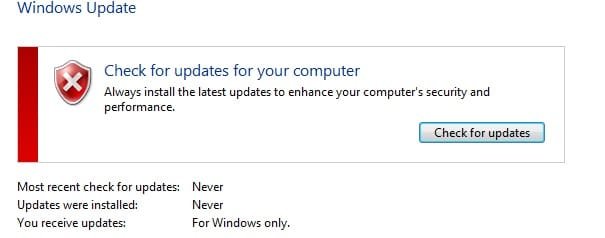
Berkey, I have attached a screen shot of the CBS.zip to see what's there and taking the space. Maybe I need only include the .txt file for this purpose?

Also, tried the reset. The update window doesn't say "reset" though, even though it looks like it is. I'm including a jpg of that screen, too.
 

Attachments

  • Windows update picture.jpg
    Windows update picture.jpg
    13.7 KB · Views: 30

My Computer

Computer type
PC/Desktop
Computer Manufacturer/Model Number
asus
OS
windows 7 64
Save you logs and wait for a expert to join in.
I have done what my 3 brain cells are capable of doing.
I will drop a note off to one of our experts.
 

My Computer

Computer type
PC/Desktop
Computer Manufacturer/Model Number
Home made Desktop
OS
Windows 10 Pro. 64/ version 1709 Windows 7 Pro/64
CPU
Intel i7-6800K @ 4.3
Motherboard
ASUS X-99 Deluxe II
Memory
Corsair Platinum 16 gig @2400
Graphics Card(s)
EVGA GTX 1070 OC
Monitor(s) Displays
Asus 27" LED LCD/VE278Q
Screen Resolution
1920-1080 or 1280-720 HDMI
Hard Drives
INTEL SSD 730-240 Gb Sata 3.0/
PSU
EVGA Platium 1200W
Case
Phanteks Luxe Tempered Glass 8 fans/ one radiator
Cooling
XSPC/ Water Cooled CPU
Keyboard
Das 4 Professional
Mouse
Logitech M705/MX Anywhere 2-S
Internet Speed
100 mbits
Antivirus
Microsoft Security Essentials/ Malwarebytes Premium 3.0/ SAS
Browser
I.E. 11 default/Firefox/ ISP Time Warner Cable/Spectrum
Other Info
LG BluRay Burner/
Sound system-KLipsch-THX/
Icy Dock ssd Hot Swap bays.
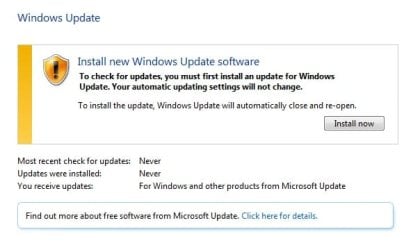
Screen shot of "update the updater" message

I'm attaching a screen shot of the message I get every time I try to check for updates. When I click to upload, I then get the error code 800736B3
 

Attachments

  • update the updater.jpg
    update the updater.jpg
    24.4 KB · Views: 30

My Computer

Computer type
PC/Desktop
Computer Manufacturer/Model Number
asus
OS
windows 7 64
I have ccleaner. Don't think I've ever cleaned the registry. Would this be helpful to do? Anyway, twiddling thumbs, itching to fix this thing since I've been wrestling with it for about two weeks.
 

My Computer

Computer type
PC/Desktop
Computer Manufacturer/Model Number
asus
OS
windows 7 64
Back
Top