Windows Updates - Remove Outdated Updates in Windows 7

How to Remove Outdated Windows Updates Using Disk Cleanup in Windows 7

   Information
Microsoft released an update on October 8, 2013 that allows you to remove outdated Windows Updates using Disk Cleanup in Windows 7.

This update adds a new plugin to the Disk Cleanup wizard. After you install this update, you can use the Windows Update Cleanup option to delete Windows updates that you no longer need.

Notes

  • The Windows Update Cleanup option is available only when the Disk Cleanup wizard detects Windows updates that you do not need on the computer.
  • To enable you to roll back to previous updates, updates are stored in the WinSxS store even after they are superseded by later updates. Therefore, after you run the Disk Cleanup wizard, you may be unable to roll back to a superseded update. If you want to roll back to a superseded update that the Disk Cleanup wizard deletes, you can manually install the update.
Running Windows Update Cleanup will reduce the size of the WinSxS folder (component store) and gain more hard drive space.

Source: Update is available that enables you to delete outdated Windows updates by using a new option in the Disk Cleanup wizard in Windows 7 SP1

   Note
Be sure you are running Windows 7 Service Pack 1.


Instructions:

1. If you have not already, you will need to download and install the update from Windows Update or from the Microsoft Download Center links below.
32 Bit:

Download


64 Bit:

Download


2. Open Disk Cleanup.

   Note
You need to run Disk Cleanup as Administrator or select "Clean up system files" in Disk Cleanup.


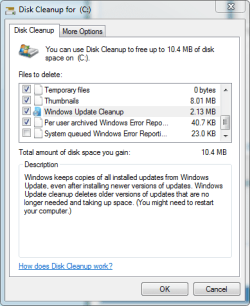
3. Tick the "Windows Update Cleanup" box.
Windows_Update_Cleanup.png
4. Select OK.

5. Reboot your computer, so the changes will be applied.


That's it! You can run this every time you need to clean up old Windows Update files. Post down below if you have any questions or comments!


Last edited by a moderator:
Last edited:

My Computer

Computer type
Laptop
Computer Manufacturer/Model Number
HP Pavilion dv6-6c10us
OS
x64 (6.3.9600) Win8.1 Pro & soon dual boot x64 (6.1.7601) Win7_SP1 HomePrem
CPU
AMD A6-3420M APU with Radeon(tm) HD Graphics
Motherboard
Hewlett-Packard 1805
Memory
6.00 GB
Graphics Card(s)
AMD Radeon(TM) HD 6520G
Sound Card
(1) AMD High Definition Audio Device (2) IDT High Definiti
Monitor(s) Displays
HP W2072a 20" LCD (1600 x 900) @ 60 Hz
Screen Resolution
1366 x 768 x 32 bits (4294967296 colors) @ 60 Hz
Hard Drives
ST640LM0 00 HM641JI SATA Disk Device
Keyboard
Logitech k520 wireless KB
Mouse
Logitech m320 wireless mouse (bundled with KB)
Internet Speed
15/5 | 54 MB Wireless 'n'
Antivirus
Realtime: Defender or Avast | On-demand: Malwarebytes, ESET
Browser
IE 11 on Win8, IE 10 on win 7
Other Info
Media: [Gimp, Audacity, VLC] || Comm: [WEmail 2012, Skype] || Productivity: [OpenOffice,| Textpad] || Utils: [Sysinternals, cCleaner, Speccy, Defraggler]
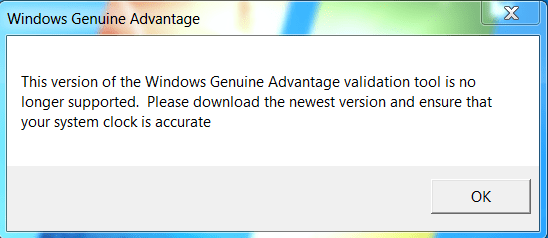
I keep getting this and can go no further. Can not download the update.
 

Attachments

  • Validate.PNG
    Validate.PNG
    11.7 KB · Views: 92,944

My Computer

Computer type
Laptop
Computer Manufacturer/Model Number
Lenovo Z710 #59400485
OS
Windows 8.1.1 64bit
CPU
i7-4700MQ
Memory
8.0GB PC3-12800 DDR3L SDRAM 1600 MHz
Graphics Card(s)
Intel® HD Graphics 4600
Sound Card
on-board
Monitor(s) Displays
17.3"
Screen Resolution
1920x1080
Hard Drives
1TB 5400 RPM;(OS,programs)


Hitachi, 1Tb external,(B'up)
PSU
4 Cell 41 Watt Hour Lithium-Ion
Case
Lenovo
Cooling
Air in, Air out.
Keyboard
Logitech - Y-UY95 - Illuminated
Mouse
M$ - Arc Touch
Internet Speed
59 Mb down / 25 Mb up
Antivirus
Defender
Browser
Firefox (newest)
Other Info
MBAM Pro, SAS Pro, Revo Pro.

Ext. HP 2311 Monitor

My Computer

Computer type
Laptop
Computer Manufacturer/Model Number
ACER ASPIRE 5742G
OS
Microsoft Windows 7 Home Premium 64-bits 7601 Multiprocessor Free Service Pack 1
CPU
Intel(R) Core(TM) i3 CPU M 370 @ 2.40GHz
Motherboard
Acer Aspire 5742G
Memory
4,00 GB
Graphics Card(s)
ATI Mobility Radeon HD 5400 Series
Sound Card
(1) AMD High Definition Audio Device (2) Realtek High Defi
Screen Resolution
1366 x 768 x 32 bits (4294967296 colors) @ 60 Hz
Hard Drives
WDC WD5000BEVT-22ZAT0
Yes.
 

My Computer

Computer type
Laptop
Computer Manufacturer/Model Number
Lenovo Z710 #59400485
OS
Windows 8.1.1 64bit
CPU
i7-4700MQ
Memory
8.0GB PC3-12800 DDR3L SDRAM 1600 MHz
Graphics Card(s)
Intel® HD Graphics 4600
Sound Card
on-board
Monitor(s) Displays
17.3"
Screen Resolution
1920x1080
Hard Drives
1TB 5400 RPM;(OS,programs)


Hitachi, 1Tb external,(B'up)
PSU
4 Cell 41 Watt Hour Lithium-Ion
Case
Lenovo
Cooling
Air in, Air out.
Keyboard
Logitech - Y-UY95 - Illuminated
Mouse
M$ - Arc Touch
Internet Speed
59 Mb down / 25 Mb up
Antivirus
Defender
Browser
Firefox (newest)
Other Info
MBAM Pro, SAS Pro, Revo Pro.

Ext. HP 2311 Monitor

My Computer

Computer type
Laptop
Computer Manufacturer/Model Number
ACER ASPIRE 5742G
OS
Microsoft Windows 7 Home Premium 64-bits 7601 Multiprocessor Free Service Pack 1
CPU
Intel(R) Core(TM) i3 CPU M 370 @ 2.40GHz
Motherboard
Acer Aspire 5742G
Memory
4,00 GB
Graphics Card(s)
ATI Mobility Radeon HD 5400 Series
Sound Card
(1) AMD High Definition Audio Device (2) Realtek High Defi
Screen Resolution
1366 x 768 x 32 bits (4294967296 colors) @ 60 Hz
Hard Drives
WDC WD5000BEVT-22ZAT0
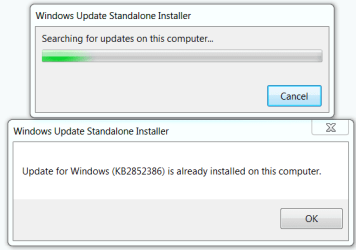
Thank's for the direct link but, looks like its been installed already.
Maybe it was in the 20 updates from yesterday ?
 

Attachments

  • inst.PNG
    inst.PNG
    9 KB · Views: 92,909

My Computer

Computer type
Laptop
Computer Manufacturer/Model Number
Lenovo Z710 #59400485
OS
Windows 8.1.1 64bit
CPU
i7-4700MQ
Memory
8.0GB PC3-12800 DDR3L SDRAM 1600 MHz
Graphics Card(s)
Intel® HD Graphics 4600
Sound Card
on-board
Monitor(s) Displays
17.3"
Screen Resolution
1920x1080
Hard Drives
1TB 5400 RPM;(OS,programs)


Hitachi, 1Tb external,(B'up)
PSU
4 Cell 41 Watt Hour Lithium-Ion
Case
Lenovo
Cooling
Air in, Air out.
Keyboard
Logitech - Y-UY95 - Illuminated
Mouse
M$ - Arc Touch
Internet Speed
59 Mb down / 25 Mb up
Antivirus
Defender
Browser
Firefox (newest)
Other Info
MBAM Pro, SAS Pro, Revo Pro.

Ext. HP 2311 Monitor
Thank's for the direct link but, looks like its been installed already.
Maybe it was in the 20 updates from yesterday ?
Maybe it was... don't know. check your windows update history... or just believe it. You can continue now with tutorial
 

My Computer

Computer type
Laptop
Computer Manufacturer/Model Number
ACER ASPIRE 5742G
OS
Microsoft Windows 7 Home Premium 64-bits 7601 Multiprocessor Free Service Pack 1
CPU
Intel(R) Core(TM) i3 CPU M 370 @ 2.40GHz
Motherboard
Acer Aspire 5742G
Memory
4,00 GB
Graphics Card(s)
ATI Mobility Radeon HD 5400 Series
Sound Card
(1) AMD High Definition Audio Device (2) Realtek High Defi
Screen Resolution
1366 x 768 x 32 bits (4294967296 colors) @ 60 Hz
Hard Drives
WDC WD5000BEVT-22ZAT0
Checked and found it from yesterday.


Update for Windows 7 for x64-based Systems (KB2852386)

Installation date: ‎10/‎8/‎2013 4:43 PM

Installation status: Successful

Update type: Recommended

Install this update to resolve issues in Windows. For a complete listing of the issues that are included in this update, see the associated Microsoft Knowledge Base article for more information. After you install this item, you may have to restart your computer.

More information:
Update is available that enables you to delete outdated Windows updates by using a new option in the Disk Cleanup wizard in Windows 7 SP1

Help and Support:
Microsoft Support
 

My Computer

Computer type
Laptop
Computer Manufacturer/Model Number
Lenovo Z710 #59400485
OS
Windows 8.1.1 64bit
CPU
i7-4700MQ
Memory
8.0GB PC3-12800 DDR3L SDRAM 1600 MHz
Graphics Card(s)
Intel® HD Graphics 4600
Sound Card
on-board
Monitor(s) Displays
17.3"
Screen Resolution
1920x1080
Hard Drives
1TB 5400 RPM;(OS,programs)


Hitachi, 1Tb external,(B'up)
PSU
4 Cell 41 Watt Hour Lithium-Ion
Case
Lenovo
Cooling
Air in, Air out.
Keyboard
Logitech - Y-UY95 - Illuminated
Mouse
M$ - Arc Touch
Internet Speed
59 Mb down / 25 Mb up
Antivirus
Defender
Browser
Firefox (newest)
Other Info
MBAM Pro, SAS Pro, Revo Pro.

Ext. HP 2311 Monitor
Maybe a note can be added to the tutorial that the update has been available through windows update since Oct. 8th and may already be installed.
 

My Computer

Computer type
PC/Desktop
Computer Manufacturer/Model Number
Self Built
OS
Win 10 Pro x64
CPU
Intel I5-2500K @3.3GHz
Motherboard
Asrock P67 Extreme4
Memory
16GB G.Skill Ripjaws X (4x4GB)
Graphics Card(s)
EVGA GeForce 750 Ti SC 2GB
Sound Card
ASUS Xonar DG 5.1 Channels 24-bit 96KHz PCI Interface Sound
Monitor(s) Displays
auria eq2367
Screen Resolution
1920 x 1080
Hard Drives
250GB Samsung 850 EVO SSD
1TB WD Blue
1TB Hitachi
PSU
SeaSonic X 650W 80 Plus Gold
Case
Corsair Obsidian 750D
Cooling
Corsair H60, Three 140mm case fans
Keyboard
Logitech Wireless Keyboard K520
Mouse
Logitech Wireless Mouse M310
Internet Speed
Wave Broadband ~ 100 dn 5 up
Antivirus
Windows Defender, Malwarebytes Premium
Browser
Edge, IE11, Chrome
Other Info
Laptop specs: HP g7-1365dx /
CPU: AMD A6-3420M APU with Radeon(tm) HD Graphics /
RAM: Crucial 8Gb (2x4Gb) /
SSD: Crucial M4-CT128M4SSD2 ATA Device/ FW 000F /
GFX: AMD Radeon HD 6520G /
OS: Windows 10 Pro x64
Worked well for me, cleaned up 3.1 GB of wasted space on my C: drive. :D
 

My Computer

OS
W7 HOP 64
296 updates count

I tried your instructions when I got to diskmgr there is not a windows update box or in cleanup disk. checked my updates still 296 back to 11/20/2010 im confused :confused:
 

My Computer

Computer type
PC/Desktop
Computer Manufacturer/Model Number
Custom Build
OS
MS Windows 7 Ultimate 64-bit SP1
CPU
AMD FX-8350
Motherboard
Gigabyte GA-970A-UD3
Memory
8 GB DDR3 1600
Graphics Card(s)
AMD Radeon HD 9750
Sound Card
n/a
Monitor(s) Displays
39" 4k
Screen Resolution
3840 X 2160
Hard Drives
AMD SSD 240 + 1TB WD + 2 500GB WD
PSU
Antec 620
Case
Apevia X-Trooper
Cooling
120" Corsair H50
Keyboard
Cooler Master Devastator
Mouse
Cooler Master Devastator
Internet Speed
108 Mbps down !0 Mbps up
Antivirus
Microsoft Security Essentials
Browser
IE11, Mozzilla firefox
Other Info
2 DVD players one with light scribe
Front panel with two 3.0 USB ports (add-on)
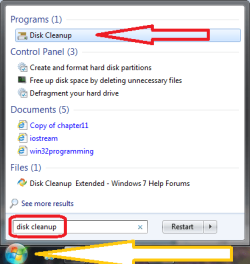
Try this: type disk cleanup in the search box on the start menu (orb)
Make sure the selected item is Disk Cleanup and hit enter

74ms_DiskCleanup.png

A prompt showing you the default drive C:\ might pop up, answer OK or yes
hit the Clean up system files button
A prompt showing you the default drive C:\ might pop up, answer OK or yes
When the utility dialog returns, scroll down until you see Windows Update Cleanup
tick the box on the left if it is not already ticked.
Then you can follow the instructions
I tried your instructions when I got to diskmgr there is not a windows update box or in cleanup disk. checked my updates still 296 back to 11/20/2010 im confused :confused:
 

My Computer

Computer type
Laptop
Computer Manufacturer/Model Number
HP Pavilion dv6-6c10us
OS
x64 (6.3.9600) Win8.1 Pro & soon dual boot x64 (6.1.7601) Win7_SP1 HomePrem
CPU
AMD A6-3420M APU with Radeon(tm) HD Graphics
Motherboard
Hewlett-Packard 1805
Memory
6.00 GB
Graphics Card(s)
AMD Radeon(TM) HD 6520G
Sound Card
(1) AMD High Definition Audio Device (2) IDT High Definiti
Monitor(s) Displays
HP W2072a 20" LCD (1600 x 900) @ 60 Hz
Screen Resolution
1366 x 768 x 32 bits (4294967296 colors) @ 60 Hz
Hard Drives
ST640LM0 00 HM641JI SATA Disk Device
Keyboard
Logitech k520 wireless KB
Mouse
Logitech m320 wireless mouse (bundled with KB)
Internet Speed
15/5 | 54 MB Wireless 'n'
Antivirus
Realtime: Defender or Avast | On-demand: Malwarebytes, ESET
Browser
IE 11 on Win8, IE 10 on win 7
Other Info
Media: [Gimp, Audacity, VLC] || Comm: [WEmail 2012, Skype] || Productivity: [OpenOffice,| Textpad] || Utils: [Sysinternals, cCleaner, Speccy, Defraggler]
Cleanmgr will do.
 

My Computers

System One System Two

  • Computer type
    PC/Desktop
    OS
    7 X64
    CPU
    i5 8400
    Motherboard
    gigabyte b365m ds3h
    Memory
    2x8gb 3200mhz
    Hard Drives
    various
    PSU
    pure power 11 400w cm
    Case
    Coolermaster
    Cooling
    cryorig m9i
  • Computer type
    PC/Desktop
    OS
    7x64
    CPU
    g5400
    Motherboard
    ga b365m ds3h
    Memory
    8gb ddr4 2400
    PSU
    xfx pro 450w
oops sorry I meant Disk Cleanup it doesn't not have a windows update box when it opens I hit disk cleanup all on C: I only have one drive C: when disk cleanup starts running it shows reading Service Pack Backup Files then System error memory dump files then Windows Update Cleanup it has a box to check for SPBF and Semdf but none for WUC
 
Last edited:

My Computer

Computer type
PC/Desktop
Computer Manufacturer/Model Number
Custom Build
OS
MS Windows 7 Ultimate 64-bit SP1
CPU
AMD FX-8350
Motherboard
Gigabyte GA-970A-UD3
Memory
8 GB DDR3 1600
Graphics Card(s)
AMD Radeon HD 9750
Sound Card
n/a
Monitor(s) Displays
39" 4k
Screen Resolution
3840 X 2160
Hard Drives
AMD SSD 240 + 1TB WD + 2 500GB WD
PSU
Antec 620
Case
Apevia X-Trooper
Cooling
120" Corsair H50
Keyboard
Cooler Master Devastator
Mouse
Cooler Master Devastator
Internet Speed
108 Mbps down !0 Mbps up
Antivirus
Microsoft Security Essentials
Browser
IE11, Mozzilla firefox
Other Info
2 DVD players one with light scribe
Front panel with two 3.0 USB ports (add-on)
Hello Howie, and welcome to Seven Forums.

Did you already try manually installing the 64-bit update from step 1?
 

My Computer

Computer type
PC/Desktop
Computer Manufacturer/Model Number
Self built custom
OS
64-bit Windows 11 Pro for Workstations
CPU
Intel i7-8700K OC'd to 5 GHz
Motherboard
ASUS ROG Maximus XI Formula Z390
Memory
64 GB (4x16GB) G.SKILL TridentZ RGB DDR4 3600 MHz
Graphics Card(s)
ASUS ROG-STRIX-GTX1080TI-O11G-GAMING
Sound Card
Integrated
Monitor(s) Displays
2 x Samsung Odyssey G7 27"
Screen Resolution
2560x1440
Hard Drives
1TB Samsung 990 PRO M.2,
4TB Samsung 990 PRO PRO M.2,
TerraMaster F8 SSD Plus NAS
PSU
Seasonic Prime Titanium 850W
Case
Thermaltake Core P3
Cooling
Corsair Hydro H115i
Keyboard
Logitech wireless K800
Mouse
Logitech MX Master 4
Internet Speed
2 Gb/s Download and 100 Mb/s Upload
Antivirus
Malwarebyte Anti-Malware Premium
Browser
Google Chrome
Other Info
Logitech Z625 speaker system,
Logitech BRIO 4K Pro webcam,
HP Color LaserJet Pro MFP M477fdn,
APC SMART-UPS RT 1000 XL - SURT1000XLI,
Galaxy S23 Plus phone
Try this: type disk cleanup in the search box on the start menu (orb)
Make sure the selected item is Disk Cleanup and hit enter

View attachment 289798

A prompt showing you the default drive C:\ might pop up, answer OK or yes
hit the Clean up system files button
A prompt showing you the default drive C:\ might pop up, answer OK or yes
When the utility dialog returns, scroll down until you see Windows Update Cleanup
tick the box on the left if it is not already ticked.
Then you can follow the instructions
I tried your instructions when I got to diskmgr there is not a windows update box or in cleanup disk. checked my updates still 296 back to 11/20/2010 im confused :confused:
oops sorry I meant Disk Cleanup it doesn't not have a windows update box when it opens I hit disk cleanup all on C: I only have one drive C: when disk cleanup starts running it shows reading Service Pack Backup Files then System error memory dump files then Windows Update Cleanup it has a box to check for SPBF and Semdf but none for WUC
 

My Computer

Computer type
PC/Desktop
Computer Manufacturer/Model Number
Custom Build
OS
MS Windows 7 Ultimate 64-bit SP1
CPU
AMD FX-8350
Motherboard
Gigabyte GA-970A-UD3
Memory
8 GB DDR3 1600
Graphics Card(s)
AMD Radeon HD 9750
Sound Card
n/a
Monitor(s) Displays
39" 4k
Screen Resolution
3840 X 2160
Hard Drives
AMD SSD 240 + 1TB WD + 2 500GB WD
PSU
Antec 620
Case
Apevia X-Trooper
Cooling
120" Corsair H50
Keyboard
Cooler Master Devastator
Mouse
Cooler Master Devastator
Internet Speed
108 Mbps down !0 Mbps up
Antivirus
Microsoft Security Essentials
Browser
IE11, Mozzilla firefox
Other Info
2 DVD players one with light scribe
Front panel with two 3.0 USB ports (add-on)
Hello Howie, and welcome to Seven Forums.

Did you already try manually installing the 64-bit update from step 1?
it shows it was already installed
 

My Computer

Computer type
PC/Desktop
Computer Manufacturer/Model Number
Custom Build
OS
MS Windows 7 Ultimate 64-bit SP1
CPU
AMD FX-8350
Motherboard
Gigabyte GA-970A-UD3
Memory
8 GB DDR3 1600
Graphics Card(s)
AMD Radeon HD 9750
Sound Card
n/a
Monitor(s) Displays
39" 4k
Screen Resolution
3840 X 2160
Hard Drives
AMD SSD 240 + 1TB WD + 2 500GB WD
PSU
Antec 620
Case
Apevia X-Trooper
Cooling
120" Corsair H50
Keyboard
Cooler Master Devastator
Mouse
Cooler Master Devastator
Internet Speed
108 Mbps down !0 Mbps up
Antivirus
Microsoft Security Essentials
Browser
IE11, Mozzilla firefox
Other Info
2 DVD players one with light scribe
Front panel with two 3.0 USB ports (add-on)
Are you logged in as an administrator?

Try running the disk cleanup "as administrator"
Right click on the highlighted search result "Disk Cleanup"
select "run as administrator" from the alternate meniu
you won't have the "Clean Up Files System" button and you should see WUC below Thumbnails and above "Per User archived WER"
oops sorry I meant Disk Cleanup it doesn't not have a windows update box when it opens I hit disk cleanup all on C: I only have one drive C:
when disk cleanup starts running it shows reading Service Pack Backup Files then System error memory dump files then Windows Update Cleanup
it has a box to check for SPBF and Semdf but none for WUC
 

Attachments

  • cleanmgr-c.PNG
    cleanmgr-c.PNG
    13.6 KB · Views: 2,650

My Computer

Computer type
Laptop
Computer Manufacturer/Model Number
HP Pavilion dv6-6c10us
OS
x64 (6.3.9600) Win8.1 Pro & soon dual boot x64 (6.1.7601) Win7_SP1 HomePrem
CPU
AMD A6-3420M APU with Radeon(tm) HD Graphics
Motherboard
Hewlett-Packard 1805
Memory
6.00 GB
Graphics Card(s)
AMD Radeon(TM) HD 6520G
Sound Card
(1) AMD High Definition Audio Device (2) IDT High Definiti
Monitor(s) Displays
HP W2072a 20" LCD (1600 x 900) @ 60 Hz
Screen Resolution
1366 x 768 x 32 bits (4294967296 colors) @ 60 Hz
Hard Drives
ST640LM0 00 HM641JI SATA Disk Device
Keyboard
Logitech k520 wireless KB
Mouse
Logitech m320 wireless mouse (bundled with KB)
Internet Speed
15/5 | 54 MB Wireless 'n'
Antivirus
Realtime: Defender or Avast | On-demand: Malwarebytes, ESET
Browser
IE 11 on Win8, IE 10 on win 7
Other Info
Media: [Gimp, Audacity, VLC] || Comm: [WEmail 2012, Skype] || Productivity: [OpenOffice,| Textpad] || Utils: [Sysinternals, cCleaner, Speccy, Defraggler]
This might help.
When you use Cleanmgr right tick on it and select Run as Administrator.

Sorry Slartybart I was typing while you were posting.
 
Last edited:

My Computer

Computer type
PC/Desktop
Computer Manufacturer/Model Number
Home made Desktop
OS
Windows 10 Pro. 64/ version 1709 Windows 7 Pro/64
CPU
Intel i7-6800K @ 4.3
Motherboard
ASUS X-99 Deluxe II
Memory
Corsair Platinum 16 gig @2400
Graphics Card(s)
EVGA GTX 1070 OC
Monitor(s) Displays
Asus 27" LED LCD/VE278Q
Screen Resolution
1920-1080 or 1280-720 HDMI
Hard Drives
INTEL SSD 730-240 Gb Sata 3.0/
PSU
EVGA Platium 1200W
Case
Phanteks Luxe Tempered Glass 8 fans/ one radiator
Cooling
XSPC/ Water Cooled CPU
Keyboard
Das 4 Professional
Mouse
Logitech M705/MX Anywhere 2-S
Internet Speed
100 mbits
Antivirus
Microsoft Security Essentials/ Malwarebytes Premium 3.0/ SAS
Browser
I.E. 11 default/Firefox/ ISP Time Warner Cable/Spectrum
Other Info
LG BluRay Burner/
Sound system-KLipsch-THX/
Icy Dock ssd Hot Swap bays.
Back
Top