Solved Windows uses full RAM without process

tibo88

New member
Local time
1:05 AM
Messages
4
Hi,


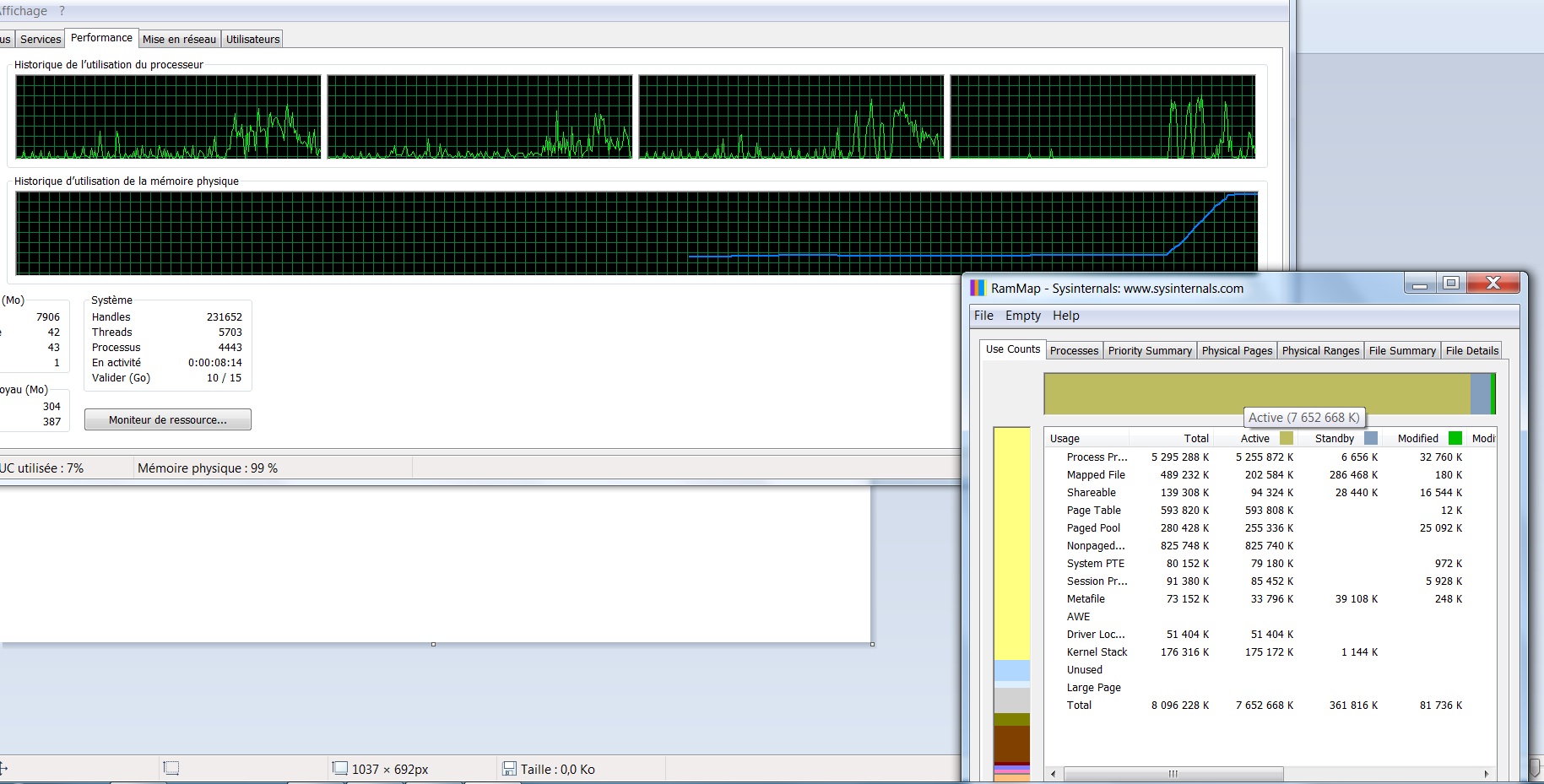
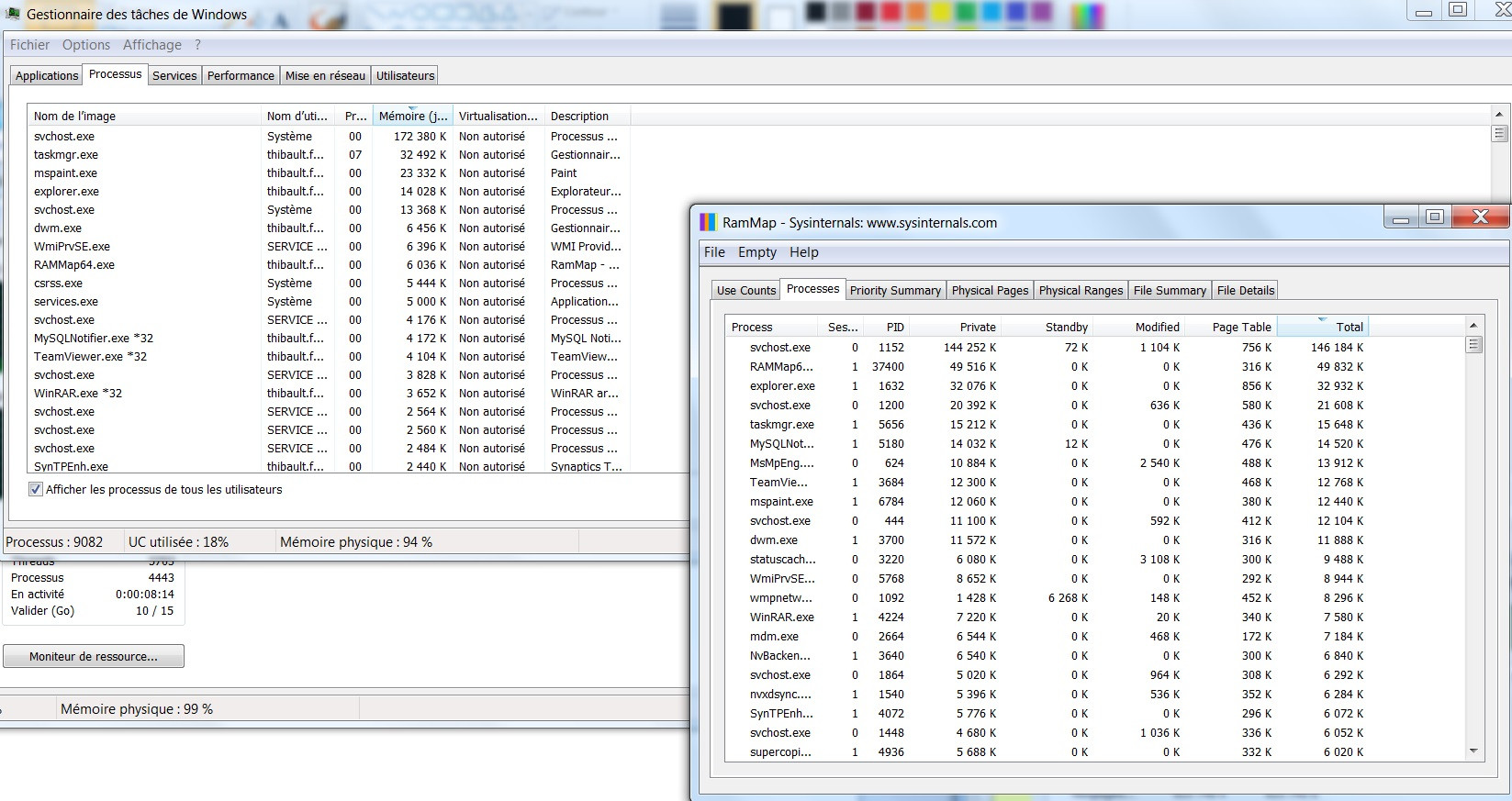
About 9 minutes after startup of windows 7, the RAM usage increases linearly to reach max. And then my PC is stuck. I don't find any process using all this RAM even using RAMMAP. (it is always 9 minutes)


VtqKD.jpg


VFtOp.jpg


I also don't manage to restore old point. I lost the windows search service and I don't manage to restore the service.


Is someone knows where is the problem?
 

My Computer

Computer type
Laptop
Computer Manufacturer/Model Number
lenovo
OS
Windows 7 professionnal x64
Memory
8 Gb
Hi and welcome to SevenForums,
You have an astounding 9082 processes running :shock:
I'd try clean boot and run some free scanners,
Use Clean boot,
http://www.sevenforums.com/tutorial...ation-conflicts-performing-clean-startup.html
Click Start and type in the search box,
msconfig
Click on the suggestion on top or hit the Enter key,
Go to the Startup section and take some screen shots for a complete list,
Go to the Services section and on the bottom left Check the box to Hide All Microsoft services,
Repeat the screen shots,
See the links above my signature on how to take and upload screen shots here,

Review Jacee’s instructions to run Adwcleaner here post #7,
Ignore the title of the thread,
http://www.sevenforums.com/system-security/316404-instant-savings-app.html
On the BleepingComputer site use the button that looks like this,
adwcleaner-button.JPG


Manually Update them before running full scans,
Try not to use your computer while the scans are running, (one at a time of course).
See this tutorial on how to download and run Malwarebytes,
http://www.sevenforums.com/tutorials/338716-malwarebytes-anti-malware-free.html
Also be sure to scan for rootkits in the custom scan/ Configure scan options
mbam scan for rootkits.jpg

Also use the Custom scan option not the Threat scan,
Malwarebytes | Malwarebytes Anti-Malware Premium
SAS is safe to remove anything it finds ;)
SUPERAntiSpyware | Remove Malware | Remove Spyware - AntiMalware, AntiSpyware, AntiAdware!
 

My Computer

Computer type
PC/Desktop
Computer Manufacturer/Model Number
Custom assembled by me :}
OS
Win-7-Pro64bit 7-H-Prem-64bit
CPU
i7-5930K 2nd i9-9940x both water blocked VRM's too
Motherboard
ASUS SABERTOOTH X99 2nd ASUS x299 Apex
Memory
Trident-z 3200C14 2nd Trident-z 3600C16
Graphics Card(s)
EVGA 1080ti ftw3 2nd Titan Xp both water blocked
Sound Card
Built-in Realtek
Monitor(s) Displays
1-AOC G2460PG 24"G-Sync 144Hz/ 2nd 1-ASUS VG248QE 24" 144Hz
Screen Resolution
1920 x 1080 144Hz
Hard Drives
2-Samsung M.2 Evo & Evo Plus
2-Samsung 850 EVO 500GB SSD's/ 3-2.5 W.D. Black 1tb-&3-1tb/3-3.5 WD Black 1tb hdd's
PSU
EVGA SuperNOVA 1000-P2 2nd 1200-P2
Case
2-Corsair Obsidian Series 450D Black ATX Mid Tower
Cooling
Custom water loops
Keyboard
Logitech G710+/ 2nd Logitech G910
Mouse
2-RedDragon M901 Perdition 16400 dpi Gaming mouse = wired
Internet Speed
Comcast Ping 19ms 89.31mbps download speed 6.12mbps upload
Antivirus
Malwarebytes Pro/ Superantispyware Pro
Browser
FireFox & Pale moon
Other Info
2nd ASUS X299 Apex/Intel i9-9940x with Custom water loop/7H-Prem-x64/Corsair 450D case/Ram Trident-z 3600C16 4x8gb / Samsung970Evo plus 500gb SSD/Dual ssd EZ swap evo/PSU EVGA SuperNova 1200w-P2 80+Platinum/GPU Titan Xp /8-ML-140 on push-pull on 2-280GTX rads
RE: RAMMap. Forget processes. Try "File Summary" tab then sort by "Active" - high to low.

Post a screenshot if anything shows up with high "Active" RAM usage.
 

My Computer

Computer type
Laptop
Computer Manufacturer/Model Number
ASUS
OS
Microsoft Windows 7 Home Premium 64-bit 7601 Multiprocessor Free Service Pack 1
CPU
AMD C-60 APU with Radeon(tm) HD Graphics
Motherboard
ASUSTeK COMPUTER INC. X501U
Memory
4.00 GB
Graphics Card(s)
AMD Radeon HD 6290 Graphics
Sound Card
(1) AMD High Definition Audio Device (2) Realtek High Defi
Screen Resolution
1366 x 768 x 32 bits (4294967296 colors) @ 60 Hz
Hard Drives
Hitachi HTS545050A7E380 SATA Disk Device
Antivirus
Comodo CIS & FW, SecureAplus App Whitelisting, Threatfire
Browser
Cyberfox 64bit, Opera 64bit, Airfox
Other Info
Spy-The-Spy, HitmanPro.Alert, Norton Connect Safe, MJRegWatcher, BitDefender TrafficLight, Voodoo Shield, Zemana AntiMalware
Thank you for your help.

I switched in clean mode (I have to use safe mode for long scan because whan the RAM usage increases the scan becomes very slow).

-Adwcleaner (see report below)
- Malwarebytes found nothing
- SAS found 4 tracking cookies

I don't see high active process in "File summary".

The problem is the same: the number of process is around 60 (in clean mode) and increase to 9000 when the RAM increases.

# AdwCleaner v5.201 - Rapport créé le 25/07/2016 à 23:33:59
# Mis à jour le 30/06/2016 par ToolsLib
# Base de données : 2016-07-25.1 [Serveur]
# Système d'exploitation : Windows 7 Professional Service Pack 1 (X64)
# Nom d'utilisateur : xxxxx.xxxx - xxxxxxxx
# Exécuté depuis : C:\Users\xxxxx.xxxxxx\Downloads\AdwCleaner.exe
# Option : Scanner
# Support : https://toolslib.net/forum

***** [ Services ] *****


***** [ Dossiers ] *****

Dossier trouvé : C:\Users\xxxx\AppData\Local\FileViewPro
Dossier trouvé : C:\Program Files\FileViewPro

***** [ Fichiers ] *****

Fichier trouvé : C:\Windows\SysWOW64\lavasofttcpservice.dll
Fichier trouvé : C:\Windows\SysWOW64\LavasoftTcpServiceOff.ini
Fichier trouvé : C:\Users\xxxxxxxxxxx\AppData\Roaming\Mozilla\Firefox\Profiles\5xn2s8fs.default\searchplugins\bing-lavasoft.xml
Fichier trouvé : C:\Windows\SysNative\LavasoftTcpService64.dll
Fichier trouvé : C:\Windows\SysNative\LavasoftTcpServiceOff.ini

***** [ DLL ] *****


***** [ WMI ] *****


***** [ Raccourcis ] *****


***** [ Tâches planifiées ] *****


***** [ Registre ] *****

Clé trouvée : HKCU\Software\Microsoft\Windows\CurrentVersion\Internet Settings\ZoneMap\Domains\webcompanion.com
Clé trouvée : HKLM\SOFTWARE\Classes\TypeLib\{ED62BC6E-64F1-46BE-866F-4C8DC0DF7057}
Clé trouvée : HKLM\SOFTWARE\Lavasoft\Web Companion

***** [ Navigateurs ] *****

[C:\Users\xxxxxxx\AppData\Roaming\Mozilla\Firefox\Profiles\5xn2s8fs.default\prefs.js] trouvée : user_pref("browser.newtabpage.url", "hxxp://www.bing.com/?pc=COSP&ptag=D060716-A295234DE60&form=CONMHP&conlogo=CT3334485");
[C:\Users\xxxxxxxx\AppData\Roaming\Mozilla\Firefox\Profiles\5xn2s8fs.default\prefs.js] trouvée : user_pref("browser.search.defaultenginename", "Yahoo! Powered");
[C:\Users\xxxxxxx\AppData\Roaming\Mozilla\Firefox\Profiles\5xn2s8fs.default\prefs.js] trouvée : user_pref("browser.search.selectedEngine", "Yahoo! Powered");
[C:\Users\xxxxx\AppData\Local\Google\Chrome\User Data\Default\Web data] [Search Provider] trouvé : search.avira.com
[C:\Users\xxxxx\AppData\Local\Google\Chrome\User Data\Default\Secure Preferences] [Extension] trouvée : fcfenmboojpjinhpgggodefccipikbpd

*************************

C:\AdwCleaner\AdwCleaner[S1].txt - [2013 octets] - [25/07/2016 23:21:53]
C:\AdwCleaner\AdwCleaner[S2].txt - [2527 octets] - [25/07/2016 23:26:55]
C:\AdwCleaner\AdwCleaner[S3].txt - [2601 octets] - [25/07/2016 23:30:47]
C:\AdwCleaner\AdwCleaner[S4].txt - [2521 octets] - [25/07/2016 23:33:59]

########## EOF - C:\AdwCleaner\AdwCleaner[S4].txt - [2595 octets] ##########


# AdwCleaner v5.201 - Rapport créé le 25/07/2016 à 23:35:40
# Mis à jour le 30/06/2016 par ToolsLib
# Base de données : 2016-07-25.1 [Serveur]
# Système d'exploitation : Windows 7 Professional Service Pack 1 (X64)
# Nom d'utilisateur : xxxxxx - xxxxx
# Exécuté depuis : C:\Users\xxxxx\Downloads\AdwCleaner.exe
# Option : Nettoyer
# Support : https://toolslib.net/forum

***** [ Services ] *****


***** [ Dossiers ] *****

[-] Dossier supprimé : C:\Users\xxxxxx\AppData\Local\FileViewPro
[-] Dossier supprimé : C:\Program Files\FileViewPro

***** [ Fichiers ] *****

[-] Fichier supprimé : C:\Windows\SysWOW64\lavasofttcpservice.dll
[-] Fichier supprimé : C:\Windows\SysWOW64\LavasoftTcpServiceOff.ini
[-] Fichier supprimé : C:\Users\xxxxxxxx\AppData\Roaming\Mozilla\Firefox\Profiles\5xn2s8fs.default\searchplugins\bing-lavasoft.xml
[-] Fichier supprimé : C:\Windows\SysNative\LavasoftTcpService64.dll
[-] Fichier supprimé : C:\Windows\SysNative\LavasoftTcpServiceOff.ini

***** [ DLLs ] *****


***** [ WMI ] *****


***** [ Raccourcis ] *****


***** [ Tâches planifiées ] *****


***** [ Registre ] *****

[-] Clé supprimée : HKCU\Software\Microsoft\Windows\CurrentVersion\Internet Settings\ZoneMap\Domains\webcompanion.com
[-] Clé supprimée : HKLM\SOFTWARE\Classes\TypeLib\{ED62BC6E-64F1-46BE-866F-4C8DC0DF7057}
[-] Clé supprimée : HKLM\SOFTWARE\Lavasoft\Web Companion

***** [ Navigateurs ] *****

[-] [C:\Users\xxxxxxxx\AppData\Roaming\Mozilla\Firefox\Profiles\5xn2s8fs.default\prefs.js] supprimée : user_pref("browser.newtabpage.url", "hxxp://www.bing.com/?pc=COSP&ptag=D060716-A295234DE60&form=CONMHP&conlogo=CT3334485");
[-] [C:\Users\xxxxxxxx\AppData\Roaming\Mozilla\Firefox\Profiles\5xn2s8fs.default\prefs.js] supprimée : user_pref("browser.search.defaultenginename", "Yahoo! Powered");
[-] [C:\Users\xxxxxxx\AppData\Roaming\Mozilla\Firefox\Profiles\5xn2s8fs.default\prefs.js] supprimée : user_pref("browser.search.selectedEngine", "Yahoo! Powered");
[-] [C:\Users\xxxxx\AppData\Local\Google\Chrome\User Data\Default\Web Data] [Search Provider] supprimé : search.avira.com
[-] [C:\Users\xxxxx\AppData\Local\Google\Chrome\User Data\Default\Secure Preferences] [Extension] supprimé : fcfenmboojpjinhpgggodefccipikbpd

*************************

:: Clés "Tracing" supprimées
:: Paramètres Winsock réinitialisés

*************************

C:\AdwCleaner\AdwCleaner[C1].txt - [2493 octets] - [25/07/2016 23:35:40]
C:\AdwCleaner\AdwCleaner[S1].txt - [2013 octets] - [25/07/2016 23:21:53]
C:\AdwCleaner\AdwCleaner[S2].txt - [2527 octets] - [25/07/2016 23:26:55]
C:\AdwCleaner\AdwCleaner[S3].txt - [2601 octets] - [25/07/2016 23:30:47]
C:\AdwCleaner\AdwCleaner[S4].txt - [2675 octets] - [25/07/2016 23:33:59]

########## EOF - C:\AdwCleaner\AdwCleaner[C1].txt - [2863 octets] ##########

 
Last edited:

My Computer

Computer type
Laptop
Computer Manufacturer/Model Number
lenovo
OS
Windows 7 professionnal x64
Memory
8 Gb
Have you tried running a leak test?
 

My Computers

System One System Two

  • Computer type
    PC/Desktop
    Computer Manufacturer/Model Number
    ASUS CUSTOM BUILD IN THERMALTAKE LEVEL 10 GT CASE
    OS
    Windows 7 Ultimate, Windows 8.1 Pro, Linux Mint/Cinnimon (Triple Boot)
    CPU
    INTEL 6900K
    Motherboard
    X99-E WS USB 3.1
    Memory
    CORSAIR DOMINATOR PLATINUM 128GB
    Graphics Card(s)
    EVGA GTX 1070 FTW
    Sound Card
    Onboard Crystal Sound - very nice ;)
    Monitor(s) Displays
    SAMSUNG 4K 28"
    Screen Resolution
    3140 x 2160 - A little extreme. Need to change it.
    Hard Drives
    1) LSI LOGICAL VOLUME RAID 10 (250 GBX4) SSD ARRAY
    2) INTEL RAID 0 KINGSTON (2) SSD ARRAY
    3) INTEL RAID 1 SEAGATE (2) 1TB ARRAY (secured backup)
    4) INTEL RAID 1 SEAGATE HYBRID (2) (secure secured backup)
    5) AHCI SEAGATE 3TB (1) BACKUP & STORAGE (back
    PSU
    CORSAIR HX 1000i
    Case
    THERMAL TAKE LEVEL 10 GT
    Cooling
    NOCTUA TOWER COOLING - PUSH/PULL
    Keyboard
    LOGITECH PRODIGY (One day I'll get a real keyboard.)
    Mouse
    LOGITECH (One day I'll get a real mouse.)
    Internet Speed
    300 Gb down 12 up Intel(R) I210 Gigabit Network Connection
    Antivirus
    several - Network implementing vs from other PCs - ask me
    Browser
    Mostly FireFox these days
    Other Info
    NOT ENOUGH ROOM TO LIST ALL HARD DRIVES HERE. Cuts me off at 5. Did you know that if you run a network you can scan your PC for viruses via other PCs using several different virus scanners? No virus scanner gets it all. This is narrows down the window for contracting a virus. By using multiple operating systems you can use different virus scanners with no risk of conflict.
  • Antivirus
    KASPERSKY
I found the problem. It is linked to java. I don't know why but a lot of javas.exe processes were launched. I uninstalled java and it is ok.

Thank you for your help.
 

My Computer

Computer type
Laptop
Computer Manufacturer/Model Number
lenovo
OS
Windows 7 professionnal x64
Memory
8 Gb
Hi,
Yep Oracle bites :)
How many processes do you have now :)
I show all users as 55 processes at this moment the 8k you had going was pretty wild :D
 

My Computer

Computer type
PC/Desktop
Computer Manufacturer/Model Number
Custom assembled by me :}
OS
Win-7-Pro64bit 7-H-Prem-64bit
CPU
i7-5930K 2nd i9-9940x both water blocked VRM's too
Motherboard
ASUS SABERTOOTH X99 2nd ASUS x299 Apex
Memory
Trident-z 3200C14 2nd Trident-z 3600C16
Graphics Card(s)
EVGA 1080ti ftw3 2nd Titan Xp both water blocked
Sound Card
Built-in Realtek
Monitor(s) Displays
1-AOC G2460PG 24"G-Sync 144Hz/ 2nd 1-ASUS VG248QE 24" 144Hz
Screen Resolution
1920 x 1080 144Hz
Hard Drives
2-Samsung M.2 Evo & Evo Plus
2-Samsung 850 EVO 500GB SSD's/ 3-2.5 W.D. Black 1tb-&3-1tb/3-3.5 WD Black 1tb hdd's
PSU
EVGA SuperNOVA 1000-P2 2nd 1200-P2
Case
2-Corsair Obsidian Series 450D Black ATX Mid Tower
Cooling
Custom water loops
Keyboard
Logitech G710+/ 2nd Logitech G910
Mouse
2-RedDragon M901 Perdition 16400 dpi Gaming mouse = wired
Internet Speed
Comcast Ping 19ms 89.31mbps download speed 6.12mbps upload
Antivirus
Malwarebytes Pro/ Superantispyware Pro
Browser
FireFox & Pale moon
Other Info
2nd ASUS X299 Apex/Intel i9-9940x with Custom water loop/7H-Prem-x64/Corsair 450D case/Ram Trident-z 3600C16 4x8gb / Samsung970Evo plus 500gb SSD/Dual ssd EZ swap evo/PSU EVGA SuperNova 1200w-P2 80+Platinum/GPU Titan Xp /8-ML-140 on push-pull on 2-280GTX rads
Now it is about 60 processes. Your question on the 9000 processes give me the hint to look at these processes.

Thank you!
 

My Computer

Computer type
Laptop
Computer Manufacturer/Model Number
lenovo
OS
Windows 7 professionnal x64
Memory
8 Gb
Back
Top