Windows Vista Installation error!!!

Andrei31910

New member
Local time
4:50 AM
Messages
6
Location
NPC 07,Ambiong
Hi!
I know that this is a place for 7 questions, but I have a problem with my vista setup. Whenever I boot into whatever boot device I use, it just goes into a black screen, defying all my expectations. How to fix?
Thanks! :)
 

My Computers

System One System Two

  • Computer type
    Laptop
    Computer Manufacturer/Model Number
    Samsung
    OS
    Windows XP/Vista/7
    CPU
    Intel
    Graphics Card(s)
    Intel
    Sound Card
    Realtek
    Browser
    Chrome
  • Computer type
    PC/Desktop
what machine are you trying to install it on ?

One workaround is to get a windows 7 official iso file and replace sources\install.wim with the vista install.wim
The free version of anyburn can be used to edit an iso file.

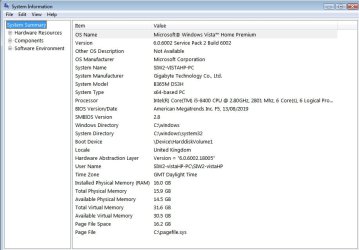
I got vista running on a 300 series motherboard with an 8th gen cpu. It is not an oem machine and the license I had was from a dual core desktop I bought years previously. I phoned microsoft and they activated it for me.

On the b365 motherboard the regular vista boot.wim goes nowhere, just a black screen. I fiddled about with the vista boot.wim and got it working. But that is too difficult for most people, so use win7 media with replaced install.wim instead.

I would recommend 3rd gen cpu ( lga 1155 ) as the most sensible machines for vista
Something like hp 8300, or optiplex 7010 or anything from that era such as gigabyte b75 motherboard with an i5-3570s


vista-b365-msinfo32.jpg

- - - Updated - - -
 
Last edited:

My Computers

System One System Two

  • Computer type
    PC/Desktop
    OS
    7 X64
    CPU
    i5 8400
    Motherboard
    gigabyte b365m ds3h
    Memory
    2x8gb 3200mhz
    Hard Drives
    various
    PSU
    pure power 11 400w cm
    Case
    Coolermaster
    Cooling
    cryorig m9i
  • Computer type
    PC/Desktop
    OS
    7x64
    CPU
    g5400
    Motherboard
    ga b365m ds3h
    Memory
    8gb ddr4 2400
    PSU
    xfx pro 450w
Hey there! It seems that this solution may be promising, if you need this info, i am installing it on a samsung RV511. I am new so i dont know many features of this yet but if i master it, i may be able to put how you can see my specs! Unfortunately it is night in this area and time so i might not be able to perform this solution. Thanks again!
 

My Computers

System One System Two

  • Computer type
    Laptop
    Computer Manufacturer/Model Number
    Samsung
    OS
    Windows XP/Vista/7
    CPU
    Intel
    Graphics Card(s)
    Intel
    Sound Card
    Realtek
    Browser
    Chrome
  • Computer type
    PC/Desktop
There is also Vista Forums sister-site, link at the bottom of every page. Although many VF members are also 7F members, there are a few Vista gurus who are not members here.

image.png
 

My Computers

System One System Two

  • Computer type
    Laptop
    Computer Manufacturer/Model Number
    Toshiba satellite C650D
    OS
    Windows 7 Home Premium x64
    CPU
    AMD V120
    Memory
    4GB
    Internet Speed
    150 Mbps
    Antivirus
    MSE
    Browser
    IE11, Edge, Firefox
    Other Info
    I also have W7 Pro on my System Two, and several W7 Hyper-V VMs. My other machines run Windows 10/11. Their specs are in my Ten Forums & Eleven Forum profiles.
  • Computer type
    Laptop
    System Manufacturer/Model Number
    Lenovo Thinkpad T430
    OS
    Windows 7 Pro x64
    CPU
    Intel i5-3320M
    Memory
    8 GB
    Hard Drives
    250GB Samsung SSD 860 EVO
    Other Info
    Antivirus: MSE
Last edited:

My Computer

Computer type
PC/Desktop
Computer Manufacturer/Model Number
Dell OptiPlex 9020
OS
Windows 7 Professional SP1 64-bit
CPU
Intel Core i7-4790 3.60 GHz
Memory
32 GB DDR3-1600 MHz
Graphics Card(s)
Integrated Intel HD Graphics 4600
Monitor(s) Displays
Viewsonic 32" LCD
Hard Drives
Kingston SATA 3 240 GB SSD
Internet Speed
Spectrum Internet 1000 Mbps
Thanks!

Hey Bree and flavallee! Thank you for notifying me about this! I will try to post this in the Vista Forums and your forum and see if anymore fixes will flow in. BTW, im still open for fixes

Best Regards, Andrei
 

My Computers

System One System Two

  • Computer type
    Laptop
    Computer Manufacturer/Model Number
    Samsung
    OS
    Windows XP/Vista/7
    CPU
    Intel
    Graphics Card(s)
    Intel
    Sound Card
    Realtek
    Browser
    Chrome
  • Computer type
    PC/Desktop
Back
Top