
Solved Windows wont detect portable harddisk

dxbladexd

New member
Local time
11:03 PM
Messages
23
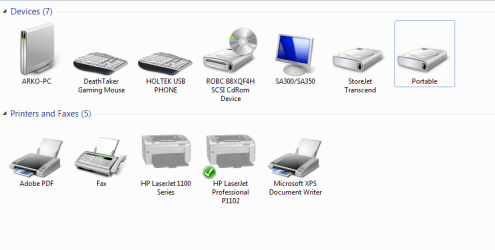
Hello, I bought a Seagate SRD00F1 1TB external hard disk drive. It does not show up on my computer. All it shows is as portable, and nothing on the computer window.

Please help I am on the verge of losing important data :cry:

It does not detect on any other ports of the desktop or in another desktop or laptop, and also my ports are fine I can plug in other hard disk drives just fine.
 

Attachments
  • 1.png
    1.png
    25.3 KB · Views: 1

My Computer

Computer type
PC/Desktop
OS
Windows 7 64 bit
CPU
Intel
Motherboard
Intel DH55TC
Memory
8GB
Well, I would try to see if you have a Linux machine or if a friend has one where you can plug your external in and see if it can detect it?

Also, this may not be your HD failing but it could be the chip on your case that has gone bad. The only way to test this is to physically remove the Hard Drive from its external case (being VERY careful). Typically (but not always) this involves completely destroying the case. As I said "not always" my external case simply has a piece that I can remove to get to the Sata connectors, which is what you want to get to.

Once you have removed your external case and/or have access to the Sata connectors on the actual Hard drive, use a Sata data/power cable to connect it directly to your PC. (as if it were just a normal HD)
 

My Computer

Computer type
PC/Desktop
Computer Manufacturer/Model Number
Custom
OS
Dual Boot: Windows 8.1 & Server 2012r2 VMs: Kali Linux, Backbox, Matriux, Windows 8.1
CPU
A10 7700 Kavari SteamRoller
Motherboard
ASUS A88XM-PLUS (FM2+ )
Memory
8GB DDR3 SDRAM PC3-8500
Graphics Card(s)
1024MB ATI AMD Radeon R7 Graphics
Sound Card
Realtek High Definition Audio
Monitor(s) Displays
Samsung
Hard Drives
SSD Crucial 120gb
WD VelociRaptor 1tb
PSU
Rosewill Gaming 650w
Case
Rosewill Galaxy 2
Internet Speed
55/12
Antivirus
Malwarebytes, MSE, SAS
Browser
FireFox, Chrome
1. If your drive is still under warranty, do not break it. Not yet. That will be the last option.

2. Please check whether your Seagate Expansion portable shows up in Windows Disk Management. If it does show up, post a screenshot with Console Tree and Action Pane hidden. ( Hit on the Show/Hide icons in the top tool bar) Also adjust the seperators in the Disk List so that we can see how much space is free.

3. Whether it shows up or not in Disk Management, download, install and run Seatools for Windows. Quick Test and then Extended Long Test with repair option to repair if possible.. If the drive is not detected by the utility at all to run the tests, or the Short and long tests fail, then RMA if under warranty.

4. If you don't mind losing the warranty or it is out of warranty, then do what Gator suggests. Last option. :)
 

My Computer

OS
Windows 7 Home Premium 32 bit
1. If your drive is still under warranty, do not break it. Not yet. That will be the last option.

2. Please check whether your Seagate Expansion portable shows up in Windows Disk Management. If it does show up, post a screenshot with Console Tree and Action Pane hidden. ( Hit on the Show/Hide icons in the top tool bar) Also adjust the seperators in the Disk List so that we can see how much space is free.

3. Whether it shows up or not in Disk Management, download, install and run Seatools for Windows. Quick Test and then Extended Long Test with repair option to repair if possible.. If the drive is not detected by the utility at all to run the tests, or the Short and long tests fail, then RMA if under warranty.

4. If you don't mind losing the warranty or it is out of warranty, then do what Gator suggests. Last option. :)

I have warranty so yeah no use to break it yet, but the sad part is I am still gonna lose data. Also Seagate Expansion portable does not show up in windows disk management. It does not even show in Seatools at all.
 

My Computer

Computer type
PC/Desktop
OS
Windows 7 64 bit
CPU
Intel
Motherboard
Intel DH55TC
Memory
8GB
Back
Top