- Local time
- 8:18 PM
- Messages
- 565
Hi Sir(s),
BiGmick :
1.Thanks sir for the response.
cedar: sir,
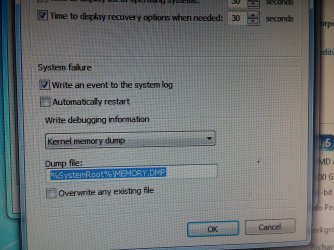
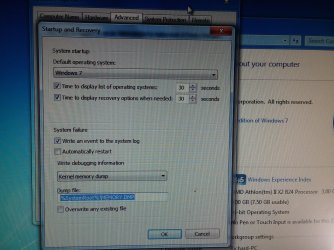
how to grab error code or memory dump file
2. As soon as the system crashes, there will appear an immediate screen mentioning error/bug check code something like ''0x002.... '' & a small description like ''Display_Error_...._...'' You have to note it down. Additionally, you can snap the screen if it gives you time! Make sure you note down the error code & small description.
3. The next time when you boot into the system 'Safe mode/Normal mode'. You have to go to ''C:\Windows''. If you go a little down, there will be listed some files. Look for file(s) named ''Memory.dmp''. Copy it & upload it somewhere (For eg. Google Drive) with a shareable link & share the link here.
4. I will help you with Speecy.
5. I see you are using IOBit. This program has caused a lot of problems in the past & the cause of strange computer problems. In fact in some cases the only remedy has been a complete OS reinstall.
That is when you use it for uninstalling programs, removing left overs,etc.!
Thanks & regards. ...
BiGmick :
1.Thanks sir for the response.
cedar: sir,
how to grab error code or memory dump file
2. As soon as the system crashes, there will appear an immediate screen mentioning error/bug check code something like ''0x002.... '' & a small description like ''Display_Error_...._...'' You have to note it down. Additionally, you can snap the screen if it gives you time! Make sure you note down the error code & small description.
3. The next time when you boot into the system 'Safe mode/Normal mode'. You have to go to ''C:\Windows''. If you go a little down, there will be listed some files. Look for file(s) named ''Memory.dmp''. Copy it & upload it somewhere (For eg. Google Drive) with a shareable link & share the link here.
4. I will help you with Speecy.
5. I see you are using IOBit. This program has caused a lot of problems in the past & the cause of strange computer problems. In fact in some cases the only remedy has been a complete OS reinstall.
That is when you use it for uninstalling programs, removing left overs,etc.!
Thanks & regards. ...
My Computer
- Computer type
- Laptop
- Computer Manufacturer/Model Number
- hp compaq presario c795VU notebook pc
- OS
- Windows 7 Ultimate x32 With Sp1 + Vista Ultimate x32 with Sp1 & Sp2 !!
- CPU
- Intel Mobile Core 2 Duo T5750 @ 2.00GHz Merom 65nm Technolog
- Motherboard
- Hewlett-Packard 30D9 (CPU)
- Memory
- 2.00GB Dual-Channel DDR2 @ 332MHz (5-5-5-15)
- Graphics Card(s)
- Mobile Intel(R) 965 Express Chipset Family
- Sound Card
- High Definition Audio Device
- Monitor(s) Displays
- LP154WX4-TLCB on Mobile Intel 965 Express Chipset Family
- Screen Resolution
- 1280x800 @ 60Hz
- Hard Drives
- 149GB Western Digital WDC WD1600BEVS-60VAT0 ATA Device (SATA)
- Keyboard
- Standard 101/102-Key or Microsoft Natural PS/2 Key + HP QLB
- Mouse
- ALPS pointing device
- Antivirus
- Kaspersky AV 2017(Win 7) & AVG AntiVirus Free 2016 (VISTA)
- Browser
- google chrome