
windows xp style volume control panel in windows 7?

yeahman45

Banned
Local time
3:42 AM
Messages
37
is it possible to have windows xp style volume/audio panel in windows 7? here's my problem.. i have a very old analog tv card that outputs audio through the cd audio... in xp i an unmute the cd audio to get the sound but in windows 7... i am unable to find how to individually unmute the cd audio... anyone can help? thx in advance
 

My Computer My Computer

OS
Microsoft Windows 7 Ultimate Versio 6.1.7601 Service Pack 1 Build 7601
CPU
Intel Core 2 Quad Q8200 @ 2.33GHz
Motherboard
ASUSTeK Computer INC. P5Q DELUXE (LGA 775)
Memory
4.00 GB Dual-Channel DDR2 @ 399MHz (6-6-6-18)
Graphics Card(s)
ATI Radeon HD 4800 Series (ATI AIB)
Sound Card
AMD High Definition Audio Device
Monitor(s) Displays
VW246
Screen Resolution
1920x1080@60Hz
Hard Drives
1863GB Western Digital WDC WD20EARX-00PASB0 ATA Device 466GB Hitachi Hitachi HDP725050GLA360 ATA Device (SATA)932GB Western Digital WDC WD1001FALS-00E8B0 ATA Device 56GB INTEL SSDSC2CT060A3 ATA Device (SSD)
Case
Gigabyte Isolo
Cooling
Gigabyte Turbo Fan
Hello Yeahman,

You might see if right clicking on the Volume icon in the notification area, and clicking on Open Volume Mixer may have an option for the volume control of the CD audio. If so, then clicking on it's speaker should unmute it.

Hope this helps, :)
Shawn
 

My Computer My Computer

Computer type
PC/Desktop
Computer Manufacturer/Model Number
Self built custom
OS
64-bit Windows 11 Pro for Workstations
CPU
Intel i7-8700K OC'd to 5 GHz
Motherboard
ASUS ROG Maximus XI Formula Z390
Memory
64 GB (4x16GB) G.SKILL TridentZ RGB DDR4 3600 MHz
Graphics Card(s)
ASUS ROG-STRIX-GTX1080TI-O11G-GAMING
Sound Card
Integrated
Monitor(s) Displays
2 x Samsung Odyssey G7 27"
Screen Resolution
2560x1440
Hard Drives
1TB Samsung 990 PRO M.2,
4TB Samsung 990 PRO PRO M.2,
TerraMaster F8 SSD Plus NAS
PSU
Seasonic Prime Titanium 850W
Case
Thermaltake Core P3
Cooling
Corsair Hydro H115i
Keyboard
Logitech wireless K800
Mouse
Logitech MX Master 4
Internet Speed
2 Gb/s Download and 100 Mb/s Upload
Antivirus
Malwarebyte Anti-Malware Premium
Browser
Google Chrome
Other Info
Logitech Z625 speaker system,
Logitech BRIO 4K Pro webcam,
HP Color LaserJet Pro MFP M477fdn,
APC SMART-UPS RT 1000 XL - SURT1000XLI,
Galaxy S23 Plus phone
Hello Yeahman,

You might see if right clicking on the Volume icon in the notification area, and clicking on Open Volume Mixer may have an option for the volume control of the CD audio. If so, then clicking on it's speaker should unmute it.

Hope this helps, :)
Shawn

thx for the reply but i don't have the cd audio in the mixer panel as i said.. :( (see attached; winTVR is the name of my tv tuner application)
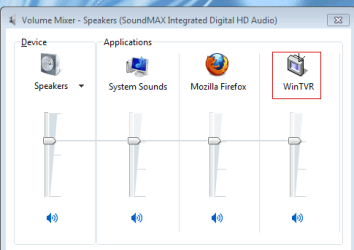
 

Attachments

  • volume.png
    volume.png
    7.9 KB · Views: 10

My Computer My Computer

OS
Microsoft Windows 7 Ultimate Versio 6.1.7601 Service Pack 1 Build 7601
CPU
Intel Core 2 Quad Q8200 @ 2.33GHz
Motherboard
ASUSTeK Computer INC. P5Q DELUXE (LGA 775)
Memory
4.00 GB Dual-Channel DDR2 @ 399MHz (6-6-6-18)
Graphics Card(s)
ATI Radeon HD 4800 Series (ATI AIB)
Sound Card
AMD High Definition Audio Device
Monitor(s) Displays
VW246
Screen Resolution
1920x1080@60Hz
Hard Drives
1863GB Western Digital WDC WD20EARX-00PASB0 ATA Device 466GB Hitachi Hitachi HDP725050GLA360 ATA Device (SATA)932GB Western Digital WDC WD1001FALS-00E8B0 ATA Device 56GB INTEL SSDSC2CT060A3 ATA Device (SSD)
Case
Gigabyte Isolo
Cooling
Gigabyte Turbo Fan
When you insert an audio CD for example, then an entry should show in the Mixer for the application you have assigned to play the audio. Eg. WMP. It has a mute on/off option below the volume slider control.

Not sure if that's exactly what you are after but may help.
 

My Computer My Computer

Computer Manufacturer/Model Number
HP Pavilion p6040a
OS
Windows 7 Professional x64, SP1
CPU
Intel Core 2 Duo E7400 2.8GHz
Motherboard
FOXCONN Napa
Memory
4GB
Graphics Card(s)
ATI Radeon HD3540
the tv card audio output is connected via the cd audio internal wire..... but in windows 7 there's no way to control the cd audio volume while in windows xp you can easily control each audio output (line in, cd audio, microphone).. in windows 7 it only shows the application's volume and it's not working for the tv tuner app
 

My Computer My Computer

OS
Microsoft Windows 7 Ultimate Versio 6.1.7601 Service Pack 1 Build 7601
CPU
Intel Core 2 Quad Q8200 @ 2.33GHz
Motherboard
ASUSTeK Computer INC. P5Q DELUXE (LGA 775)
Memory
4.00 GB Dual-Channel DDR2 @ 399MHz (6-6-6-18)
Graphics Card(s)
ATI Radeon HD 4800 Series (ATI AIB)
Sound Card
AMD High Definition Audio Device
Monitor(s) Displays
VW246
Screen Resolution
1920x1080@60Hz
Hard Drives
1863GB Western Digital WDC WD20EARX-00PASB0 ATA Device 466GB Hitachi Hitachi HDP725050GLA360 ATA Device (SATA)932GB Western Digital WDC WD1001FALS-00E8B0 ATA Device 56GB INTEL SSDSC2CT060A3 ATA Device (SSD)
Case
Gigabyte Isolo
Cooling
Gigabyte Turbo Fan
Back
Top