winlogon.exe error

np231

New member
Local time
10:29 AM
Messages
4
Hi guys, I have recently updated to windows 7 from vista... and I am getting this error related to winlogon.exe file...

Issues
1. After LogIn, my screen stays black for 10sec. but after that everything loads perfectly fine... (In vista there was no wait)

2. When I shutdown, logoff, or restart my computer ... an error comes up saying "1 Program still needs to close" and it says its winlogon.exe, and it gives two options either force shutdown or cancel.... this causes the screen to flicker few times and it shuts down the computer normally after that (without clicking force shutdown)... but it seems that everytime I try to shutdown,restart or logoff I get this error.... again the error shows up for about 2 sec and then computer shutsdown normally after that....I was wondering what do I need to do to getrid of this error message..

These issues add 10sec more to normal shutdown and startup times... I did not experience these issues in Vista... If anyone has any suggestions as to what I should do .... I would really appreciate it...

Thank You
 
Last edited:

My Computer

OS
Windows 7
Uninstall your antivirus, as it's the most likely cause. Could be other 3rd party software as well.
 

My Computer

Computer Manufacturer/Model Number
self built
OS
7600.20510 x86
CPU
P4 550 3.4 GHz HT running at 3.5 GHz
Motherboard
MSI PM8M3-V (MS-7211 v1.x) Micro-ATX mainboard
Memory
OCZ 2 GB(2x1GB) DDR400mHz running @ 414 mHz
Graphics Card(s)
HIS Radeon HD 3850 IceQ 3 Turbo HDMI Dual DL-DVI AGP
Sound Card
MOTU Traveler firewire studio interface 192 kHz 24 bit
Monitor(s) Displays
22" widescreen Acer X223W LCD, 17" Compaq P75 CRT
Screen Resolution
1680x1050 and 1280x1024
Hard Drives
SATA I x2 WD, 400 GB and 120 GB, SATA 2 WD Caviar Black 1 TB
PSU
350W generic
Case
Cybertronpc, it glows blue
Cooling
stock cpu fan, Ice-Q 3 gpu and system, many case fans
Keyboard
Logitch Classical Keyboard 200
Mouse
Logitech Mediaplay cordless
Internet Speed
1792/448 kbits/sec
Other Info
SATA II PCI fake RAID adapter, 1 GB Readyboost, original ATI Remote Wonder (even works with WMC perfectly), Logitech Rumblepad 2 game controller x2
Hey, I use the Microsoft Security Essentials.. so I don't know if this program is causing winlogon.exe error...

thanks for the reply...


Uninstall your antivirus, as it's the most likely cause. Could be other 3rd party software as well.
 

My Computer

OS
Windows 7
In that case, probably not MSE. But definitely something starting with the pc.

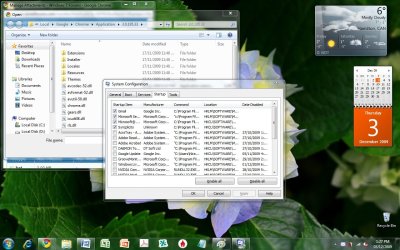
Post a screenshot of when you go to start menu and type msconfig, hit enter.

Go to startup tab and that's what we need to see to make suggestions. Could actually be a service too but let's have a look at this first.

You can use the paperclip to attach the screenshot to a post.
 

My Computer

Computer Manufacturer/Model Number
self built
OS
7600.20510 x86
CPU
P4 550 3.4 GHz HT running at 3.5 GHz
Motherboard
MSI PM8M3-V (MS-7211 v1.x) Micro-ATX mainboard
Memory
OCZ 2 GB(2x1GB) DDR400mHz running @ 414 mHz
Graphics Card(s)
HIS Radeon HD 3850 IceQ 3 Turbo HDMI Dual DL-DVI AGP
Sound Card
MOTU Traveler firewire studio interface 192 kHz 24 bit
Monitor(s) Displays
22" widescreen Acer X223W LCD, 17" Compaq P75 CRT
Screen Resolution
1680x1050 and 1280x1024
Hard Drives
SATA I x2 WD, 400 GB and 120 GB, SATA 2 WD Caviar Black 1 TB
PSU
350W generic
Case
Cybertronpc, it glows blue
Cooling
stock cpu fan, Ice-Q 3 gpu and system, many case fans
Keyboard
Logitch Classical Keyboard 200
Mouse
Logitech Mediaplay cordless
Internet Speed
1792/448 kbits/sec
Other Info
SATA II PCI fake RAID adapter, 1 GB Readyboost, original ATI Remote Wonder (even works with WMC perfectly), Logitech Rumblepad 2 game controller x2
Hey, I have tried disabling all of the startup programs, but this issue still persists...

I read some suggestions for decreasing the startup time and this was one of the option .. I have also tried doing this in safe mode as well..

Is it possible that the winlogon.exe file is corrupted? ... as the error I get when I shutdown actually says winlogon.exe still needs to close...
 

Attachments

  • Msconfig.jpg
    Msconfig.jpg
    156.9 KB · Views: 303

My Computer

OS
Windows 7
It could be that Syncplicity causing it, especially because the maker is coming up as unknown in the screenshot. Uninstall that to test, if you'd like.

No, probably not corrupted because Windows wouldn't work at all then.
 

My Computer

Computer Manufacturer/Model Number
self built
OS
7600.20510 x86
CPU
P4 550 3.4 GHz HT running at 3.5 GHz
Motherboard
MSI PM8M3-V (MS-7211 v1.x) Micro-ATX mainboard
Memory
OCZ 2 GB(2x1GB) DDR400mHz running @ 414 mHz
Graphics Card(s)
HIS Radeon HD 3850 IceQ 3 Turbo HDMI Dual DL-DVI AGP
Sound Card
MOTU Traveler firewire studio interface 192 kHz 24 bit
Monitor(s) Displays
22" widescreen Acer X223W LCD, 17" Compaq P75 CRT
Screen Resolution
1680x1050 and 1280x1024
Hard Drives
SATA I x2 WD, 400 GB and 120 GB, SATA 2 WD Caviar Black 1 TB
PSU
350W generic
Case
Cybertronpc, it glows blue
Cooling
stock cpu fan, Ice-Q 3 gpu and system, many case fans
Keyboard
Logitch Classical Keyboard 200
Mouse
Logitech Mediaplay cordless
Internet Speed
1792/448 kbits/sec
Other Info
SATA II PCI fake RAID adapter, 1 GB Readyboost, original ATI Remote Wonder (even works with WMC perfectly), Logitech Rumblepad 2 game controller x2
Hey, I have uninstalled that program, but I still get that winlogon.exe needs to close error during shutdown...and I still get that black screen (10sec delay) after login..

to provide more info.... when I press shutdown... the screen goes black and then flickers and then comes up with this error "1 program still needs to close" and this error stays for about 2 sec. and before I can click force shutdown or cancel.. the error disappears and windows shuts down normally....
 

My Computer

OS
Windows 7
That's basically normal for Windows to do that, depending on what is currenly running when you shut down. I wouldn't worry about it then. It's only 2 sec.
 

My Computer

Computer Manufacturer/Model Number
self built
OS
7600.20510 x86
CPU
P4 550 3.4 GHz HT running at 3.5 GHz
Motherboard
MSI PM8M3-V (MS-7211 v1.x) Micro-ATX mainboard
Memory
OCZ 2 GB(2x1GB) DDR400mHz running @ 414 mHz
Graphics Card(s)
HIS Radeon HD 3850 IceQ 3 Turbo HDMI Dual DL-DVI AGP
Sound Card
MOTU Traveler firewire studio interface 192 kHz 24 bit
Monitor(s) Displays
22" widescreen Acer X223W LCD, 17" Compaq P75 CRT
Screen Resolution
1680x1050 and 1280x1024
Hard Drives
SATA I x2 WD, 400 GB and 120 GB, SATA 2 WD Caviar Black 1 TB
PSU
350W generic
Case
Cybertronpc, it glows blue
Cooling
stock cpu fan, Ice-Q 3 gpu and system, many case fans
Keyboard
Logitch Classical Keyboard 200
Mouse
Logitech Mediaplay cordless
Internet Speed
1792/448 kbits/sec
Other Info
SATA II PCI fake RAID adapter, 1 GB Readyboost, original ATI Remote Wonder (even works with WMC perfectly), Logitech Rumblepad 2 game controller x2
most likely a registry hive issue , check ur event viewer
 

My Computer

Computer type
PC/Desktop
Computer Manufacturer/Model Number
Motherboard ASUS P6T SE
OS
Windows 10 32 bit oem & Arch Linux x86_64
CPU
Intel® Core™ i7-920 Processor
Motherboard
ASUSTeK model: P6T SE v: Rev 1.xx Bios: American Megatrends
Memory
6GB DDR3 1600 MHz Kingston RAM 3x2GB Triple channel
Graphics Card(s)
Advanced Micro Devices [AMD/ATI] RV770 [Radeon HD 4870]
Sound Card
[AMD/ATI] RV770 HDMI Audio [Radeon]
Monitor(s) Displays
1 X 22" LG M2262D : 1 X 23" Dell Ultrasharp
Screen Resolution
[email protected] + [email protected] : 3840x1080
Hard Drives
HDD Total Size: 1388.6GB (0.1% used) ID-1: /dev/sda model: HDS728080PLA380 size: 82.3GB
ID-2: /dev/sdb model: Hitachi_HTS54164 size: 40.0GB
ID-3: /dev/sdc model: SAMSUNG_HM250HI size: 250.1GB
ID-4: USB /dev/sdd mod
PSU
Corsair VX550W power supply unit
Case
AVP Mamba chassis
Cooling
ARCTIC Alpine 11 Pro Rev.2 - 95 Watts Low Noise
Keyboard
Dell
Mouse
Logitech M515
Internet Speed
ADSL+ up to 12MB 9 is the norm
Browser
Firefox
Other Info
i got sick of windows , so i moved to linux now i can get some work done without having to constantly watch my back & do scans for malware.
Back
Top