Wired adapter issue

Scottyboy99

New member
Member
VIP
Local time
9:52 AM
Messages
347
Hi all,

I have asked this issue before but as I was totally barking up the wrong tree thought it best to start again fresh. Basically I am seeing a strange boot delay of about 10-15 seconds when using ethernet on my laptop 24 hours after previous shutdown. So I will boot up, reach the login screen, tap in password and then the 'welcome to windows' message remains onscreen for about 10 - 15 secs before continuing to the desktop. If I use wifi instead, then I see no delay, straight into desktop. It only happens with the ethernet adapter. The other thing that makes this delay weird is if completely shutdown the laptop and boot up again before 24 hours have elapsed then I will see no delay. It just happens if I don't reboot within a day of last use. Once it is up and running I have zero problems. But this delay is irritating.

I have unmapped all drives, switched ethernet cables (3 times), changed the static IP and also set to obtain automatically, updated the atheros driver all without success. I cannot understand what windows is doing/waiting for in these 10 - 15 secs. I look at the boot time in the event viewer and I see no 101 events. Just a 100 event showing the times which all look ok apart from being 10-15 secs longer when this happens.

I thought the router could be the issue but have eliminated that because it works fine with other devices and plus it must be doing things correctly anyway as the wifi my laptop takes comes from an access point rather than the main router - so the ethernet that feeds the access point's wifi signal is working great and has no delay. So Windows 7 must be the culprit.

Any ideas?

Cheers,
Wayne
 

My Computer

Computer type
Laptop
Computer Manufacturer/Model Number
Alienware M17RX3
OS
Windows 7 Ultimate 64 bit
CPU
Sandybridge 2820 QM 2.3 ghz
Memory
8 gb
Graphics Card(s)
AMD Radeon 6970m
Sound Card
Integrated
Monitor(s) Displays
Laptop 17"
Screen Resolution
1980x1080
Hard Drives
750 gb mechanical (7,200RPM) Seagate Momentous paired with OCZ Synapse 128 gb SSD cache drive
Internet Speed
55 mbits download, 12 mbits download
Antivirus
Microsoft Security Essentials
Browser
IE11, Mozilla
I still want to get to the root of the problem but since ethernet is the issue. Is there a way of delaying the wired NIC at windows startup? Obviously there is some kind of event happening every 24 hours causing the delay. If the NIC does not enable itself til slightly later in the boot I could get prob get round this. I would then turn the wifi on so that is present immediately upon boot so I initially have network access. If that makes sense?

I know I can just keep the ethernet unplugged and plug it back in shortly after windows desktop displays but would like to have sonething more automated. Maybe a batch script I could put in the startup section if the start menu?

Cheers
Wayne
 

My Computer

Computer type
Laptop
Computer Manufacturer/Model Number
Alienware M17RX3
OS
Windows 7 Ultimate 64 bit
CPU
Sandybridge 2820 QM 2.3 ghz
Memory
8 gb
Graphics Card(s)
AMD Radeon 6970m
Sound Card
Integrated
Monitor(s) Displays
Laptop 17"
Screen Resolution
1980x1080
Hard Drives
750 gb mechanical (7,200RPM) Seagate Momentous paired with OCZ Synapse 128 gb SSD cache drive
Internet Speed
55 mbits download, 12 mbits download
Antivirus
Microsoft Security Essentials
Browser
IE11, Mozilla
Hello,

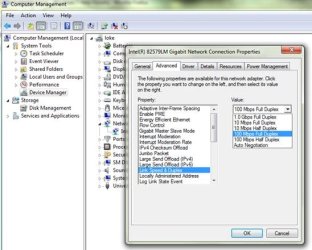
What type of ethernet adapter do you have? Is this a Gigabit? You my try changing the Link Speed and Duplex.
 

Attachments

  • link speed and duplex.JPG
    link speed and duplex.JPG
    54.7 KB · Views: 8

My Computer

Computer Manufacturer/Model Number
Lenovo Desktop/Samsung Laptop
OS
Win7 & Win8 64bit
CPU
Intel i5
Internet Speed
Charter-20 Mbps
Antivirus
Avast
Browser
FF, IE9 and Chrome
Hi,

Thanks for the response. Yes it is gigabit, I'll give that a try, mine from memory is on auto negotiation. I don't want to jeopardise my gigabit NAS transfer speeds so should I be selecting the top one or the one highlighted in the screenshot? Unfortunately I then have to wait 24 hours before booting again to see if that worked.

Cheers
Wayne
 

My Computer

Computer type
Laptop
Computer Manufacturer/Model Number
Alienware M17RX3
OS
Windows 7 Ultimate 64 bit
CPU
Sandybridge 2820 QM 2.3 ghz
Memory
8 gb
Graphics Card(s)
AMD Radeon 6970m
Sound Card
Integrated
Monitor(s) Displays
Laptop 17"
Screen Resolution
1980x1080
Hard Drives
750 gb mechanical (7,200RPM) Seagate Momentous paired with OCZ Synapse 128 gb SSD cache drive
Internet Speed
55 mbits download, 12 mbits download
Antivirus
Microsoft Security Essentials
Browser
IE11, Mozilla
I'd also try disabling any AV or Security software running, test it out for a little over 24 hrs.
 

My Computer

Computer Manufacturer/Model Number
Lenovo Desktop/Samsung Laptop
OS
Win7 & Win8 64bit
CPU
Intel i5
Internet Speed
Charter-20 Mbps
Antivirus
Avast
Browser
FF, IE9 and Chrome
One thing... do you have to wait 24 hours between boots, or can you boot it while disconnected from the network as often as you like, then after 24 hours, reconnect to the network, boot, and still see the problem? (Does the question make sense?)

Why doesn't Windows have a "verbose" boot like most versions of Linux do/did? Things like that might tell you where the hangup is.
 

My Computer

Computer type
PC/Desktop
Computer Manufacturer/Model Number
iBuyPower NZXT
OS
Microsoft Windows 10 Home Build 15036
CPU
Intel(R) Core(TM) i7-860 @ 2.80GHz
Motherboard
Gigabyte Technology Co., Ltd. P55-UD3L
Memory
4.00 GB
Graphics Card(s)
NVIDIA GeForce GTX 750
Sound Card
(1) Line 6 UX2 (2) Realtek High Definition Audio
Monitor(s) Displays
23" acer
Screen Resolution
1920 x 1080 x 32 bits (4294967296 colors) @ 60 Hz
Hard Drives
(1) WDC WD5000AAKS-00D2B0 ATA Device (2) Seagate FreeAgent Go 250G USB Device
Cooling
Corsair H75 liquid cooler (Very easy to install, actually)
Internet Speed
60M cable modem-->Linksys E1200-->1Gbps net card
Browser
Chrome
Other Info
This is probably the longest I've ever had a Windows machine run without having to restore it to scratch. I'm used to restoring to "factory" about every 2 yrs. I've run with Win7 since new in 2009 and only recently (Nov, '14) restored to clean up the machine from all my 'xperimenting. LOL!! I may never need another machine.

Upgraded to 10 when it was still free, then installed 2017 update.
I have to wait 24 hours to be able to re produce the problem.
 

My Computer

Computer type
Laptop
Computer Manufacturer/Model Number
Alienware M17RX3
OS
Windows 7 Ultimate 64 bit
CPU
Sandybridge 2820 QM 2.3 ghz
Memory
8 gb
Graphics Card(s)
AMD Radeon 6970m
Sound Card
Integrated
Monitor(s) Displays
Laptop 17"
Screen Resolution
1980x1080
Hard Drives
750 gb mechanical (7,200RPM) Seagate Momentous paired with OCZ Synapse 128 gb SSD cache drive
Internet Speed
55 mbits download, 12 mbits download
Antivirus
Microsoft Security Essentials
Browser
IE11, Mozilla
How does one disable ms security essentials? There is no option to just disable it short of totally uninstalling it? I doubt this will be the issue as under wifi adapter only it doesn't cause this delay. It only happens when wired is connected and then only 24 hours after last boot. If I was to reboot 6 hours later for example then no delay. And then the problem would only show if I switched off and waited another 24 hours. It's only a 10-15 sec delay and I have great ethernet speed beyond this but its irritating especially when I specifically bought a cache SSD over a year ago to give quicker boot times. It's as if windows is waiting for something when it happens - like a previous poster suggested, if there was a verbose boot log which made it obvious that would be great. I suspect maybe it's a network identifying thing but its not as if I can see a problem with spiny circle over the adapter icon or exclamation mark because whilst I see the delay its always stuck on the 'welcome to windows' so I don't see what's hanging in the desktop. As soon as the desktop shows all the icons load pretty much instant along with the adapter icon fully connected!

Is there a way of delaying when the ethernet loads in a little much like one can delay a service? Or a way to reset the wired adapter so when it plugs in again windows sees it as a new connection and asks whether its a public, private, or work connection - maybe such a reset will help.
Cheers
Wayne
 
Last edited:

My Computer

Computer type
Laptop
Computer Manufacturer/Model Number
Alienware M17RX3
OS
Windows 7 Ultimate 64 bit
CPU
Sandybridge 2820 QM 2.3 ghz
Memory
8 gb
Graphics Card(s)
AMD Radeon 6970m
Sound Card
Integrated
Monitor(s) Displays
Laptop 17"
Screen Resolution
1980x1080
Hard Drives
750 gb mechanical (7,200RPM) Seagate Momentous paired with OCZ Synapse 128 gb SSD cache drive
Internet Speed
55 mbits download, 12 mbits download
Antivirus
Microsoft Security Essentials
Browser
IE11, Mozilla
I'm not sure that you understood my question. What I meant was, if you disconnected your ethernet cable, then rebooted 17 times over the next 24 hours, then reconnected the ethernet cable at hour 25 and rebooted, would the problem re-occur? Would the pause happen again?

What I'm trying to find out is if the router is only giving you an IP lease for 24 hours, so now the computer has to negotiate a new IP address.

If you can access the admin page of your router, can you delete your machine from the DHCP client list, just to see if that causes the delay on the next boot? Again, this would determine if the pause is caused by the machine re-obtaining an IP address.
 

My Computer

Computer type
PC/Desktop
Computer Manufacturer/Model Number
iBuyPower NZXT
OS
Microsoft Windows 10 Home Build 15036
CPU
Intel(R) Core(TM) i7-860 @ 2.80GHz
Motherboard
Gigabyte Technology Co., Ltd. P55-UD3L
Memory
4.00 GB
Graphics Card(s)
NVIDIA GeForce GTX 750
Sound Card
(1) Line 6 UX2 (2) Realtek High Definition Audio
Monitor(s) Displays
23" acer
Screen Resolution
1920 x 1080 x 32 bits (4294967296 colors) @ 60 Hz
Hard Drives
(1) WDC WD5000AAKS-00D2B0 ATA Device (2) Seagate FreeAgent Go 250G USB Device
Cooling
Corsair H75 liquid cooler (Very easy to install, actually)
Internet Speed
60M cable modem-->Linksys E1200-->1Gbps net card
Browser
Chrome
Other Info
This is probably the longest I've ever had a Windows machine run without having to restore it to scratch. I'm used to restoring to "factory" about every 2 yrs. I've run with Win7 since new in 2009 and only recently (Nov, '14) restored to clean up the machine from all my 'xperimenting. LOL!! I may never need another machine.

Upgraded to 10 when it was still free, then installed 2017 update.
Sorry I do understand what you mean now. I will test it out and report back. I have played around with this so much. I may well of tried something similar whereby having rebooted several times inbetween with wifi only and/or no adapter being connected I tried then reconnecting ethernet in the '25th' hour and there was no pause. So it seems that when ethernet is last connected & remains connected for the next boot the delay shows itself after 24 hours. Doing stuff/boots inbetween or before 24 hours has elapsed does some kind of reset preventing this problem showing.

I will test this and check for certain though.

Thanks,
Wayne
 

My Computer

Computer type
Laptop
Computer Manufacturer/Model Number
Alienware M17RX3
OS
Windows 7 Ultimate 64 bit
CPU
Sandybridge 2820 QM 2.3 ghz
Memory
8 gb
Graphics Card(s)
AMD Radeon 6970m
Sound Card
Integrated
Monitor(s) Displays
Laptop 17"
Screen Resolution
1980x1080
Hard Drives
750 gb mechanical (7,200RPM) Seagate Momentous paired with OCZ Synapse 128 gb SSD cache drive
Internet Speed
55 mbits download, 12 mbits download
Antivirus
Microsoft Security Essentials
Browser
IE11, Mozilla
Wired adapter problem

Hi, I finally got some time to re test this. I booted with ethernet attached and saw the same 10-15 sec delay at the welcome to windows screen. So I then disconnected and cold booted a few times over next few hours and saw no delay. On the 25th hour I booted whilst still disconnected and also saw no delay so I then reconnected the ethernet and the delay came back. Keeping ethernet connected I cold booted a couple times a few hours after and saw no delay. So it definetely occurs 24 hours after last boot with ethernet (and not with wifi) - as long as I ensure that I boot within before 1 day has elapsed since last using ethernet I can keep the issue at bay. But this is not ideal. It seems to be some kind of lease issue perhaps. However I am inclined to blame windows 7 rather than my router. I have plenty other devices hard wired to my network and don't see these exhibiting same behaviour. This particular machine has SSD cache drive so it is noticeable due to its fast boot unlike my other laptop.

I tried updating the drivers on the wired adapter and changing the cat5e and cat6 cables I have used but no change. Up until several weeks ago this problem did not exist and there have been no changes on the laptop. The only thing I did have to do was reboot a netgear switch a while back but can't be sure if the problem existed before or after this. In any event I have tried power cycling the router and switch to no effect. If I use wifi I actually use an access point hard wired to the router via the switch and seeing as this causes no delay it rules out the main routers gigabit ports being the culprit. Is there anything I can try on windows - maybe delay the ethernet adapter initialising a tiny bit until windows has at least displayed the desktop or perhaps a way of erasing the local wired connection from windows 7 so that when I reconnect the cable it thinks its a brand new connection and prompts for the network type again. Starting anew might help although I am conscious that I am grabbing at straws a bit.

Cheers
Wayne
 
Last edited:

My Computer

Computer type
Laptop
Computer Manufacturer/Model Number
Alienware M17RX3
OS
Windows 7 Ultimate 64 bit
CPU
Sandybridge 2820 QM 2.3 ghz
Memory
8 gb
Graphics Card(s)
AMD Radeon 6970m
Sound Card
Integrated
Monitor(s) Displays
Laptop 17"
Screen Resolution
1980x1080
Hard Drives
750 gb mechanical (7,200RPM) Seagate Momentous paired with OCZ Synapse 128 gb SSD cache drive
Internet Speed
55 mbits download, 12 mbits download
Antivirus
Microsoft Security Essentials
Browser
IE11, Mozilla
Well, the whole situation has officially gone over my head. I'm not sure I understand the tendency to blame 7 for the issue though, seeing as it didn't seem to crop up until after a power cycle on your router (switch?). I understand the frustration, though. Using an SSD should make things fly, and as one who boots every morning, I'd never run into the issue. Here's something to try:

Set your machine to a static IP address and setup your router to reserve the IP address for your machine. This will eliminate the DHCP negotiation at boot and could possibly speed things up. I do this with my machine at home. Not for any specific reason, but just to be exclusive. (If there is ANY odd activity on my network, I can eliminate my machine without guessing which IP address I'm at.)
 

My Computer

Computer type
PC/Desktop
Computer Manufacturer/Model Number
iBuyPower NZXT
OS
Microsoft Windows 10 Home Build 15036
CPU
Intel(R) Core(TM) i7-860 @ 2.80GHz
Motherboard
Gigabyte Technology Co., Ltd. P55-UD3L
Memory
4.00 GB
Graphics Card(s)
NVIDIA GeForce GTX 750
Sound Card
(1) Line 6 UX2 (2) Realtek High Definition Audio
Monitor(s) Displays
23" acer
Screen Resolution
1920 x 1080 x 32 bits (4294967296 colors) @ 60 Hz
Hard Drives
(1) WDC WD5000AAKS-00D2B0 ATA Device (2) Seagate FreeAgent Go 250G USB Device
Cooling
Corsair H75 liquid cooler (Very easy to install, actually)
Internet Speed
60M cable modem-->Linksys E1200-->1Gbps net card
Browser
Chrome
Other Info
This is probably the longest I've ever had a Windows machine run without having to restore it to scratch. I'm used to restoring to "factory" about every 2 yrs. I've run with Win7 since new in 2009 and only recently (Nov, '14) restored to clean up the machine from all my 'xperimenting. LOL!! I may never need another machine.

Upgraded to 10 when it was still free, then installed 2017 update.
cheers mate. Unfortunately i had already in past static ip'd on windows 7 and also reserved the address on the router and it made no difference. Same outcome after 24 hours. I will try it again though. Totally baffled as you are. I appreciate your efforts though buddy.
 

My Computer

Computer type
Laptop
Computer Manufacturer/Model Number
Alienware M17RX3
OS
Windows 7 Ultimate 64 bit
CPU
Sandybridge 2820 QM 2.3 ghz
Memory
8 gb
Graphics Card(s)
AMD Radeon 6970m
Sound Card
Integrated
Monitor(s) Displays
Laptop 17"
Screen Resolution
1980x1080
Hard Drives
750 gb mechanical (7,200RPM) Seagate Momentous paired with OCZ Synapse 128 gb SSD cache drive
Internet Speed
55 mbits download, 12 mbits download
Antivirus
Microsoft Security Essentials
Browser
IE11, Mozilla
Back
Top