Solved Wired broadband connection problem - Win7 Ult - long time to connect

standsalone

New member
Local time
3:44 PM
Messages
19
Location
Auckland, New Zealand
Hi all,
This one's been driving me crazy since I switched to Win 7 Ultimate.

My system:
Asus H87-Pro mobo,
8GB Ram,
Intel i5-3330 Core i5 CPU,
Asus HD 5450 1GB Silent GDDR3 PCI-E HDCP VGA/DVI/HDMI Video Card,
Netgear DGN1000 Wireless-N Router with Built-in ADSL Modem, 4 ports
Standard garden-variety network card

I installed W7 from scratch on SSD.

Problem:
System connects to internet, eventually. It can take up to 5 to 6 mins from boot-to-desktop until I can access a website. Ditto with email. During this time, the network tray icon has a yellow ! and the Network and Sharing Center shows a red X between the Network and Internet icons. Then suddenly both change to an OK state but there is still a delay of up to 1 minute before I can see a website.

My network setup is basic: PC > DGN1000 > Internet

I've been through whatever I can think of and my network properties appear ok.

Been in touch with my ISP and everything appears ok at their end.

Very grateful for any suggestions. Thanks!
 

My Computer My Computer

At a glance

Windows 7 Ultimate 32bitIntel i5-4440 @ 3.10 GHz8GB Kingston ValueRAM 1600MHz DDR3 Non-ECC CL11Asus HD 5450 1GB Silent GDDR3 PCI-E HDCP VGA/...
Computer type
PC/Desktop
Computer Manufacturer/Model Number
custom built
OS
Windows 7 Ultimate 32bit
CPU
Intel i5-4440 @ 3.10 GHz
Motherboard
Asus H87-pro
Memory
8GB Kingston ValueRAM 1600MHz DDR3 Non-ECC CL11
Graphics Card(s)
Asus HD 5450 1GB Silent GDDR3 PCI-E HDCP VGA/DVI/HDMI
Hard Drives
Samsung 840 EVO Series 120GB Solid State Drive
2GB Western Digital Green
Browser
Firefox, Chrome
Hello,

Try performing Clean Boot, see if it helps.

If not, boot on Safe Mode with Networking, see if you can replicate your issue.
 

My Computer My Computer

At a glance

Win7 & Win8 64bitIntel i5
Computer Manufacturer/Model Number
Lenovo Desktop/Samsung Laptop
OS
Win7 & Win8 64bit
CPU
Intel i5
Internet Speed
Charter-20 Mbps
Antivirus
Avast
Browser
FF, IE9 and Chrome
Thanks 2xg.

I went into safemode via msconfig, with network enabled.
Result: From desktop, connected to net in about 30 to 40 secs.

Opened System Configuration and set it up as follows:
GENERAL: Selective start-up > Load system services (everything else deselected)

BOOT: Safe boot > Network selected > boot log selected

SERVICES: All services selected

STARTUP: All startup items deselected

Then I rebooted to normal mode but net connection was back to slow.

Thanks
 

My Computer My Computer

At a glance

Windows 7 Ultimate 32bitIntel i5-4440 @ 3.10 GHz8GB Kingston ValueRAM 1600MHz DDR3 Non-ECC CL11Asus HD 5450 1GB Silent GDDR3 PCI-E HDCP VGA/...
Computer type
PC/Desktop
Computer Manufacturer/Model Number
custom built
OS
Windows 7 Ultimate 32bit
CPU
Intel i5-4440 @ 3.10 GHz
Motherboard
Asus H87-pro
Memory
8GB Kingston ValueRAM 1600MHz DDR3 Non-ECC CL11
Graphics Card(s)
Asus HD 5450 1GB Silent GDDR3 PCI-E HDCP VGA/DVI/HDMI
Hard Drives
Samsung 840 EVO Series 120GB Solid State Drive
2GB Western Digital Green
Browser
Firefox, Chrome
Can you please post an ipconfig/all output for review? Please follow the guide here.

What type of Anti-Virus/Security software are you using?
 

My Computer My Computer

At a glance

Win7 & Win8 64bitIntel i5
Computer Manufacturer/Model Number
Lenovo Desktop/Samsung Laptop
OS
Win7 & Win8 64bit
CPU
Intel i5
Internet Speed
Charter-20 Mbps
Antivirus
Avast
Browser
FF, IE9 and Chrome
Attached: Ipconfig.txt

Anti-Virus Software:
- ESET NOD32 Antivirus
- Malwarebytes Anti-Malware
 

Attachments

My Computer My Computer

At a glance

Windows 7 Ultimate 32bitIntel i5-4440 @ 3.10 GHz8GB Kingston ValueRAM 1600MHz DDR3 Non-ECC CL11Asus HD 5450 1GB Silent GDDR3 PCI-E HDCP VGA/...
Computer type
PC/Desktop
Computer Manufacturer/Model Number
custom built
OS
Windows 7 Ultimate 32bit
CPU
Intel i5-4440 @ 3.10 GHz
Motherboard
Asus H87-pro
Memory
8GB Kingston ValueRAM 1600MHz DDR3 Non-ECC CL11
Graphics Card(s)
Asus HD 5450 1GB Silent GDDR3 PCI-E HDCP VGA/DVI/HDMI
Hard Drives
Samsung 840 EVO Series 120GB Solid State Drive
2GB Western Digital Green
Browser
Firefox, Chrome
This could slow down things.
Your spec show Windows 7 Ultimate 32
Also shows 8 gig of ram
32 bit Windows 7 will only recognize up to 4 gigs of ram.

System Manufacturer/Model Number custom built
OS Windows 7 Ultimate 32bit
CPU Intel i5-4440 @ 3.10 GHz
Motherboard Asus H87-pro
Memory 8GB Kingston ValueRAM 1600MHz DDR3
 

My Computer My Computer

At a glance

Windows 10 Pro. 64/ version 1709 Windows 7 Pr...Intel i7-6800K @ 4.3Corsair Platinum 16 gig @2400EVGA GTX 1070 OC
Computer type
PC/Desktop
Computer Manufacturer/Model Number
Home made Desktop
OS
Windows 10 Pro. 64/ version 1709 Windows 7 Pro/64
CPU
Intel i7-6800K @ 4.3
Motherboard
ASUS X-99 Deluxe II
Memory
Corsair Platinum 16 gig @2400
Graphics Card(s)
EVGA GTX 1070 OC
Monitor(s) Displays
Asus 27" LED LCD/VE278Q
Screen Resolution
1920-1080 or 1280-720 HDMI
Hard Drives
INTEL SSD 730-240 Gb Sata 3.0/
PSU
EVGA Platium 1200W
Case
Phanteks Luxe Tempered Glass 8 fans/ one radiator
Cooling
XSPC/ Water Cooled CPU
Keyboard
Das 4 Professional
Mouse
Logitech M705/MX Anywhere 2-S
Internet Speed
100 mbits
Antivirus
Microsoft Security Essentials/ Malwarebytes Premium 3.0/ SAS
Browser
I.E. 11 default/Firefox/ ISP Time Warner Cable/Spectrum
Other Info
LG BluRay Burner/
Sound system-KLipsch-THX/
Icy Dock ssd Hot Swap bays.
Thanks for the latest info. provided, your LAN setting is set to Manual IPs, have you tried changing this to Auto IPs?
Change TCP/IP settings - Windows Help

Ethernet adapter Local Area Connection 4:
Connection-specific DNS Suffix . :
Description . . . . . . . . . . . : Realtek RTL8139/810x Family Fast Ethernet NIC
Physical Address. . . . . . . . . : 00-E0-4C-1B-0B-A1
DHCP Enabled. . . . . . . . . . . : No <-- Should be Yes
Autoconfiguration Enabled . . . . : Yes
Link-local IPv6 Address . . . . . : fe80::503:800e:28cc:36ce%15(Preferred)
IPv4 Address. . . . . . . . . . . : 192.168.0.51(Preferred)
Subnet Mask . . . . . . . . . . . : 255.255.255.0
Default Gateway . . . . . . . . . : 192.168.0.1
DHCPv6 IAID . . . . . . . . . . . : 536928332
DHCPv6 Client DUID. . . . . . . . : 00-01-00-01-1B-03-A0-84-D8-50-E6-BA-25-49
DNS Servers . . . . . . . . . . . : 58.28.5.2
58.28.6.2
We'll deal with your Eset program later on if changing to DHCP or Auto IP didn't help at all.
 

My Computer My Computer

At a glance

Win7 & Win8 64bitIntel i5
Computer Manufacturer/Model Number
Lenovo Desktop/Samsung Laptop
OS
Win7 & Win8 64bit
CPU
Intel i5
Internet Speed
Charter-20 Mbps
Antivirus
Avast
Browser
FF, IE9 and Chrome
Really appreciate your help 2xg.

DHCP was enabled. Changed settings from Manual IPs to Auto IPs.

Result:

Time from reboot desktop to website connection = 5m02s (time to live website)

One thing I noticed is that the red X between the Network and Internet icons in Network and Sharing Center disappears approx 1m30s before the website appears live in Firefox.
 

My Computer My Computer

At a glance

Windows 7 Ultimate 32bitIntel i5-4440 @ 3.10 GHz8GB Kingston ValueRAM 1600MHz DDR3 Non-ECC CL11Asus HD 5450 1GB Silent GDDR3 PCI-E HDCP VGA/...
Computer type
PC/Desktop
Computer Manufacturer/Model Number
custom built
OS
Windows 7 Ultimate 32bit
CPU
Intel i5-4440 @ 3.10 GHz
Motherboard
Asus H87-pro
Memory
8GB Kingston ValueRAM 1600MHz DDR3 Non-ECC CL11
Graphics Card(s)
Asus HD 5450 1GB Silent GDDR3 PCI-E HDCP VGA/DVI/HDMI
Hard Drives
Samsung 840 EVO Series 120GB Solid State Drive
2GB Western Digital Green
Browser
Firefox, Chrome
Thanks for giving that a try. What type of ethernet cable are you using? Cat5, Cat5e, etc.... Have you tried using a different one, also try a different port in your router?

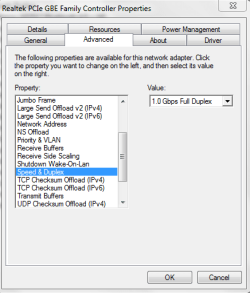
Also, try changing the Speed and Duplex setting of your ethernet adapter.

Another update of your progress will be appreciated.
 

Attachments

  • Speed and Duplex.PNG
    Speed and Duplex.PNG
    12.5 KB · Views: 35

My Computer My Computer

At a glance

Win7 & Win8 64bitIntel i5
Computer Manufacturer/Model Number
Lenovo Desktop/Samsung Laptop
OS
Win7 & Win8 64bit
CPU
Intel i5
Internet Speed
Charter-20 Mbps
Antivirus
Avast
Browser
FF, IE9 and Chrome
Thanks mate.

Cables tried: Cat6 and Cat5 = same results. Currently using Cat6 cable.

Have tried different ports = same results

Speed and Duplex setting of adapter
= have tried changing with same results

Prior to this reply I was using a 3rd party Realtek RTL8139/810x Family Fast Ethernet NIC network card in the PC. I've just disabled this card and enabled the onboard Realtek PCIe GBE Family Controller on the mobo.

Strange thing is that the 3rd party card worked like a rocket in the XP/SP3 system I recently changed from.
 

My Computer My Computer

At a glance

Windows 7 Ultimate 32bitIntel i5-4440 @ 3.10 GHz8GB Kingston ValueRAM 1600MHz DDR3 Non-ECC CL11Asus HD 5450 1GB Silent GDDR3 PCI-E HDCP VGA/...
Computer type
PC/Desktop
Computer Manufacturer/Model Number
custom built
OS
Windows 7 Ultimate 32bit
CPU
Intel i5-4440 @ 3.10 GHz
Motherboard
Asus H87-pro
Memory
8GB Kingston ValueRAM 1600MHz DDR3 Non-ECC CL11
Graphics Card(s)
Asus HD 5450 1GB Silent GDDR3 PCI-E HDCP VGA/DVI/HDMI
Hard Drives
Samsung 840 EVO Series 120GB Solid State Drive
2GB Western Digital Green
Browser
Firefox, Chrome
Please verify that you have the latest driver for your Realtek network adapter, visit their site here. I would uninstall the current driver then install the new driver.
 

My Computer My Computer

At a glance

Win7 & Win8 64bitIntel i5
Computer Manufacturer/Model Number
Lenovo Desktop/Samsung Laptop
OS
Win7 & Win8 64bit
CPU
Intel i5
Internet Speed
Charter-20 Mbps
Antivirus
Avast
Browser
FF, IE9 and Chrome
Hi 2xg - thanks!

Updated onboard network adapter driver = problem still exists.

I wondered about replacing the network card with a more recent model. All the card spares I have are older XP-era. It might be worth $NZ17.00 to rule out the card once and for all.

I don't know why I didn't notice it before but soon after boot-to-desktop the Eset icon in notification area is active, performing a start-up scan. I disabled this function in Eset but it made no difference.
 

My Computer My Computer

At a glance

Windows 7 Ultimate 32bitIntel i5-4440 @ 3.10 GHz8GB Kingston ValueRAM 1600MHz DDR3 Non-ECC CL11Asus HD 5450 1GB Silent GDDR3 PCI-E HDCP VGA/...
Computer type
PC/Desktop
Computer Manufacturer/Model Number
custom built
OS
Windows 7 Ultimate 32bit
CPU
Intel i5-4440 @ 3.10 GHz
Motherboard
Asus H87-pro
Memory
8GB Kingston ValueRAM 1600MHz DDR3 Non-ECC CL11
Graphics Card(s)
Asus HD 5450 1GB Silent GDDR3 PCI-E HDCP VGA/DVI/HDMI
Hard Drives
Samsung 840 EVO Series 120GB Solid State Drive
2GB Western Digital Green
Browser
Firefox, Chrome
Sorry for the delay, too busy... It might help changing the NIC... but, can you please try changing the secondary DNS from your LAN setting to any of these Google DNS'es?

Is your computer the only one that's having an issue?

Another thing, please create a different User Account, log on as that new User and see if you can replicate the issue.
 
Last edited:

My Computer My Computer

At a glance

Win7 & Win8 64bitIntel i5
Computer Manufacturer/Model Number
Lenovo Desktop/Samsung Laptop
OS
Win7 & Win8 64bit
CPU
Intel i5
Internet Speed
Charter-20 Mbps
Antivirus
Avast
Browser
FF, IE9 and Chrome
No worries or expectations 2xg :)

Tried changing the secondary DNS = No change. Abandoned at 7 minutes because test webpage would not load.

Is your computer the only one that's having an issue? = Possibly the only one in the known universe with this problem :) I previously used the DGN1000 with XP/SP3 and connection only took seconds.
Can you also try connecting directly to the Modem = The Netgear DGN1000 won't let me do that.

Create a different User Account
= Will try that in the morning.

I also reinstalled the DGN to double check the settings = made no difference
 

My Computer My Computer

At a glance

Windows 7 Ultimate 32bitIntel i5-4440 @ 3.10 GHz8GB Kingston ValueRAM 1600MHz DDR3 Non-ECC CL11Asus HD 5450 1GB Silent GDDR3 PCI-E HDCP VGA/...
Computer type
PC/Desktop
Computer Manufacturer/Model Number
custom built
OS
Windows 7 Ultimate 32bit
CPU
Intel i5-4440 @ 3.10 GHz
Motherboard
Asus H87-pro
Memory
8GB Kingston ValueRAM 1600MHz DDR3 Non-ECC CL11
Graphics Card(s)
Asus HD 5450 1GB Silent GDDR3 PCI-E HDCP VGA/DVI/HDMI
Hard Drives
Samsung 840 EVO Series 120GB Solid State Drive
2GB Western Digital Green
Browser
Firefox, Chrome
Thanks for update, will await for this:
Create a different User Account = Will try that in the morning.
 

My Computer My Computer

At a glance

Win7 & Win8 64bitIntel i5
Computer Manufacturer/Model Number
Lenovo Desktop/Samsung Laptop
OS
Win7 & Win8 64bit
CPU
Intel i5
Internet Speed
Charter-20 Mbps
Antivirus
Avast
Browser
FF, IE9 and Chrome
Hi 2xg
Sorry for the delay. I gave myself a bout of food-poisoning which knocked me flat for a day or so. Very bad but saved by a tablespoon of powdered charcoal. Something you did not want to know :)

Set up a new user account this morning but the time to a live webpage was just as laggy.

Applied a de-oxy spray to the wall filter box plugs and sockets = no difference

Routed a LAN cable from XP PC to a spare port on DGN1000 and rebooted XP = Time to live webpage took under 30 seconds. This appears to confirm that the router settings to the outside world are OK.
 

My Computer My Computer

At a glance

Windows 7 Ultimate 32bitIntel i5-4440 @ 3.10 GHz8GB Kingston ValueRAM 1600MHz DDR3 Non-ECC CL11Asus HD 5450 1GB Silent GDDR3 PCI-E HDCP VGA/...
Computer type
PC/Desktop
Computer Manufacturer/Model Number
custom built
OS
Windows 7 Ultimate 32bit
CPU
Intel i5-4440 @ 3.10 GHz
Motherboard
Asus H87-pro
Memory
8GB Kingston ValueRAM 1600MHz DDR3 Non-ECC CL11
Graphics Card(s)
Asus HD 5450 1GB Silent GDDR3 PCI-E HDCP VGA/DVI/HDMI
Hard Drives
Samsung 840 EVO Series 120GB Solid State Drive
2GB Western Digital Green
Browser
Firefox, Chrome
No worries, I hope that you are feeling much better now. I know how it is.... been there, it wasn't fun.
Let's try something else.....Scan your computer for possible spyware by using either Free Malwarebytes or SuperAntiSpyware.

If the issue still persist, you may try uninstalling Eset by using the removal tool, might be worth to try. You may of course reinstall it back.

If Eset is not the culprit, you may change the network card.
 

My Computer My Computer

At a glance

Win7 & Win8 64bitIntel i5
Computer Manufacturer/Model Number
Lenovo Desktop/Samsung Laptop
OS
Win7 & Win8 64bit
CPU
Intel i5
Internet Speed
Charter-20 Mbps
Antivirus
Avast
Browser
FF, IE9 and Chrome
Thanks 2xg

Malwarebytes = clear

Eset = I added Eset around 3 months ago, post problem.

Network card = Currently using the onboard mobo NIC with same result as PCI card

Double-checked the Asus H87-Pro Bio settings = Nothing seemed out of place.

Ran a network repair using the Asus mobo install CD = no change
 

My Computer My Computer

At a glance

Windows 7 Ultimate 32bitIntel i5-4440 @ 3.10 GHz8GB Kingston ValueRAM 1600MHz DDR3 Non-ECC CL11Asus HD 5450 1GB Silent GDDR3 PCI-E HDCP VGA/...
Computer type
PC/Desktop
Computer Manufacturer/Model Number
custom built
OS
Windows 7 Ultimate 32bit
CPU
Intel i5-4440 @ 3.10 GHz
Motherboard
Asus H87-pro
Memory
8GB Kingston ValueRAM 1600MHz DDR3 Non-ECC CL11
Graphics Card(s)
Asus HD 5450 1GB Silent GDDR3 PCI-E HDCP VGA/DVI/HDMI
Hard Drives
Samsung 840 EVO Series 120GB Solid State Drive
2GB Western Digital Green
Browser
Firefox, Chrome
find command promt "cmd.exe" right click on it then click and Run As Administrator:
enter each one step by step pressing ENTER until you'll se OK

netsh int ipv4 set subinterface "Local Area Connection" mtu=1500 store=persistent
netsh int tcp set global autotuninglevel=normal
netsh int tcp set global timestamps=disabled
netsh int tcp set heuristics wsh=disabled
netsh int tcp set global congestionprovider=ctcp
netsh int tcp set global ecncapability=disabled
netsh int ip set global taskoffload=enabled
netsh int tcp set global chimney=automatic
netsh int tcp set global rss=enabled
netsh int tcp set global netdma=disabled
netsh int tcp set global dca=enabled
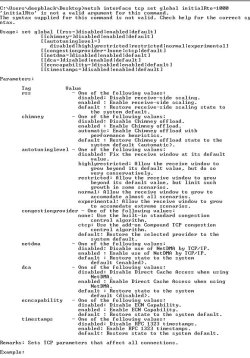
netsh interface tcp set global initialRto=1000

restart PC
 

My Computer My Computer

At a glance

Windows 7 Ultimate x64Intel Core 2 Duo 3 Ghz
Computer type
PC/Desktop
Computer Manufacturer/Model Number
Gigabyte
OS
Windows 7 Ultimate x64
CPU
Intel Core 2 Duo 3 Ghz
Internet Speed
14,4 Mbps
Antivirus
F-Secure
Browser
Firefox 31
Thanks KEiGHT

Attached is screencap of the results:
 

Attachments

  • results.Jpg
    results.Jpg
    101.5 KB · Views: 2

My Computer My Computer

At a glance

Windows 7 Ultimate 32bitIntel i5-4440 @ 3.10 GHz8GB Kingston ValueRAM 1600MHz DDR3 Non-ECC CL11Asus HD 5450 1GB Silent GDDR3 PCI-E HDCP VGA/...
Computer type
PC/Desktop
Computer Manufacturer/Model Number
custom built
OS
Windows 7 Ultimate 32bit
CPU
Intel i5-4440 @ 3.10 GHz
Motherboard
Asus H87-pro
Memory
8GB Kingston ValueRAM 1600MHz DDR3 Non-ECC CL11
Graphics Card(s)
Asus HD 5450 1GB Silent GDDR3 PCI-E HDCP VGA/DVI/HDMI
Hard Drives
Samsung 840 EVO Series 120GB Solid State Drive
2GB Western Digital Green
Browser
Firefox, Chrome
Back
Top