Solved Wired broadband connection problem - Win7 Ult - long time to connect

I think you don't have the right hotfix to enable that one !
use this : http://support.microsoft.com/kb/2472264
just skip this one if you are fine !
this one is for how much time your browser search for unreachable host RTT = 1000 ms = 1 second
 

My Computer My Computer

At a glance

Windows 7 Ultimate x64Intel Core 2 Duo 3 Ghz
Computer type
PC/Desktop
Computer Manufacturer/Model Number
Gigabyte
OS
Windows 7 Ultimate x64
CPU
Intel Core 2 Duo 3 Ghz
Internet Speed
14,4 Mbps
Antivirus
F-Secure
Browser
Firefox 31
If I may.

Check to see if anything in msconfig/Startup or NON Microsoft Services is set to check for updates or scan on boot.
Many programs will do that without the owner/operators permission.
I would suggest checking auto update being added anytime you update a program. Sometimes the update will add that little goodie. Google and Adobe are two that come to mind. Sometimes a printer will also do auto update.

Check all your browsers and see if you have check for updates on auto.
That normally is the default settings.

Basically have nothing on auto update. Of course you will have to manually check for updates when you so desire.
 

My Computer My Computer

At a glance

Windows 10 Pro. 64/ version 1709 Windows 7 Pr...Intel i7-6800K @ 4.3Corsair Platinum 16 gig @2400EVGA GTX 1070 OC
Computer type
PC/Desktop
Computer Manufacturer/Model Number
Home made Desktop
OS
Windows 10 Pro. 64/ version 1709 Windows 7 Pro/64
CPU
Intel i7-6800K @ 4.3
Motherboard
ASUS X-99 Deluxe II
Memory
Corsair Platinum 16 gig @2400
Graphics Card(s)
EVGA GTX 1070 OC
Monitor(s) Displays
Asus 27" LED LCD/VE278Q
Screen Resolution
1920-1080 or 1280-720 HDMI
Hard Drives
INTEL SSD 730-240 Gb Sata 3.0/
PSU
EVGA Platium 1200W
Case
Phanteks Luxe Tempered Glass 8 fans/ one radiator
Cooling
XSPC/ Water Cooled CPU
Keyboard
Das 4 Professional
Mouse
Logitech M705/MX Anywhere 2-S
Internet Speed
100 mbits
Antivirus
Microsoft Security Essentials/ Malwarebytes Premium 3.0/ SAS
Browser
I.E. 11 default/Firefox/ ISP Time Warner Cable/Spectrum
Other Info
LG BluRay Burner/
Sound system-KLipsch-THX/
Icy Dock ssd Hot Swap bays.
Thanks KEiGHT

Regretfully your suggestion didn't help with the problem. I've replaced the registry to where I was before implementing the commands and will keep on looking :)
 

My Computer My Computer

At a glance

Windows 7 Ultimate 32bitIntel i5-4440 @ 3.10 GHz8GB Kingston ValueRAM 1600MHz DDR3 Non-ECC CL11Asus HD 5450 1GB Silent GDDR3 PCI-E HDCP VGA/...
Computer type
PC/Desktop
Computer Manufacturer/Model Number
custom built
OS
Windows 7 Ultimate 32bit
CPU
Intel i5-4440 @ 3.10 GHz
Motherboard
Asus H87-pro
Memory
8GB Kingston ValueRAM 1600MHz DDR3 Non-ECC CL11
Graphics Card(s)
Asus HD 5450 1GB Silent GDDR3 PCI-E HDCP VGA/DVI/HDMI
Hard Drives
Samsung 840 EVO Series 120GB Solid State Drive
2GB Western Digital Green
Browser
Firefox, Chrome
Nice of you to drop by Layback Bear.

Had a good look (again) in
msconfig/Startup and unchecked a few items but no difference. The wait time from boot until a live website in Firefox still averages around 6 minutes.

Thanks.


My Computer My Computer

At a glance

Windows 7 Ultimate 32bitIntel i5-4440 @ 3.10 GHz8GB Kingston ValueRAM 1600MHz DDR3 Non-ECC CL11Asus HD 5450 1GB Silent GDDR3 PCI-E HDCP VGA/...
Computer type
PC/Desktop
Computer Manufacturer/Model Number
custom built
OS
Windows 7 Ultimate 32bit
CPU
Intel i5-4440 @ 3.10 GHz
Motherboard
Asus H87-pro
Memory
8GB Kingston ValueRAM 1600MHz DDR3 Non-ECC CL11
Graphics Card(s)
Asus HD 5450 1GB Silent GDDR3 PCI-E HDCP VGA/DVI/HDMI
Hard Drives
Samsung 840 EVO Series 120GB Solid State Drive
2GB Western Digital Green
Browser
Firefox, Chrome
I'm always around and reading threads. 2xg is the network person. I'm not trying to get in the way but I do have some ideas.


I noticed your specs don't indicate what security programs you are using.
That could also be helpful if installed in your system specs.

Could you also post the Tuneup, Speedup or the like programs you use?

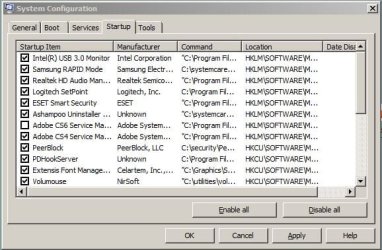
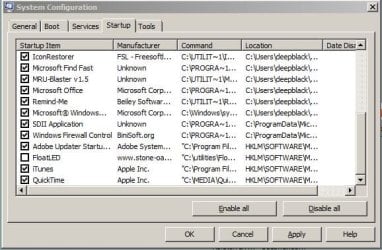
Could you post a complete picture of msconfig/startup. It might help?

Something some how is slowing down your system.

Use this tutorial by Brink:

http://www.sevenforums.com/tutorials/9733-screenshots-files-upload-post-seven-forums.html
 

My Computer My Computer

At a glance

Windows 10 Pro. 64/ version 1709 Windows 7 Pr...Intel i7-6800K @ 4.3Corsair Platinum 16 gig @2400EVGA GTX 1070 OC
Computer type
PC/Desktop
Computer Manufacturer/Model Number
Home made Desktop
OS
Windows 10 Pro. 64/ version 1709 Windows 7 Pro/64
CPU
Intel i7-6800K @ 4.3
Motherboard
ASUS X-99 Deluxe II
Memory
Corsair Platinum 16 gig @2400
Graphics Card(s)
EVGA GTX 1070 OC
Monitor(s) Displays
Asus 27" LED LCD/VE278Q
Screen Resolution
1920-1080 or 1280-720 HDMI
Hard Drives
INTEL SSD 730-240 Gb Sata 3.0/
PSU
EVGA Platium 1200W
Case
Phanteks Luxe Tempered Glass 8 fans/ one radiator
Cooling
XSPC/ Water Cooled CPU
Keyboard
Das 4 Professional
Mouse
Logitech M705/MX Anywhere 2-S
Internet Speed
100 mbits
Antivirus
Microsoft Security Essentials/ Malwarebytes Premium 3.0/ SAS
Browser
I.E. 11 default/Firefox/ ISP Time Warner Cable/Spectrum
Other Info
LG BluRay Burner/
Sound system-KLipsch-THX/
Icy Dock ssd Hot Swap bays.
standsalone

Please describe your windows status a little !
What kind of internet connection do you have?
What AntiVirus do you have !?
 

My Computer My Computer

At a glance

Windows 7 Ultimate x64Intel Core 2 Duo 3 Ghz
Computer type
PC/Desktop
Computer Manufacturer/Model Number
Gigabyte
OS
Windows 7 Ultimate x64
CPU
Intel Core 2 Duo 3 Ghz
Internet Speed
14,4 Mbps
Antivirus
F-Secure
Browser
Firefox 31
Layback Bear:

My security progs are in my post #18.

No tuneup/speedup progs used.

Msconfig startup (2 jpgs) attached.
 

Attachments

  • msconfig-startup-1.jpg
    msconfig-startup-1.jpg
    48.4 KB · Views: 13
  • msconfig-startup-2.jpg
    msconfig-startup-2.jpg
    47.9 KB · Views: 13

My Computer My Computer

At a glance

Windows 7 Ultimate 32bitIntel i5-4440 @ 3.10 GHz8GB Kingston ValueRAM 1600MHz DDR3 Non-ECC CL11Asus HD 5450 1GB Silent GDDR3 PCI-E HDCP VGA/...
Computer type
PC/Desktop
Computer Manufacturer/Model Number
custom built
OS
Windows 7 Ultimate 32bit
CPU
Intel i5-4440 @ 3.10 GHz
Motherboard
Asus H87-pro
Memory
8GB Kingston ValueRAM 1600MHz DDR3 Non-ECC CL11
Graphics Card(s)
Asus HD 5450 1GB Silent GDDR3 PCI-E HDCP VGA/DVI/HDMI
Hard Drives
Samsung 840 EVO Series 120GB Solid State Drive
2GB Western Digital Green
Browser
Firefox, Chrome
KEiGHT:

What do you mean by windows status?

Wired broadband.

Anti-Virus: see my post #18
 

My Computer My Computer

At a glance

Windows 7 Ultimate 32bitIntel i5-4440 @ 3.10 GHz8GB Kingston ValueRAM 1600MHz DDR3 Non-ECC CL11Asus HD 5450 1GB Silent GDDR3 PCI-E HDCP VGA/...
Computer type
PC/Desktop
Computer Manufacturer/Model Number
custom built
OS
Windows 7 Ultimate 32bit
CPU
Intel i5-4440 @ 3.10 GHz
Motherboard
Asus H87-pro
Memory
8GB Kingston ValueRAM 1600MHz DDR3 Non-ECC CL11
Graphics Card(s)
Asus HD 5450 1GB Silent GDDR3 PCI-E HDCP VGA/DVI/HDMI
Hard Drives
Samsung 840 EVO Series 120GB Solid State Drive
2GB Western Digital Green
Browser
Firefox, Chrome
try even changing PCI slot for NIC
 

My Computer My Computer

At a glance

Windows 7 Ultimate x64Intel Core 2 Duo 3 Ghz
Computer type
PC/Desktop
Computer Manufacturer/Model Number
Gigabyte
OS
Windows 7 Ultimate x64
CPU
Intel Core 2 Duo 3 Ghz
Internet Speed
14,4 Mbps
Antivirus
F-Secure
Browser
Firefox 31
try even changing PCI slot for NIC

At present I'm using the mobo's onboard NIC, although there's no apparent difference if I use a PCI NIC.
 

My Computer My Computer

At a glance

Windows 7 Ultimate 32bitIntel i5-4440 @ 3.10 GHz8GB Kingston ValueRAM 1600MHz DDR3 Non-ECC CL11Asus HD 5450 1GB Silent GDDR3 PCI-E HDCP VGA/...
Computer type
PC/Desktop
Computer Manufacturer/Model Number
custom built
OS
Windows 7 Ultimate 32bit
CPU
Intel i5-4440 @ 3.10 GHz
Motherboard
Asus H87-pro
Memory
8GB Kingston ValueRAM 1600MHz DDR3 Non-ECC CL11
Graphics Card(s)
Asus HD 5450 1GB Silent GDDR3 PCI-E HDCP VGA/DVI/HDMI
Hard Drives
Samsung 840 EVO Series 120GB Solid State Drive
2GB Western Digital Green
Browser
Firefox, Chrome
Hi standsalone,

My apology for the tardiness. Work has been insanely preoccupying me. :(

Back to your issue, I take it that you have not resolved it. Any progress at all?

Have you tried installing an old ethernet driver if the current driver didn't help at all. See if it makes a difference. I'll try not to disappear until we have figured out what was causing your issue.
 

My Computer My Computer

At a glance

Win7 & Win8 64bitIntel i5
Computer Manufacturer/Model Number
Lenovo Desktop/Samsung Laptop
OS
Win7 & Win8 64bit
CPU
Intel i5
Internet Speed
Charter-20 Mbps
Antivirus
Avast
Browser
FF, IE9 and Chrome
Hi 2xg

No need to apologize. Your diligent assistance has been greatly appreciated in the dark night of the faulty PC :)

Now this is going to bake your noodle as it did mine this evening: I had lost the audio stream from the same PC and in the process of searching for the cause, I moved the audio-out lead from the (back) interface panel of the mobo to the front audio out socket. I then rebooted, also keeping an eye on the modem router and Network and Sharing Center connection speed.

The connection speed was almost instantaneous!!! This has left me grateful and baffled. Could it be possible that the audio-out socket from the rear panel was faulty, causing a current drain or short somewhere in the mobo?

I've just rebooted again to confirm the previous result and the connect speed is fantastic.
 

My Computer My Computer

At a glance

Windows 7 Ultimate 32bitIntel i5-4440 @ 3.10 GHz8GB Kingston ValueRAM 1600MHz DDR3 Non-ECC CL11Asus HD 5450 1GB Silent GDDR3 PCI-E HDCP VGA/...
Computer type
PC/Desktop
Computer Manufacturer/Model Number
custom built
OS
Windows 7 Ultimate 32bit
CPU
Intel i5-4440 @ 3.10 GHz
Motherboard
Asus H87-pro
Memory
8GB Kingston ValueRAM 1600MHz DDR3 Non-ECC CL11
Graphics Card(s)
Asus HD 5450 1GB Silent GDDR3 PCI-E HDCP VGA/DVI/HDMI
Hard Drives
Samsung 840 EVO Series 120GB Solid State Drive
2GB Western Digital Green
Browser
Firefox, Chrome
Problem solved

After another day or so the problem still seems to be fixed. Thank you all for your great help, esp 2xg.

In hindsight, everything we threw at the problem did not make any difference and this puzzled me. My head kept telling me it was a hardware problem. But because the router/modem, NIC and associated software came through all tests OK, I did not give hardware any further thought and didn't have a clue where to look anyway.

All I can think of now is that at some early stage while first building this PC, some stress was put on the mini TRS plug inserted into the back panel audio jack field, like a sharp yank on the cable that munged something adjacent to the plug PCB hardware. I may at some stage take a closer look with a microscope but for now everything works and I don't want to awaken the God of Magic Smoke :)

 

My Computer My Computer

At a glance

Windows 7 Ultimate 32bitIntel i5-4440 @ 3.10 GHz8GB Kingston ValueRAM 1600MHz DDR3 Non-ECC CL11Asus HD 5450 1GB Silent GDDR3 PCI-E HDCP VGA/...
Computer type
PC/Desktop
Computer Manufacturer/Model Number
custom built
OS
Windows 7 Ultimate 32bit
CPU
Intel i5-4440 @ 3.10 GHz
Motherboard
Asus H87-pro
Memory
8GB Kingston ValueRAM 1600MHz DDR3 Non-ECC CL11
Graphics Card(s)
Asus HD 5450 1GB Silent GDDR3 PCI-E HDCP VGA/DVI/HDMI
Hard Drives
Samsung 840 EVO Series 120GB Solid State Drive
2GB Western Digital Green
Browser
Firefox, Chrome
Nice to hear that your issue has been resolved. Thanks for the update.

Glad to give our insights. :)
 

My Computer My Computer

At a glance

Win7 & Win8 64bitIntel i5
Computer Manufacturer/Model Number
Lenovo Desktop/Samsung Laptop
OS
Win7 & Win8 64bit
CPU
Intel i5
Internet Speed
Charter-20 Mbps
Antivirus
Avast
Browser
FF, IE9 and Chrome
Back
Top