Solved Wireless can't find existing wireless router

Bowler

New member
Local time
11:07 AM
Messages
7
My wife has an Asus Netbook that has worked fine until now. It is running Windows 7 Starter and until now has been recognizing our Linksys router. The Netbook is only 2 months old and the trial virus protection ran out. so I first uninstalled the original virus program and then downloaded from the internet, the AVG free virus protection program. Everything dowloaded and installed fine. Or so I thought. AVG went to look for updates and couldn't because it couldn't get on the internet. Even though my main desktop and my wifes Iphone recognize the router signal, the Netbook says No connections are available. I even went so far as to uninstall the AVG, reboot several times, cold and warm. Tried Microsoft troubleshooting and all it would say was that "No connections available". I suspect the wireless portion of the Netbook has gone sour. Any suggestions??? Note: Other than the wireless problem, the Netbook is working fine.


Update your question: Cancel Update
 

My Computer My Computer

Computer Manufacturer/Model Number
Custom
OS
Windows 7 Professional Edition
CPU
Intel 3.4 Mhz
Motherboard
Asus P5e
Memory
4 Gb
Graphics Card(s)
Nvdia 9400
Sound Card
On MB
Monitor(s) Displays
Samsung
Hard Drives
500 gb Western Digital
500 gb Seagate
80 gb Western Digital
PSU
500 watt
Case
Thermal
Cooling
Power Supply, Side case, Front case, CPU, and graphics card
hi there :)
there are lots of reasons "No connections available" if you search this site you will see. your antivirus may have changed settings to the ports check the firewall etc here are some checks for you i use below but i have found windows 7 to be good at re correcting problems with the network


  • reset router and restart pc/laptop simultaneously
  • check the driver for the wireless adapter in device manager
  • i check that im using home network not work or public
  • run windows troubleshooter
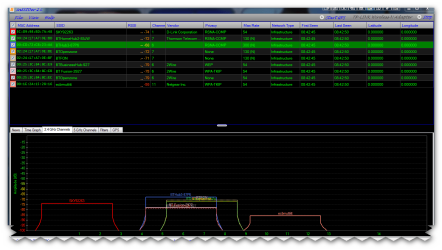
when connected use the router management to see what channel i am using with the aid of a program called inssider(its free) it shows the wireless channels and you can judge interference noise from other wireless routers LINK >>> inSSIDer | MetaGeek

inSSIDer 2
Genuine geeks, whether professional or casual, need Wi-Fi tools that help troubleshoot WLAN networks. With inSSIDer, MetaGeek has created a gift that keeps on giving. Our award-winning, open-source Wi-Fi scanner software, inSSIDer, is an alternative to network scanners like NetStumbler. One big difference: inSSIDer actually works with Windows Vista, Windows 7, and 64-bit PCs

this is worth a read >>> http://answers.microsoft.com/en-us/...wireless/43f61a9c-069b-49ab-9f5b-f52ec2b1ef7e
 

Attachments

  • brys snap ?10 ?March ?2011 08h42m57s.png
    brys snap ?10 ?March ?2011 08h42m57s.png
    44.8 KB · Views: 83

My Computer My Computer

Computer Manufacturer/Model Number
packard bell IXTREME M5722
OS
Operating System : Windows 7 Home Premium Edition 6.01.7600 SP1 (x64)
CPU
Processor : Intel Core 2 Quad Q8300 @ 2500 MHz
Motherboard
Mainboard : Packard Bell (Acer EG43M )
Memory
Physical Memory :8GB Corsair4x 2GB 800MHz C5 DDR2
Graphics Card(s)
Video Card : XFX 6700 AMD
Monitor(s) Displays
Maestro 234DL - BenQ V2220 - BenQ VW2420H
Screen Resolution
Current Display :1920x1080p pixels at 60 Hz in HD LED
Hard Drives
Hard Disks : WDC (1000 GB)
Drive C: (Hard Disk) : 428 GB available on 491 GB
Drive D: (Hard Disk) : 426 GB available on 492 GB
SAMSUNG spinpoint HD103SJ 1000.2 GB
(X 2) KINGSTON SSD NOW V 30GB
PSU
XFX ProSeries 550W PSU
Case
PACKARD BELL IXTREME
Cooling
System Blower Current: 150mA Air Flow16CFM ;Akasa 90mm rear
Keyboard
Gigabyte Aivia K8100
Mouse
TRUST-Wireless Laser Mouse - Carbon edition MI-7770C
Internet Speed
TP-LINK > TL-WN951N / AV500 Gigabit Powerline Adapters
Browser
chrome dev
Other Info
EXTRA COOLING>(FAN CONTROLLER) PC Bay Cooler 3 x 40mm fans; Akasa AK-HD-BL Blue hard drive cooler 2 x 40 mm fan 4500 rpm 29.7 dBA
Bios> American Megatrends Inc.
Version : P01-A1
Date : 08/31/2009
I downloaded Insider 2 but when it goes to install, it brings up my Epson Scanner and wants to know how many copies I want. Because I can't get on the internet with the Netbook, I downloaded to my main PC and planned on using a thumb drive to copy and install on the Netbook. I thought I would look at it first on the main PC. It won't get by the Epson Scanner problem.
2, I looked at the netbook device manager and can't see any descrepancies
3. Windows troubleshooter just comes up and says "No connections available".
 

My Computer My Computer

Computer Manufacturer/Model Number
Custom
OS
Windows 7 Professional Edition
CPU
Intel 3.4 Mhz
Motherboard
Asus P5e
Memory
4 Gb
Graphics Card(s)
Nvdia 9400
Sound Card
On MB
Monitor(s) Displays
Samsung
Hard Drives
500 gb Western Digital
500 gb Seagate
80 gb Western Digital
PSU
500 watt
Case
Thermal
Cooling
Power Supply, Side case, Front case, CPU, and graphics card
I downloaded Insider 2 but when it goes to install, it brings up my Epson Scanner and wants to know how many copies I want. Because I can't get on the internet with the Netbook, I downloaded to my main PC and planned on using a thumb drive to copy and install on the Netbook. I thought I would look at it first on the main PC. It won't get by the Epson Scanner problem.
2, I looked at the netbook device manager and can't see any descrepancies
3. Windows troubleshooter just comes up and says "No connections available".

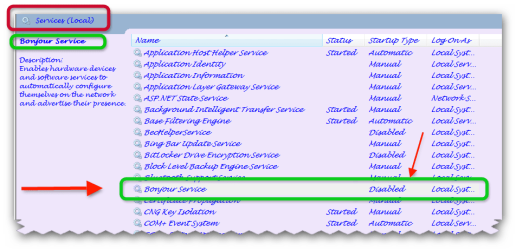
the inssider needs to be installed when you are connected to the internet i believe. have you tried going into the device manager and un-installing the driver for the adapter, then restarting the machine and letting windows re-install driver? also look in services and see if you have a service called bonjour if you have disable this.(a known problem with affecting wireless adapters)
 

Attachments

  • brys snap ?11 ?March ?2011 10h01m17s.png
    brys snap ?11 ?March ?2011 10h01m17s.png
    28.4 KB · Views: 199
Last edited:

My Computer My Computer

Computer Manufacturer/Model Number
packard bell IXTREME M5722
OS
Operating System : Windows 7 Home Premium Edition 6.01.7600 SP1 (x64)
CPU
Processor : Intel Core 2 Quad Q8300 @ 2500 MHz
Motherboard
Mainboard : Packard Bell (Acer EG43M )
Memory
Physical Memory :8GB Corsair4x 2GB 800MHz C5 DDR2
Graphics Card(s)
Video Card : XFX 6700 AMD
Monitor(s) Displays
Maestro 234DL - BenQ V2220 - BenQ VW2420H
Screen Resolution
Current Display :1920x1080p pixels at 60 Hz in HD LED
Hard Drives
Hard Disks : WDC (1000 GB)
Drive C: (Hard Disk) : 428 GB available on 491 GB
Drive D: (Hard Disk) : 426 GB available on 492 GB
SAMSUNG spinpoint HD103SJ 1000.2 GB
(X 2) KINGSTON SSD NOW V 30GB
PSU
XFX ProSeries 550W PSU
Case
PACKARD BELL IXTREME
Cooling
System Blower Current: 150mA Air Flow16CFM ;Akasa 90mm rear
Keyboard
Gigabyte Aivia K8100
Mouse
TRUST-Wireless Laser Mouse - Carbon edition MI-7770C
Internet Speed
TP-LINK > TL-WN951N / AV500 Gigabit Powerline Adapters
Browser
chrome dev
Other Info
EXTRA COOLING>(FAN CONTROLLER) PC Bay Cooler 3 x 40mm fans; Akasa AK-HD-BL Blue hard drive cooler 2 x 40 mm fan 4500 rpm 29.7 dBA
Bios> American Megatrends Inc.
Version : P01-A1
Date : 08/31/2009
Just a thought...have you checked to see the range of addresses available to DHCP on your router is big enough? If there are no addresses free then you won't be able to connect until you have one available.
 

My Computer My Computer

OS
win7
The problem has been solved! I was unawares that there was a Function key (Fn) on the keyboard and when used with the F2 key, it shut off all wireless functions. It works now. Thank you for those suggestions.
 

My Computer My Computer

Computer Manufacturer/Model Number
Custom
OS
Windows 7 Professional Edition
CPU
Intel 3.4 Mhz
Motherboard
Asus P5e
Memory
4 Gb
Graphics Card(s)
Nvdia 9400
Sound Card
On MB
Monitor(s) Displays
Samsung
Hard Drives
500 gb Western Digital
500 gb Seagate
80 gb Western Digital
PSU
500 watt
Case
Thermal
Cooling
Power Supply, Side case, Front case, CPU, and graphics card
great glad you found that out so we can call this thread resolved. also this is a handy tip to remember for anyone else with wifi probs on the laptop. some laptops have a designated wireless button to turn on/off wireless does the laptop have this?
 

My Computer My Computer

Computer Manufacturer/Model Number
packard bell IXTREME M5722
OS
Operating System : Windows 7 Home Premium Edition 6.01.7600 SP1 (x64)
CPU
Processor : Intel Core 2 Quad Q8300 @ 2500 MHz
Motherboard
Mainboard : Packard Bell (Acer EG43M )
Memory
Physical Memory :8GB Corsair4x 2GB 800MHz C5 DDR2
Graphics Card(s)
Video Card : XFX 6700 AMD
Monitor(s) Displays
Maestro 234DL - BenQ V2220 - BenQ VW2420H
Screen Resolution
Current Display :1920x1080p pixels at 60 Hz in HD LED
Hard Drives
Hard Disks : WDC (1000 GB)
Drive C: (Hard Disk) : 428 GB available on 491 GB
Drive D: (Hard Disk) : 426 GB available on 492 GB
SAMSUNG spinpoint HD103SJ 1000.2 GB
(X 2) KINGSTON SSD NOW V 30GB
PSU
XFX ProSeries 550W PSU
Case
PACKARD BELL IXTREME
Cooling
System Blower Current: 150mA Air Flow16CFM ;Akasa 90mm rear
Keyboard
Gigabyte Aivia K8100
Mouse
TRUST-Wireless Laser Mouse - Carbon edition MI-7770C
Internet Speed
TP-LINK > TL-WN951N / AV500 Gigabit Powerline Adapters
Browser
chrome dev
Other Info
EXTRA COOLING>(FAN CONTROLLER) PC Bay Cooler 3 x 40mm fans; Akasa AK-HD-BL Blue hard drive cooler 2 x 40 mm fan 4500 rpm 29.7 dBA
Bios> American Megatrends Inc.
Version : P01-A1
Date : 08/31/2009
Back
Top