Wireless connection issues - Stuck on Identifying

jigsaw82

New member
Hi,
I have a Dell Latitude with Windows 7 enterprise 64 bit edition. From past 4 days, I am facing an issue wherein I am not able to connect to my wireless continuously. If I switch off the modem and router, it connects for some time but drops again and then gets stuck on identifying. There are other devices that can connect to the wireless fine - tablet/mobile/another laptop. Apparently, I can connect to my mobile hotspot without any issues.

I am a novice in these kind of networking issues so have not been able to try much. But I did try the following options:

1. System restore - Restored to around 10 days back
2. Deleted wireless connection - It connected but drops and gets stuck. It did give the message "problem with wireless adapter or access point" when I did a troubleshoot. If I troubleshoot again it does not do anything.
3. Driver update - Says the driver is up to date
4. Ran McAfee antivirus - A trojan was detected and deleted.

I would really appreciate any help regarding this.

Thanks.
 

My Computer

Computer type
Laptop
Computer Manufacturer/Model Number
Dell
OS
Windows 7 Enterprise 64 bit
Hi,
I have a Dell Latitude with Windows 7 enterprise 64 bit edition. From past 4 days, I am facing an issue wherein I am not able to connect to my wireless continuously. If I switch off the modem and router, it connects for some time but drops again and then gets stuck on identifying. There are other devices that can connect to the wireless fine - tablet/mobile/another laptop. Apparently, I can connect to my mobile hotspot without any issues.

I am a novice in these kind of networking issues so have not been able to try much. But I did try the following options:

1. System restore - Restored to around 10 days back
2. Deleted wireless connection - It connected but drops and gets stuck. It did give the message "problem with wireless adapter or access point" when I did a troubleshoot. If I troubleshoot again it does not do anything.
3. Driver update - Says the driver is up to date
4. Ran McAfee antivirus - A trojan was detected and deleted.

I would really appreciate any help regarding this.

Thanks.

If you can post the output of the following two commands it would be most helpful. :)

Code:
ipconfig/all

Code:
netsh wlan show all
 

My Computer

Computer type
PC/Desktop
Computer Manufacturer/Model Number
Home built
OS
Windows 7 Ult, Windows 8.1 Pro,
CPU
Q9650-4.275GHz, E8600 4.5GHz, E6750-3.8GHz
Motherboard
Evga 780i FTW
Memory
G.Skill PC2 9600 1200Mhz 5 5 5 15 2T
Graphics Card(s)
GTX480
Sound Card
Asus Xonar D2
Monitor(s) Displays
HannsG
Screen Resolution
1680X1050
Hard Drives
GSkill Phoenix Pro 120GB SSD
PSU
ThermalTake Toughpower 1000Watt modular
Case
ThermalTake XaserV
Cooling
Xigmatek S1283
Keyboard
Logitech G15
Mouse
Logitech G9
Internet Speed
T1
Hi,

Thanks for helping me out here. Attached are the outputs of those commands.

~Aps
 

Attachments

My Computer

Computer type
Laptop
Computer Manufacturer/Model Number
Dell
OS
Windows 7 Enterprise 64 bit
I'm not really seeing anything that would explain the connection drop issue.

Have you tried resetting the router?
 

My Computer

Computer type
PC/Desktop
Computer Manufacturer/Model Number
Home built
OS
Windows 7 Ult, Windows 8.1 Pro,
CPU
Q9650-4.275GHz, E8600 4.5GHz, E6750-3.8GHz
Motherboard
Evga 780i FTW
Memory
G.Skill PC2 9600 1200Mhz 5 5 5 15 2T
Graphics Card(s)
GTX480
Sound Card
Asus Xonar D2
Monitor(s) Displays
HannsG
Screen Resolution
1680X1050
Hard Drives
GSkill Phoenix Pro 120GB SSD
PSU
ThermalTake Toughpower 1000Watt modular
Case
ThermalTake XaserV
Cooling
Xigmatek S1283
Keyboard
Logitech G15
Mouse
Logitech G9
Internet Speed
T1
Yes, I did reset the router a couple of days back to no effect.
 

My Computer

Computer type
Laptop
Computer Manufacturer/Model Number
Dell
OS
Windows 7 Enterprise 64 bit
Yes try resetting by first unplugging the router from the modem, reset the modem by unplugging it for a few minutes and plug it back in letting the lights settle. Then plug the router back in to the WAN or Internet port. Let the lights calm down then check for connectivity.

Post a screen shot of the ipconfig/all if you are still having problems after this.
 

My Computer

Computer type
PC/Desktop
Computer Manufacturer/Model Number
Home built
OS
Windows 7 Ult, Windows 8.1 Pro,
CPU
Q9650-4.275GHz, E8600 4.5GHz, E6750-3.8GHz
Motherboard
Evga 780i FTW
Memory
G.Skill PC2 9600 1200Mhz 5 5 5 15 2T
Graphics Card(s)
GTX480
Sound Card
Asus Xonar D2
Monitor(s) Displays
HannsG
Screen Resolution
1680X1050
Hard Drives
GSkill Phoenix Pro 120GB SSD
PSU
ThermalTake Toughpower 1000Watt modular
Case
ThermalTake XaserV
Cooling
Xigmatek S1283
Keyboard
Logitech G15
Mouse
Logitech G9
Internet Speed
T1
Hi Chev65,

Thanks for your time.

I did try resetting again as you suggested but it did not work. Then I uninstalled the network card and installed it again. It worked for some time and now its back to where it was - stuck at Identifying.

Below is the ipconfig /all output:

Wireless LAN adapter Wireless Network Connection:

Connection-specific DNS Suffix . :
Description . . . . . . . . . . . : Intel(R) Centrino(R) Ultimate-N 6300 AGN
Physical Address. . . . . . . . . : 24-77-03-65-B5-F4
DHCP Enabled. . . . . . . . . . . : Yes
Autoconfiguration Enabled . . . . : Yes
Link-local IPv6 Address . . . . . : fe80::6d77:e7bb:cbe9:43e7%28(Preferred)
Autoconfiguration IPv4 Address. . : 169.254.67.231(Preferred)
Subnet Mask . . . . . . . . . . . : 255.255.0.0
Default Gateway . . . . . . . . . :
DNS Servers . . . . . . . . . . . : fec0:0:0:ffff::1%1
fec0:0:0:ffff::2%1
fec0:0:0:ffff::3%1
NetBIOS over Tcpip. . . . . . . . : Enabled

Any other ideas?

Thanks,
Jigsaw
 

My Computer

Computer type
Laptop
Computer Manufacturer/Model Number
Dell
OS
Windows 7 Enterprise 64 bit
Hi Chev65,

Thanks for your time.

I did try resetting again as you suggested but it did not work. Then I uninstalled the network card and installed it again. It worked for some time and now its back to where it was - stuck at Identifying.

Below is the ipconfig /all output:

Wireless LAN adapter Wireless Network Connection:

Connection-specific DNS Suffix . :
Description . . . . . . . . . . . : Intel(R) Centrino(R) Ultimate-N 6300 AGN
Physical Address. . . . . . . . . : 24-77-03-65-B5-F4
DHCP Enabled. . . . . . . . . . . : Yes
Autoconfiguration Enabled . . . . : Yes
Link-local IPv6 Address . . . . . : fe80::6d77:e7bb:cbe9:43e7%28(Preferred)
Autoconfiguration IPv4 Address. . : 169.254.67.231(Preferred)
Subnet Mask . . . . . . . . . . . : 255.255.0.0
Default Gateway . . . . . . . . . :
DNS Servers . . . . . . . . . . . : fec0:0:0:ffff::1%1
fec0:0:0:ffff::2%1
fec0:0:0:ffff::3%1
NetBIOS over Tcpip. . . . . . . . : Enabled

Any other ideas?

Thanks,
Jigsaw

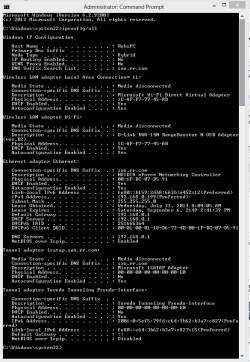
Is this the entire ipconfig/all? Because many components of the network stack are missing from this for some reason?

This should look more like mine. Most likely your system files have been corrupted by a virus or malware.

You should try running the following command and let me know the results. It's unlikely you will pass this scan from what I've seen here.

Code:
sfc/scannow
 

Attachments

  • My ipconfig all.PNG
    My ipconfig all.PNG
    46 KB · Views: 1

My Computer

Computer type
PC/Desktop
Computer Manufacturer/Model Number
Home built
OS
Windows 7 Ult, Windows 8.1 Pro,
CPU
Q9650-4.275GHz, E8600 4.5GHz, E6750-3.8GHz
Motherboard
Evga 780i FTW
Memory
G.Skill PC2 9600 1200Mhz 5 5 5 15 2T
Graphics Card(s)
GTX480
Sound Card
Asus Xonar D2
Monitor(s) Displays
HannsG
Screen Resolution
1680X1050
Hard Drives
GSkill Phoenix Pro 120GB SSD
PSU
ThermalTake Toughpower 1000Watt modular
Case
ThermalTake XaserV
Cooling
Xigmatek S1283
Keyboard
Logitech G15
Mouse
Logitech G9
Internet Speed
T1
Hi,

Attached is the complete output of ipconfig. I actually just pasted the top part earlier. Sorry about that.

Thanks.
 

Attachments

My Computer

Computer type
Laptop
Computer Manufacturer/Model Number
Dell
OS
Windows 7 Enterprise 64 bit
Yes I think that virus messed something up. No real problems showing there, your machine can see the router but isn't connecting for some reason.

Can you run the sfc system file scan and let me know the results?
 

My Computer

Computer type
PC/Desktop
Computer Manufacturer/Model Number
Home built
OS
Windows 7 Ult, Windows 8.1 Pro,
CPU
Q9650-4.275GHz, E8600 4.5GHz, E6750-3.8GHz
Motherboard
Evga 780i FTW
Memory
G.Skill PC2 9600 1200Mhz 5 5 5 15 2T
Graphics Card(s)
GTX480
Sound Card
Asus Xonar D2
Monitor(s) Displays
HannsG
Screen Resolution
1680X1050
Hard Drives
GSkill Phoenix Pro 120GB SSD
PSU
ThermalTake Toughpower 1000Watt modular
Case
ThermalTake XaserV
Cooling
Xigmatek S1283
Keyboard
Logitech G15
Mouse
Logitech G9
Internet Speed
T1
Attached output of sfc scan.

If virus or malware did mess up any files, shouldnt that effect connectivity through mobile hotspot as well? Surprisingly that works fine without any issues.
 

Attachments

My Computer

Computer type
Laptop
Computer Manufacturer/Model Number
Dell
OS
Windows 7 Enterprise 64 bit
Ok try going into the Network and Sharing Center, look to the left for "Manage Wireless Networks" delete the old profile for this connection then create a new wireless profile making sure the SSID, password and, security type and encryption are the same as the ones in the routers settings. Check if the connection holds up after that.
 

My Computer

Computer type
PC/Desktop
Computer Manufacturer/Model Number
Home built
OS
Windows 7 Ult, Windows 8.1 Pro,
CPU
Q9650-4.275GHz, E8600 4.5GHz, E6750-3.8GHz
Motherboard
Evga 780i FTW
Memory
G.Skill PC2 9600 1200Mhz 5 5 5 15 2T
Graphics Card(s)
GTX480
Sound Card
Asus Xonar D2
Monitor(s) Displays
HannsG
Screen Resolution
1680X1050
Hard Drives
GSkill Phoenix Pro 120GB SSD
PSU
ThermalTake Toughpower 1000Watt modular
Case
ThermalTake XaserV
Cooling
Xigmatek S1283
Keyboard
Logitech G15
Mouse
Logitech G9
Internet Speed
T1
How do I check the router settings?
 

My Computer

Computer type
Laptop
Computer Manufacturer/Model Number
Dell
OS
Windows 7 Enterprise 64 bit
How do I check the router settings?

You've never accessed the routers wireless settings before?

Ok just click on > http://192.168.1.1

This should be your routers firmware set up page.

Since you reset your router's it's likely that all the wireless connection settings are at default so you will need to set up the SSID, password, security and encryption again from scratch.
 

My Computer

Computer type
PC/Desktop
Computer Manufacturer/Model Number
Home built
OS
Windows 7 Ult, Windows 8.1 Pro,
CPU
Q9650-4.275GHz, E8600 4.5GHz, E6750-3.8GHz
Motherboard
Evga 780i FTW
Memory
G.Skill PC2 9600 1200Mhz 5 5 5 15 2T
Graphics Card(s)
GTX480
Sound Card
Asus Xonar D2
Monitor(s) Displays
HannsG
Screen Resolution
1680X1050
Hard Drives
GSkill Phoenix Pro 120GB SSD
PSU
ThermalTake Toughpower 1000Watt modular
Case
ThermalTake XaserV
Cooling
Xigmatek S1283
Keyboard
Logitech G15
Mouse
Logitech G9
Internet Speed
T1
Hi Chev65,

Tried this as well but did not work. As a workaround, I am using my tablet for USB tethering.

Thanks for your help.
 

My Computer

Computer type
Laptop
Computer Manufacturer/Model Number
Dell
OS
Windows 7 Enterprise 64 bit
Back
Top