Wireless Connection Speed limited to 54mb/s on Wireless-N equipment

joelshort

New member
Local time
5:44 PM
Messages
7
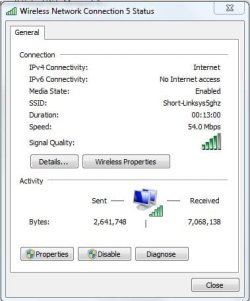
I have a new dual band wireless-AC router (Linksys EA6300) and just installed an Intel AC 7260 wireless card in my laptop. The wireless network I am connected to indicates that it is a 802.11n connection, but in the Wireless Network Connection Status it only shows a connection speed of 54mb/s. The router is capable of 300mb/s in the 2.4ghz band and 867mb/s in the 5ghz band. Using inSSIDer to examine the networks, it shows that when I'm connected to the 5ghz network it has a max rate of 450mb/s.

I have tried everything I can think of and have searched and searched to no avail. If my router is an AC router, and my wireless card is an AC card, why is my connection speed limited to 54mb/s?

I also have another computer with a wireless-N card and the connection speed is also limited to 54mb/s on that computer too.

I've attached a screenshot showing the connection speed.
 

Attachments
  • Network.JPG
    Network.JPG
    29.7 KB · Views: 19

My Computer My Computer

At a glance

Windows 7 Ultimate x64Intel i716GBNvidia
Computer type
Laptop
Computer Manufacturer/Model Number
Clevo W150ERQ
OS
Windows 7 Ultimate x64
CPU
Intel i7
Memory
16GB
Graphics Card(s)
Nvidia
Hard Drives
120GB SSD
500GB HDD
Have you tried checking the various setting in the network folder? Also, your router has a configuration web page doesnt it? a page you would go to; in order to change the router settings? If so, log into that page and check the router settings. Also; even though the router is new I believe you mentioned; there might be a firmware upgrade for the router that you should be able to easily check for. Im not familiar with the type of router you have. but you should be able to get into the settings fairly easily.
 

My Computer My Computer

At a glance

Windows 7 ultimate 64-bitIntel I7 2600K 3.4ghzCorsair 16gb ddr3 1600mhzNvidia Geforce gt 430
Computer type
PC/Desktop
Computer Manufacturer/Model Number
custom built
OS
Windows 7 ultimate 64-bit
CPU
Intel I7 2600K 3.4ghz
Motherboard
Asus Evo P8P67
Memory
Corsair 16gb ddr3 1600mhz
Graphics Card(s)
Nvidia Geforce gt 430
Sound Card
Sound Blaster Titanium x-fi pci express
Monitor(s) Displays
Dell E198WFP
Hard Drives
1 western digital 2TB drive.
PSU
Antec 1200 watt
Case
Inwin Dragon Rider
Cooling
6 case supplied cooling fans
Keyboard
logitech mk700
Mouse
logitech m705
Internet Speed
25-50mbps download; 10mbps upload(i think)
Antivirus
avg free 2014
Browser
mozilla firefox
Other Info
Also have a pretty bad speaker setup which is a klipsch promedia 5.1 surround speaker setup with huge subwoofer and lg blu ray player/writer. Also a hp officejet pro 8600 plus wireless all in one and a logitech s7500 webcam.
Thanks for trying, but I've looked at all that already and everything looks set up correctly. The firmware on my router is the latest firmware.
 

My Computer My Computer

At a glance

Windows 7 Ultimate x64Intel i716GBNvidia
Computer type
Laptop
Computer Manufacturer/Model Number
Clevo W150ERQ
OS
Windows 7 Ultimate x64
CPU
Intel i7
Memory
16GB
Graphics Card(s)
Nvidia
Hard Drives
120GB SSD
500GB HDD
I have a new dual band wireless-AC router (Linksys EA6300) and just installed an Intel AC 7260 wireless card in my laptop. The wireless network I am connected to indicates that it is a 802.11n connection, but in the Wireless Network Connection Status it only shows a connection speed of 54mb/s. The router is capable of 300mb/s in the 2.4ghz band and 867mb/s in the 5ghz band. Using inSSIDer to examine the networks, it shows that when I'm connected to the 5ghz network it has a max rate of 450mb/s.

I have tried everything I can think of and have searched and searched to no avail. If my router is an AC router, and my wireless card is an AC card, why is my connection speed limited to 54mb/s?

I also have another computer with a wireless-N card and the connection speed is also limited to 54mb/s on that computer too.

I've attached a screenshot showing the connection speed.

It sometimes helps to use brand matching wireless AC hardware as the final draft is still being worked on and there are some compatibility issues involved. You may have better luck using Linksys AC hardware with that router and there is usually an updated firmware for all these new AC routers that can help. The beam forming antenna can be tricky beast when it comes to mismatched hardware.

For wireless N in general you need to set it to use 802.11n ONLY because the mixed settings will limit to around 54Mbps. Using WPA2 and AES is also required to achieve maximum bandwidth with wireless n.

There are other issues you need to keep in mind when using the 5Ghz frequency, the biggest one being that it's not made to go through walls like 2.4Ghz. Going by the 4 bar signal strength this may be part of the problem.

5Ghz signals typically do not go through more than one wall without serious degradation of signal strength, this also limits potential bandwidth which then shows up as a slow wireless status speed.

You could try posting the output from inSSIDer to check the signal strength etc.

http://files.metageek.net/downloads/...r-3.0.7.48.msi

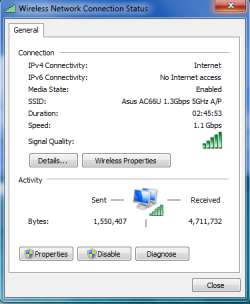
Ideally you should be seeing something similar to the status speed in the picture when using 5Ghz AC, this is 35 feet from access point to antenna but it's open space which is how the 5Ghz frequency is meant to be used.
 

Attachments

  • 1.1Gbps.PNG
    1.1Gbps.PNG
    13.4 KB · Views: 16

My Computer My Computer

At a glance

Windows 7 Ult, Windows 8.1 Pro,Q9650-4.275GHz, E8600 4.5GHz, E6750-3.8GHzG.Skill PC2 9600 1200Mhz 5 5 5 15 2TGTX480
Computer type
PC/Desktop
Computer Manufacturer/Model Number
Home built
OS
Windows 7 Ult, Windows 8.1 Pro,
CPU
Q9650-4.275GHz, E8600 4.5GHz, E6750-3.8GHz
Motherboard
Evga 780i FTW
Memory
G.Skill PC2 9600 1200Mhz 5 5 5 15 2T
Graphics Card(s)
GTX480
Sound Card
Asus Xonar D2
Monitor(s) Displays
HannsG
Screen Resolution
1680X1050
Hard Drives
GSkill Phoenix Pro 120GB SSD
PSU
ThermalTake Toughpower 1000Watt modular
Case
ThermalTake XaserV
Cooling
Xigmatek S1283
Keyboard
Logitech G15
Mouse
Logitech G9
Internet Speed
T1
Thanks for the reply. The signal strength remains the same whether the laptop is right beside the router or on the other side of the house, always 54mb/s.

Earlier I had tried to set my router to wireless-n only, but for some reason when I did that (in either the 2.4ghz or 5ghz band) I couldn't connect at all to the network.

Right now the security type is WPA2-PSK. I didn't see a setting to change it to WPA2-AES.

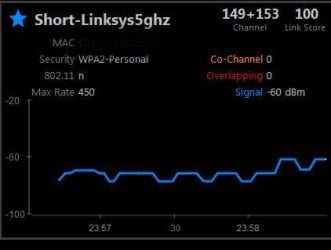
Here's a screenshot of inSSIDer showing the signal connection etc.
 

Attachments

  • inSSIDer.JPG
    inSSIDer.JPG
    30.1 KB · Views: 15

My Computer My Computer

At a glance

Windows 7 Ultimate x64Intel i716GBNvidia
Computer type
Laptop
Computer Manufacturer/Model Number
Clevo W150ERQ
OS
Windows 7 Ultimate x64
CPU
Intel i7
Memory
16GB
Graphics Card(s)
Nvidia
Hard Drives
120GB SSD
500GB HDD
Thanks for the reply. The signal strength remains the same whether the laptop is right beside the router or on the other side of the house, always 54mb/s.

Earlier I had tried to set my router to wireless-n only, but for some reason when I did that (in either the 2.4ghz or 5ghz band) I couldn't connect at all to the network.

Right now the security type is WPA2-PSK. I didn't see a setting to change it to WPA2-AES.

Here's a screenshot of inSSIDer showing the signal connection etc.

That signal line is supposed to be arrow straight and with the signal strength at -60 I would not expect much from this connection at all. I know this because I've helped on many AC router problems including the learning experience from my own AC hardware.

If you can't use the N only setting then there is zero chance you will see any improvement in status speed.

It's like I said with the different hardware vendors, with AC hardware you really need to match vendors, and the 2.4Ghz AC may or may not work with older wireless N hardware, there are major compatibility issues in many cases. I bet they didn't mention this when you purchased the router...

You didn't mention if you updated the firmware as was advised earlier but this is a required step for any AC router as they all have compatibility issues.
 

My Computer My Computer

At a glance

Windows 7 Ult, Windows 8.1 Pro,Q9650-4.275GHz, E8600 4.5GHz, E6750-3.8GHzG.Skill PC2 9600 1200Mhz 5 5 5 15 2TGTX480
Computer type
PC/Desktop
Computer Manufacturer/Model Number
Home built
OS
Windows 7 Ult, Windows 8.1 Pro,
CPU
Q9650-4.275GHz, E8600 4.5GHz, E6750-3.8GHz
Motherboard
Evga 780i FTW
Memory
G.Skill PC2 9600 1200Mhz 5 5 5 15 2T
Graphics Card(s)
GTX480
Sound Card
Asus Xonar D2
Monitor(s) Displays
HannsG
Screen Resolution
1680X1050
Hard Drives
GSkill Phoenix Pro 120GB SSD
PSU
ThermalTake Toughpower 1000Watt modular
Case
ThermalTake XaserV
Cooling
Xigmatek S1283
Keyboard
Logitech G15
Mouse
Logitech G9
Internet Speed
T1
So if I understand you correctly there is a compatibility issue between my Linksys AC router and the Intel AC wireless card in the laptop? The signal strength remains pretty constant at around -56, even with the computer right beside the router. I have updated the firmware and drivers for all components.

At this point I don't even care about getting the AC working. If I could just get N-only working and get closer to 100mb/s speed I'd be happy with that. As I said, if I set the router to wireless-N only then no computers in the network can connect to the router, even though all of them have N wireless cards.
 

My Computer My Computer

At a glance

Windows 7 Ultimate x64Intel i716GBNvidia
Computer type
Laptop
Computer Manufacturer/Model Number
Clevo W150ERQ
OS
Windows 7 Ultimate x64
CPU
Intel i7
Memory
16GB
Graphics Card(s)
Nvidia
Hard Drives
120GB SSD
500GB HDD
So if I understand you correctly there is a compatibility issue between my Linksys AC router and the Intel AC wireless card in the laptop? The signal strength remains pretty constant at around -56, even with the computer right beside the router. I have updated the firmware and drivers for all components.

At this point I don't even care about getting the AC working. If I could just get N-only working and get closer to 100mb/s speed I'd be happy with that. As I said, if I set the router to wireless-N only then no computers in the network can connect to the router, even though all of them have N wireless cards.

Yes with AC hardware compatibility with older hardware has been a problem.

I've had the same problem myself when trying to use older N USB adaptors with my Asus AC router but no problems at all using the Asus PCI-e AC adaptor with the Asus router. Newer devices like phones connect without issue but older hardware on PC's have been problematic.

I'd like to blow smoke and say that everything will be ok, but in reality it won't be.

Easiest way to fix the problem is to purchase Linksys AC USB or PCI/e adaptors for all of your machines.

I realize this is not the answer you wanted to hear but it's the truth non the less.

You can thank me later when you realize that I'm correct and have just saved you weeks of frustration trying to figure out what is wrong.
 

My Computer My Computer

At a glance

Windows 7 Ult, Windows 8.1 Pro,Q9650-4.275GHz, E8600 4.5GHz, E6750-3.8GHzG.Skill PC2 9600 1200Mhz 5 5 5 15 2TGTX480
Computer type
PC/Desktop
Computer Manufacturer/Model Number
Home built
OS
Windows 7 Ult, Windows 8.1 Pro,
CPU
Q9650-4.275GHz, E8600 4.5GHz, E6750-3.8GHz
Motherboard
Evga 780i FTW
Memory
G.Skill PC2 9600 1200Mhz 5 5 5 15 2T
Graphics Card(s)
GTX480
Sound Card
Asus Xonar D2
Monitor(s) Displays
HannsG
Screen Resolution
1680X1050
Hard Drives
GSkill Phoenix Pro 120GB SSD
PSU
ThermalTake Toughpower 1000Watt modular
Case
ThermalTake XaserV
Cooling
Xigmatek S1283
Keyboard
Logitech G15
Mouse
Logitech G9
Internet Speed
T1
OK, thanks. I guess I'll have to see if Linksys makes a wireless card, or if Intel makes a AC router. I still don't understand why if I set the router to wireless-N only nothing will connect. Something else to throw into the mix, I have another wireless-N router and when I connect to that router I still only get 54mb/s speed. There doesn't appear to be an option in that router's settings to go to wireless-N only.

Pulling my hair out...
Thanks again for the help.
 

My Computer My Computer

At a glance

Windows 7 Ultimate x64Intel i716GBNvidia
Computer type
Laptop
Computer Manufacturer/Model Number
Clevo W150ERQ
OS
Windows 7 Ultimate x64
CPU
Intel i7
Memory
16GB
Graphics Card(s)
Nvidia
Hard Drives
120GB SSD
500GB HDD
OK, thanks. I guess I'll have to see if Linksys makes a wireless card, or if Intel makes a AC router. I still don't understand why if I set the router to wireless-N only nothing will connect. Something else to throw into the mix, I have another wireless-N router and when I connect to that router I still only get 54mb/s speed. There doesn't appear to be an option in that router's settings to go to wireless-N only.

Pulling my hair out...
Thanks again for the help.


With my AC router, when I connected using an older Wireless Dlink DWA-140 N USB NIC, it showed decent connection speed but the connection dropped out in a certain amount of time so it was completely unstable. Although my wife's newer wireless N IPad connects to the same AC access point without issue.

Obviously if you went to matching hardware I would expect the numbers to be much higher and if not then it's on the manufacture to have their own matching hardware working up to specs.

That is a pretty strange coincidence with both routers stuck at 54Mbps.

All routers that I've seen have the 802.11 N Only setting though it may appear as something else, or it may not show up unless you change the security to WPA2/AES, it's hard to give exact directions because there are so many different routers/firmware's etc. With N working you should see between 100Mbps up to 450Mbps but only the best N routers using 3 antenna PCI NIC's can obtain that type of speed.
 

My Computer My Computer

At a glance

Windows 7 Ult, Windows 8.1 Pro,Q9650-4.275GHz, E8600 4.5GHz, E6750-3.8GHzG.Skill PC2 9600 1200Mhz 5 5 5 15 2TGTX480
Computer type
PC/Desktop
Computer Manufacturer/Model Number
Home built
OS
Windows 7 Ult, Windows 8.1 Pro,
CPU
Q9650-4.275GHz, E8600 4.5GHz, E6750-3.8GHz
Motherboard
Evga 780i FTW
Memory
G.Skill PC2 9600 1200Mhz 5 5 5 15 2T
Graphics Card(s)
GTX480
Sound Card
Asus Xonar D2
Monitor(s) Displays
HannsG
Screen Resolution
1680X1050
Hard Drives
GSkill Phoenix Pro 120GB SSD
PSU
ThermalTake Toughpower 1000Watt modular
Case
ThermalTake XaserV
Cooling
Xigmatek S1283
Keyboard
Logitech G15
Mouse
Logitech G9
Internet Speed
T1
Good news!!! In the router settings I turned on "Media Prioritization" and enabled WMM Support, and changed the 5ghz band to "AC-Only" and "80ghz" and I am now getting consistent connections speeds of 500+mb/s and I've seen it go close to the max of 867mb/s!
 

My Computer My Computer

At a glance

Windows 7 Ultimate x64Intel i716GBNvidia
Computer type
Laptop
Computer Manufacturer/Model Number
Clevo W150ERQ
OS
Windows 7 Ultimate x64
CPU
Intel i7
Memory
16GB
Graphics Card(s)
Nvidia
Hard Drives
120GB SSD
500GB HDD
One more question..even though the router is set to broadcast wireless-AC Only, and I am getting connection speeds consistent with wireless-A, Windows and inSSIDer still identifies the network at being wireless-N. Any idea why?
 

My Computer My Computer

At a glance

Windows 7 Ultimate x64Intel i716GBNvidia
Computer type
Laptop
Computer Manufacturer/Model Number
Clevo W150ERQ
OS
Windows 7 Ultimate x64
CPU
Intel i7
Memory
16GB
Graphics Card(s)
Nvidia
Hard Drives
120GB SSD
500GB HDD
OK, thanks. I guess I'll have to see if Linksys makes a wireless card, or if Intel makes a AC router. I still don't understand why if I set the router to wireless-N only nothing will connect. Something else to throw into the mix, I have another wireless-N router and when I connect to that router I still only get 54mb/s speed. There doesn't appear to be an option in that router's settings to go to wireless-N only.

Pulling my hair out...
Thanks again for the help.

Pulling your hair out you say?...trust me when i say been there done that!. Thats why we "geeks" are here to help :)
 

My Computer My Computer

At a glance

Windows 7 ultimate 64-bitIntel I7 2600K 3.4ghzCorsair 16gb ddr3 1600mhzNvidia Geforce gt 430
Computer type
PC/Desktop
Computer Manufacturer/Model Number
custom built
OS
Windows 7 ultimate 64-bit
CPU
Intel I7 2600K 3.4ghz
Motherboard
Asus Evo P8P67
Memory
Corsair 16gb ddr3 1600mhz
Graphics Card(s)
Nvidia Geforce gt 430
Sound Card
Sound Blaster Titanium x-fi pci express
Monitor(s) Displays
Dell E198WFP
Hard Drives
1 western digital 2TB drive.
PSU
Antec 1200 watt
Case
Inwin Dragon Rider
Cooling
6 case supplied cooling fans
Keyboard
logitech mk700
Mouse
logitech m705
Internet Speed
25-50mbps download; 10mbps upload(i think)
Antivirus
avg free 2014
Browser
mozilla firefox
Other Info
Also have a pretty bad speaker setup which is a klipsch promedia 5.1 surround speaker setup with huge subwoofer and lg blu ray player/writer. Also a hp officejet pro 8600 plus wireless all in one and a logitech s7500 webcam.
Back
Top