Wireless Network Adapter not working properly

Well I could access facebook, after that I lost internet access again :( (the lower right thing says I do have internet access) ... nevermind I have internet access again I have the feeling the internet speed is fluctuating like crazy. My usual download rate is 6XX kbps (ISP in Peru suck) right now I'm DLing at 10kbps ... and now at 0kpbs

The IPreset file must have done something but with you not being able to access the router and slow speeds it sounds like the router isn't set up correctly or Avast is messing up the connection.

What is the signal strength?

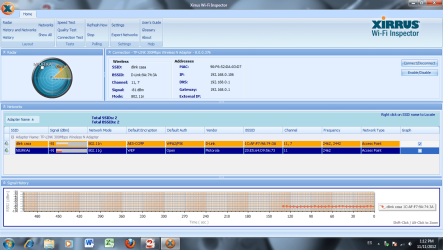
If you can install Xirrus WiFi inspector it will help me to spot other potential problems. Small size quick install lots of information, post screen shot of the results here.
http://www.xirrus.com/Products/Wi-Fi-Inspector
 

My Computer

Computer type
PC/Desktop
Computer Manufacturer/Model Number
Home built
OS
Windows 7 Ult, Windows 8.1 Pro,
CPU
Q9650-4.275GHz, E8600 4.5GHz, E6750-3.8GHz
Motherboard
Evga 780i FTW
Memory
G.Skill PC2 9600 1200Mhz 5 5 5 15 2T
Graphics Card(s)
GTX480
Sound Card
Asus Xonar D2
Monitor(s) Displays
HannsG
Screen Resolution
1680X1050
Hard Drives
GSkill Phoenix Pro 120GB SSD
PSU
ThermalTake Toughpower 1000Watt modular
Case
ThermalTake XaserV
Cooling
Xigmatek S1283
Keyboard
Logitech G15
Mouse
Logitech G9
Internet Speed
T1
Here's what Xirrus shows
 

Attachments

  • xirrus1.png
    xirrus1.png
    74.2 KB · Views: 17

My Computer

OS
Windows 7 Ultimate x64
CPU
Intel Core i5 3570k
Motherboard
Gigabyte Z77P-D3
Memory
8gb
Graphics Card(s)
Nvidia GTX 660 Ti
Hard Drives
500gb
Ok two problems here, very weak signal strength which is not even good enough for a decent connection.

Also it shows that you have channel bonding enabled in the routers settings which works well with a good signal but actually slows down the connection when you have a bad signal. You might try disabling channel bonding in your routers settings, will show up as 20-40Mhz or 20Mhz, you want to use the 20Mhz setting.

But the real problem seems to be a very poor connection which means you are going through too many walls to obtain a good connection. You need to be closer to the router or install an access point closer to where your machine is located, preferably in the same room.

It might also help to change to another channel because 11 is being used by your neighbor. Go to the other end of the band like channel 1 and turn off channel bonding. Also setting the wireless in the routers settings to N only will make the connection faster although G clients or below won't be able to connect.

Contrary to popular belief wireless signals do not go through more than a couple of walls before it loses it's punch.
 

My Computer

Computer type
PC/Desktop
Computer Manufacturer/Model Number
Home built
OS
Windows 7 Ult, Windows 8.1 Pro,
CPU
Q9650-4.275GHz, E8600 4.5GHz, E6750-3.8GHz
Motherboard
Evga 780i FTW
Memory
G.Skill PC2 9600 1200Mhz 5 5 5 15 2T
Graphics Card(s)
GTX480
Sound Card
Asus Xonar D2
Monitor(s) Displays
HannsG
Screen Resolution
1680X1050
Hard Drives
GSkill Phoenix Pro 120GB SSD
PSU
ThermalTake Toughpower 1000Watt modular
Case
ThermalTake XaserV
Cooling
Xigmatek S1283
Keyboard
Logitech G15
Mouse
Logitech G9
Internet Speed
T1
The thing is my laptop is at the same place where my desktop currently is and I do get very fast DL speeds here ... stupid marketing :(
 

My Computer

OS
Windows 7 Ultimate x64
CPU
Intel Core i5 3570k
Motherboard
Gigabyte Z77P-D3
Memory
8gb
Graphics Card(s)
Nvidia GTX 660 Ti
Hard Drives
500gb
just move my PC right next to the router, getting max speed now , TP LINK SUCKS.
 

My Computer

OS
Windows 7 Ultimate x64
CPU
Intel Core i5 3570k
Motherboard
Gigabyte Z77P-D3
Memory
8gb
Graphics Card(s)
Nvidia GTX 660 Ti
Hard Drives
500gb
moved the desktop to my room which has 1 less wall between the router and the pc but is farther away and im getting a good speed, i guess the previous room was cursed, thanks for all the help!!
 

My Computer

OS
Windows 7 Ultimate x64
CPU
Intel Core i5 3570k
Motherboard
Gigabyte Z77P-D3
Memory
8gb
Graphics Card(s)
Nvidia GTX 660 Ti
Hard Drives
500gb
moved the desktop to my room which has 1 less wall between the router and the pc but is farther away and im getting a good speed, i guess the previous room was cursed, thanks for all the help!!

Yes I used to have the same problems because of my router in the bedroom going to my living room which is three rooms away and has a heater closest with a huge metal heater and my fireplace which is old and very thick cement is right in between which used to kill my wireless connection in that room.

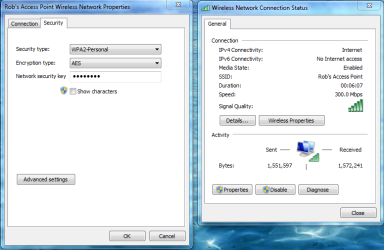
I've since installed a wired switch and an access point in that room and another one outside my house to cover the yard/garage and I get the full 300Mbps because of good access point placement.

Wireless quality of service is really about access point placement and finding channels that aren't being used.

If you really want the best fastest connection "300Mbps" then use channel bonding and wireless N only settings plus 5 bar signal strength.

You are welcome for the help. :)
 

Attachments

  • 300mbps AES.PNG
    300mbps AES.PNG
    41.5 KB · Views: 11

My Computer

Computer type
PC/Desktop
Computer Manufacturer/Model Number
Home built
OS
Windows 7 Ult, Windows 8.1 Pro,
CPU
Q9650-4.275GHz, E8600 4.5GHz, E6750-3.8GHz
Motherboard
Evga 780i FTW
Memory
G.Skill PC2 9600 1200Mhz 5 5 5 15 2T
Graphics Card(s)
GTX480
Sound Card
Asus Xonar D2
Monitor(s) Displays
HannsG
Screen Resolution
1680X1050
Hard Drives
GSkill Phoenix Pro 120GB SSD
PSU
ThermalTake Toughpower 1000Watt modular
Case
ThermalTake XaserV
Cooling
Xigmatek S1283
Keyboard
Logitech G15
Mouse
Logitech G9
Internet Speed
T1
Back
Top