
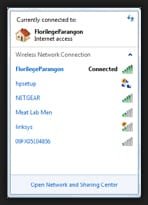
My computer will no longer show any available WiFi networks on the WiFi icon on bottom right of the taskbar. I use to click on it and it use to show available networks to connect to (like in the attachment - see attachment) now it does nothing. When you hover the mouse over the WiFi icon it just comes up what I am connected to and not a list of available networks. It worked fine a few weeks ago but now won't show available networks to connect to. If you could help I would be truly grateful as I have searched everywhere over the internet and cannot find a resolution. Thank you in advance. Cheers - Stu.
Attachments
My Computers
-
At a glance
Window Professional 64 bitCore i7- Computer type
- Laptop
- Computer Manufacturer/Model Number
- Dell
- OS
- Window Professional 64 bit
- CPU
- Core i7
-
- Computer type
- PC/Desktop


