Wireless printer drops off the network

TVeblen

Building Stuff
Guru
Gold Member
VIP
Local time
9:27 AM
Messages
6,239
Location
In The Woods
This is a common problem judging by the results of a web search. I'm hoping one of the good folks here knows of a solution that actually works!

I have an Epson Artisan 810 printer that has wireless networking. My desktop connects to this printer by USB and the network by Ethernet. Our laptop connects to everything wireless. Everything works just as you would expect except:

When the printer goes into "idle" mode (low power - standby) it drops off the network and the laptop can't find it to print to. The desktop (of course) can print to it in low power mode. But, this only happens in a particular order:

  • If the laptop connects to the printer and prints, then the printer goes into idle mode, the laptop can still print to the printer.
  • If the printer is on (not into idle) and the laptop restarts it can print.
  • If the printer is in idle, and the laptop is restarted, it will not print.
  • If I turn the printer off, then back on, it is recognized and works again wirelessly.
What I have tried:

  • Set a static IP on the printer
  • Reserved the IP on the router (Trendnet TEW-691GR) for the MAC of the printer.
  • Tried to ping the idle printer IP from laptop: No. Restarted: Yes.
  • Tried to ping the idle printer from the desktop: No.
  • Removed the printer from the laptop, deleted the printer port, re-installed the printer using the manual IP port.
I've run out of ideas and have started drinking! Any suggestions?
 

My Computer

Computer type
PC/Desktop
Computer Manufacturer/Model Number
Home Built - Jan 2013
OS
Windows 7 64 Bit Home Premium SP1
CPU
i7-3820
Motherboard
Asus P9X79-PRO - Bios 4608
Memory
GSkill F3-14900CL9Q - 16GB
Graphics Card(s)
EVGA GeForce GTX660 - Driver 352.86
Sound Card
On board Realtek ALC898
Monitor(s) Displays
Acer S271HL
Screen Resolution
1920 x 1080
Hard Drives
#1- Samsung 840 Pro Series
#2- Western Digital WD1002FAEX Sata3 Black
#3- Western Digital WD1002FAEX Sata3 Black
PSU
Corsair CMPSU-850TX-V2 - 850 watt (by Seasonic)
Case
Corsair Obsidian 550D
Cooling
Standard 3 120mm case fans, Cooler Master Hyper 212 EVO
Keyboard
MS KC-0405
Mouse
Intellimouse 5-button
Internet Speed
56 Mbits/Sec (on a good day)
Antivirus
Avast & Malwarebytes
Browser
Firefox
Other Info
Asus DVD - DRW-24B1ST 24X
Is the laptop dropping it, or is the router dropping it. That's my first real question even if you've manually set it routers like to just ignore things that have no traffic after a set amount of time. It doesn't appear there is a way to change the sleep mode settings in that model of printer though.

Anyhow if it's dropping off the nat table there may still be some way to tweak the router a little bit more to keep the connection alive. The printer itself has no setting or feature I can see that would help with this. (I can't believe I actually looked at a manual for something I don't even own.)

At any rate I tried man, but I don't see anything you missed, and as you already pointed out the other mentions of this online are all dead ends too.
 

My Computer

Computer Manufacturer/Model Number
Insane hobo technologies. ;-)
OS
Windows 7 x64
CPU
Intel i7 2600k
Motherboard
Asrock z68 extreme 4 gen 3
Memory
G.skill Ripjaw 16gigs @ 1866
Graphics Card(s)
Nvidia gtx580 (evga)
Sound Card
Integrated HD audio + hdmi
Monitor(s) Displays
24" ASUS widescreen + 42" insignia
Screen Resolution
1080p (1920x1080)
Hard Drives
128 Samsung 830
256 Samsung 840
3 x 1tb storage drive (various)
1 western digital 1tb (eSATA)
1 Seagate 1tb (eSATA)
PSU
1 kilowatt SLI/Crossfire rated Silverstone modular
Case
NZXT Phantom + additional 220 fan
Cooling
Zalmann
Keyboard
Microsoft wireless 3000 (v2)
Mouse
MS - wireless 5000 (bluetrack)
Internet Speed
depends on if you ask me or my provider.
Other Info
The above information is provided as is, and the author assumes no responsibility for issues it may cause with your sanity or fanboyism.
Hey Maguscreed, thanks for taking a look. It is driving me nuts cause I can't give it up!

How would I tell if it is the Laptop or the router?

One clue, when my daughter visits with her laptop it does the same thing.

Thanks again.
 

My Computer

Computer type
PC/Desktop
Computer Manufacturer/Model Number
Home Built - Jan 2013
OS
Windows 7 64 Bit Home Premium SP1
CPU
i7-3820
Motherboard
Asus P9X79-PRO - Bios 4608
Memory
GSkill F3-14900CL9Q - 16GB
Graphics Card(s)
EVGA GeForce GTX660 - Driver 352.86
Sound Card
On board Realtek ALC898
Monitor(s) Displays
Acer S271HL
Screen Resolution
1920 x 1080
Hard Drives
#1- Samsung 840 Pro Series
#2- Western Digital WD1002FAEX Sata3 Black
#3- Western Digital WD1002FAEX Sata3 Black
PSU
Corsair CMPSU-850TX-V2 - 850 watt (by Seasonic)
Case
Corsair Obsidian 550D
Cooling
Standard 3 120mm case fans, Cooler Master Hyper 212 EVO
Keyboard
MS KC-0405
Mouse
Intellimouse 5-button
Internet Speed
56 Mbits/Sec (on a good day)
Antivirus
Avast & Malwarebytes
Browser
Firefox
Other Info
Asus DVD - DRW-24B1ST 24X
The only thing that really comes to mind is to let it sit sleeping for about 30 minutes to an hour then pull up the router settings and see if it still shows it as an actively connected device.

The only other thing I can think of ..and this would be getting around it not fixing it. Would be to turn the desktop into your print host. So you could send the print request from the laptop but it would actually be going through the usb connection.

Sure you already thought of that though.
 

My Computer

Computer Manufacturer/Model Number
Insane hobo technologies. ;-)
OS
Windows 7 x64
CPU
Intel i7 2600k
Motherboard
Asrock z68 extreme 4 gen 3
Memory
G.skill Ripjaw 16gigs @ 1866
Graphics Card(s)
Nvidia gtx580 (evga)
Sound Card
Integrated HD audio + hdmi
Monitor(s) Displays
24" ASUS widescreen + 42" insignia
Screen Resolution
1080p (1920x1080)
Hard Drives
128 Samsung 830
256 Samsung 840
3 x 1tb storage drive (various)
1 western digital 1tb (eSATA)
1 Seagate 1tb (eSATA)
PSU
1 kilowatt SLI/Crossfire rated Silverstone modular
Case
NZXT Phantom + additional 220 fan
Cooling
Zalmann
Keyboard
Microsoft wireless 3000 (v2)
Mouse
MS - wireless 5000 (bluetrack)
Internet Speed
depends on if you ask me or my provider.
Other Info
The above information is provided as is, and the author assumes no responsibility for issues it may cause with your sanity or fanboyism.
Yes I did, and that would work fine, but it defeats the purpose of a wireless printer, so now it is a geek challenge!

Would you mind telling me what the NAT table is (short, dummy version!)

And why would the router "drop" a device? I'm wondering if there is a time limit setting that I could play with.

I suspect the wireless radio on the printer powers off.

I've got a setting on the Trendnet named "WAN Ping" that is default on Disable.

The printer has been in idle for a couple hours now and shows up on the Trendnet Wireless "Station List" now.
 

My Computer

Computer type
PC/Desktop
Computer Manufacturer/Model Number
Home Built - Jan 2013
OS
Windows 7 64 Bit Home Premium SP1
CPU
i7-3820
Motherboard
Asus P9X79-PRO - Bios 4608
Memory
GSkill F3-14900CL9Q - 16GB
Graphics Card(s)
EVGA GeForce GTX660 - Driver 352.86
Sound Card
On board Realtek ALC898
Monitor(s) Displays
Acer S271HL
Screen Resolution
1920 x 1080
Hard Drives
#1- Samsung 840 Pro Series
#2- Western Digital WD1002FAEX Sata3 Black
#3- Western Digital WD1002FAEX Sata3 Black
PSU
Corsair CMPSU-850TX-V2 - 850 watt (by Seasonic)
Case
Corsair Obsidian 550D
Cooling
Standard 3 120mm case fans, Cooler Master Hyper 212 EVO
Keyboard
MS KC-0405
Mouse
Intellimouse 5-button
Internet Speed
56 Mbits/Sec (on a good day)
Antivirus
Avast & Malwarebytes
Browser
Firefox
Other Info
Asus DVD - DRW-24B1ST 24X
NAT (Network Address Translation) Definition

That about sums up what a nat table is for you. It's pretty simple, it's basically just a list of active connections on a device.

I suppose if your router has some sort of TTL (Time to live - Wikipedia, the free encyclopedia) setting you could just set it insanely high and that may fix the problem. I have no idea what router you are working with though. Setting the TTL insanely high could actually lead to some things sitting there that should be discarded though. If it does have something like a TTL setting it more than likely applies to all connections on the router.
 

My Computer

Computer Manufacturer/Model Number
Insane hobo technologies. ;-)
OS
Windows 7 x64
CPU
Intel i7 2600k
Motherboard
Asrock z68 extreme 4 gen 3
Memory
G.skill Ripjaw 16gigs @ 1866
Graphics Card(s)
Nvidia gtx580 (evga)
Sound Card
Integrated HD audio + hdmi
Monitor(s) Displays
24" ASUS widescreen + 42" insignia
Screen Resolution
1080p (1920x1080)
Hard Drives
128 Samsung 830
256 Samsung 840
3 x 1tb storage drive (various)
1 western digital 1tb (eSATA)
1 Seagate 1tb (eSATA)
PSU
1 kilowatt SLI/Crossfire rated Silverstone modular
Case
NZXT Phantom + additional 220 fan
Cooling
Zalmann
Keyboard
Microsoft wireless 3000 (v2)
Mouse
MS - wireless 5000 (bluetrack)
Internet Speed
depends on if you ask me or my provider.
Other Info
The above information is provided as is, and the author assumes no responsibility for issues it may cause with your sanity or fanboyism.
Yes, it is looking more and more like I'm going to have to live with it.

Thanks for the info. Something to read tomorrow.
 

My Computer

Computer type
PC/Desktop
Computer Manufacturer/Model Number
Home Built - Jan 2013
OS
Windows 7 64 Bit Home Premium SP1
CPU
i7-3820
Motherboard
Asus P9X79-PRO - Bios 4608
Memory
GSkill F3-14900CL9Q - 16GB
Graphics Card(s)
EVGA GeForce GTX660 - Driver 352.86
Sound Card
On board Realtek ALC898
Monitor(s) Displays
Acer S271HL
Screen Resolution
1920 x 1080
Hard Drives
#1- Samsung 840 Pro Series
#2- Western Digital WD1002FAEX Sata3 Black
#3- Western Digital WD1002FAEX Sata3 Black
PSU
Corsair CMPSU-850TX-V2 - 850 watt (by Seasonic)
Case
Corsair Obsidian 550D
Cooling
Standard 3 120mm case fans, Cooler Master Hyper 212 EVO
Keyboard
MS KC-0405
Mouse
Intellimouse 5-button
Internet Speed
56 Mbits/Sec (on a good day)
Antivirus
Avast & Malwarebytes
Browser
Firefox
Other Info
Asus DVD - DRW-24B1ST 24X
Update & Net Settings Qs

Embarrassed to say I'm still hacking away at this...

Update: At the request of Trendnet tech support (the router is a TEW-691GR) I have since:

  • Updated the firmware on the router
  • Hard reset the router
  • Re-set the printer to obtain IP automatically.
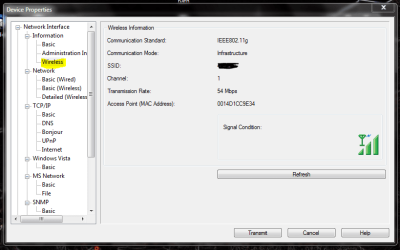
  • Confirmed that the printer is sending a wireless radio signal while in low power mode - it is - and it shows up on the router's "Station List" even though it can't be seen on the network or pinged.
No change in behavior. The printer drops off the network as soon as it goes into low power mode.

So I am focusing on the printer at the moment.
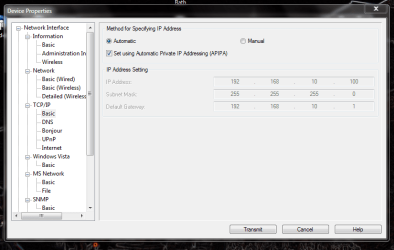
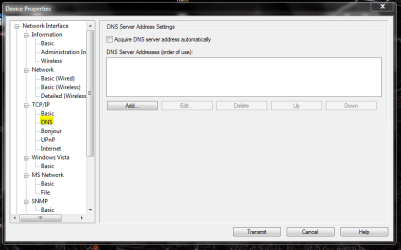
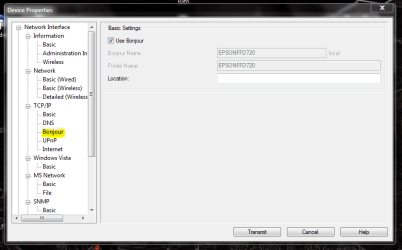
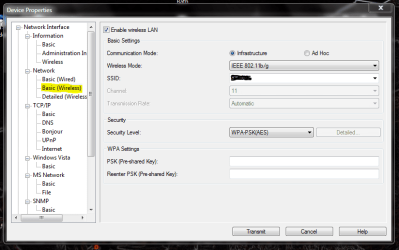
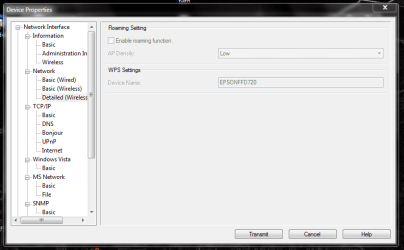
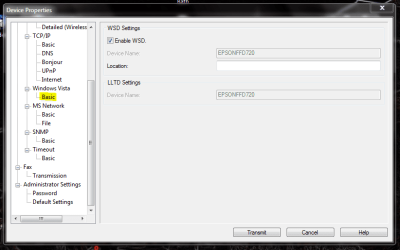
Epson has a utility (EpsonNet) for administrators to configure the printer's network settings. I installed this in order to set a static IP in the first place.

There are some additional settings that I could change if it would make any difference. Anyone care to take a look and tell me what you would suggest?

I plan on re-setting a static IP again. All setting shown here are default with the IP on Auto:
 

Attachments

  • Basic.PNG
    Basic.PNG
    32.6 KB · Views: 62
  • DNS.PNG
    DNS.PNG
    27 KB · Views: 40
  • Bonjour.PNG
    Bonjour.PNG
    26.8 KB · Views: 40
  • Basic (Wireless).PNG
    Basic (Wireless).PNG
    32.7 KB · Views: 40
  • Detailed (Wireless).PNG
    Detailed (Wireless).PNG
    23.7 KB · Views: 38
  • Wireless.PNG
    Wireless.PNG
    27.6 KB · Views: 37
  • Vista Basic.PNG
    Vista Basic.PNG
    25.4 KB · Views: 32

My Computer

Computer type
PC/Desktop
Computer Manufacturer/Model Number
Home Built - Jan 2013
OS
Windows 7 64 Bit Home Premium SP1
CPU
i7-3820
Motherboard
Asus P9X79-PRO - Bios 4608
Memory
GSkill F3-14900CL9Q - 16GB
Graphics Card(s)
EVGA GeForce GTX660 - Driver 352.86
Sound Card
On board Realtek ALC898
Monitor(s) Displays
Acer S271HL
Screen Resolution
1920 x 1080
Hard Drives
#1- Samsung 840 Pro Series
#2- Western Digital WD1002FAEX Sata3 Black
#3- Western Digital WD1002FAEX Sata3 Black
PSU
Corsair CMPSU-850TX-V2 - 850 watt (by Seasonic)
Case
Corsair Obsidian 550D
Cooling
Standard 3 120mm case fans, Cooler Master Hyper 212 EVO
Keyboard
MS KC-0405
Mouse
Intellimouse 5-button
Internet Speed
56 Mbits/Sec (on a good day)
Antivirus
Avast & Malwarebytes
Browser
Firefox
Other Info
Asus DVD - DRW-24B1ST 24X
Issue is because of an update KB2647753
Microsoft released this patch for printer pool
If this has been applied on you computer then remove it. Once done things work fine

This is on Windows 7
 

My Computer

OS
Windows 7
Back
Top