
icepurity8
New member
- Local time
- 12:59 PM
- Messages
- 15
I haven't had this problem, until about a week ago.
I noticed my wireless connection would reset & prompt me for Security Key input every time I reset my laptop.
IPConfig :
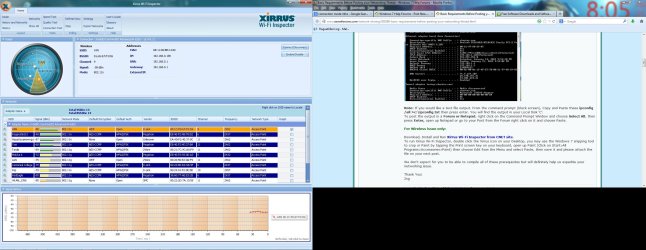
See attached for Xirrus Inspector
edit : I should also point out that I've previously used IOBit's Advance Systemcare 6 pro (and that many users have complained about wireless problems).
I've tried manually resetting Winsock, but doesn't seem to help.
I noticed my wireless connection would reset & prompt me for Security Key input every time I reset my laptop.
IPConfig :
Code:
Windows IP Configuration

   Host Name . . . . . . . . . . . . : Jim
   Primary Dns Suffix  . . . . . . . :
   Node Type . . . . . . . . . . . . : Hybrid
   IP Routing Enabled. . . . . . . . : No
   WINS Proxy Enabled. . . . . . . . : No

Wireless LAN adapter Wireless Network Connection 3:

   Media State . . . . . . . . . . . : Media disconnected
   Connection-specific DNS Suffix  . :
   Description . . . . . . . . . . . : Microsoft Virtual WiFi Miniport Adapter #2
   Physical Address. . . . . . . . . : 08-11-96-BB-14-6D
   DHCP Enabled. . . . . . . . . . . : Yes
   Autoconfiguration Enabled . . . . : Yes

Wireless LAN adapter Wireless Network Connection 2:

   Media State . . . . . . . . . . . : Media disconnected
   Connection-specific DNS Suffix  . :
   Description . . . . . . . . . . . : Microsoft Virtual WiFi Miniport Adapter
   Physical Address. . . . . . . . . : 08-11-96-BB-14-6D
   DHCP Enabled. . . . . . . . . . . : Yes
   Autoconfiguration Enabled . . . . : Yes

Wireless LAN adapter Wireless Network Connection:

   Connection-specific DNS Suffix  . :
   Description . . . . . . . . . . . : Intel(R) Centrino(R) Advanced-N 6205
   Physical Address. . . . . . . . . : 08-11-96-BB-14-6C
   DHCP Enabled. . . . . . . . . . . : Yes
   Autoconfiguration Enabled . . . . : Yes
   Link-local IPv6 Address . . . . . : fe80::2d9e:99a4:d9c8:c66%17(Preferred)
   IPv4 Address. . . . . . . . . . . : 192.168.0.196(Preferred)
   Subnet Mask . . . . . . . . . . . : 255.255.255.0
   Lease Obtained. . . . . . . . . . : October-15-13 7:20:10 PM
   Lease Expires . . . . . . . . . . : October-16-13 7:20:14 PM
   Default Gateway . . . . . . . . . : 192.168.0.1
   DHCP Server . . . . . . . . . . . : 192.168.0.1
   DHCPv6 IAID . . . . . . . . . . . : 201855382
   DHCPv6 Client DUID. . . . . . . . : 00-01-00-01-16-4E-DE-8A-DC-0E-A1-04-85-A6
   DNS Servers . . . . . . . . . . . : 192.168.0.1
   NetBIOS over Tcpip. . . . . . . . : Enabled

Ethernet adapter Local Area Connection:

   Media State . . . . . . . . . . . : Media disconnected
   Connection-specific DNS Suffix  . :
   Description . . . . . . . . . . . : Broadcom NetLink (TM) Gigabit Ethernet
   Physical Address. . . . . . . . . : DC-0E-A1-04-85-A6
   DHCP Enabled. . . . . . . . . . . : Yes
   Autoconfiguration Enabled . . . . : Yes

Tunnel adapter Teredo Tunneling Pseudo-Interface:

   Media State . . . . . . . . . . . : Media disconnected
   Connection-specific DNS Suffix  . :
   Description . . . . . . . . . . . : Teredo Tunneling Pseudo-Interface
   Physical Address. . . . . . . . . : 00-00-00-00-00-00-00-E0
   DHCP Enabled. . . . . . . . . . . : No
   Autoconfiguration Enabled . . . . : Yes

Tunnel adapter isatap.{F477F2DE-EB38-4240-9E90-C9F580080F6B}:

   Media State . . . . . . . . . . . : Media disconnected
   Connection-specific DNS Suffix  . :
   Description . . . . . . . . . . . : Microsoft ISATAP Adapter #3
   Physical Address. . . . . . . . . : 00-00-00-00-00-00-00-E0
   DHCP Enabled. . . . . . . . . . . : No
   Autoconfiguration Enabled . . . . : Yes

Tunnel adapter isatap.{1720B08D-2461-4EB0-8F52-51BEAA17DC33}:

   Media State . . . . . . . . . . . : Media disconnected
   Connection-specific DNS Suffix  . :
   Description . . . . . . . . . . . : Microsoft ISATAP Adapter #4
   Physical Address. . . . . . . . . : 00-00-00-00-00-00-00-E0
   DHCP Enabled. . . . . . . . . . . : No
   Autoconfiguration Enabled . . . . : Yes

Tunnel adapter isatap.{E7CA62C8-1054-468C-9553-576A3AA4A2FF}:

   Media State . . . . . . . . . . . : Media disconnected
   Connection-specific DNS Suffix  . :
   Description . . . . . . . . . . . : Microsoft ISATAP Adapter #5
   Physical Address. . . . . . . . . : 00-00-00-00-00-00-00-E0
   DHCP Enabled. . . . . . . . . . . : No
   Autoconfiguration Enabled . . . . : Yes

Tunnel adapter isatap.{B6655DFB-57B1-496B-ADA6-72CF7637F905}:

   Media State . . . . . . . . . . . : Media disconnected
   Connection-specific DNS Suffix  . :
   Description . . . . . . . . . . . : Microsoft ISATAP Adapter #6
   Physical Address. . . . . . . . . : 00-00-00-00-00-00-00-E0
   DHCP Enabled. . . . . . . . . . . : No
   Autoconfiguration Enabled . . . . : Yes
See attached for Xirrus Inspector
edit : I should also point out that I've previously used IOBit's Advance Systemcare 6 pro (and that many users have complained about wireless problems).
I've tried manually resetting Winsock, but doesn't seem to help.
Attachments
Last edited:
My Computer
- Computer type
- Laptop
- OS
- Windows 7 Home Premium 64bit


