Wireless yes, but no internet

hope68

New member
Local time
2:59 PM
Messages
23
Hi,

I just bought a new Packard Bell computer with Win7 Home Premium 64bit yesterday.

After unpacking and doing all the settings I tried to connect to the internet.

My wireless network was found and everything was OK, but when I started IE it only said "connecting" on the page, and then that I the page cant be displayed.

Tried to disable TCP/IPv6, but no good.

All my other computers and the iPhone dont have a problem going online via this router (Thomson ST585v6).

ipconfig /all gives this:

Windows IP Configuration

Host Name . . . . . . . . . . . . : hope68desktop
Primary Dns Suffix . . . . . . . :
Node Type . . . . . . . . . . . . : Hybrid
IP Routing Enabled. . . . . . . . : No
WINS Proxy Enabled. . . . . . . . : No
DNS Suffix Search List. . . . . . : lan

Wireless LAN adapter Wireless Network Connection:

Connection-specific DNS Suffix . : lan
Description . . . . . . . . . . . : Ralink 802.11n Wireless LAN Card
Physical Address. . . . . . . . . : 00-17-C4-B6-76-5F
DHCP Enabled. . . . . . . . . . . : Yes
Autoconfiguration Enabled . . . . : Yes
IPv4 Address. . . . . . . . . . . : 192.168.1.65(Preferred)
Subnet Mask . . . . . . . . . . . : 255.255.255.0
Lease Obtained. . . . . . . . . . : 10 November 2009 17:46:15
Lease Expires . . . . . . . . . . : 11 November 2009 18:18:03
Default Gateway . . . . . . . . . : 192.168.1.254
DHCP Server . . . . . . . . . . . : 10.0.0.138
DNS Servers . . . . . . . . . . . : 10.0.0.138
NetBIOS over Tcpip. . . . . . . . : Enabled

Ethernet adapter Local Area Connection:

Media State . . . . . . . . . . . : Media disconnected
Connection-specific DNS Suffix . :
Description . . . . . . . . . . . : Realtek PCIe GBE Family Controller
Physical Address. . . . . . . . . : 00-26-9E-37-C7-35
DHCP Enabled. . . . . . . . . . . : Yes
Autoconfiguration Enabled . . . . : Yes

Tunnel adapter isatap.lan:

Media State . . . . . . . . . . . : Media disconnected
Connection-specific DNS Suffix . : lan
Description . . . . . . . . . . . : Microsoft ISATAP Adapter
Physical Address. . . . . . . . . : 00-00-00-00-00-00-00-E0
DHCP Enabled. . . . . . . . . . . : No
Autoconfiguration Enabled . . . . : Yes

Tunnel adapter 6TO4 Adapter:

Media State . . . . . . . . . . . : Media disconnected
Connection-specific DNS Suffix . :
Description . . . . . . . . . . . : Microsoft 6to4 Adapter
Physical Address. . . . . . . . . : 00-00-00-00-00-00-00-E0
DHCP Enabled. . . . . . . . . . . : No
Autoconfiguration Enabled . . . . : Yes

Tunnel adapter Local Area Connection* 9:

Media State . . . . . . . . . . . : Media disconnected
Connection-specific DNS Suffix . :
Description . . . . . . . . . . . : Microsoft 6to4 Adapter #2
Physical Address. . . . . . . . . : 00-00-00-00-00-00-00-E0
DHCP Enabled. . . . . . . . . . . : No
Autoconfiguration Enabled . . . . : Yes

Tunnel adapter Reusable Microsoft 6To4 Adapter:

Media State . . . . . . . . . . . : Media disconnected
Connection-specific DNS Suffix . :
Description . . . . . . . . . . . : Microsoft 6to4 Adapter #3
Physical Address. . . . . . . . . : 00-00-00-00-00-00-00-E0
DHCP Enabled. . . . . . . . . . . : No
Autoconfiguration Enabled . . . . : Yes

Tried also to contact AOL, but they connected me from one departement to the next and so on. Same procedure with Comet, where I bought this computer.

Hope someone can help me :)

cu Peter
 

My Computer

Computer Manufacturer/Model Number
Packard Bell OneTwo M3700
OS
Win 7 Home Premium 64bit
CPU
Pentium Dual Core
Memory
4GB RAM
It looks like your router is assigning it an address but it appears that the router is delivering any internet traffic to the system...
 

My Computer

Computer Manufacturer/Model Number
Compal JFT02 (Custom Build Laptop)
OS
Windows 7 Home Premium x64 - Mac OS X 10.6.4 x64
CPU
Intel Core 2 Duo T9300 2.5 GHz
Motherboard
JFT02
Memory
4GB Kingston DDR2-800
Graphics Card(s)
NVIDIA Geforce 8600M GT (512MB Model)
Sound Card
Realtek HD Audio
Monitor(s) Displays
WUXGA Standard Laptop Display
Screen Resolution
1680*1050
Hard Drives
Toshiba 320GB 5400RPM Laptop HD
PSU
Standard Laptop Power Supply
Case
Standard Laptop Case
Cooling
Standard Laptop Cooling
Keyboard
Standard Laptop 105 Key-Keyboard
Mouse
Synaptics Touchpad
Internet Speed
Verizion Online DSL 3360/864 kbs (dl/up)
Thx - Which means?

cu Peter
 

My Computer

Computer Manufacturer/Model Number
Packard Bell OneTwo M3700
OS
Win 7 Home Premium 64bit
CPU
Pentium Dual Core
Memory
4GB RAM
Are you part of a home, public, or work network?

Do an ipconfig /all from one of your other computers and compare the results. Let us know if there are any differences.
 

My Computer

Computer Manufacturer/Model Number
Dell XPS 15 L502x
OS
Windows 7 Ultimate x64 SP1
CPU
Core i7-2670QM
Memory
8GB DDR3 PC3-10600
Graphics Card(s)
Intel HD Graphics 3000 + GeForce GT 540M
Screen Resolution
1920x1080
Hard Drives
1TB 5400RPM Seagate
Home network. Two computers and the iPhone has access to the router.

Thats the ipconfig from the old computer:

Windows IP Configuration

Host Name . . . . . . . . . . . . : hope68
Primary Dns Suffix . . . . . . . :
Node Type . . . . . . . . . . . . : Unknown
IP Routing Enabled. . . . . . . . : No
WINS Proxy Enabled. . . . . . . . : No
DNS Suffix Search List. . . . . . : lan

Ethernet adapter Local Area Connection:

Media State . . . . . . . . . . . : Media disconnected
Description . . . . . . . . . . . : Realtek RTL8139/810x Family Fast Eth
ernet NIC
Physical Address. . . . . . . . . : 00-13-D3-B1-4C-94

Ethernet adapter Wireless Network Connection 3:

Connection-specific DNS Suffix . : lan
Description . . . . . . . . . . . : Belkin F5D8053 N Wireless USB Adapte
r
Physical Address. . . . . . . . . : 00-1C-DF-6A-37-16
Dhcp Enabled. . . . . . . . . . . : Yes
Autoconfiguration Enabled . . . . : Yes
IP Address. . . . . . . . . . . . : 192.168.1.64
Subnet Mask . . . . . . . . . . . : 255.255.255.0
Default Gateway . . . . . . . . . : 192.168.1.254
DHCP Server . . . . . . . . . . . : 10.0.0.138
DNS Servers . . . . . . . . . . . : 10.0.0.138
Lease Obtained. . . . . . . . . . : 10 November 2009 18:17:57
Lease Expires . . . . . . . . . . : 11 November 2009 18:17:57

cu Peter
 

My Computer

Computer Manufacturer/Model Number
Packard Bell OneTwo M3700
OS
Win 7 Home Premium 64bit
CPU
Pentium Dual Core
Memory
4GB RAM
Just like I said above it appears that your router isn't giving the new computer any interent traffic...

Try to power-cycle the router and the new computer first. If that doesn't work than update the wireless drivers for the wireless card
 

My Computer

Computer Manufacturer/Model Number
Compal JFT02 (Custom Build Laptop)
OS
Windows 7 Home Premium x64 - Mac OS X 10.6.4 x64
CPU
Intel Core 2 Duo T9300 2.5 GHz
Motherboard
JFT02
Memory
4GB Kingston DDR2-800
Graphics Card(s)
NVIDIA Geforce 8600M GT (512MB Model)
Sound Card
Realtek HD Audio
Monitor(s) Displays
WUXGA Standard Laptop Display
Screen Resolution
1680*1050
Hard Drives
Toshiba 320GB 5400RPM Laptop HD
PSU
Standard Laptop Power Supply
Case
Standard Laptop Case
Cooling
Standard Laptop Cooling
Keyboard
Standard Laptop 105 Key-Keyboard
Mouse
Synaptics Touchpad
Internet Speed
Verizion Online DSL 3360/864 kbs (dl/up)
You should also try connecting via ethernet, to see if it is just a wireless issue.
 

My Computer

Computer Manufacturer/Model Number
Dell XPS 15 L502x
OS
Windows 7 Ultimate x64 SP1
CPU
Core i7-2670QM
Memory
8GB DDR3 PC3-10600
Graphics Card(s)
Intel HD Graphics 3000 + GeForce GT 540M
Screen Resolution
1920x1080
Hard Drives
1TB 5400RPM Seagate
Power cycle the router means that I disconnect it from the plug? If yes, then I tried this already several times.:(

Driver for the Ralink card should be the newest, did a search via google, but no newer one came up.

@kegobeer:
I tried it with the ethernet cable as well this morning - no luck.

In the basic network information it says that everything is OK.

In the "Wireless Network Connetcion Status" ist says:

IPv4 Connectivity: ................ Internet
IPv6 Connectivity: ................ no network access
Media State: ....................... Enabled
SSID: ................................ hope68wlan
Speed: .............................. 54 Mbps
And the signal quiality is excellent.

And in the Activity it shows that bytes are sending and receiving.

cu Peter
 

My Computer

Computer Manufacturer/Model Number
Packard Bell OneTwo M3700
OS
Win 7 Home Premium 64bit
CPU
Pentium Dual Core
Memory
4GB RAM
Check mac address filters on router that may allow or deny internet access. Turn any filters found completely off, to test.

Check task manager for mdsnresponder.exe.

If you have that, it means Bonjour service. Google for how to effectively remove and let us know if it helped. If that doesn't we can reset the TCP/IP stack.

Have a look at hosts file. Only entry should be for localhost @ 127.0.0.1, unless you personally edited it.
C:\Windows\System32\drivers\etc\hosts
 

My Computer

Computer Manufacturer/Model Number
self built
OS
7600.20510 x86
CPU
P4 550 3.4 GHz HT running at 3.5 GHz
Motherboard
MSI PM8M3-V (MS-7211 v1.x) Micro-ATX mainboard
Memory
OCZ 2 GB(2x1GB) DDR400mHz running @ 414 mHz
Graphics Card(s)
HIS Radeon HD 3850 IceQ 3 Turbo HDMI Dual DL-DVI AGP
Sound Card
MOTU Traveler firewire studio interface 192 kHz 24 bit
Monitor(s) Displays
22" widescreen Acer X223W LCD, 17" Compaq P75 CRT
Screen Resolution
1680x1050 and 1280x1024
Hard Drives
SATA I x2 WD, 400 GB and 120 GB, SATA 2 WD Caviar Black 1 TB
PSU
350W generic
Case
Cybertronpc, it glows blue
Cooling
stock cpu fan, Ice-Q 3 gpu and system, many case fans
Keyboard
Logitch Classical Keyboard 200
Mouse
Logitech Mediaplay cordless
Internet Speed
1792/448 kbits/sec
Other Info
SATA II PCI fake RAID adapter, 1 GB Readyboost, original ATI Remote Wonder (even works with WMC perfectly), Logitech Rumblepad 2 game controller x2
Check mac address filters on router that may allow or deny internet access. Turn any filters found completely off, to test.

I'm a noob at this - so I checked on google and hope that I found the right way to check the filters. But everything was enabled, if I did it the right way.

Check task manager for mdsnresponder.exe.

If you have that, it means Bonjour service. Google for how to effectively remove and let us know if it helped. If that doesn't we can reset the TCP/IP stack.

No such a file in the task manager.

Have a look at hosts file. Only entry should be for localhost @ 127.0.0.1, unless you personally edited it.
C:\Windows\System32\drivers\etc\hosts

There are two lines when I open the hosts-file:
127.0.0.1 localhost
::1 localhost

I didnt edit this file (never went that deep into my computer...)
On the old computer there is only the first line in this file.

cu Peter
 

My Computer

Computer Manufacturer/Model Number
Packard Bell OneTwo M3700
OS
Win 7 Home Premium 64bit
CPU
Pentium Dual Core
Memory
4GB RAM
"All my other computers and the iPhone dont have a problem going online via this router (Thomson ST585v6)."

Wow this is interesting. Have you tried static IP method? copy your IP settings from the machine that worked (their ipconfig /all).
 

My Computer

Computer Manufacturer/Model Number
Lenovo ThinkPad T60
OS
Windows 7 Ultimate 64Bit
CPU
GenuineIntel Intel(R) Core(TM) DuoCore T2400 @ 1.83GHz
Motherboard
Intel(R) 82801G (ICH7 Family)
Memory
2.00 GB
Graphics Card(s)
Mobile Intel(R) 945 Express Chipset
Sound Card
SoundMAX Integrated Digital HD Audio
Monitor(s) Displays
ThinkPad Display
Screen Resolution
1400x1050
Hard Drives
100Gb SATA
Keyboard
Standard Keyboard
Mouse
HID-compliant Mouse
Internet Speed
Cable Broadband - 54Mbps
Other Info
Intel(R) PRO/1000 PL Network Connection
11a/b/g Wireless LAN Mini PCI Express Adapter
Sorry for the question - how do you do that?:o

cu Peter
 

My Computer

Computer Manufacturer/Model Number
Packard Bell OneTwo M3700
OS
Win 7 Home Premium 64bit
CPU
Pentium Dual Core
Memory
4GB RAM
Log onto the machine that works, and provide the ipconfig /all details.
 

My Computer

Computer Manufacturer/Model Number
Lenovo ThinkPad T60
OS
Windows 7 Ultimate 64Bit
CPU
GenuineIntel Intel(R) Core(TM) DuoCore T2400 @ 1.83GHz
Motherboard
Intel(R) 82801G (ICH7 Family)
Memory
2.00 GB
Graphics Card(s)
Mobile Intel(R) 945 Express Chipset
Sound Card
SoundMAX Integrated Digital HD Audio
Monitor(s) Displays
ThinkPad Display
Screen Resolution
1400x1050
Hard Drives
100Gb SATA
Keyboard
Standard Keyboard
Mouse
HID-compliant Mouse
Internet Speed
Cable Broadband - 54Mbps
Other Info
Intel(R) PRO/1000 PL Network Connection
11a/b/g Wireless LAN Mini PCI Express Adapter
Right - found an article how to change to static :)

But shall I change TCP/IPv6 or TCP/IPv4 to static?

The ipconfig /all details from the working machine are still the same as posted previous except the lease expire date.

cu Peter
 

My Computer

Computer Manufacturer/Model Number
Packard Bell OneTwo M3700
OS
Win 7 Home Premium 64bit
CPU
Pentium Dual Core
Memory
4GB RAM
So these are the exact details from the working machine?

"Ethernet adapter Wireless Network Connection 3:

Connection-specific DNS Suffix . : lan
Description . . . . . . . . . . . : Belkin F5D8053 N Wireless USB Adapte
r
Physical Address. . . . . . . . . : 00-1C-DF-6A-37-16
Dhcp Enabled. . . . . . . . . . . : Yes
Autoconfiguration Enabled . . . . : Yes
IP Address. . . . . . . . . . . . : 192.168.1.64
Subnet Mask . . . . . . . . . . . : 255.255.255.0
Default Gateway . . . . . . . . . : 192.168.1.254
DHCP Server . . . . . . . . . . . : 10.0.0.138
DNS Servers . . . . . . . . . . . : 10.0.0.138
"

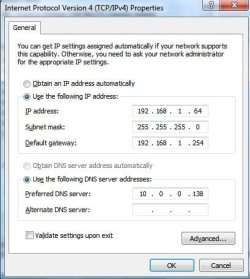
Use these and follow the article and use ipv4. Disable ipv6.

Ps, i find those figures a little weird.
 

My Computer

Computer Manufacturer/Model Number
Lenovo ThinkPad T60
OS
Windows 7 Ultimate 64Bit
CPU
GenuineIntel Intel(R) Core(TM) DuoCore T2400 @ 1.83GHz
Motherboard
Intel(R) 82801G (ICH7 Family)
Memory
2.00 GB
Graphics Card(s)
Mobile Intel(R) 945 Express Chipset
Sound Card
SoundMAX Integrated Digital HD Audio
Monitor(s) Displays
ThinkPad Display
Screen Resolution
1400x1050
Hard Drives
100Gb SATA
Keyboard
Standard Keyboard
Mouse
HID-compliant Mouse
Internet Speed
Cable Broadband - 54Mbps
Other Info
Intel(R) PRO/1000 PL Network Connection
11a/b/g Wireless LAN Mini PCI Express Adapter
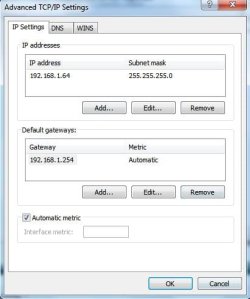
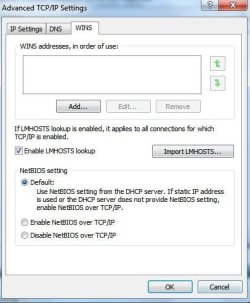
Here is what it should look like based on your details.

You may need to shutdown the other machine if it has 192.168.1.64 as IP. No two mahines can use the one IP at the same time.
 

Attachments

  • Noname.jpg
    Noname.jpg
    30 KB · Views: 9
  • Noname1.jpg
    Noname1.jpg
    23.8 KB · Views: 2
  • Noname2.jpg
    Noname2.jpg
    31.7 KB · Views: 3
  • Noname4.jpg
    Noname4.jpg
    28.7 KB · Views: 1

My Computer

Computer Manufacturer/Model Number
Lenovo ThinkPad T60
OS
Windows 7 Ultimate 64Bit
CPU
GenuineIntel Intel(R) Core(TM) DuoCore T2400 @ 1.83GHz
Motherboard
Intel(R) 82801G (ICH7 Family)
Memory
2.00 GB
Graphics Card(s)
Mobile Intel(R) 945 Express Chipset
Sound Card
SoundMAX Integrated Digital HD Audio
Monitor(s) Displays
ThinkPad Display
Screen Resolution
1400x1050
Hard Drives
100Gb SATA
Keyboard
Standard Keyboard
Mouse
HID-compliant Mouse
Internet Speed
Cable Broadband - 54Mbps
Other Info
Intel(R) PRO/1000 PL Network Connection
11a/b/g Wireless LAN Mini PCI Express Adapter
Ps, i find those figures a little weird.

why?

Yes, this are the ipconfig /all details - here again.

Windows IP Configuration

Host Name . . . . . . . . . . . . : hope68
Primary Dns Suffix . . . . . . . :
Node Type . . . . . . . . . . . . : Unknown
IP Routing Enabled. . . . . . . . : No
WINS Proxy Enabled. . . . . . . . : No
DNS Suffix Search List. . . . . . : lan

Ethernet adapter Local Area Connection:

Media State . . . . . . . . . . . : Media disconnected
Description . . . . . . . . . . . : Realtek RTL8139/810x Family Fast Eth
ernet NIC
Physical Address. . . . . . . . . : 00-13-D3-B1-4C-94

Ethernet adapter Wireless Network Connection 3:

Connection-specific DNS Suffix . : lan
Description . . . . . . . . . . . : Belkin F5D8053 N Wireless USB Adapte
r
Physical Address. . . . . . . . . : 00-1C-DF-6A-37-16
Dhcp Enabled. . . . . . . . . . . : Yes
Autoconfiguration Enabled . . . . : Yes
IP Address. . . . . . . . . . . . : 192.168.1.64
Subnet Mask . . . . . . . . . . . : 255.255.255.0
Default Gateway . . . . . . . . . : 192.168.1.254
DHCP Server . . . . . . . . . . . : 10.0.0.138
DNS Servers . . . . . . . . . . . : 10.0.0.138
Lease Obtained. . . . . . . . . . : 11 November 2009 11:39:07
Lease Expires . . . . . . . . . . : 12 November 2009 11:39:07

I followed the article but then I got a message that Windows has detected an IP address conflict, another computer in this network has the same IP address. I shall contact the network administrator for help resolving this issue. And more details are available in the Win System event log.

cu Peter
 

My Computer

Computer Manufacturer/Model Number
Packard Bell OneTwo M3700
OS
Win 7 Home Premium 64bit
CPU
Pentium Dual Core
Memory
4GB RAM
On the other machine, in command prompt do a

ipconfig /release

then

ipconfig /renew

Check after that it's ip is no longer 192.168.1.64.
 

My Computer

Computer Manufacturer/Model Number
Lenovo ThinkPad T60
OS
Windows 7 Ultimate 64Bit
CPU
GenuineIntel Intel(R) Core(TM) DuoCore T2400 @ 1.83GHz
Motherboard
Intel(R) 82801G (ICH7 Family)
Memory
2.00 GB
Graphics Card(s)
Mobile Intel(R) 945 Express Chipset
Sound Card
SoundMAX Integrated Digital HD Audio
Monitor(s) Displays
ThinkPad Display
Screen Resolution
1400x1050
Hard Drives
100Gb SATA
Keyboard
Standard Keyboard
Mouse
HID-compliant Mouse
Internet Speed
Cable Broadband - 54Mbps
Other Info
Intel(R) PRO/1000 PL Network Connection
11a/b/g Wireless LAN Mini PCI Express Adapter
done - but the IP-address is still the same:confused:

And on the new computer the connection between wlan and Internet which showed before as OK is now crossed out with a red cross (in the Network and Sharing Center).
 

My Computer

Computer Manufacturer/Model Number
Packard Bell OneTwo M3700
OS
Win 7 Home Premium 64bit
CPU
Pentium Dual Core
Memory
4GB RAM
Did u check the working machine is no longer having 192.168.1.64?

You may need to restart the machine u have just made static ip.
 

My Computer

Computer Manufacturer/Model Number
Lenovo ThinkPad T60
OS
Windows 7 Ultimate 64Bit
CPU
GenuineIntel Intel(R) Core(TM) DuoCore T2400 @ 1.83GHz
Motherboard
Intel(R) 82801G (ICH7 Family)
Memory
2.00 GB
Graphics Card(s)
Mobile Intel(R) 945 Express Chipset
Sound Card
SoundMAX Integrated Digital HD Audio
Monitor(s) Displays
ThinkPad Display
Screen Resolution
1400x1050
Hard Drives
100Gb SATA
Keyboard
Standard Keyboard
Mouse
HID-compliant Mouse
Internet Speed
Cable Broadband - 54Mbps
Other Info
Intel(R) PRO/1000 PL Network Connection
11a/b/g Wireless LAN Mini PCI Express Adapter
Back
Top