WMP12 discussion

Firestrider

New member
Power User
VIP
Local time
2:39 PM
Messages
333
Is M$ going to support .PLS in the future? Right now I'm using Open PLS in WMP program to get this functionality but this program is missing a lot of features like track listing, station browsing, and often times the stream will stutter or completely cut out.

Is anyone fond of the new now playing window? I don't get why they had to make it open in a new window. Is there more functionality with this method or what?

I like all the added codecs and such but not the new UI! What happened to the rip tab?

Will this ever come in 64-bit? Ripping, burning, decoding, and encoding might be faster if it was.

There seems to be an audio/video pausing function when you open a new file, how exactly can you control this and see what files are "in pause"?
 

My Computer

Computer Manufacturer/Model Number
Intel WBIBX10J
OS
Linux (Debian, Android)
CPU
Intel Core i7 860
Motherboard
Intel DP55WB
Memory
2x 2GB Kingston DDR3-1333
Graphics Card(s)
AMD Radeon HD 5750
Sound Card
Realtek ALC888
Monitor(s) Displays
2x Dell Inc. E248WFP
Screen Resolution
3840x1200
Hard Drives
Intel X25-V
Samsung HD103SJ
PSU
Corsair CX400
Case
Silverstone GD05
Cooling
Stock
Keyboard
Dell Inc. Bluetooth Wireless
Internet Speed
30 Mbps
Does anyone know what happened to the equalizer? I can't seem to find it in Windows Media Player 12.
 

My Computer

Computer Manufacturer/Model Number
Intel WBIBX10J
OS
Linux (Debian, Android)
CPU
Intel Core i7 860
Motherboard
Intel DP55WB
Memory
2x 2GB Kingston DDR3-1333
Graphics Card(s)
AMD Radeon HD 5750
Sound Card
Realtek ALC888
Monitor(s) Displays
2x Dell Inc. E248WFP
Screen Resolution
3840x1200
Hard Drives
Intel X25-V
Samsung HD103SJ
PSU
Corsair CX400
Case
Silverstone GD05
Cooling
Stock
Keyboard
Dell Inc. Bluetooth Wireless
Internet Speed
30 Mbps
Does anyone know what happened to the equalizer? I can't seem to find it in Windows Media Player 12.

It seems you're double posting. Double posting is usually against forum rules and is a general bother. It also proves that you're PC illiterate, as you don't know how to locate an 'edit' button. Unless posts were deleted, it just looks pointless to me.
However, it does seem the forum doesn't have anything specific towards double posting.

What you're asking seems very unlikely. Microsoft rarely ever goes third-party, hence why WMA and WMV are the easiest formats to use in WMP.
From what I can see, there is no 64-bit build of Windows Media Player... some would like to prove otherwise, but if it were that easy I would have one on my own PC by now.


My Computer

Computer type
PC/Desktop
OS
Windows 8 Pro x64
CPU
i7 3820 @ 4.68GHz
Motherboard
ASUS Rampage IV Extreme RoG BF3
Memory
F3-12800CL9D-8GBXL (32GB)
Graphics Card(s)
GTX 480 SLI
Sound Card
Auzentech X-Fi HomeTheater HD
Monitor(s) Displays
Sony 32V5500
Screen Resolution
1920 x 1080
Hard Drives
LSI MR9260-4i (RAID10):
Toshiba DT01ACA300 x 4
iaStorA:
OCZ Vertex Enterprise 120GB
ST3500320AS 500GB
Intel 520 Series 120GB
PSU
OCZ ZX 1250W
Case
HAF X
Cooling
H80
Keyboard
Cyborg V.7
Mouse
Razer Lachesis 3.5G 5600dpi
Internet Speed
23296kbps ds / 812kbps us ADSL2+
Browser
Mozilla/5.0 (Windows NT 6.3; Win64; x64; rv:32.0) Gecko/2010
Other Info
AverMedia C127 Game Broadcaster HD
Whoa, sorry man, my first post was a day ago... it is not like I posted back to back.

Anyways, if you can find the equalizer in WMP12 I would be grateful.
 

My Computer

Computer Manufacturer/Model Number
Intel WBIBX10J
OS
Linux (Debian, Android)
CPU
Intel Core i7 860
Motherboard
Intel DP55WB
Memory
2x 2GB Kingston DDR3-1333
Graphics Card(s)
AMD Radeon HD 5750
Sound Card
Realtek ALC888
Monitor(s) Displays
2x Dell Inc. E248WFP
Screen Resolution
3840x1200
Hard Drives
Intel X25-V
Samsung HD103SJ
PSU
Corsair CX400
Case
Silverstone GD05
Cooling
Stock
Keyboard
Dell Inc. Bluetooth Wireless
Internet Speed
30 Mbps
Whoa, sorry man, my first post was a day ago... it is not like I posted back to back.

Anyways, if you can find the equalizer in WMP12 I would be grateful.

That's okay.

Well they must have left it out, but according to a guide I read, you can access the equalizer by changing the skin to another and using the GUI-based skin's equalizer. The example was the 'Revert' skin.
Never mind that... upon doing a quick search, I found this topic: http://www.sevenforums.com/media-center/1928-how-set-graphic-equilizer-wmp12.html
 

My Computer

Computer type
PC/Desktop
OS
Windows 8 Pro x64
CPU
i7 3820 @ 4.68GHz
Motherboard
ASUS Rampage IV Extreme RoG BF3
Memory
F3-12800CL9D-8GBXL (32GB)
Graphics Card(s)
GTX 480 SLI
Sound Card
Auzentech X-Fi HomeTheater HD
Monitor(s) Displays
Sony 32V5500
Screen Resolution
1920 x 1080
Hard Drives
LSI MR9260-4i (RAID10):
Toshiba DT01ACA300 x 4
iaStorA:
OCZ Vertex Enterprise 120GB
ST3500320AS 500GB
Intel 520 Series 120GB
PSU
OCZ ZX 1250W
Case
HAF X
Cooling
H80
Keyboard
Cyborg V.7
Mouse
Razer Lachesis 3.5G 5600dpi
Internet Speed
23296kbps ds / 812kbps us ADSL2+
Browser
Mozilla/5.0 (Windows NT 6.3; Win64; x64; rv:32.0) Gecko/2010
Other Info
AverMedia C127 Game Broadcaster HD
Accessing the Equalizer

The equalizer is there but a little hard to find. You need to open WMP and switch to now playing mode which is done by clicking on the four sqaure (bottom right corner of WMP). Then click on show list top right corner. Then click the right of the 2 buttons that apprear (the one with the tick in it) and select enhancement from the pop up list.

Let me know if you need some screen shots if you are having trouble doing.

Hope this helps.
 

My Computer

OS
Windows Se7en Ultimate x64
CPU
AMD Athlon Phenom II 550 (Dual Core at the moment)
Motherboard
DFI LPJR790GX-M2RS
Memory
4GB OCZ reaper DDR2 PC8500 1066
Graphics Card(s)
CrosssFire 2 x Sapphire RADEON HD3650 (512 MB GDDR3)
Sound Card
Built-in
Monitor(s) Displays
Samsung LE-40B551 40 in. HDTV, HP w2007v, Elo Touchscreen
Screen Resolution
1920 x 1080 pixels
Hard Drives
OCZ Agility Series 30GB SATA II 2.5" Solid State Drive
Samsung Spinpoint F3 1TB SATA II
Samsung Spinpoint F1 500GB SATA II
Western Digital Caviar 500GB SATA II
PSU
OCZ 600W StealthXStream
Case
Antec P180 Mini
Cooling
Scythe Ninja Copper Cooler 5th Anniversary Limited Edition
Keyboard
Cordless Desktop® EX 90
Mouse
Cordless Desktop® EX 90
Internet Speed
Hamster-in-a-wheel
Other Info
WinTV-NOVA-T PCI
Altec Lansing ACS56
However, it does seem the forum doesn't have anything specific towards double posting.

What you're asking seems very unlikely. Microsoft rarely ever goes third-party, hence why WMA and WMV are the easiest formats to use in WMP.
From what I can see, there is no 64-bit build of Windows Media Player... some would like to prove otherwise, but if it were that easy I would have one on my own PC by now.


LuzTeTT,

Here you go...there is a 64 bit version of wmp12 in Seven x64 Beta and as far as I know it has always been there in Seven. I also have WMP 64 bit in Vista x64 and the quality is far better, being able to produce studio quality sound as opposed to DVD through WMP.

If you go into C:\Program Files\Window Media Player you will find it. MS installs 2 versions x86 and x64. You will also see WMP in C:\Program Files (x86)\Window Media Player
 
Last edited:

My Computer

OS
Windows Se7en Ultimate x64
CPU
AMD Athlon Phenom II 550 (Dual Core at the moment)
Motherboard
DFI LPJR790GX-M2RS
Memory
4GB OCZ reaper DDR2 PC8500 1066
Graphics Card(s)
CrosssFire 2 x Sapphire RADEON HD3650 (512 MB GDDR3)
Sound Card
Built-in
Monitor(s) Displays
Samsung LE-40B551 40 in. HDTV, HP w2007v, Elo Touchscreen
Screen Resolution
1920 x 1080 pixels
Hard Drives
OCZ Agility Series 30GB SATA II 2.5" Solid State Drive
Samsung Spinpoint F3 1TB SATA II
Samsung Spinpoint F1 500GB SATA II
Western Digital Caviar 500GB SATA II
PSU
OCZ 600W StealthXStream
Case
Antec P180 Mini
Cooling
Scythe Ninja Copper Cooler 5th Anniversary Limited Edition
Keyboard
Cordless Desktop® EX 90
Mouse
Cordless Desktop® EX 90
Internet Speed
Hamster-in-a-wheel
Other Info
WinTV-NOVA-T PCI
Altec Lansing ACS56
Hi,

When I Pin WMP 12 x64 to the taskbar, I have 2 icons for WMP. Does anybody has the the same problem?
WMP x86 does only have one icon
 

My Computer

OS
Windows 7 Ultimate x64 RC
CPU
Intel Core 2 Duo E6600
Motherboard
Asus P5W DH Deluxe
Memory
GEIL 4x1024 DDR2 800 MHz
Graphics Card(s)
nVidia Geforce 8800 320 GTS
Screen Resolution
1680 x 1050
Hard Drives
Samsung Spinpoint HD103UJ
Hi,

When I Pin WMP 12 x64 to the taskbar, I have 2 icons for WMP. Does anybody has the the same problem?
WMP x86 does only have one icon

Yes, by default the x86 version is pinned. Just remove them both then re-pin the x64 bit icon.
 

My Computer

OS
Windows Se7en Ultimate x64
CPU
AMD Athlon Phenom II 550 (Dual Core at the moment)
Motherboard
DFI LPJR790GX-M2RS
Memory
4GB OCZ reaper DDR2 PC8500 1066
Graphics Card(s)
CrosssFire 2 x Sapphire RADEON HD3650 (512 MB GDDR3)
Sound Card
Built-in
Monitor(s) Displays
Samsung LE-40B551 40 in. HDTV, HP w2007v, Elo Touchscreen
Screen Resolution
1920 x 1080 pixels
Hard Drives
OCZ Agility Series 30GB SATA II 2.5" Solid State Drive
Samsung Spinpoint F3 1TB SATA II
Samsung Spinpoint F1 500GB SATA II
Western Digital Caviar 500GB SATA II
PSU
OCZ 600W StealthXStream
Case
Antec P180 Mini
Cooling
Scythe Ninja Copper Cooler 5th Anniversary Limited Edition
Keyboard
Cordless Desktop® EX 90
Mouse
Cordless Desktop® EX 90
Internet Speed
Hamster-in-a-wheel
Other Info
WinTV-NOVA-T PCI
Altec Lansing ACS56
I have already unpinned the icon for the x86 version. So there was no WMP icon in the taskbar anymore. Then I started WMP 12 x64 (one WMP icon in Taskbar), rightclicked on it, chose pin to taskbar and then there were two icons.
 

My Computer

OS
Windows 7 Ultimate x64 RC
CPU
Intel Core 2 Duo E6600
Motherboard
Asus P5W DH Deluxe
Memory
GEIL 4x1024 DDR2 800 MHz
Graphics Card(s)
nVidia Geforce 8800 320 GTS
Screen Resolution
1680 x 1050
Hard Drives
Samsung Spinpoint HD103UJ
I have already unpinned the icon for the x86 version. So there was no WMP icon in the taskbar anymore. Then I started WMP 12 x64 (one WMP icon in Taskbar), rightclicked on it, chose pin to taskbar and then there were two icons.

Yep that's right, 1 for the pinned program and 1 for the instance of the program when it is running. If you right click the new instance of the icon you should have some 'hot jump' options or whatever is the ms term they use.
 

My Computer

OS
Windows Se7en Ultimate x64
CPU
AMD Athlon Phenom II 550 (Dual Core at the moment)
Motherboard
DFI LPJR790GX-M2RS
Memory
4GB OCZ reaper DDR2 PC8500 1066
Graphics Card(s)
CrosssFire 2 x Sapphire RADEON HD3650 (512 MB GDDR3)
Sound Card
Built-in
Monitor(s) Displays
Samsung LE-40B551 40 in. HDTV, HP w2007v, Elo Touchscreen
Screen Resolution
1920 x 1080 pixels
Hard Drives
OCZ Agility Series 30GB SATA II 2.5" Solid State Drive
Samsung Spinpoint F3 1TB SATA II
Samsung Spinpoint F1 500GB SATA II
Western Digital Caviar 500GB SATA II
PSU
OCZ 600W StealthXStream
Case
Antec P180 Mini
Cooling
Scythe Ninja Copper Cooler 5th Anniversary Limited Edition
Keyboard
Cordless Desktop® EX 90
Mouse
Cordless Desktop® EX 90
Internet Speed
Hamster-in-a-wheel
Other Info
WinTV-NOVA-T PCI
Altec Lansing ACS56
But thats not the way its supposed to be. Other programs like IE, Firefox, WMP x86, etc. have always only one icon
 

My Computer

OS
Windows 7 Ultimate x64 RC
CPU
Intel Core 2 Duo E6600
Motherboard
Asus P5W DH Deluxe
Memory
GEIL 4x1024 DDR2 800 MHz
Graphics Card(s)
nVidia Geforce 8800 320 GTS
Screen Resolution
1680 x 1050
Hard Drives
Samsung Spinpoint HD103UJ
Jump To

How do you incorporate jump to functionality with just one icon?

edit: I can see how and yes it must be an error please post MS using your feedback
 
Last edited:

My Computer

OS
Windows Se7en Ultimate x64
CPU
AMD Athlon Phenom II 550 (Dual Core at the moment)
Motherboard
DFI LPJR790GX-M2RS
Memory
4GB OCZ reaper DDR2 PC8500 1066
Graphics Card(s)
CrosssFire 2 x Sapphire RADEON HD3650 (512 MB GDDR3)
Sound Card
Built-in
Monitor(s) Displays
Samsung LE-40B551 40 in. HDTV, HP w2007v, Elo Touchscreen
Screen Resolution
1920 x 1080 pixels
Hard Drives
OCZ Agility Series 30GB SATA II 2.5" Solid State Drive
Samsung Spinpoint F3 1TB SATA II
Samsung Spinpoint F1 500GB SATA II
Western Digital Caviar 500GB SATA II
PSU
OCZ 600W StealthXStream
Case
Antec P180 Mini
Cooling
Scythe Ninja Copper Cooler 5th Anniversary Limited Edition
Keyboard
Cordless Desktop® EX 90
Mouse
Cordless Desktop® EX 90
Internet Speed
Hamster-in-a-wheel
Other Info
WinTV-NOVA-T PCI
Altec Lansing ACS56
If you went to the properties of the already pined icon you could have just changed the target to the programs folder instead of programs (x86), that way it still opens with one icon, although the target is a bit strange so try changing the target properties of your pinned icon to this: "C:\Program Files\Windows Media Player\wmplayer.exe" /prefetch:1

Not sure what the prefetch part does but I think it may resolve your problem.
 

My Computer

Computer Manufacturer/Model Number
Home Brew
OS
Windows 7 Ultimate Vista Ultimate x64
CPU
Core 2 Duo E8500 3.16Ghz @ 3.8Ghz
Motherboard
eVGA 750i FTW
Memory
2x2Gigs Patriot PC2-6400 LL
Graphics Card(s)
Inno3D GeForce GTX260 216 SP
Monitor(s) Displays
ASUS VW222U 22" 2ms Response time
Screen Resolution
1680x1050
Hard Drives
SATA 150GB
SATA II 250GB
USB IDE 750GB Ext.
PSU
HYTEC 600W & Thermaltake 650W Toughpower Power Exp
Case
Thermaltake Armor LCS (Liquid Cooling System)
Cooling
Liquid Cooling System
Keyboard
Logitech G15 Gaming Keyboard
Mouse
Logitech G9 Gaming Mouse
This works

If you went to the properties of the already pined icon you could have just changed the target to the programs folder instead of programs (x86), that way it still opens with one icon, although the target is a bit strange so try changing the target properties of your pinned icon to this: "C:\Program Files\Windows Media Player\wmplayer.exe" /prefetch:1

Not sure what the prefetch part does but I think it may resolve your problem.


Hi Grim,

This didn't really resolve the current problem we have as the original icon was deleted but this fixes it.

(1) Unpin the icon.
(2) Start WMP using the start button and select it from the programs if you have it there ( I have it pinned), alternative go into the directory and launch the .exe file.
(3) Once open, right click the icon in the task bar and pin it.

This then leaves you with one single icon working as you would expect i.e. one icon does all.

update: apologies it was the x86 version that I pinned. x64 is still a problem. Have sent feedback
 
Last edited:

My Computer

OS
Windows Se7en Ultimate x64
CPU
AMD Athlon Phenom II 550 (Dual Core at the moment)
Motherboard
DFI LPJR790GX-M2RS
Memory
4GB OCZ reaper DDR2 PC8500 1066
Graphics Card(s)
CrosssFire 2 x Sapphire RADEON HD3650 (512 MB GDDR3)
Sound Card
Built-in
Monitor(s) Displays
Samsung LE-40B551 40 in. HDTV, HP w2007v, Elo Touchscreen
Screen Resolution
1920 x 1080 pixels
Hard Drives
OCZ Agility Series 30GB SATA II 2.5" Solid State Drive
Samsung Spinpoint F3 1TB SATA II
Samsung Spinpoint F1 500GB SATA II
Western Digital Caviar 500GB SATA II
PSU
OCZ 600W StealthXStream
Case
Antec P180 Mini
Cooling
Scythe Ninja Copper Cooler 5th Anniversary Limited Edition
Keyboard
Cordless Desktop® EX 90
Mouse
Cordless Desktop® EX 90
Internet Speed
Hamster-in-a-wheel
Other Info
WinTV-NOVA-T PCI
Altec Lansing ACS56
Both Methods do not work for me. I always have 2 icons when using the x64 version of WMP. Seems like I have to get along with the 32 bit version
 

My Computer

OS
Windows 7 Ultimate x64 RC
CPU
Intel Core 2 Duo E6600
Motherboard
Asus P5W DH Deluxe
Memory
GEIL 4x1024 DDR2 800 MHz
Graphics Card(s)
nVidia Geforce 8800 320 GTS
Screen Resolution
1680 x 1050
Hard Drives
Samsung Spinpoint HD103UJ
OK no worries, any idea what the prefetch part of the address does then?
 

My Computer

Computer Manufacturer/Model Number
Home Brew
OS
Windows 7 Ultimate Vista Ultimate x64
CPU
Core 2 Duo E8500 3.16Ghz @ 3.8Ghz
Motherboard
eVGA 750i FTW
Memory
2x2Gigs Patriot PC2-6400 LL
Graphics Card(s)
Inno3D GeForce GTX260 216 SP
Monitor(s) Displays
ASUS VW222U 22" 2ms Response time
Screen Resolution
1680x1050
Hard Drives
SATA 150GB
SATA II 250GB
USB IDE 750GB Ext.
PSU
HYTEC 600W & Thermaltake 650W Toughpower Power Exp
Case
Thermaltake Armor LCS (Liquid Cooling System)
Cooling
Liquid Cooling System
Keyboard
Logitech G15 Gaming Keyboard
Mouse
Logitech G9 Gaming Mouse
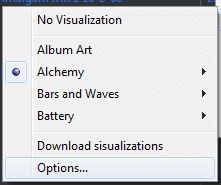
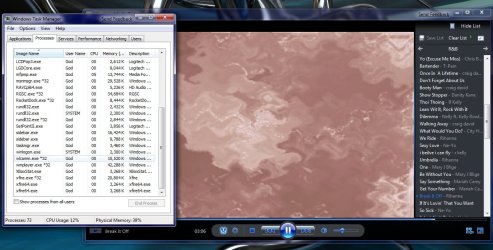
Did anyone test the performance of the 64-bit WMP vs 32-bit one? I played a music file with a visualization and it seems the memory footprint + processing needed is cut in half. Is it like this for all 64-bit applications? With the 32-bit WMP I was using 135,796K memory and 14-20% processor utilization, and with 64-bit WMP I was using 52,208K memory and 7-10% processor utilization. Also found a typo :)
 

Attachments

  • typo.png
    typo.png
    3.5 KB · Views: 326

My Computer

Computer Manufacturer/Model Number
Intel WBIBX10J
OS
Linux (Debian, Android)
CPU
Intel Core i7 860
Motherboard
Intel DP55WB
Memory
2x 2GB Kingston DDR3-1333
Graphics Card(s)
AMD Radeon HD 5750
Sound Card
Realtek ALC888
Monitor(s) Displays
2x Dell Inc. E248WFP
Screen Resolution
3840x1200
Hard Drives
Intel X25-V
Samsung HD103SJ
PSU
Corsair CX400
Case
Silverstone GD05
Cooling
Stock
Keyboard
Dell Inc. Bluetooth Wireless
Internet Speed
30 Mbps
Did anyone test the performance of the 64-bit WMP vs 32-bit one? I played a music file with a visualization and it seems the memory footprint + processing needed is cut in half. Is it like this for all 64-bit applications? With the 32-bit WMP I was using 135,796K memory and 14-20% processor utilization, and with 64-bit WMP I was using 52,208K memory and 7-10% processor utilization. Also found a typo :)


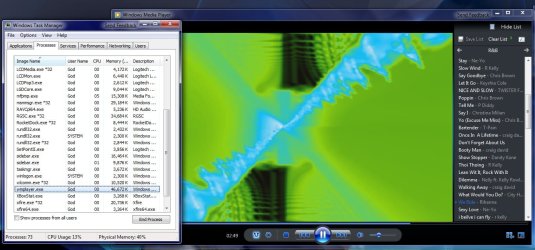
I found the opposite was true for me, 64bit WMP was using more and I also didn't have the typo in your screen shot.

2009-01-21_010147.jpg2009-01-21_010550.jpg2009-01-21_010811.jpg
 

My Computer

Computer Manufacturer/Model Number
Home Brew
OS
Windows 7 Ultimate Vista Ultimate x64
CPU
Core 2 Duo E8500 3.16Ghz @ 3.8Ghz
Motherboard
eVGA 750i FTW
Memory
2x2Gigs Patriot PC2-6400 LL
Graphics Card(s)
Inno3D GeForce GTX260 216 SP
Monitor(s) Displays
ASUS VW222U 22" 2ms Response time
Screen Resolution
1680x1050
Hard Drives
SATA 150GB
SATA II 250GB
USB IDE 750GB Ext.
PSU
HYTEC 600W & Thermaltake 650W Toughpower Power Exp
Case
Thermaltake Armor LCS (Liquid Cooling System)
Cooling
Liquid Cooling System
Keyboard
Logitech G15 Gaming Keyboard
Mouse
Logitech G9 Gaming Mouse
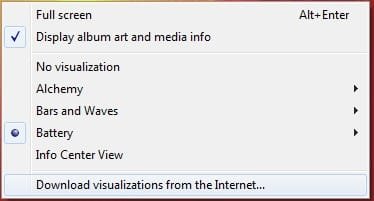
Hey, I was using the Alchemy visualization to do the tests, I tried Battery too but that used about the same amount of memory for both. Also the typo was in Now Playing --> Show List --> Select list pane options --> Visualizations.

Yeah, I know these things are trivial :)
 

My Computer

Computer Manufacturer/Model Number
Intel WBIBX10J
OS
Linux (Debian, Android)
CPU
Intel Core i7 860
Motherboard
Intel DP55WB
Memory
2x 2GB Kingston DDR3-1333
Graphics Card(s)
AMD Radeon HD 5750
Sound Card
Realtek ALC888
Monitor(s) Displays
2x Dell Inc. E248WFP
Screen Resolution
3840x1200
Hard Drives
Intel X25-V
Samsung HD103SJ
PSU
Corsair CX400
Case
Silverstone GD05
Cooling
Stock
Keyboard
Dell Inc. Bluetooth Wireless
Internet Speed
30 Mbps
Back
Top