WMPNetworkSvc - What is it and what is the default services.msc

Melissa

New member
Power User
Local time
7:33 AM
Messages
394
Dear Community,

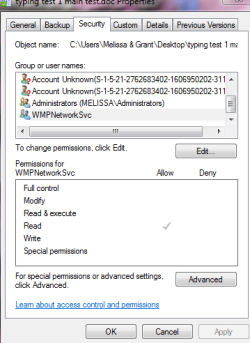
I went onto to Google thinking that I would be able to avoid embarassment by going on here and ask why that I have WMPNetworkSvc has access to some of my documents.

I know that I am a silly sausage. I even have been ditched on MS Communities for my supposed 'filddling".

I just wish to finish this back up and know what the default of the above is as I was told to do a workaround for my back up on Microsoft Communities and disable it.


In my experience, the backup fails with the 0x80070002 error because of two things:
1) The built-in administrator account is disabled (it is disabled by default in Win7)
2) The Windows Media Player Network Sharing Service is enabled


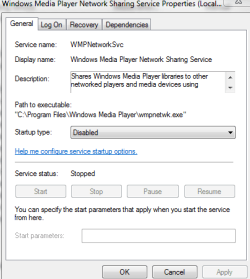
2) Disable the Windows Media Player Network Sharing Service , this also can be done several ways. The two most common ways are:
  • msconfig
    • click the Start Menu
    • type msconfig in the "search programs and files" entry box (or from Run dialog box)
    • select the Services tab at the top of the window
    • un-check the Windows Media Player Network Sharing Service
    • click Apply
    • click OK (you may see some warnings or notifications, click OK)
    • restart the computer
    OR
  • services.msc
    • click the Start Menu
    • type services.msc in the "search programs and files" entry box (or from Run dialog box)
    • select the Windows Media Player Network Sharing Service fro the list at the right
    • right-click it and select properties
    • set Startup type to disabled
    • click Apply
    • click OK
    • restart the computer
3) Backup the computer

Windows 7 Backup Error 0x80070002 - Microsoft Community

Thank you
 

Attachments
My Computer My Computer

At a glance

Windows 7 Home Premium 64bitWindows 7 Service Pack 1 x86 NTFS4 GB
Computer type
Laptop
Computer Manufacturer/Model Number
Sony VAIO / E Series VPCEB46FG
OS
Windows 7 Home Premium 64bit
CPU
Windows 7 Service Pack 1 x86 NTFS
Motherboard
AMD E-350 Processor
Memory
4 GB
Hard Drives
500GB
Other Info
1.6GHz
This is a helpful post Melissa. :)
I always have this service permanently disabled right after a clean install. I do not use WMP or any related services so I keep it disabled so never had any issues with the backup.
 

My Computer My Computer

At a glance

Windows® 8 Pro (64-bit)Intel® Core™ i5 Processor 2467M (1.60GHz, 3MB...6GB DDR3 System Memory at 1,333MHz (on BD 4GB...AMD Radeon™ HD7550M 1GB DDR3 (Ext. Graphic)
Computer Manufacturer/Model Number
Samsung NP530U4B-S02IN
OS
Windows® 8 Pro (64-bit)
CPU
Intel® Core™ i5 Processor 2467M (1.60GHz, 3MB L3 Cache)
Motherboard
Samsung Electronics
Memory
6GB DDR3 System Memory at 1,333MHz (on BD 4GB + 2GB x 1)
Graphics Card(s)
AMD Radeon™ HD7550M 1GB DDR3 (Ext. Graphic)
Sound Card
Realtek High Definition Audio
Monitor(s) Displays
35.56cm (14.0) SuperBright 300nit HD LED Display
Screen Resolution
1366x768
Hard Drives
1TB S-ATA II Hard Drive (5400RPM) with ExpressCache 16GB SSD
Internet Speed
sucks
Antivirus
Microsoft Security Essentials
Browser
Google Chrome (Sync enabled)
So there is no need to have it on Automatic - delayed start.

When do you ever use it?

I did not do it after a clean install. I just did it for an error in back up.

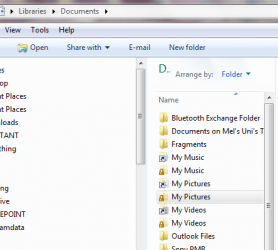
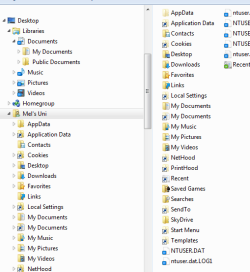
Is it normal for your libraries to look like the following afterwards?

I also saw that there was an extra permission on my documents.

Not allowed to 'fiddle' with any settings anymore
 

Attachments

  • libraries - documents.PNG
    libraries - documents.PNG
    23.7 KB · Views: 45
  • libraries - full.PNG
    libraries - full.PNG
    17.1 KB · Views: 44

My Computer My Computer

At a glance

Windows 7 Home Premium 64bitWindows 7 Service Pack 1 x86 NTFS4 GB
Computer type
Laptop
Computer Manufacturer/Model Number
Sony VAIO / E Series VPCEB46FG
OS
Windows 7 Home Premium 64bit
CPU
Windows 7 Service Pack 1 x86 NTFS
Motherboard
AMD E-350 Processor
Memory
4 GB
Hard Drives
500GB
Other Info
1.6GHz
I didnt have any issues with my Libraries. I have set the service to Disabled and Stopped.
No issues whatsoever. :)
 

My Computer My Computer

At a glance

Windows® 8 Pro (64-bit)Intel® Core™ i5 Processor 2467M (1.60GHz, 3MB...6GB DDR3 System Memory at 1,333MHz (on BD 4GB...AMD Radeon™ HD7550M 1GB DDR3 (Ext. Graphic)
Computer Manufacturer/Model Number
Samsung NP530U4B-S02IN
OS
Windows® 8 Pro (64-bit)
CPU
Intel® Core™ i5 Processor 2467M (1.60GHz, 3MB L3 Cache)
Motherboard
Samsung Electronics
Memory
6GB DDR3 System Memory at 1,333MHz (on BD 4GB + 2GB x 1)
Graphics Card(s)
AMD Radeon™ HD7550M 1GB DDR3 (Ext. Graphic)
Sound Card
Realtek High Definition Audio
Monitor(s) Displays
35.56cm (14.0) SuperBright 300nit HD LED Display
Screen Resolution
1366x768
Hard Drives
1TB S-ATA II Hard Drive (5400RPM) with ExpressCache 16GB SSD
Internet Speed
sucks
Antivirus
Microsoft Security Essentials
Browser
Google Chrome (Sync enabled)
On my other computer it is Started - automatic (delayed start)would it because that machine has a DVD player and the such on it.

I have never adjusted the services module on that machine -Windows 7 and 64 bit Sony VIAO
 

My Computer My Computer

At a glance

Windows 7 Home Premium 64bitWindows 7 Service Pack 1 x86 NTFS4 GB
Computer type
Laptop
Computer Manufacturer/Model Number
Sony VAIO / E Series VPCEB46FG
OS
Windows 7 Home Premium 64bit
CPU
Windows 7 Service Pack 1 x86 NTFS
Motherboard
AMD E-350 Processor
Memory
4 GB
Hard Drives
500GB
Other Info
1.6GHz
Nope. It has nothing to do with the DVD player. You may choose to leave it to Automatic - Delayed Start. It consumes only 2 MB of RAM so its not resource hungry you see. ;)
 

My Computer My Computer

At a glance

Windows® 8 Pro (64-bit)Intel® Core™ i5 Processor 2467M (1.60GHz, 3MB...6GB DDR3 System Memory at 1,333MHz (on BD 4GB...AMD Radeon™ HD7550M 1GB DDR3 (Ext. Graphic)
Computer Manufacturer/Model Number
Samsung NP530U4B-S02IN
OS
Windows® 8 Pro (64-bit)
CPU
Intel® Core™ i5 Processor 2467M (1.60GHz, 3MB L3 Cache)
Motherboard
Samsung Electronics
Memory
6GB DDR3 System Memory at 1,333MHz (on BD 4GB + 2GB x 1)
Graphics Card(s)
AMD Radeon™ HD7550M 1GB DDR3 (Ext. Graphic)
Sound Card
Realtek High Definition Audio
Monitor(s) Displays
35.56cm (14.0) SuperBright 300nit HD LED Display
Screen Resolution
1366x768
Hard Drives
1TB S-ATA II Hard Drive (5400RPM) with ExpressCache 16GB SSD
Internet Speed
sucks
Antivirus
Microsoft Security Essentials
Browser
Google Chrome (Sync enabled)
I just thought it having permission in my security settings scared me a little.

Any thoughts on why that program would be doing that on a MS Word document - like the screen shot above?

Or do you have to change the settings in something totally different for that?

I am very confused.
 

My Computer My Computer

At a glance

Windows 7 Home Premium 64bitWindows 7 Service Pack 1 x86 NTFS4 GB
Computer type
Laptop
Computer Manufacturer/Model Number
Sony VAIO / E Series VPCEB46FG
OS
Windows 7 Home Premium 64bit
CPU
Windows 7 Service Pack 1 x86 NTFS
Motherboard
AMD E-350 Processor
Memory
4 GB
Hard Drives
500GB
Other Info
1.6GHz
No idea about it. May be because it can be used for sharing purposes. Not sure though.
 

My Computer My Computer

At a glance

Windows® 8 Pro (64-bit)Intel® Core™ i5 Processor 2467M (1.60GHz, 3MB...6GB DDR3 System Memory at 1,333MHz (on BD 4GB...AMD Radeon™ HD7550M 1GB DDR3 (Ext. Graphic)
Computer Manufacturer/Model Number
Samsung NP530U4B-S02IN
OS
Windows® 8 Pro (64-bit)
CPU
Intel® Core™ i5 Processor 2467M (1.60GHz, 3MB L3 Cache)
Motherboard
Samsung Electronics
Memory
6GB DDR3 System Memory at 1,333MHz (on BD 4GB + 2GB x 1)
Graphics Card(s)
AMD Radeon™ HD7550M 1GB DDR3 (Ext. Graphic)
Sound Card
Realtek High Definition Audio
Monitor(s) Displays
35.56cm (14.0) SuperBright 300nit HD LED Display
Screen Resolution
1366x768
Hard Drives
1TB S-ATA II Hard Drive (5400RPM) with ExpressCache 16GB SSD
Internet Speed
sucks
Antivirus
Microsoft Security Essentials
Browser
Google Chrome (Sync enabled)
Thanks for that - very interesting. Wondering if anyone on this forum would know - just wish to clarify.

I have never seen it as a property of security - is that normal?
 

My Computer My Computer

At a glance

Windows 7 Home Premium 64bitWindows 7 Service Pack 1 x86 NTFS4 GB
Computer type
Laptop
Computer Manufacturer/Model Number
Sony VAIO / E Series VPCEB46FG
OS
Windows 7 Home Premium 64bit
CPU
Windows 7 Service Pack 1 x86 NTFS
Motherboard
AMD E-350 Processor
Memory
4 GB
Hard Drives
500GB
Other Info
1.6GHz
Back
Top