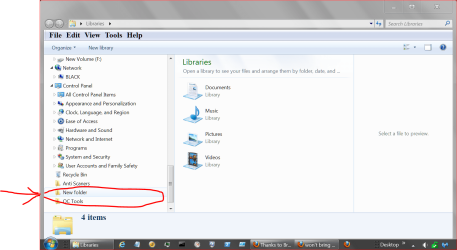
won't bring up new folder

amsanborn

New member
Local time
12:22 AM
Messages
21
Location
Vancouver, WA
In documents I select new folder and don't get one. This happened to me before but I forgot how to cure it. Please assist.

Amsanborn
 

My Computer

Computer Manufacturer/Model Number
AsusTeK Computer INC. (Essentio Series)
OS
windows 7 Home Premium 64 bit
CPU
Pentium (R) Dual-Core ES400 @ 2.7GHz
Memory
6.00 GB (5.75 GB usable) intel (R) G45/G43 Express Chipset
Sound Card
Microsoft
Monitor(s) Displays
HP f1905
Hard Drives
1 drive 500GB
Keyboard
Logitech Wireless
Mouse
Logitech Wireless
Internet Speed
comcast
In documents I select new folder and don't get one. This happened to me before but I forgot how to cure it. Please assist.

Amsanborn


The new folder is being put into the "Default save location". You can find out which folder this is by clicking on the link above that says "# locations".

Or, back out of the Documents library and then right-click the Documents library itself and choose Properties.
 

My Computer

Computer type
PC/Desktop
In documents I select new folder and don't get one. This happened to me before but I forgot how to cure it. Please assist.

Amsanborn


The new folder is being put into the "Default save location". You can find out which folder this is by clicking on the link above that says "# locations".

Or, back out of the Documents library and then right-click the Documents library itself and choose Properties.

Sorry I don't understand "# Locations" can't find it. Also right-clicked on properties and then what do I look for.

Thanks twocable
 

My Computer

Computer Manufacturer/Model Number
AsusTeK Computer INC. (Essentio Series)
OS
windows 7 Home Premium 64 bit
CPU
Pentium (R) Dual-Core ES400 @ 2.7GHz
Memory
6.00 GB (5.75 GB usable) intel (R) G45/G43 Express Chipset
Sound Card
Microsoft
Monitor(s) Displays
HP f1905
Hard Drives
1 drive 500GB
Keyboard
Logitech Wireless
Mouse
Logitech Wireless
Internet Speed
comcast
In documents I select new folder and don't get one. This happened to me before but I forgot how to cure it. Please assist.

Amsanborn


The new folder is being put into the "Default save location". You can find out which folder this is by clicking on the link above that says "# locations".

Or, back out of the Documents library and then right-click the Documents library itself and choose Properties.

Sorry I don't understand "# Locations" can't find it. Also right-clicked on properties and then what do I look for.

Thanks twocable

You're looking for the folder that is the "Default save location".

The thing I was talking about before is located at the top of the folder. It's a blue text link telling you how many locations are included in the library that you are in.
 

My Computer

Computer type
PC/Desktop
Give this a try.
Start Orb and type in New Folder. If their is one it should you. If it is there right click and select Open File Location.
 

My Computer

Computer type
PC/Desktop
Computer Manufacturer/Model Number
Home made Desktop
OS
Windows 10 Pro. 64/ version 1709 Windows 7 Pro/64
CPU
Intel i7-6800K @ 4.3
Motherboard
ASUS X-99 Deluxe II
Memory
Corsair Platinum 16 gig @2400
Graphics Card(s)
EVGA GTX 1070 OC
Monitor(s) Displays
Asus 27" LED LCD/VE278Q
Screen Resolution
1920-1080 or 1280-720 HDMI
Hard Drives
INTEL SSD 730-240 Gb Sata 3.0/
PSU
EVGA Platium 1200W
Case
Phanteks Luxe Tempered Glass 8 fans/ one radiator
Cooling
XSPC/ Water Cooled CPU
Keyboard
Das 4 Professional
Mouse
Logitech M705/MX Anywhere 2-S
Internet Speed
100 mbits
Antivirus
Microsoft Security Essentials/ Malwarebytes Premium 3.0/ SAS
Browser
I.E. 11 default/Firefox/ ISP Time Warner Cable/Spectrum
Other Info
LG BluRay Burner/
Sound system-KLipsch-THX/
Icy Dock ssd Hot Swap bays.
Give this a try.
Start Orb and type in New Folder. If their is one it should you. If it is there right click and select Open File Location.

Sorry but what is orb
 

My Computer

Computer Manufacturer/Model Number
AsusTeK Computer INC. (Essentio Series)
OS
windows 7 Home Premium 64 bit
CPU
Pentium (R) Dual-Core ES400 @ 2.7GHz
Memory
6.00 GB (5.75 GB usable) intel (R) G45/G43 Express Chipset
Sound Card
Microsoft
Monitor(s) Displays
HP f1905
Hard Drives
1 drive 500GB
Keyboard
Logitech Wireless
Mouse
Logitech Wireless
Internet Speed
comcast

My Computer

Computer type
PC/Desktop
Computer Manufacturer/Model Number
Self Built
OS
Win 10 Pro x64
CPU
Intel I5-2500K @3.3GHz
Motherboard
Asrock P67 Extreme4
Memory
16GB G.Skill Ripjaws X (4x4GB)
Graphics Card(s)
EVGA GeForce 750 Ti SC 2GB
Sound Card
ASUS Xonar DG 5.1 Channels 24-bit 96KHz PCI Interface Sound
Monitor(s) Displays
auria eq2367
Screen Resolution
1920 x 1080
Hard Drives
250GB Samsung 850 EVO SSD
1TB WD Blue
1TB Hitachi
PSU
SeaSonic X 650W 80 Plus Gold
Case
Corsair Obsidian 750D
Cooling
Corsair H60, Three 140mm case fans
Keyboard
Logitech Wireless Keyboard K520
Mouse
Logitech Wireless Mouse M310
Internet Speed
Wave Broadband ~ 100 dn 5 up
Antivirus
Windows Defender, Malwarebytes Premium
Browser
Edge, IE11, Chrome
Other Info
Laptop specs: HP g7-1365dx /
CPU: AMD A6-3420M APU with Radeon(tm) HD Graphics /
RAM: Crucial 8Gb (2x4Gb) /
SSD: Crucial M4-CT128M4SSD2 ATA Device/ FW 000F /
GFX: AMD Radeon HD 6520G /
OS: Windows 10 Pro x64
The new folder is being put into the "Default save location". You can find out which folder this is by clicking on the link above that says "# locations".

Or, back out of the Documents library and then right-click the Documents library itself and choose Properties.

Sorry I don't understand "# Locations" can't find it. Also right-clicked on properties and then what do I look for.

Thanks twocable

You're looking for the folder that is the "Default save location".

The thing I was talking about before is located at the top of the folder. It's a blue text link telling you how many locations are included in the library that you are in.

My Default save location has the folder "My Documents" that's all . What do I do now?
 

My Computer

Computer Manufacturer/Model Number
AsusTeK Computer INC. (Essentio Series)
OS
windows 7 Home Premium 64 bit
CPU
Pentium (R) Dual-Core ES400 @ 2.7GHz
Memory
6.00 GB (5.75 GB usable) intel (R) G45/G43 Express Chipset
Sound Card
Microsoft
Monitor(s) Displays
HP f1905
Hard Drives
1 drive 500GB
Keyboard
Logitech Wireless
Mouse
Logitech Wireless
Internet Speed
comcast

My Computer

Computer Manufacturer/Model Number
AsusTeK Computer INC. (Essentio Series)
OS
windows 7 Home Premium 64 bit
CPU
Pentium (R) Dual-Core ES400 @ 2.7GHz
Memory
6.00 GB (5.75 GB usable) intel (R) G45/G43 Express Chipset
Sound Card
Microsoft
Monitor(s) Displays
HP f1905
Hard Drives
1 drive 500GB
Keyboard
Logitech Wireless
Mouse
Logitech Wireless
Internet Speed
comcast
Sorry I don't understand "# Locations" can't find it. Also right-clicked on properties and then what do I look for.

Thanks twocable

You're looking for the folder that is the "Default save location".

The thing I was talking about before is located at the top of the folder. It's a blue text link telling you how many locations are included in the library that you are in.

My Default save location has the folder "My Documents" that's all . What do I do now?

Start Orb means "Start Menu".

Look inside of My Documents for the New Folder.
 

My Computer

Computer type
PC/Desktop
If New Folder doesn't show up that means the New Folder name has been change to something else. You must do a search for the new name of the folder. Example:
New Folder name changed to Semper FI. Now you must do a search for Semper FI instead of New Folder.
If you haven't changed the name it indicates that a New folder was not created.

You could also try this. Look in Windows Explorer.

New Folder 7 21.PNG
 

My Computer

Computer type
PC/Desktop
Computer Manufacturer/Model Number
Home made Desktop
OS
Windows 10 Pro. 64/ version 1709 Windows 7 Pro/64
CPU
Intel i7-6800K @ 4.3
Motherboard
ASUS X-99 Deluxe II
Memory
Corsair Platinum 16 gig @2400
Graphics Card(s)
EVGA GTX 1070 OC
Monitor(s) Displays
Asus 27" LED LCD/VE278Q
Screen Resolution
1920-1080 or 1280-720 HDMI
Hard Drives
INTEL SSD 730-240 Gb Sata 3.0/
PSU
EVGA Platium 1200W
Case
Phanteks Luxe Tempered Glass 8 fans/ one radiator
Cooling
XSPC/ Water Cooled CPU
Keyboard
Das 4 Professional
Mouse
Logitech M705/MX Anywhere 2-S
Internet Speed
100 mbits
Antivirus
Microsoft Security Essentials/ Malwarebytes Premium 3.0/ SAS
Browser
I.E. 11 default/Firefox/ ISP Time Warner Cable/Spectrum
Other Info
LG BluRay Burner/
Sound system-KLipsch-THX/
Icy Dock ssd Hot Swap bays.

My Computer

Computer type
PC/Desktop
Computer Manufacturer/Model Number
Self Built
OS
Win 10 Pro x64
CPU
Intel I5-2500K @3.3GHz
Motherboard
Asrock P67 Extreme4
Memory
16GB G.Skill Ripjaws X (4x4GB)
Graphics Card(s)
EVGA GeForce 750 Ti SC 2GB
Sound Card
ASUS Xonar DG 5.1 Channels 24-bit 96KHz PCI Interface Sound
Monitor(s) Displays
auria eq2367
Screen Resolution
1920 x 1080
Hard Drives
250GB Samsung 850 EVO SSD
1TB WD Blue
1TB Hitachi
PSU
SeaSonic X 650W 80 Plus Gold
Case
Corsair Obsidian 750D
Cooling
Corsair H60, Three 140mm case fans
Keyboard
Logitech Wireless Keyboard K520
Mouse
Logitech Wireless Mouse M310
Internet Speed
Wave Broadband ~ 100 dn 5 up
Antivirus
Windows Defender, Malwarebytes Premium
Browser
Edge, IE11, Chrome
Other Info
Laptop specs: HP g7-1365dx /
CPU: AMD A6-3420M APU with Radeon(tm) HD Graphics /
RAM: Crucial 8Gb (2x4Gb) /
SSD: Crucial M4-CT128M4SSD2 ATA Device/ FW 000F /
GFX: AMD Radeon HD 6520G /
OS: Windows 10 Pro x64
You're looking for the folder that is the "Default save location".

The thing I was talking about before is located at the top of the folder. It's a blue text link telling you how many locations are included in the library that you are in.

My Default save location has the folder "My Documents" that's all . What do I do now?

Start Orb means "Start Menu".

Look inside of My Documents for the New Folder.

Nothing there. I also select a folder and then click new folder and nothing happens, no new folder.
 

My Computer

Computer Manufacturer/Model Number
AsusTeK Computer INC. (Essentio Series)
OS
windows 7 Home Premium 64 bit
CPU
Pentium (R) Dual-Core ES400 @ 2.7GHz
Memory
6.00 GB (5.75 GB usable) intel (R) G45/G43 Express Chipset
Sound Card
Microsoft
Monitor(s) Displays
HP f1905
Hard Drives
1 drive 500GB
Keyboard
Logitech Wireless
Mouse
Logitech Wireless
Internet Speed
comcast
My Default save location has the folder "My Documents" that's all . What do I do now?

Start Orb means "Start Menu".

Look inside of My Documents for the New Folder.

Nothing there. I also select a folder and then click new folder and nothing happens, no new folder.

Uh oh. Try this:

  1. Go into My Computer (or "Computer")
  2. Open the C: drive
  3. Try to make a new folder
  4. Failing that, go into a random folder and try to make one
 

My Computer

Computer type
PC/Desktop

My Computer

Computer Manufacturer/Model Number
AsusTeK Computer INC. (Essentio Series)
OS
windows 7 Home Premium 64 bit
CPU
Pentium (R) Dual-Core ES400 @ 2.7GHz
Memory
6.00 GB (5.75 GB usable) intel (R) G45/G43 Express Chipset
Sound Card
Microsoft
Monitor(s) Displays
HP f1905
Hard Drives
1 drive 500GB
Keyboard
Logitech Wireless
Mouse
Logitech Wireless
Internet Speed
comcast

My Computer

Computer type
PC/Desktop
Computer Manufacturer/Model Number
Self Built
OS
Win 10 Pro x64
CPU
Intel I5-2500K @3.3GHz
Motherboard
Asrock P67 Extreme4
Memory
16GB G.Skill Ripjaws X (4x4GB)
Graphics Card(s)
EVGA GeForce 750 Ti SC 2GB
Sound Card
ASUS Xonar DG 5.1 Channels 24-bit 96KHz PCI Interface Sound
Monitor(s) Displays
auria eq2367
Screen Resolution
1920 x 1080
Hard Drives
250GB Samsung 850 EVO SSD
1TB WD Blue
1TB Hitachi
PSU
SeaSonic X 650W 80 Plus Gold
Case
Corsair Obsidian 750D
Cooling
Corsair H60, Three 140mm case fans
Keyboard
Logitech Wireless Keyboard K520
Mouse
Logitech Wireless Mouse M310
Internet Speed
Wave Broadband ~ 100 dn 5 up
Antivirus
Windows Defender, Malwarebytes Premium
Browser
Edge, IE11, Chrome
Other Info
Laptop specs: HP g7-1365dx /
CPU: AMD A6-3420M APU with Radeon(tm) HD Graphics /
RAM: Crucial 8Gb (2x4Gb) /
SSD: Crucial M4-CT128M4SSD2 ATA Device/ FW 000F /
GFX: AMD Radeon HD 6520G /
OS: Windows 10 Pro x64
Back
Top