

2 desktop computers, which are in my sig. HP and Gateway
I was advised to use Work Network to avoid using passwords, even though I'm at home.
Name of Network is RSNETWORK. Network is ethernet, internet access is fine
I want these shared:
-both username (Prize-02 and PC-03) folders, or if not, the AppData folders
-D, the Data partition (drive) on each called D-Gate and D-HP
-Printer on the HP
How I use them: I use one comp to back up data more often than my image on exterior drive, and back up any changes in program profiles, Firefox, Thunderbird profiles, etc. I use 1 to work from home online. I set up the Gateway, formerly a Vista, just this month, and it's my first time trying to network Win7.
Screenshots:
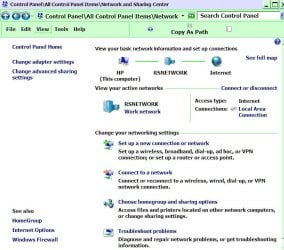
HP--Win Explorer and Ctl Panel Netw area
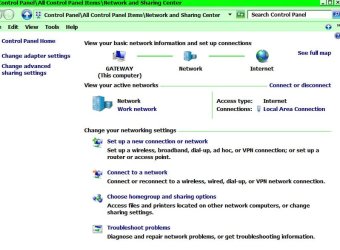
Gateway--WinExplorer and Ctrl Panel Netw Center
Neither machine can make a network map.
Issues:
-On the Gateway, I never named the network "Network," but there's no place to change it
-I marked all my folders "shared", but D and USERNAME folders revert back to "Unshared."
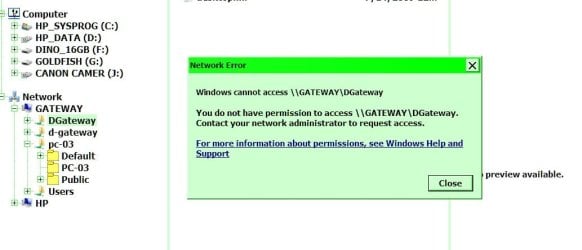
-Gateway can't even access its own folder in Win Explorer\Network
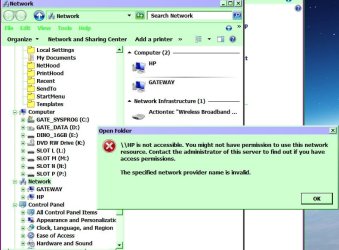
-HP can access only the Users folder on the Gateway, although I've already unshared that folder.
I've gone over all the settings for days, passwords are turned off.
Let me know if you need more screenshots
I was advised to use Work Network to avoid using passwords, even though I'm at home.
Name of Network is RSNETWORK. Network is ethernet, internet access is fine
I want these shared:
-both username (Prize-02 and PC-03) folders, or if not, the AppData folders
-D, the Data partition (drive) on each called D-Gate and D-HP
-Printer on the HP
How I use them: I use one comp to back up data more often than my image on exterior drive, and back up any changes in program profiles, Firefox, Thunderbird profiles, etc. I use 1 to work from home online. I set up the Gateway, formerly a Vista, just this month, and it's my first time trying to network Win7.
Screenshots:
HP--Win Explorer and Ctl Panel Netw area
Gateway--WinExplorer and Ctrl Panel Netw Center
Neither machine can make a network map.
Issues:
-On the Gateway, I never named the network "Network," but there's no place to change it
-I marked all my folders "shared", but D and USERNAME folders revert back to "Unshared."
-Gateway can't even access its own folder in Win Explorer\Network
-HP can access only the Users folder on the Gateway, although I've already unshared that folder.
I've gone over all the settings for days, passwords are turned off.
Let me know if you need more screenshots
Attachments
Last edited:
My Computer
At a glance
Win 7 Ult 64-bitG620 2.6GHZ Pentium R6 GB
- Computer type
- PC/Desktop
- Computer Manufacturer/Model Number
- HP p6-2020t
- OS
- Win 7 Ult 64-bit
- CPU
- G620 2.6GHZ Pentium R
- Memory
- 6 GB
- Monitor(s) Displays
- 25" HPLV2311
- Screen Resolution
- 1920 x 1200
- Hard Drives
- 1 SATA, 1 exterior SATA
- Case
- HP
- Cooling
- PSU
- Antivirus
- Glasswire
- Browser
- Waterfox; Firefox; Chrome for work
- Other Info
- Firewall--Glasswire
Similar specs in Gateway DX4200
Verizon FIOS Wired network
1 other Win7 computer-- has SSD

