Solved Wrong SSD space remaining ?

Spov

New member
Local time
2:21 PM
Messages
17
Hello,

When I go to my computer and look at the Space remaining on my SSD drive (Samsung 840 Evo 120GB) it states that I only have around 10 GB left.

1Sdib.png


However when I go inside Local Disk C and hover my mouse on everything (including hidden files & folders) and right click properties it states that the files are only 48.6 GB large.

DiFKe.png


Now my question is what is using my other 60 GB and why doesn't the drive state 70 GB of free space because only 48.8 GB is being used ?

Regards
 

My Computer

Computer type
PC/Desktop
Computer Manufacturer/Model Number
Custom Build
OS
Windows 7 Ultimate x64
CPU
I5 4670K
Motherboard
Asus Maximus Vi Hero
Memory
2 x 16 GB Ram Vengeance
Graphics Card(s)
MSI Twin Frozr R9 280x
Hard Drives
Samsung 120 gb SSD
WD 1TB Blue
Antivirus
Avast
Browser
Mozilla Firefox

My Computer

Computer type
PC/Desktop
Computer Manufacturer/Model Number
Ignatz Special; 4 speed manual gearbox; factory air conditioning; one of one
OS
Windows 7 Home Premium SP1, 64-bit
CPU
Intel Skylake i5-6600K, not overclocked
Motherboard
AsRock Z170M Extreme 4, micro ATX
Memory
8 GB HyperX DDR4-2666 (2 x 4 GB)
Graphics Card(s)
none; graphics are integrated on CPU
Sound Card
onboard: Realtek ALC1150; external: USB Behringer UF0-202
Monitor(s) Displays
Dell S2340M 23 inch IPS
Screen Resolution
1600 x 900
Hard Drives
System: Crucial MX100 series SSD, 128 GB;
Data: Samsung Spinpoint 103SJ, 1 TB;
Backup: WD Caviar Green WD30EZRX-00D8PB0, 3 TB
PSU
Rosewill SilentNight 500 watt fanless, semi-modular
Case
Antec Solo II
Cooling
Noctua NH-U12S; Noctua F12 intake, Noctua S12A exhaust
Keyboard
Microsoft 200 6JH-00001 USB
Mouse
Dell or Microsoft optical wired; USB
Antivirus
Microsoft Security Essentials and Malwarebytes Premium
Browser
Pale Moon
Other Info
All fans PWM; speeds at idle: CPU circa 500 rpm; intake circa 600 rpm; exhaust circa 600 rpm; CPU temps 27 idle and 47 C load in a warm room (27 C/81 F) when running Intel Extreme Tuning Utility stress test.
Hey ignatzatsonic,

Thanks for the reply. This is what I found:

6txXe.png


As you can see "System Volume Information" is taking up the most space. When I expand the folder it shows me these files:

KAJNf.png


Are these important files ? Are they system files ? or can I delete them ?

Thanks
 

My Computer

Computer type
PC/Desktop
Computer Manufacturer/Model Number
Custom Build
OS
Windows 7 Ultimate x64
CPU
I5 4670K
Motherboard
Asus Maximus Vi Hero
Memory
2 x 16 GB Ram Vengeance
Graphics Card(s)
MSI Twin Frozr R9 280x
Hard Drives
Samsung 120 gb SSD
WD 1TB Blue
Antivirus
Avast
Browser
Mozilla Firefox
I think most of those are system restore points that you can delete.

You apparently have a large amount of space devoted to system restore--30 or 40 gb. But it's controllable.

I devote only about 6 GB and have only about 10 restore points dating back to mid January.

You've got 30 or so restore points dating back to last year.

How many do you figure you need? Do you anticipate having to restore to last year? If not, reduce the amount of space devoted to system restore to something lower--say 8 or 10 gb.

When you do that, I think your free space will magically grow.
 

My Computer

Computer type
PC/Desktop
Computer Manufacturer/Model Number
Ignatz Special; 4 speed manual gearbox; factory air conditioning; one of one
OS
Windows 7 Home Premium SP1, 64-bit
CPU
Intel Skylake i5-6600K, not overclocked
Motherboard
AsRock Z170M Extreme 4, micro ATX
Memory
8 GB HyperX DDR4-2666 (2 x 4 GB)
Graphics Card(s)
none; graphics are integrated on CPU
Sound Card
onboard: Realtek ALC1150; external: USB Behringer UF0-202
Monitor(s) Displays
Dell S2340M 23 inch IPS
Screen Resolution
1600 x 900
Hard Drives
System: Crucial MX100 series SSD, 128 GB;
Data: Samsung Spinpoint 103SJ, 1 TB;
Backup: WD Caviar Green WD30EZRX-00D8PB0, 3 TB
PSU
Rosewill SilentNight 500 watt fanless, semi-modular
Case
Antec Solo II
Cooling
Noctua NH-U12S; Noctua F12 intake, Noctua S12A exhaust
Keyboard
Microsoft 200 6JH-00001 USB
Mouse
Dell or Microsoft optical wired; USB
Antivirus
Microsoft Security Essentials and Malwarebytes Premium
Browser
Pale Moon
Other Info
All fans PWM; speeds at idle: CPU circa 500 rpm; intake circa 600 rpm; exhaust circa 600 rpm; CPU temps 27 idle and 47 C load in a warm room (27 C/81 F) when running Intel Extreme Tuning Utility stress test.
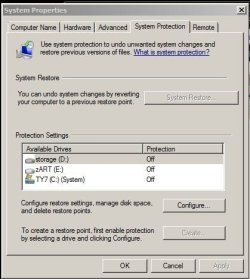
it is 'generally' considered smart to disable 'system restore' with an SSD--the System Volume Information folder contains the restore points--to recover the drive space--turn off system restore and delete your restore points--but--before you do that--read this:

The Windows 7 Optimization Guide | The SSD Review

specifically..."d. Disable System Restore

System restore is an effective tool for backing out of things such as tweaking mistakes, failed program installations and other activities that seem to leave your system damages. For this reason, consider carefully whether you want to turn it off or just leave it. Turning it off allows for performance improvement as new system backups aren’t being created in the background and, also, it allows for more computer space as it frees up some valuable disk property. I regularly back up to an external which solves my problems with respect to this.

Go to Control Panel/System/System Protection and then Configure.
Turn off or adjust System Protection; and
Apply and then confirm Yes.
 

My Computer

Computer type
PC/Desktop
Computer Manufacturer/Model Number
SALEON Systems V3.1
OS
Windows 7 Ultimate 32bit
CPU
Intel Core 2 Extreme QX6850
Motherboard
ASUSTeK P5G41-M LE
Memory
4 gb
Graphics Card(s)
NVIDIA GeForce 8400GS
Hard Drives
Intel 120 GB SSD, Seagate 250GB, Seagate 2TB
Antivirus
Comodo
Browser
Chrome
I think most of those are system restore points that you can delete.

You apparently have a large amount of space devoted to system restore--30 or 40 gb. But it's controllable.

I devote only about 6 GB and have only about 10 restore points dating back to mid January.

You've got 30 or so restore points dating back to last year.

How many do you figure you need? Do you anticipate having to restore to last year? If not, reduce the amount of space devoted to system restore to something lower--say 8 or 10 gb.

When you do that, I think your free space will magically grow.

Thanks again ignatzatsonic. But if I set the space being backed up to 8 - 10 GB will it backup the windows folder ? (the Win folder alone is 25GB).

it is 'generally' considered smart to disable 'system restore' with an SSD--the System Volume Information folder contains the restore points--to recover the drive space--turn off system restore and delete your restore points--but--before you do that--read this:

The Windows 7 Optimization Guide | The SSD Review

specifically..."d. Disable System Restore

System restore is an effective tool for backing out of things such as tweaking mistakes, failed program installations and other activities that seem to leave your system damages. For this reason, consider carefully whether you want to turn it off or just leave it. Turning it off allows for performance improvement as new system backups aren’t being created in the background and, also, it allows for more computer space as it frees up some valuable disk property. I regularly back up to an external which solves my problems with respect to this.

Go to Control Panel/System/System Protection and then Configure.
Turn off or adjust System Protection; and
Apply and then confirm Yes.

Hi NimoTony,

Thanks for the reply. I have 2 drives. My main SSD drive is 120 GB Samsung 840 Evo SSD and my second drive is a 1TB Western Digital Drive. Can I set it so that my 1 TB WD drive also backs up for my SSD drive (and turn it off for my SSD) ? (I have alot of space in the 1TB drive.)

Regards
 

My Computer

Computer type
PC/Desktop
Computer Manufacturer/Model Number
Custom Build
OS
Windows 7 Ultimate x64
CPU
I5 4670K
Motherboard
Asus Maximus Vi Hero
Memory
2 x 16 GB Ram Vengeance
Graphics Card(s)
MSI Twin Frozr R9 280x
Hard Drives
Samsung 120 gb SSD
WD 1TB Blue
Antivirus
Avast
Browser
Mozilla Firefox
System Restore doesn't back up the Windows folder regardless of how much space you have devoted to it.

If I recall, you can set it to apply to each drive separately.

If you want to "back up" Windows, you need to use imaging.

What's on the 1 TB drive?

I have an SSD and a separate data drive. I set System Restore to apply to the SSD only.
 

My Computer

Computer type
PC/Desktop
Computer Manufacturer/Model Number
Ignatz Special; 4 speed manual gearbox; factory air conditioning; one of one
OS
Windows 7 Home Premium SP1, 64-bit
CPU
Intel Skylake i5-6600K, not overclocked
Motherboard
AsRock Z170M Extreme 4, micro ATX
Memory
8 GB HyperX DDR4-2666 (2 x 4 GB)
Graphics Card(s)
none; graphics are integrated on CPU
Sound Card
onboard: Realtek ALC1150; external: USB Behringer UF0-202
Monitor(s) Displays
Dell S2340M 23 inch IPS
Screen Resolution
1600 x 900
Hard Drives
System: Crucial MX100 series SSD, 128 GB;
Data: Samsung Spinpoint 103SJ, 1 TB;
Backup: WD Caviar Green WD30EZRX-00D8PB0, 3 TB
PSU
Rosewill SilentNight 500 watt fanless, semi-modular
Case
Antec Solo II
Cooling
Noctua NH-U12S; Noctua F12 intake, Noctua S12A exhaust
Keyboard
Microsoft 200 6JH-00001 USB
Mouse
Dell or Microsoft optical wired; USB
Antivirus
Microsoft Security Essentials and Malwarebytes Premium
Browser
Pale Moon
Other Info
All fans PWM; speeds at idle: CPU circa 500 rpm; intake circa 600 rpm; exhaust circa 600 rpm; CPU temps 27 idle and 47 C load in a warm room (27 C/81 F) when running Intel Extreme Tuning Utility stress test.

My Computer

Computer type
PC/Desktop
Computer Manufacturer/Model Number
Home made Desktop
OS
Windows 10 Pro. 64/ version 1709 Windows 7 Pro/64
CPU
Intel i7-6800K @ 4.3
Motherboard
ASUS X-99 Deluxe II
Memory
Corsair Platinum 16 gig @2400
Graphics Card(s)
EVGA GTX 1070 OC
Monitor(s) Displays
Asus 27" LED LCD/VE278Q
Screen Resolution
1920-1080 or 1280-720 HDMI
Hard Drives
INTEL SSD 730-240 Gb Sata 3.0/
PSU
EVGA Platium 1200W
Case
Phanteks Luxe Tempered Glass 8 fans/ one radiator
Cooling
XSPC/ Water Cooled CPU
Keyboard
Das 4 Professional
Mouse
Logitech M705/MX Anywhere 2-S
Internet Speed
100 mbits
Antivirus
Microsoft Security Essentials/ Malwarebytes Premium 3.0/ SAS
Browser
I.E. 11 default/Firefox/ ISP Time Warner Cable/Spectrum
Other Info
LG BluRay Burner/
Sound system-KLipsch-THX/
Icy Dock ssd Hot Swap bays.
system restore is not a backup
I run a 120GB SSD (using only 20GB for OS and programs) and regularly (as needed) run backups and create a system image about every 3 months (which is replaced on my external 'backup' drive)
additionally I run a 250GB storage and a 2TB drive for my media
my system is setup thusly:
 

Attachments

  • Capture.JPG
    Capture.JPG
    37.5 KB · Views: 17

My Computer

Computer type
PC/Desktop
Computer Manufacturer/Model Number
SALEON Systems V3.1
OS
Windows 7 Ultimate 32bit
CPU
Intel Core 2 Extreme QX6850
Motherboard
ASUSTeK P5G41-M LE
Memory
4 gb
Graphics Card(s)
NVIDIA GeForce 8400GS
Hard Drives
Intel 120 GB SSD, Seagate 250GB, Seagate 2TB
Antivirus
Comodo
Browser
Chrome
I know of nobody that claims System Restore replaces Backups.

To me System Restore can be quite handy along with Backup.

One can use both on the same computer.
 

My Computer

Computer type
PC/Desktop
Computer Manufacturer/Model Number
Home made Desktop
OS
Windows 10 Pro. 64/ version 1709 Windows 7 Pro/64
CPU
Intel i7-6800K @ 4.3
Motherboard
ASUS X-99 Deluxe II
Memory
Corsair Platinum 16 gig @2400
Graphics Card(s)
EVGA GTX 1070 OC
Monitor(s) Displays
Asus 27" LED LCD/VE278Q
Screen Resolution
1920-1080 or 1280-720 HDMI
Hard Drives
INTEL SSD 730-240 Gb Sata 3.0/
PSU
EVGA Platium 1200W
Case
Phanteks Luxe Tempered Glass 8 fans/ one radiator
Cooling
XSPC/ Water Cooled CPU
Keyboard
Das 4 Professional
Mouse
Logitech M705/MX Anywhere 2-S
Internet Speed
100 mbits
Antivirus
Microsoft Security Essentials/ Malwarebytes Premium 3.0/ SAS
Browser
I.E. 11 default/Firefox/ ISP Time Warner Cable/Spectrum
Other Info
LG BluRay Burner/
Sound system-KLipsch-THX/
Icy Dock ssd Hot Swap bays.
Great, thanks to all the replies :)

Regards
 

My Computer

Computer type
PC/Desktop
Computer Manufacturer/Model Number
Custom Build
OS
Windows 7 Ultimate x64
CPU
I5 4670K
Motherboard
Asus Maximus Vi Hero
Memory
2 x 16 GB Ram Vengeance
Graphics Card(s)
MSI Twin Frozr R9 280x
Hard Drives
Samsung 120 gb SSD
WD 1TB Blue
Antivirus
Avast
Browser
Mozilla Firefox
Spov please let us know what you find and how you solve the problem.
Any information like this can be helpful to others.
 

My Computer

Computer type
PC/Desktop
Computer Manufacturer/Model Number
Home made Desktop
OS
Windows 10 Pro. 64/ version 1709 Windows 7 Pro/64
CPU
Intel i7-6800K @ 4.3
Motherboard
ASUS X-99 Deluxe II
Memory
Corsair Platinum 16 gig @2400
Graphics Card(s)
EVGA GTX 1070 OC
Monitor(s) Displays
Asus 27" LED LCD/VE278Q
Screen Resolution
1920-1080 or 1280-720 HDMI
Hard Drives
INTEL SSD 730-240 Gb Sata 3.0/
PSU
EVGA Platium 1200W
Case
Phanteks Luxe Tempered Glass 8 fans/ one radiator
Cooling
XSPC/ Water Cooled CPU
Keyboard
Das 4 Professional
Mouse
Logitech M705/MX Anywhere 2-S
Internet Speed
100 mbits
Antivirus
Microsoft Security Essentials/ Malwarebytes Premium 3.0/ SAS
Browser
I.E. 11 default/Firefox/ ISP Time Warner Cable/Spectrum
Other Info
LG BluRay Burner/
Sound system-KLipsch-THX/
Icy Dock ssd Hot Swap bays.
I just followed the instructions of several members who replied to this thread and allocated around 10 GB of space for my C drive.

Regards
 

My Computer

Computer type
PC/Desktop
Computer Manufacturer/Model Number
Custom Build
OS
Windows 7 Ultimate x64
CPU
I5 4670K
Motherboard
Asus Maximus Vi Hero
Memory
2 x 16 GB Ram Vengeance
Graphics Card(s)
MSI Twin Frozr R9 280x
Hard Drives
Samsung 120 gb SSD
WD 1TB Blue
Antivirus
Avast
Browser
Mozilla Firefox
Okay. Now just watch it to see if the 10GB stays put or grows.

Did you or did you not check Avast to see if it is causing problems.
 

My Computer

Computer type
PC/Desktop
Computer Manufacturer/Model Number
Home made Desktop
OS
Windows 10 Pro. 64/ version 1709 Windows 7 Pro/64
CPU
Intel i7-6800K @ 4.3
Motherboard
ASUS X-99 Deluxe II
Memory
Corsair Platinum 16 gig @2400
Graphics Card(s)
EVGA GTX 1070 OC
Monitor(s) Displays
Asus 27" LED LCD/VE278Q
Screen Resolution
1920-1080 or 1280-720 HDMI
Hard Drives
INTEL SSD 730-240 Gb Sata 3.0/
PSU
EVGA Platium 1200W
Case
Phanteks Luxe Tempered Glass 8 fans/ one radiator
Cooling
XSPC/ Water Cooled CPU
Keyboard
Das 4 Professional
Mouse
Logitech M705/MX Anywhere 2-S
Internet Speed
100 mbits
Antivirus
Microsoft Security Essentials/ Malwarebytes Premium 3.0/ SAS
Browser
I.E. 11 default/Firefox/ ISP Time Warner Cable/Spectrum
Other Info
LG BluRay Burner/
Sound system-KLipsch-THX/
Icy Dock ssd Hot Swap bays.
Okay. Now just watch it to see if the 10GB stays put or grows.

Did you or did you not check Avast to see if it is causing problems.

Once I allocated the new size of 10 GB, my free space expanded, so now I have around 50 GB of free space. Also, Avast hasn't caused any problems.

Regards
 

My Computer

Computer type
PC/Desktop
Computer Manufacturer/Model Number
Custom Build
OS
Windows 7 Ultimate x64
CPU
I5 4670K
Motherboard
Asus Maximus Vi Hero
Memory
2 x 16 GB Ram Vengeance
Graphics Card(s)
MSI Twin Frozr R9 280x
Hard Drives
Samsung 120 gb SSD
WD 1TB Blue
Antivirus
Avast
Browser
Mozilla Firefox
For testing I recommend removing Avast using their online removal tool and install MSE. Then reset then set your restore points no higher that 5%.

Your problem sounds exactly like the problem that other members had with Avast.

Microsoft Security Essentials - Microsoft Windows

When done watch your restore points and see if they still grow so large.
 

My Computer

Computer type
PC/Desktop
Computer Manufacturer/Model Number
Home made Desktop
OS
Windows 10 Pro. 64/ version 1709 Windows 7 Pro/64
CPU
Intel i7-6800K @ 4.3
Motherboard
ASUS X-99 Deluxe II
Memory
Corsair Platinum 16 gig @2400
Graphics Card(s)
EVGA GTX 1070 OC
Monitor(s) Displays
Asus 27" LED LCD/VE278Q
Screen Resolution
1920-1080 or 1280-720 HDMI
Hard Drives
INTEL SSD 730-240 Gb Sata 3.0/
PSU
EVGA Platium 1200W
Case
Phanteks Luxe Tempered Glass 8 fans/ one radiator
Cooling
XSPC/ Water Cooled CPU
Keyboard
Das 4 Professional
Mouse
Logitech M705/MX Anywhere 2-S
Internet Speed
100 mbits
Antivirus
Microsoft Security Essentials/ Malwarebytes Premium 3.0/ SAS
Browser
I.E. 11 default/Firefox/ ISP Time Warner Cable/Spectrum
Other Info
LG BluRay Burner/
Sound system-KLipsch-THX/
Icy Dock ssd Hot Swap bays.
Back
Top