
GunPilot
New member
Good morning all,
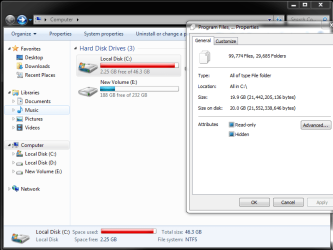
I just got myself a 50GB SSD drive. I wiped it and installed windows 7 on it. My idea was to run my OS on the SSD and install everything else to my other drives. So I litterally only have my OS and drivers installed. But now I already have a warning that I am running low on disk space on the SSD. I selected all folders and the size of all the folders doesn't add up to what the SSD is reflecting(see screenshot). I ran CCleaner and it doesn't help free up space.
Does anyone have some insight into why this is happening and then secondly - is it worth leaving my pc to run like this? will it slow down?
Thanks in advance
I just got myself a 50GB SSD drive. I wiped it and installed windows 7 on it. My idea was to run my OS on the SSD and install everything else to my other drives. So I litterally only have my OS and drivers installed. But now I already have a warning that I am running low on disk space on the SSD. I selected all folders and the size of all the folders doesn't add up to what the SSD is reflecting(see screenshot). I ran CCleaner and it doesn't help free up space.
Does anyone have some insight into why this is happening and then secondly - is it worth leaving my pc to run like this? will it slow down?
Thanks in advance
Attachments
My Computer
At a glance
Windows 7 Ultimate x64i5 2500K @ 3.2Ghz16GB DDR3MSI GTX660ti 2GB DDR5
- Computer type
- PC/Desktop
- Computer Manufacturer/Model Number
- Custom Build
- OS
- Windows 7 Ultimate x64
- CPU
- i5 2500K @ 3.2Ghz
- Motherboard
- MSI H77MA-G43
- Memory
- 16GB DDR3
- Graphics Card(s)
- MSI GTX660ti 2GB DDR5
- Hard Drives
- 1 x 1 Terabyte Seagate HDD
1 x 50 GB SSD HDD
1 x 250 GB Seagate HDD
- PSU
- 730W
- Cooling
- CoolerMaster V8 Cooler
- Mouse
- SteelSeries
- Internet Speed
- 2Mbps uncapped
- Antivirus
- Windows defender
- Browser
- Google Chrome


