Solved WU Always Fails, reverts back

Brento

New member
Local time
1:14 PM
Messages
9
I've spent about 30 hours on this, and gone through about 20 different 'recommendations', but haven't solved this problem yet. I noticed your forums seem to have experts, so perhaps someone can assist. The CBS folder zipped is 141MB, so I don't think I can upload that. Instead, I zipped the logs (minus cab files). Let me know if this is sufficient.

Background:
- Machine is about 10 years old, originally had XP, upgraded to Win7 Pro 32bit a few years ago. Didn't notice any issues
- Replaced HD with SSD using Kingston's imaging software at some point. Didn't notice any issues.
- Problem started happening several months ago (maybe over a year), disabled WU, but now have issues installing Visual Studio. So, I have re-enabled WU. Isolating the problem to WU only, for now.
- Most updates fail to install, however, occasionally one works. Earlier today I had success on one that had failed 4 times before
- I have about 40 updates with failures, but I am only targeting a single update, KB3004375. If I can get this one to work, I suspect the other updates will work afterwards. Log shows a sequence of an initial failure, clicking 'retry' in WU, then having it succeed to download and partially install, ask for a restart, fail after restart, then reverts change (approximately 10th time)
- I have done every eligible step on this post already, so asking me to do these again is probably not going to help: https://support.microsoft.com/en-us/kb/2509997

Assistance appreciated! :)

Brent
 

Attachments

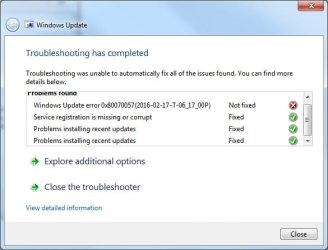
  • WUTroubleshooterError.jpg
    WUTroubleshooterError.jpg
    28.8 KB · Views: 23
  • KB3004375Error.jpg
    KB3004375Error.jpg
    35 KB · Views: 23

My Computer My Computer

Computer type
PC/Desktop
Computer Manufacturer/Model Number
custom build
OS
Windows 7 Professional (32 bit)
CPU
AMD Athlon(tm) 64 X2 Dual Core Processor 4200+ 2.20 GHz
Motherboard
DFI RDX200 Crossfire-LANParty
Memory
2GB DDR400
Graphics Card(s)
ATI Radeon HD 4800 Series
Hard Drives
KINGSTON SV300S37A240G ATA Device (SSD)
Antivirus
MalwareBytes Free
Browser
Chrome
If you have win7x32 installation disk I'd perform a Repair Install
You can chase this error code forever & maybe correct it. Haven't had much luck with hours & hours of fruitless attempts.
Check your Private Message (PM)
 

My Computer My Computer

Computer type
Laptop
OS
Win 7 Home Premium x64/Linux Lite 2.6 x64
I found the original ISO and product key. I tried following the steps illustrated. The first hundred or so updates installed successfully after half a day, but then the last third began failing again.

When I try to manually download 1 small update, it seems to hang again, kind of like it did before I did some patches in the first 30 hours. Seems like I am worse off than I was. :/
 

My Computer My Computer

Computer type
PC/Desktop
Computer Manufacturer/Model Number
custom build
OS
Windows 7 Professional (32 bit)
CPU
AMD Athlon(tm) 64 X2 Dual Core Processor 4200+ 2.20 GHz
Motherboard
DFI RDX200 Crossfire-LANParty
Memory
2GB DDR400
Graphics Card(s)
ATI Radeon HD 4800 Series
Hard Drives
KINGSTON SV300S37A240G ATA Device (SSD)
Antivirus
MalwareBytes Free
Browser
Chrome
Wow, after 1 day of repair, and applying 100+ updates successfully, I am getting failures again (probably at the same point in the timeline as I was before the repair)..

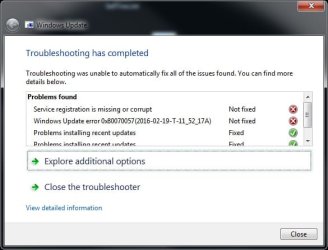
5th day on this.. here's the diagnostic report..

Got a feeling that removing Visual Studio 2010 is related to this. Seems like Microsoft has intentionally made this fail, I mean, could there be a simpler test than what I just did?

Utter garbage..
 

Attachments

  • AfterRepair.jpg
    AfterRepair.jpg
    31.4 KB · Views: 12

My Computer My Computer

Computer type
PC/Desktop
Computer Manufacturer/Model Number
custom build
OS
Windows 7 Professional (32 bit)
CPU
AMD Athlon(tm) 64 X2 Dual Core Processor 4200+ 2.20 GHz
Motherboard
DFI RDX200 Crossfire-LANParty
Memory
2GB DDR400
Graphics Card(s)
ATI Radeon HD 4800 Series
Hard Drives
KINGSTON SV300S37A240G ATA Device (SSD)
Antivirus
MalwareBytes Free
Browser
Chrome

My Computer My Computer

Computer type
PC/Desktop
Computer Manufacturer/Model Number
medionl/Aspire 6930G/acer x55a
OS
W7 home premium 32bit/W7HP 64bit/w10 tp insider ring
CPU
E5300 dual core
Motherboard
medion MS7366
Memory
3gb
Graphics Card(s)
Nvidia Geforce 7100 Nforce 630i
Monitor(s) Displays
avixc
Internet Speed
n (isp resticted to 72)
Antivirus
mse/pands
Browser
palemoon
Other Info
Belkin Fd7050 n USB using Railink RT2870 drivers, more upto date

My Computer My Computer

Computer type
PC/Desktop
Computer Manufacturer/Model Number
custom build
OS
Windows 7 Professional (32 bit)
CPU
AMD Athlon(tm) 64 X2 Dual Core Processor 4200+ 2.20 GHz
Motherboard
DFI RDX200 Crossfire-LANParty
Memory
2GB DDR400
Graphics Card(s)
ATI Radeon HD 4800 Series
Hard Drives
KINGSTON SV300S37A240G ATA Device (SSD)
Antivirus
MalwareBytes Free
Browser
Chrome
crossed see edit, see link

Roy
 

My Computer My Computer

Computer type
PC/Desktop
Computer Manufacturer/Model Number
medionl/Aspire 6930G/acer x55a
OS
W7 home premium 32bit/W7HP 64bit/w10 tp insider ring
CPU
E5300 dual core
Motherboard
medion MS7366
Memory
3gb
Graphics Card(s)
Nvidia Geforce 7100 Nforce 630i
Monitor(s) Displays
avixc
Internet Speed
n (isp resticted to 72)
Antivirus
mse/pands
Browser
palemoon
Other Info
Belkin Fd7050 n USB using Railink RT2870 drivers, more upto date
Hey Roy, is that really related? One thing I can tell you is that I have a license key that was given to me when I was using the BizSpark software program. I had just purchased an XP license, so as long as the win7 upgrade was a permanent upgrade, then it seemed like a fair deal (because I never really got value out of my XP license).

After the reinstall repair, when I entered the product key this time around, I inadvertantly entered the wrong key during the first prompt (it told me it was 'expired'??). After rebooting, it then left a little message on the bottom of my desktop saying 'not genuine'. Updates were also disabled (if I recall).

I then found the correct key, and it replied 'successful', and as posted, it downloaded about 130 updates successfully (I manually selected 130 because I wanted early feedback before going to bed (watched a movie). They worked, so I selected the rest, and had them run. The next morning, they all appear to have failed.

Seems like if it was installing 130, the rest should have installed? It does not report as having a non-genuine copy?
 

My Computer My Computer

Computer type
PC/Desktop
Computer Manufacturer/Model Number
custom build
OS
Windows 7 Professional (32 bit)
CPU
AMD Athlon(tm) 64 X2 Dual Core Processor 4200+ 2.20 GHz
Motherboard
DFI RDX200 Crossfire-LANParty
Memory
2GB DDR400
Graphics Card(s)
ATI Radeon HD 4800 Series
Hard Drives
KINGSTON SV300S37A240G ATA Device (SSD)
Antivirus
MalwareBytes Free
Browser
Chrome
problem service

Only picked up on it because its showing as not fixed in your screenshot.
Have you installed KB971033 yet.

Roy
 

My Computer My Computer

Computer type
PC/Desktop
Computer Manufacturer/Model Number
medionl/Aspire 6930G/acer x55a
OS
W7 home premium 32bit/W7HP 64bit/w10 tp insider ring
CPU
E5300 dual core
Motherboard
medion MS7366
Memory
3gb
Graphics Card(s)
Nvidia Geforce 7100 Nforce 630i
Monitor(s) Displays
avixc
Internet Speed
n (isp resticted to 72)
Antivirus
mse/pands
Browser
palemoon
Other Info
Belkin Fd7050 n USB using Railink RT2870 drivers, more upto date
Since it was simple enough, I followed the instructions. Again, this is a Windows Update Issue, and to my knowledge, not related to a Windows Genuine problem:

Code:
Diagnostic Report (1.9.0027.0):
-----------------------------------------
Windows Validation Data-->

Validation Code: 0
Cached Online Validation Code: 0x0
Windows Product Key: *****-*****-JWRT7-4QFRJ-T8F44
Windows Product Key Hash: 8ISoFoglNwk3mJ2dPERuNaPY4a8=
Windows Product ID: 00371-221-6671017-86441
Windows Product ID Type: 5
Windows License Type: Retail
Windows OS version: 6.1.7601.2.00010100.1.0.048
ID: {5056F50A-321F-4A38-8595-F15621BAF817}(1)
Is Admin: Yes
TestCab: 0x0
LegitcheckControl ActiveX: N/A, hr = 0x80070002
Signed By: N/A, hr = 0x80070002
Product Name: Windows 7 Professional
Architecture: 0x00000000
Build lab: 7601.win7sp1_gdr.150113-1808
TTS Error: 
Validation Diagnostic: 
Resolution Status: N/A

Vista WgaER Data-->
ThreatID(s): N/A, hr = 0x80070002
Version: N/A, hr = 0x80070002

Windows XP Notifications Data-->
Cached Result: N/A, hr = 0x80070002
File Exists: No
Version: N/A, hr = 0x80070002
WgaTray.exe Signed By: N/A, hr = 0x80070002
WgaLogon.dll Signed By: N/A, hr = 0x80070002

OGA Notifications Data-->
Cached Result: N/A, hr = 0x80070002
Version: N/A, hr = 0x80070002
OGAExec.exe Signed By: N/A, hr = 0x80070002
OGAAddin.dll Signed By: N/A, hr = 0x80070002

OGA Data-->
Office Status: 109 N/A
OGA Version: N/A, 0x80070002
Signed By: N/A, hr = 0x80070002
Office Diagnostics: 025D1FF3-364-80041010_025D1FF3-229-80041010_025D1FF3-230-1_025D1FF3-517-80040154_025D1FF3-237-80040154_025D1FF3-238-2_025D1FF3-244-80070002_025D1FF3-258-3

Browser Data-->
Proxy settings: N/A
User Agent: Mozilla/4.0 (compatible; MSIE 8.0; Win32)
Default Browser: C:\Program Files\Google\Chrome\Application\chrome.exe
Download signed ActiveX controls: Prompt
Download unsigned ActiveX controls: Disabled
Run ActiveX controls and plug-ins: Allowed
Initialize and script ActiveX controls not marked as safe: Disabled
Allow scripting of Internet Explorer Webbrowser control: Disabled
Active scripting: Allowed
Script ActiveX controls marked as safe for scripting: Allowed

File Scan Data-->

Other data-->
Office Details: <GenuineResults><MachineData><UGUID>{5056F50A-321F-4A38-8595-F15621BAF817}</UGUID><Version>1.9.0027.0</Version><OS>6.1.7601.2.00010100.1.0.048</OS><Architecture>x32</Architecture><PKey>*****-*****-*****-*****-T8F44</PKey><PID>00371-221-6671017-86441</PID><PIDType>5</PIDType><SID>S-1-5-21-3707718067-1474501372-672495853</SID><SYSTEM><Manufacturer>RD480_</Manufacturer><Model>AWRDACPI</Model></SYSTEM><BIOS><Manufacturer>Phoenix Technologies, LTD</Manufacturer><Version>6.00 PG</Version><SMBIOSVersion major="2" minor="3"/><Date>20051011000000.000000+000</Date></BIOS><HWID>6C923507018400F8</HWID><UserLCID>0409</UserLCID><SystemLCID>0409</SystemLCID><TimeZone>Central Standard Time(GMT-06:00)</TimeZone><iJoin>0</iJoin><SBID><stat>3</stat><msppid></msppid><name></name><model></model></SBID><OEM/><GANotification/></MachineData><Software><Office><Result>109</Result><Products/><Applications/></Office></Software></GenuineResults>  

Spsys.log Content: 0x80070002

Licensing Data-->
Software licensing service version: 6.1.7601.17514

Name: Windows(R) 7, Professional edition
Description: Windows Operating System - Windows(R) 7, RETAIL channel
Activation ID: 770bc271-8dc1-467d-b574-73cbacbeccd1
Application ID: 55c92734-d682-4d71-983e-d6ec3f16059f
Extended PID: 00371-00172-221-667101-00-4105-7601.0000-0492016
Installation ID: 015081024114858742282860205434671904611425184471316351
Processor Certificate URL: http://go.microsoft.com/fwlink/?LinkID=88338
Machine Certificate URL: http://go.microsoft.com/fwlink/?LinkID=88339
Use License URL: http://go.microsoft.com/fwlink/?LinkID=88341
Product Key Certificate URL: http://go.microsoft.com/fwlink/?LinkID=88340
Partial Product Key: T8F44
License Status: Licensed
Remaining Windows rearm count: 3
Trusted time: 19/02/2016 12:51:02 PM

Windows Activation Technologies-->
HrOffline: 0x00000000
HrOnline: 0x00000000
HealthStatus: 0x0000000000000000
Event Time Stamp: 11:26:2015 13:37
ActiveX: Registered, Version: 7.1.7600.16395
Admin Service: Registered, Version: 7.1.7600.16395
HealthStatus Bitmask Output:


HWID Data-->
HWID Hash Current: PAAAAAEABgABAAEAAQADAAAAAgABAAEAJJS2R5wL5HRePxb/YNtQAvTV1FB4oy6MmogCehni1IQe9zS1

OEM Activation 1.0 Data-->
N/A

OEM Activation 2.0 Data-->
BIOS valid for OA 2.0: yes, but no SLIC table
Windows marker version: N/A
OEMID and OEMTableID Consistent: N/A
BIOS Information: 
  ACPI Table Name	OEMID Value	OEMTableID Value
  APIC			RD480 		AWRDACPI
  FACP			RD480 		AWRDACPI
  MCFG			RD480 		AWRDACPI
 

My Computer My Computer

Computer type
PC/Desktop
Computer Manufacturer/Model Number
custom build
OS
Windows 7 Professional (32 bit)
CPU
AMD Athlon(tm) 64 X2 Dual Core Processor 4200+ 2.20 GHz
Motherboard
DFI RDX200 Crossfire-LANParty
Memory
2GB DDR400
Graphics Card(s)
ATI Radeon HD 4800 Series
Hard Drives
KINGSTON SV300S37A240G ATA Device (SSD)
Antivirus
MalwareBytes Free
Browser
Chrome
Only picked up on it because its showing as not fixed in your screenshot.
Have you installed KB971033 yet.

Roy

I have now. If it was a non-genuine copy, it should have disabled it correct? Since that has not happened, I think I can safely assume my copy is genuine, and that some sequence of events may be related to the problem. You may want to review my comments in this thread, perhaps it is related to one of these things?
 

My Computer My Computer

Computer type
PC/Desktop
Computer Manufacturer/Model Number
custom build
OS
Windows 7 Professional (32 bit)
CPU
AMD Athlon(tm) 64 X2 Dual Core Processor 4200+ 2.20 GHz
Motherboard
DFI RDX200 Crossfire-LANParty
Memory
2GB DDR400
Graphics Card(s)
ATI Radeon HD 4800 Series
Hard Drives
KINGSTON SV300S37A240G ATA Device (SSD)
Antivirus
MalwareBytes Free
Browser
Chrome
After reading this article, I am suspecting my theory that Microsoft has deliberately broken these updates, to make people buy Window 10, is at least partially true:

Microsoft ends support for .Net Framework 4, 4.5 and 4.5.1 - gHacks Tech News

I would say that the problem began shortly after this article was posted. I never updated my .NET to 4.5+.

I have now run NetFxRepairTool.exe, followed by installing 4.6.1 framework on my PC. This will take awhile, so if anyone else has guesses, please give it a shot! Thanks.
 

My Computer My Computer

Computer type
PC/Desktop
Computer Manufacturer/Model Number
custom build
OS
Windows 7 Professional (32 bit)
CPU
AMD Athlon(tm) 64 X2 Dual Core Processor 4200+ 2.20 GHz
Motherboard
DFI RDX200 Crossfire-LANParty
Memory
2GB DDR400
Graphics Card(s)
ATI Radeon HD 4800 Series
Hard Drives
KINGSTON SV300S37A240G ATA Device (SSD)
Antivirus
MalwareBytes Free
Browser
Chrome
Ok I finally solved this.

As a software engineer, I'm going to state that there is a bug in Microsoft's WU can easily be fix. Very disappointing to see such complacency here.

The incidental culprit appears to have been Visual Studio 2010's shoddy install/uninstall process. While there's nothing Microsoft can do about issues in released software in the field, there's things that can be done to save thousands of man-hours TODAY.

The root problem was a corrupt and lack of .NET configured on my system (caused by the aforemention VS2010). Simply by running the NetFxRepairTool.exe (this repairs built-in .NET libraries too, then installing the comprehensive .NET 4.6.1 library, every update, and Visual Studio 2015 installed successfully.

Now, if I had uninstalled a non-Microsoft product, and it caused the .NET corruption, then Microsoft can claim no liability. But, this is their OWN product. There were legitimate reasons I cleaned up all its associated packages, and it was based on suggestions found in other forums. Besides, regardless of how it got in this state, defense programming could easily have avoided this problem.

The solution, for Microsoft's devs to implement in an emergency fix:

DETECT THE PRESENCE OF .NET MORE ROBUSTLY.

Your Knowledge Base files clearly depend on this being stable. So, in Windows Update (or even when the OS boots), before even scanning for updates, do an integrity check!

I basically found some code on the net that simply looks at the registry settings, to determine .NET compliance, and the utter stupidity of that approach was confounding. DO MORE! Check that the physical files (where does the registry expect them?), and GAC configuration are correct before blindly installing updates and barfing all over the place. Heck, do a checksum and file size check too, while you're at it. This is just stuff off the top of my head.

My guess is Windows Update is done in C++ and relies on core assemblies, so it might be a bit slower to code, but this shouldn't take more than a couple of days. If you try to do this validation using .NET.. well, then I suggest you take a course in basic logic first. ;)

Anyways, until this fix is provided, here's the 2 magic programs I ran:

1. NetFxRepairTool.exe https://support.microsoft.com/en-us/kb/2698555
2. Comprehensive .NET (all versions to date) https://support.microsoft.com/en-us/kb/3102436

This probably applies to anyone who had to uninstall packages from their Programs and Features to remove any large application at some point.

I did have to wait several hours before updates were found, but my god was I surprised that they all succeeded when they did. Even KB3033929 worked, after 12 failures!
 
Last edited:

My Computer My Computer

Computer type
PC/Desktop
Computer Manufacturer/Model Number
custom build
OS
Windows 7 Professional (32 bit)
CPU
AMD Athlon(tm) 64 X2 Dual Core Processor 4200+ 2.20 GHz
Motherboard
DFI RDX200 Crossfire-LANParty
Memory
2GB DDR400
Graphics Card(s)
ATI Radeon HD 4800 Series
Hard Drives
KINGSTON SV300S37A240G ATA Device (SSD)
Antivirus
MalwareBytes Free
Browser
Chrome
Awesome, glad to hear your problem is resolved, & that you posted your fix.
Happy Computing!!!
 

My Computer My Computer

Computer type
Laptop
OS
Win 7 Home Premium x64/Linux Lite 2.6 x64
Back
Top