wuauserv causing svchost memory usage to explode

texasnightowl

New member
Local time
12:17 PM
Messages
9
To be honest, I started out investigating the wrong thing. This all started because I would have errors in Chrome. The Aww, Snap or It's Dead Jim errors, etc. Or Chrome would just crash and I would relaunch and restore. I did normal Chrome things like check the shockwave and flash files, disable extensions, and finally created a new user profile. But I still got application exception errors after that.

Then I saw it.

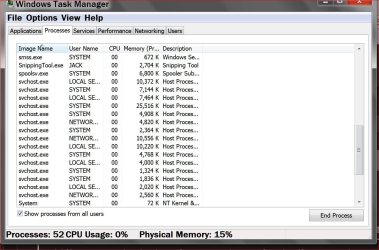
I had Task Manager open and saw one of the svchost instances jump from a normal 22,988 K to 995,688 K!!! And then saw it go higher! And at the bottom of task manager, my Physical Memory was at 86% instead of it's normal 30-40%.

So first I looked at which services were associated with that svchost process. The services were: BITS, Browser, IKEEXT, iphlpsvc, LanmanServer, ProfSvc, Schedule, SENS, ShellHWDetection, Themes, Winmmt, & wuauserv.

Of those, the only one I knew exactly what it was associated with was wuauserv. So I stopped that service. As *SOON* as I stopped it, the memory for svchost dropped back down to normal.

So I left wuaserv stopped and set startup to Manual.

About 15 or 20 minutes later, something started it back up and memory exploded to the same levels again. So I stopped it and again, memory usage dropped back down. This time I set wuauserv startup to Disabled.

So, I guess what I am looking for is suggestions on what to troubleshoot or clear or cleanup so that I can start wuauserv without the excessive memory usage causing exception errors and causing Chrome to crash.

My system is a homebuilt system running Win 7 Home Premium x64. 8gb ram. Plextor 256gb ssd. Asus P8Z68-V board. i5-2500k cpu.
 

My Computer

Computer type
PC/Desktop
Computer Manufacturer/Model Number
custom build, late 2011
OS
Microsoft Windows 7 Home Premium 64-bit Service Pack 1
CPU
Intel(R) Core(TM) i5-2500K CPU @ 3.30GHz
Motherboard
ASUSTeK Computer INC. P8Z68-V
Memory
8.00 GB
Graphics Card(s)
Intel(R) HD Graphics 3000
Sound Card
(1) Realtek High Definition Audio (2) Intel(R) Display Aud
Hard Drives
(1) PLEXTOR PX-256M5Pro (2) WDC WD5000AAKS-00A7B0
Antivirus
ESET NOD32
Browser
Chrome
There are a multitude of unintended consequences with disabling Services in an OS as lean as Win7. Better to repair, if you're confident you already have a solid install. If not look over these steps which compile everything that works best in a Clean Reinstall Windows 7.

Otherwise work through the Troubleshooting Steps for Windows 7 starting with establishing a Clean Boot, running full Malwarebyte and SuperAntiSpyware scans, then System File Checker. If these don't resolve it then continue working through the steps which almost always pin down the problem if not the solution.
 
Just a quick note to say that I had the same problem with svchost.exe and wuaserv very recently. It turned out to be a pending update problem. It might have been caused by my registry hack to disable internet explorer and also I keep system restore disabled. The latest round of updates to patch the Freak vulnerability replaced tons of system files and required a couple of reboots. For whatever reason things didn't go well for me.

Action that I took:

Ran a couple of my usual tools to fix and repair windows updates, clear pending updates and windows update history. Usually this works but no luck this time.

Rolled back system to a system image made before installing the latest updates. Kept system offline and re-enabled IE and system restore. Went online and re-downloaded and installed the missing updates. Everything was then fine.

I'm no expert on Windows Updates but would suggest getting help with checking for any problems particularly with pending updates.
 

My Computer

Computer type
Laptop
Computer Manufacturer/Model Number
ASUS
OS
Microsoft Windows 7 Home Premium 64-bit 7601 Multiprocessor Free Service Pack 1
CPU
AMD C-60 APU with Radeon(tm) HD Graphics
Motherboard
ASUSTeK COMPUTER INC. X501U
Memory
4.00 GB
Graphics Card(s)
AMD Radeon HD 6290 Graphics
Sound Card
(1) AMD High Definition Audio Device (2) Realtek High Defi
Screen Resolution
1366 x 768 x 32 bits (4294967296 colors) @ 60 Hz
Hard Drives
Hitachi HTS545050A7E380 SATA Disk Device
Antivirus
Comodo CIS & FW, SecureAplus App Whitelisting, Threatfire
Browser
Cyberfox 64bit, Opera 64bit, Airfox
Other Info
Spy-The-Spy, HitmanPro.Alert, Norton Connect Safe, MJRegWatcher, BitDefender TrafficLight, Voodoo Shield, Zemana AntiMalware
Thanks for the recommendations. While I was waiting on responses, I did 2 things.

1. I did run SFC and it came back fine.

2. I ran Disk Cleanup and let it clean up update files.

After a reboot, I re-enabled the wuauserv service. And started it. Then went to Windows Update to check for updates. svchost did once again explode. From 23,699 to 1,013,xxx and higher. However...unlike before where my physical memory percentage shot up from around 30% to 86%, this time it stayed in the 30-42% range (though admittedly, I didn't have Chrome running). I did all critical updates then made sure Windows Updates was set to never check for updates (but left wuauserv alone) and rebooted.

After reboot, something did call on wuauserv. Don't know what since Updates were set to never check, but something did start it. And svchost again went up...but a whole lot less...only into the 450,000 range. And physical memory again stayed reasonable. And now, after a while, svchost is back to normal and physical memory is sitting at 28%.

So...the problem is most definitely related to the Windows Update agent. And I would like to know what starts it even though Updates are set to never check.

To be honest, I might just re-disable wuauserv. After troubleshooting this all day I won't lose any sleep if wuauserv is disabled since I had updates set to Never Check anyway.
 

My Computer

Computer type
PC/Desktop
Computer Manufacturer/Model Number
custom build, late 2011
OS
Microsoft Windows 7 Home Premium 64-bit Service Pack 1
CPU
Intel(R) Core(TM) i5-2500K CPU @ 3.30GHz
Motherboard
ASUSTeK Computer INC. P8Z68-V
Memory
8.00 GB
Graphics Card(s)
Intel(R) HD Graphics 3000
Sound Card
(1) Realtek High Definition Audio (2) Intel(R) Display Aud
Hard Drives
(1) PLEXTOR PX-256M5Pro (2) WDC WD5000AAKS-00A7B0
Antivirus
ESET NOD32
Browser
Chrome
Why would you not want Windows 7 Updates?

The setting I use.

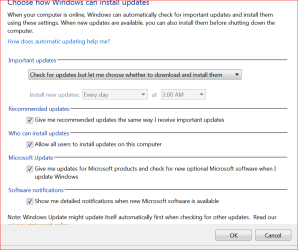
Check for updates but let me choose whether to download and install
 

My Computer

Computer type
PC/Desktop
Computer Manufacturer/Model Number
Home made Desktop
OS
Windows 10 Pro. 64/ version 1709 Windows 7 Pro/64
CPU
Intel i7-6800K @ 4.3
Motherboard
ASUS X-99 Deluxe II
Memory
Corsair Platinum 16 gig @2400
Graphics Card(s)
EVGA GTX 1070 OC
Monitor(s) Displays
Asus 27" LED LCD/VE278Q
Screen Resolution
1920-1080 or 1280-720 HDMI
Hard Drives
INTEL SSD 730-240 Gb Sata 3.0/
PSU
EVGA Platium 1200W
Case
Phanteks Luxe Tempered Glass 8 fans/ one radiator
Cooling
XSPC/ Water Cooled CPU
Keyboard
Das 4 Professional
Mouse
Logitech M705/MX Anywhere 2-S
Internet Speed
100 mbits
Antivirus
Microsoft Security Essentials/ Malwarebytes Premium 3.0/ SAS
Browser
I.E. 11 default/Firefox/ ISP Time Warner Cable/Spectrum
Other Info
LG BluRay Burner/
Sound system-KLipsch-THX/
Icy Dock ssd Hot Swap bays.
Why would you not want Windows 7 Updates?

Mostly because it is far easier to remember the times that updates have caused problems than all the times they don't.

And at the moment I would much rather eliminate the source of high memory usage and other applications crashing. And if that source is Windows Update (wuauserv) then so be it.

I'm still trying to figure out what process or app causes wuauserv to start up even with Windows Update set to Never Check. Something starts it. Just can't tell what yet. I checked the WindowsUpdate.log and when it starts up, the "Caller ID = " is blank. (When Windows Update is set to auto check instead of never, then Caller ID is Windows Update.)

One of my next steps may be to delete (or at least rename) the c:\windows\SoftwareDistribution folder. But I'm putting that off as a last resort item.

Or I may just go with leaving wuauserv set to disabled and just manually enable whenever I want to check for updates.

Everything else on the system has been fine and continues to be fine. And when wuauserv has been disabled I have had no Chrome problems at all versus the previous multiple crashes a day. And physical memory usage is remaining in a normal 30-45% range rather than 86%.
 

My Computer

Computer type
PC/Desktop
Computer Manufacturer/Model Number
custom build, late 2011
OS
Microsoft Windows 7 Home Premium 64-bit Service Pack 1
CPU
Intel(R) Core(TM) i5-2500K CPU @ 3.30GHz
Motherboard
ASUSTeK Computer INC. P8Z68-V
Memory
8.00 GB
Graphics Card(s)
Intel(R) HD Graphics 3000
Sound Card
(1) Realtek High Definition Audio (2) Intel(R) Display Aud
Hard Drives
(1) PLEXTOR PX-256M5Pro (2) WDC WD5000AAKS-00A7B0
Antivirus
ESET NOD32
Browser
Chrome

My Computer

Computer type
PC/Desktop
Computer Manufacturer/Model Number
Home made Desktop
OS
Windows 10 Pro. 64/ version 1709 Windows 7 Pro/64
CPU
Intel i7-6800K @ 4.3
Motherboard
ASUS X-99 Deluxe II
Memory
Corsair Platinum 16 gig @2400
Graphics Card(s)
EVGA GTX 1070 OC
Monitor(s) Displays
Asus 27" LED LCD/VE278Q
Screen Resolution
1920-1080 or 1280-720 HDMI
Hard Drives
INTEL SSD 730-240 Gb Sata 3.0/
PSU
EVGA Platium 1200W
Case
Phanteks Luxe Tempered Glass 8 fans/ one radiator
Cooling
XSPC/ Water Cooled CPU
Keyboard
Das 4 Professional
Mouse
Logitech M705/MX Anywhere 2-S
Internet Speed
100 mbits
Antivirus
Microsoft Security Essentials/ Malwarebytes Premium 3.0/ SAS
Browser
I.E. 11 default/Firefox/ ISP Time Warner Cable/Spectrum
Other Info
LG BluRay Burner/
Sound system-KLipsch-THX/
Icy Dock ssd Hot Swap bays.
Must be your system.
Billions of people around the world get Windows Update.
Yes...thus the reason I posted here in the first place?

If you complete this tutorial and post the log here maybe one of our experts can locate your problem.
http://www.sevenforums.com/windows-...ne-activation-issue-posting-instructions.html

Umm...yes, my system is 100% legit.

Code:
Diagnostic Report (1.9.0027.0):
-----------------------------------------
Windows Validation Data-->

Validation Code: 0
Cached Online Validation Code: 0x0
Windows Product Key: *****-*****-MHF4X-F993M-WP3HY
Windows Product Key Hash: iKlhBEVaG4AHWXRNEfXRhw5o1l0=
Windows Product ID: 00359-029-2937851-85598
Windows Product ID Type: 5
Windows License Type: Retail
Windows OS version: 6.1.7601.2.00010300.1.0.003
ID: {18776FFE-BE68-413A-A0A3-E8450DB6241F}(1)
Is Admin: Yes
TestCab: 0x0
LegitcheckControl ActiveX: N/A, hr = 0x80070002
Signed By: N/A, hr = 0x80070002
Product Name: Windows 7 Home Premium
Architecture: 0x00000009
Build lab: 7601.win7sp1_gdr.150202-1526
TTS Error: 
Validation Diagnostic: 
Resolution Status: N/A

Vista WgaER Data-->
ThreatID(s): N/A, hr = 0x80070002
Version: N/A, hr = 0x80070002

Windows XP Notifications Data-->
Cached Result: N/A, hr = 0x80070002
File Exists: No
Version: N/A, hr = 0x80070002
WgaTray.exe Signed By: N/A, hr = 0x80070002
WgaLogon.dll Signed By: N/A, hr = 0x80070002

OGA Notifications Data-->
Cached Result: N/A, hr = 0x80070002
Version: N/A, hr = 0x80070002
OGAExec.exe Signed By: N/A, hr = 0x80070002
OGAAddin.dll Signed By: N/A, hr = 0x80070002

OGA Data-->
Office Status: 100 Genuine
Microsoft Office Professional 2007 - 100 Genuine
OGA Version: N/A, 0x80070002
Signed By: N/A, hr = 0x80070002
Office Diagnostics: 025D1FF3-364-80041010_025D1FF3-229-80041010_025D1FF3-230-1_025D1FF3-517-80040154_025D1FF3-237-80040154_025D1FF3-238-2_025D1FF3-244-80070002_025D1FF3-258-3_E2AD56EA-765-d003_E2AD56EA-766-0_E2AD56EA-134-80004005_E2AD56EA-765-b01a_E2AD56EA-766-0_E2AD56EA-148-80004005_16E0B333-89-80004005_B4D0AA8B-1029-80004005

Browser Data-->
Proxy settings: N/A
User Agent: Mozilla/4.0 (compatible; MSIE 8.0; Win32)
Default Browser: C:\Users\myname\AppData\Local\Google\Chrome\Application\chrome.exe
Download signed ActiveX controls: Prompt
Download unsigned ActiveX controls: Disabled
Run ActiveX controls and plug-ins: Allowed
Initialize and script ActiveX controls not marked as safe: Disabled
Allow scripting of Internet Explorer Webbrowser control: Disabled
Active scripting: Allowed
Script ActiveX controls marked as safe for scripting: Allowed

File Scan Data-->

Other data-->
Office Details: <GenuineResults><MachineData><UGUID>{18776FFE-BE68-413A-A0A3-E8450DB6241F}</UGUID><Version>1.9.0027.0</Version><OS>6.1.7601.2.00010300.1.0.003</OS><Architecture>x64</Architecture><PKey>*****-*****-*****-*****-WP3HY</PKey><PID>00359-029-2937851-85598</PID><PIDType>5</PIDType><SID>S-1-5-21-3923643399-1494497486-2402846068</SID><SYSTEM><Manufacturer>System manufacturer</Manufacturer><Model>System Product Name</Model></SYSTEM><BIOS><Manufacturer>American Megatrends Inc.</Manufacturer><Version>3402</Version><SMBIOSVersion major="2" minor="6"/><Date>20120507000000.000000+000</Date></BIOS><HWID>86F53407018400FE</HWID><UserLCID>0409</UserLCID><SystemLCID>0409</SystemLCID><TimeZone>Central Standard Time(GMT-06:00)</TimeZone><iJoin>0</iJoin><SBID><stat>3</stat><msppid></msppid><name></name><model></model></SBID><OEM/><GANotification/></MachineData><Software><Office><Result>100</Result><Products><Product GUID="{91120000-0014-0000-0000-0000000FF1CE}"><LegitResult>100</LegitResult><Name>Microsoft Office Professional 2007</Name><Ver>12</Ver><Val>6855CA46CF2670E</Val><Hash>11bbwyn613bTntmR6guNrXMMM0c=</Hash><Pid>81605-903-3698862-65283</Pid><PidType>1</PidType></Product></Products><Applications><App Id="15" Version="12" Result="100"/><App Id="16" Version="12" Result="100"/><App Id="18" Version="12" Result="100"/><App Id="19" Version="12" Result="100"/><App Id="1A" Version="12" Result="100"/><App Id="1B" Version="12" Result="100"/></Applications></Office></Software></GenuineResults>  

Spsys.log Content: 0x80070002

Licensing Data-->
Software licensing service version: 6.1.7601.17514

Name: Windows(R) 7, HomePremium edition
Description: Windows Operating System - Windows(R) 7, RETAIL channel
Activation ID: 2e7d060d-4714-40f2-9896-1e4f15b612ad
Application ID: 55c92734-d682-4d71-983e-d6ec3f16059f
Extended PID: 00359-00170-029-293785-01-1033-7600.0000-2562011
Installation ID: 002531874304391151258171475152350903300900943780009196
Processor Certificate URL: http://go.microsoft.com/fwlink/?LinkID=88338
Machine Certificate URL: http://go.microsoft.com/fwlink/?LinkID=88339
Use License URL: http://go.microsoft.com/fwlink/?LinkID=88341
Product Key Certificate URL: http://go.microsoft.com/fwlink/?LinkID=88340
Partial Product Key: WP3HY
License Status: Licensed
Remaining Windows rearm count: 3
Trusted time: 3/20/2015 11:31:51 AM

Windows Activation Technologies-->
HrOffline: 0x00000000
HrOnline: N/A
HealthStatus: 0x0000000000000000
Event Time Stamp: N/A
ActiveX: Registered, Version: 7.1.7600.16395
Admin Service: Registered, Version: 7.1.7600.16395
HealthStatus Bitmask Output:


HWID Data-->
HWID Hash Current: NAAAAAIAAwABAAEAAQABAAAAAgABAAEAln3CWk409jt4GayLGl148yQ73ojKxF8DEkcucw==

OEM Activation 1.0 Data-->
N/A

OEM Activation 2.0 Data-->
BIOS valid for OA 2.0: yes, but no SLIC table
Windows marker version: N/A
OEMID and OEMTableID Consistent: N/A
BIOS Information: 
  ACPI Table Name	OEMID Value	OEMTableID Value
  APIC			ALASKA		A M I
  FACP			ALASKA		A M I
  HPET			ALASKA		A M I
  MCFG			ALASKA		A M I
  SSDT			SataRe		SataTabl
  SSDT			SataRe		SataTabl
  SSDT			SataRe		SataTabl
  BGRT			ALASKA		A M I
 

My Computer

Computer type
PC/Desktop
Computer Manufacturer/Model Number
custom build, late 2011
OS
Microsoft Windows 7 Home Premium 64-bit Service Pack 1
CPU
Intel(R) Core(TM) i5-2500K CPU @ 3.30GHz
Motherboard
ASUSTeK Computer INC. P8Z68-V
Memory
8.00 GB
Graphics Card(s)
Intel(R) HD Graphics 3000
Sound Card
(1) Realtek High Definition Audio (2) Intel(R) Display Aud
Hard Drives
(1) PLEXTOR PX-256M5Pro (2) WDC WD5000AAKS-00A7B0
Antivirus
ESET NOD32
Browser
Chrome
Malware Bytes...only found 5 registry entries
Code:
Malwarebytes Anti-Malware
www.malwarebytes.org

Scan Date: 3/20/2015
Scan Time: 11:41:47 AM
Logfile: MBAM.txt
Administrator: Yes

Version: 2.01.4.1018
Malware Database: v2015.03.20.05
Rootkit Database: v2015.02.25.01
License: Free
Malware Protection: Disabled
Malicious Website Protection: Disabled
Self-protection: Disabled

OS: Windows 7 Service Pack 1
CPU: x64
File System: NTFS
User: myname

Scan Type: Threat Scan
Result: Completed
Objects Scanned: 371988
Time Elapsed: 4 min, 46 sec

Memory: Enabled
Startup: Enabled
Filesystem: Enabled
Archives: Enabled
Rootkits: Disabled
Heuristics: Enabled
PUP: Enabled
PUM: Enabled

Processes: 0
(No malicious items detected)

Modules: 0
(No malicious items detected)

Registry Keys: 4
PUP.Optional.MyFreeze.A, HKLM\SOFTWARE\WOW6432NODE\Freeze.com, Quarantined, [dee73c0b8cfe48ee878c853cc2414db3], 
Adware.TryMedia, HKU\S-1-5-21-3923643399-1494497486-2402846068-1000\SOFTWARE\Trymedia Systems, Quarantined, [a71ec97e206a3afcf5e9146743c18977], 
PUP.Optional.InstallCore.A, HKU\S-1-5-21-3923643399-1494497486-2402846068-1000\SOFTWARE\INSTALLCORE\1I1T1Q1S, Quarantined, [3c892c1b2169360013a3ac559b69a65a], 
PUP.Optional.InstallCore.A, HKU\S-1-5-21-3923643399-1494497486-2402846068-1000\SOFTWARE\INSTALLCORE, Quarantined, [576e301782080b2bd9b773a4897ce61a], 

Registry Values: 1
PUP.Optional.InstallCore.A, HKU\S-1-5-21-3923643399-1494497486-2402846068-1000\SOFTWARE\INSTALLCORE|tb, 0G2Y1R2X0G1M2S1M0G1S1H, Quarantined, [576e301782080b2bd9b773a4897ce61a]

Registry Data: 0
(No malicious items detected)

Folders: 0
(No malicious items detected)

Files: 0
(No malicious items detected)

Physical Sectors: 0
(No malicious items detected)


(end)

SuperAntiSpyware...found a couple hundred Adware Tracking Cookies. Can post the whole log if desired, but only found these tracking cookies.

Also, because I don't think I mentioned it above, my AV program is ESET NOD32.

SFC /SCANNOW = Windows Resource Protection did not find any integrity violations.
 

My Computer

Computer type
PC/Desktop
Computer Manufacturer/Model Number
custom build, late 2011
OS
Microsoft Windows 7 Home Premium 64-bit Service Pack 1
CPU
Intel(R) Core(TM) i5-2500K CPU @ 3.30GHz
Motherboard
ASUSTeK Computer INC. P8Z68-V
Memory
8.00 GB
Graphics Card(s)
Intel(R) HD Graphics 3000
Sound Card
(1) Realtek High Definition Audio (2) Intel(R) Display Aud
Hard Drives
(1) PLEXTOR PX-256M5Pro (2) WDC WD5000AAKS-00A7B0
Antivirus
ESET NOD32
Browser
Chrome
Well if you still can't update your system after cleaning out all the bad things. I would suggest posting here for Update help.

http://www.sevenforums.com/windows-updates-activation/


We have experts that can do a lot more than I can.
Just hyper link this thread if need be so they can take a read if they so desire.

Their is no good reason not to keep Windows 7 up to date.
Proper Windows 7 Update is a important security measure.

Be sure you let them know you have been turning things on and off for Windows 7 Updates.

If it was my computer I would do a Repair Install because I would forget what settings I have changed. That is just me. Their might be a quicker way.

Tutorial by Brink if you choose Repair Install.

http://www.sevenforums.com/tutorials/3413-repair-install.html
 

My Computer

Computer type
PC/Desktop
Computer Manufacturer/Model Number
Home made Desktop
OS
Windows 10 Pro. 64/ version 1709 Windows 7 Pro/64
CPU
Intel i7-6800K @ 4.3
Motherboard
ASUS X-99 Deluxe II
Memory
Corsair Platinum 16 gig @2400
Graphics Card(s)
EVGA GTX 1070 OC
Monitor(s) Displays
Asus 27" LED LCD/VE278Q
Screen Resolution
1920-1080 or 1280-720 HDMI
Hard Drives
INTEL SSD 730-240 Gb Sata 3.0/
PSU
EVGA Platium 1200W
Case
Phanteks Luxe Tempered Glass 8 fans/ one radiator
Cooling
XSPC/ Water Cooled CPU
Keyboard
Das 4 Professional
Mouse
Logitech M705/MX Anywhere 2-S
Internet Speed
100 mbits
Antivirus
Microsoft Security Essentials/ Malwarebytes Premium 3.0/ SAS
Browser
I.E. 11 default/Firefox/ ISP Time Warner Cable/Spectrum
Other Info
LG BluRay Burner/
Sound system-KLipsch-THX/
Icy Dock ssd Hot Swap bays.
Well if you still can't update your system after cleaning out all the bad things. I would suggest posting here for Update help.

http://www.sevenforums.com/windows-updates-activation/


http://www.sevenforums.com/tutorials/3413-repair-install.html

Oops...just to be clear, I can update my system. That is not the problem. The problem is that even with Windows Update set to "Never check" (ie. I do it when I want to do it) *something* is still calling wuauserv. And when wuauserv runs, memory usage spikes. Physical memory percentage was jumping from say 40% to 86%.

If this was only happening when I was actively running Windows Updates it would not bother me. But since I have updates set to "never check" something was still calling wuauserv and this memory spike was crashing Chrome because of insufficient resources.

I suppose, since I have narrowed it to wuauserv I should still consider posting in the other area you mentioned, so thanks for that link.

(I have all critical updates installed...some optional ones are not installed.)
 

My Computer

Computer type
PC/Desktop
Computer Manufacturer/Model Number
custom build, late 2011
OS
Microsoft Windows 7 Home Premium 64-bit Service Pack 1
CPU
Intel(R) Core(TM) i5-2500K CPU @ 3.30GHz
Motherboard
ASUSTeK Computer INC. P8Z68-V
Memory
8.00 GB
Graphics Card(s)
Intel(R) HD Graphics 3000
Sound Card
(1) Realtek High Definition Audio (2) Intel(R) Display Aud
Hard Drives
(1) PLEXTOR PX-256M5Pro (2) WDC WD5000AAKS-00A7B0
Antivirus
ESET NOD32
Browser
Chrome
No don't go anywhere. Just stay here. I did misunderstand you. It's been that way for me all day.

Did you set your updates as I suggested in post #5?

Check for updates but let me choose whether to download and install

UPDATE SETTINGS.PNG
 

My Computer

Computer type
PC/Desktop
Computer Manufacturer/Model Number
Home made Desktop
OS
Windows 10 Pro. 64/ version 1709 Windows 7 Pro/64
CPU
Intel i7-6800K @ 4.3
Motherboard
ASUS X-99 Deluxe II
Memory
Corsair Platinum 16 gig @2400
Graphics Card(s)
EVGA GTX 1070 OC
Monitor(s) Displays
Asus 27" LED LCD/VE278Q
Screen Resolution
1920-1080 or 1280-720 HDMI
Hard Drives
INTEL SSD 730-240 Gb Sata 3.0/
PSU
EVGA Platium 1200W
Case
Phanteks Luxe Tempered Glass 8 fans/ one radiator
Cooling
XSPC/ Water Cooled CPU
Keyboard
Das 4 Professional
Mouse
Logitech M705/MX Anywhere 2-S
Internet Speed
100 mbits
Antivirus
Microsoft Security Essentials/ Malwarebytes Premium 3.0/ SAS
Browser
I.E. 11 default/Firefox/ ISP Time Warner Cable/Spectrum
Other Info
LG BluRay Burner/
Sound system-KLipsch-THX/
Icy Dock ssd Hot Swap bays.
If you don't have your Win7 patched with all Important and Optional Updates, then just like if you'd avoid SP1 you don't actually even have Windows 7. This is because there are so many critical patches (many not even named that or queued inexplicably under Optional) that the OS at any point in time is truly a collection of all of these patches to be in good running order.

I know this is hard to accept if you're facing a problem with wuaserv spiking your CPU, but it could very well be one or more of those patches that resolves this, and you must have a fully patched system to even properly troubleshoot it.

I have helped in over a million installs every one of which is set to Auto Update and have rarely had problems with Updates which are statistically about one in a million.

There of course could be other problems. What we often see with those who turn off Services is that they make other tweaks that Win7 will not sustain being a featherlight OS. So the first thing to resolve is if you have a perfect install as all those I've helped do. Everything that works best for Win7 since beta is compiled in Clean Reinstall Windows 7 to compare with your install. If it's much different to begin with, then I'd strongly consider getting that one great install that you can then preserve in an image so you never need to do it again.
 

My Computer

Computer type
PC/Desktop
Computer Manufacturer/Model Number
Home made Desktop
OS
Windows 10 Pro. 64/ version 1709 Windows 7 Pro/64
CPU
Intel i7-6800K @ 4.3
Motherboard
ASUS X-99 Deluxe II
Memory
Corsair Platinum 16 gig @2400
Graphics Card(s)
EVGA GTX 1070 OC
Monitor(s) Displays
Asus 27" LED LCD/VE278Q
Screen Resolution
1920-1080 or 1280-720 HDMI
Hard Drives
INTEL SSD 730-240 Gb Sata 3.0/
PSU
EVGA Platium 1200W
Case
Phanteks Luxe Tempered Glass 8 fans/ one radiator
Cooling
XSPC/ Water Cooled CPU
Keyboard
Das 4 Professional
Mouse
Logitech M705/MX Anywhere 2-S
Internet Speed
100 mbits
Antivirus
Microsoft Security Essentials/ Malwarebytes Premium 3.0/ SAS
Browser
I.E. 11 default/Firefox/ ISP Time Warner Cable/Spectrum
Other Info
LG BluRay Burner/
Sound system-KLipsch-THX/
Icy Dock ssd Hot Swap bays.
No don't go anywhere. Just stay here. I did misunderstand you. It's been that way for me all day.

Did you set your updates as I suggested in post #5?

I have done that for the moment yes.

If you don't have your Win7 patched with all Important and Optional Updates, then just like if you'd avoid SP1 you don't actually even have Windows 7. This is because there are so many critical patches (many not even named that or queued inexplicably under Optional) that the OS at any point in time is truly a collection of all of these patches to be in good running order.

Just to be clear, it is not like I have hundreds of optional not installed. It is a total of 25. Of those 25, 8 are specifically for Office 2007 *HELP* functions. So I really only have 17 Optional hotfixes that are not currently installed.

There of course could be other problems. What we often see with those who turn off Services is that they make other tweaks that Win7 will not sustain being a featherlight OS. So the first thing to resolve is if you have a perfect install as all those I've helped do.

Look, don't take this the wrong way, but I am still a long, long, long way away from even considering a reinstall. Not even close to considering it. I am not trying to be difficult and I understand why you would recommend it to people who have OEM machines. Also, I do not go around turning off services all the time. I turned off wuauserv yesterday because of the physical memory spike affecting svchost and because I knew what wuauserv was as one of the processes on that instance of svchost. It was enabled until yesterday. Before that, it has been ages since I last opened services.msc.

I did look at the instructions in your link, but honestly, I did a clean install when I switched to my SSD drive (granted, over a year ago) and since this was a custom build anyway, I never had any of the bloatware to be found on OEM Dell, HP, Lenovo, etc. systems.

I will admit, against what appears to be common advice here, I do *not* have System Restore enabled so I do not have any restore points.

Anyway, I will go ahead and install the 17 optional updates and get back to you.
 

My Computer

Computer type
PC/Desktop
Computer Manufacturer/Model Number
custom build, late 2011
OS
Microsoft Windows 7 Home Premium 64-bit Service Pack 1
CPU
Intel(R) Core(TM) i5-2500K CPU @ 3.30GHz
Motherboard
ASUSTeK Computer INC. P8Z68-V
Memory
8.00 GB
Graphics Card(s)
Intel(R) HD Graphics 3000
Sound Card
(1) Realtek High Definition Audio (2) Intel(R) Display Aud
Hard Drives
(1) PLEXTOR PX-256M5Pro (2) WDC WD5000AAKS-00A7B0
Antivirus
ESET NOD32
Browser
Chrome
Good. Then there is a way to drill down into specific Processes which are spiking in Troubleshooting Steps for Windows 7.

Working through all of those steps will also often uncover the problem, unless someone has more specific suggestions.

Yeah, that link was suggested yesterday (which is why I posted my MBAM and SuperAntiSpyware results). I do need to try the Process Explorer suggestion and have another look at Event Viewer under the custom view as suggested.


I have completed all updates and "Windows is up to date".

I will say, and I mentioned it in a post last night, after I ran Disc Cleanup and cleaned up system update files (3 gb) that while svchost still jumps from around 22,000 to 1,120,566 that physical memory percentage has not gone as high as yesterday. Instead of spiking to 86% usage, it has remained under 50%. So that is progress.

Right now, for some reason svchost is hanging at 551,948...considering updating is done and not openly running, I would have expected it to drop back down to the normal 22,000 level. lol. right after I posted it dropped down to 23,408.
 

My Computer

Computer type
PC/Desktop
Computer Manufacturer/Model Number
custom build, late 2011
OS
Microsoft Windows 7 Home Premium 64-bit Service Pack 1
CPU
Intel(R) Core(TM) i5-2500K CPU @ 3.30GHz
Motherboard
ASUSTeK Computer INC. P8Z68-V
Memory
8.00 GB
Graphics Card(s)
Intel(R) HD Graphics 3000
Sound Card
(1) Realtek High Definition Audio (2) Intel(R) Display Aud
Hard Drives
(1) PLEXTOR PX-256M5Pro (2) WDC WD5000AAKS-00A7B0
Antivirus
ESET NOD32
Browser
Chrome
Just for a example here are my service host. This is a system not in my specs.

Service host.JPG
 

My Computer

Computer type
PC/Desktop
Computer Manufacturer/Model Number
Home made Desktop
OS
Windows 10 Pro. 64/ version 1709 Windows 7 Pro/64
CPU
Intel i7-6800K @ 4.3
Motherboard
ASUS X-99 Deluxe II
Memory
Corsair Platinum 16 gig @2400
Graphics Card(s)
EVGA GTX 1070 OC
Monitor(s) Displays
Asus 27" LED LCD/VE278Q
Screen Resolution
1920-1080 or 1280-720 HDMI
Hard Drives
INTEL SSD 730-240 Gb Sata 3.0/
PSU
EVGA Platium 1200W
Case
Phanteks Luxe Tempered Glass 8 fans/ one radiator
Cooling
XSPC/ Water Cooled CPU
Keyboard
Das 4 Professional
Mouse
Logitech M705/MX Anywhere 2-S
Internet Speed
100 mbits
Antivirus
Microsoft Security Essentials/ Malwarebytes Premium 3.0/ SAS
Browser
I.E. 11 default/Firefox/ ISP Time Warner Cable/Spectrum
Other Info
LG BluRay Burner/
Sound system-KLipsch-THX/
Icy Dock ssd Hot Swap bays.
Suggestion

Okay so you keep System Restore disabled - like me. Only what happens if you try to enable it just for test purposes?

Start> Run

type sysdm.cpl

press Enter

On the system protection tab try enabling system restore for your windows partition. "System settings & previous versions of files"

Do you get any error message about a pending update? If so that's the same problem that I had following the last round of windows updates.

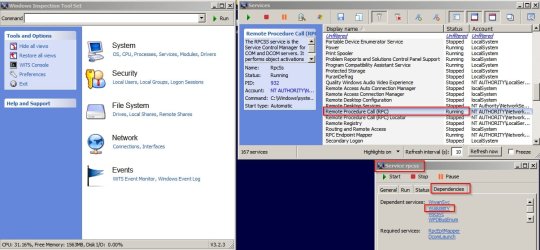
Re: Your question on disabling windows updates. It's not clear to me but it looks like if you have another service running where one of it's dependencies is windows updates then it might attempt to restart it.

rpcss.jpg

Another check: Control Panel > Windows Updates > Restore hidden updates - if any.

If you like you can try my usual fixes but be warned that although they usually work - they didn't work for me on the last occasion.

Usual fixes that I use with a reboot in between each fix.

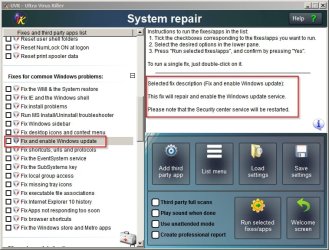
UVK System Repair. Runs the fix shown and also clears windows update temporary files and windows update history.

UVK - WU Fix.jpg

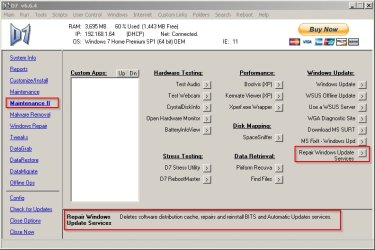
D7 repair windows update service:

D7.jpg

Let me know if you want info on the two above fixes.

Lastly if all else fails I run:

MicrosoftFixit.wu.Run.exe - usually doesn't help though

then lastly

MicrosoftFixit50202.msi - choosing non aggressive option first and after a reboot if te problem remains I try aggressive option.

Note: Sometimes the only option that actually works is rolling back to a working system image backup.

You can find links to the last two microsoft fixes here:

https://www.winhelp.us/reinstall-windows-update.html

Along with advice on what to try before reinstalling windows but the experts here will be able to help you with that if needed.
 

My Computer

Computer type
Laptop
Computer Manufacturer/Model Number
ASUS
OS
Microsoft Windows 7 Home Premium 64-bit 7601 Multiprocessor Free Service Pack 1
CPU
AMD C-60 APU with Radeon(tm) HD Graphics
Motherboard
ASUSTeK COMPUTER INC. X501U
Memory
4.00 GB
Graphics Card(s)
AMD Radeon HD 6290 Graphics
Sound Card
(1) AMD High Definition Audio Device (2) Realtek High Defi
Screen Resolution
1366 x 768 x 32 bits (4294967296 colors) @ 60 Hz
Hard Drives
Hitachi HTS545050A7E380 SATA Disk Device
Antivirus
Comodo CIS & FW, SecureAplus App Whitelisting, Threatfire
Browser
Cyberfox 64bit, Opera 64bit, Airfox
Other Info
Spy-The-Spy, HitmanPro.Alert, Norton Connect Safe, MJRegWatcher, BitDefender TrafficLight, Voodoo Shield, Zemana AntiMalware
Update: Honestly, did not do any troubleshooting at all yesterday. Wanted to just run things and see what was going on. Yes, Windows Update was enabled and set to check but let me choose.

I also didn't watch the usage every second. ;)

So the first thing to note is that I have not experienced any Chrome crashes in at least 36 hours and maybe a little longer. I was getting crashes multiple times an hour so this is a great improvement.

Looking back, it seems the biggest improvement came after I ran disk cleanup and included Windows Update files to be cleaned up (which it said took up over 3gb).

Was there probably more to it than that? Yeah, probably. I had updated most of the critical updates before I did the disk cleanup, but after the disk cleanup I did all the optional updates and 2-4 more criticals that popped up.

Now, wuauserv does still explode in memory from betweeen 20 and 30 D to over 900 K or more in task manager. However, physical memory percentage is staying at a reasonable 40% range rather than 86%.

So, I'm going to keep an eye on it for another day or two and if we are still stable I will come back and mark solved.

Thanks for all the help!
 

My Computer

Computer type
PC/Desktop
Computer Manufacturer/Model Number
custom build, late 2011
OS
Microsoft Windows 7 Home Premium 64-bit Service Pack 1
CPU
Intel(R) Core(TM) i5-2500K CPU @ 3.30GHz
Motherboard
ASUSTeK Computer INC. P8Z68-V
Memory
8.00 GB
Graphics Card(s)
Intel(R) HD Graphics 3000
Sound Card
(1) Realtek High Definition Audio (2) Intel(R) Display Aud
Hard Drives
(1) PLEXTOR PX-256M5Pro (2) WDC WD5000AAKS-00A7B0
Antivirus
ESET NOD32
Browser
Chrome
Back
Top