XP mode: 32 or 64 bit

New7user7

New member
Member
Local time
8:03 AM
Messages
77
I just installed XP mode. In the XP desktop, if I do click Start, right-click MyComputer, and select Properties, there is no indication in the General tab as to whether it is 32-bit XP or 64-bit XP. Is there a way to tell?
 

My Computer

OS
Windows 7 Pro 64bit
I believe if you click Start > All Programs > Accessories > System Tools > System Information, it should be listed as System Type and should tell you which it is.
 

My Computer

Computer Manufacturer/Model Number
Toshiba Satellite L300D-038 / MN. PSLC8C-03801R
OS
Windows Dual-boot / Win 7 Home Premium 64-Bit & Win XP Pro 32-Bit
CPU
AMD Athlon X2 Dual-Core QL-62 (2.0 GHz)
Motherboard
Chipset: AMD 780G / Southbridge: AMD SB700
Memory
6144 MB DDR2 (One 2 GB and one 4 GB)
Graphics Card(s)
ATI Radeon 3100
Sound Card
Realtek High Definition Audio (Audio Codec: ALC268)
Monitor(s) Displays
TFT Active Matrix colour LCD with TruBrite
Screen Resolution
1280 x 800
Hard Drives
320 GB Western Digital Scorpion Blue SATA (5400 RPM)
PSU
6 Cell Li-ion Battery & Power Adapter
Case
Toshiba Laptop
Cooling
Normal Laptop Cooling & Additional Targus Laptop Cooling Pad
Keyboard
Integrated
Mouse
Synaptics Touchpad
Other Info
Initial RAM was 3 GB DDR2 (One 1 GB Samsung and one 2 GB Samsung) until upgraded to current state. (Nothing was wrong with it, I just wanted more RAM.)
BIOS:
Brand- Insyde Corp.
Version- 1.80
Date- 09/01/2009
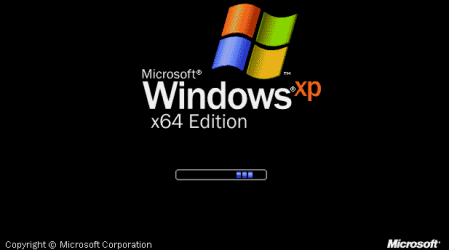
In XP, unless it specifically says Windows XP Professional x64, then you're fine. Additionally, here are the screenshots of the boot screen as well as the system properties dialog box from Windows XP Professional x64. If your screen does not look like this, then you have XP 32-bit. Also, as a point of reference, XP mode uses Windows XP 32-bit.
 

Attachments

  • XP x64 Boot.png
    XP x64 Boot.png
    4.8 KB · Views: 14
  • XP x64 System.png
    XP x64 System.png
    17.1 KB · Views: 20

My Computer

OS
Windows 7 Ultimate x64 SP1
CPU
Intel Core i3 530 2.93 Ghz Clarkdale
Motherboard
ASRock P55 PRO/USB3 LGA 1156
Memory
4 GB OCZ DDR3 1600 (PC12800) Low Voltage Desktop Memory
Graphics Card(s)
Nvidia GeForce GTX 550 Ti with 1 GB of RAM
Sound Card
Realtek HD ALC892
Monitor(s) Displays
20'' eMachines E202HDbmd Glare Panel Widescreen
Screen Resolution
1600 x 900
Hard Drives
Western Digital 1 TB Caviar Black Edition (7200 RPM) SATA
Hitachi Deskstar 500 GB (7200 RPM) SATA
Samsung SpinPoint 400 GB (7200 RPM) SATA
PSU
Rosewill Xtreme Series RX750-D-B ATX12V v2.2 & EPS12V (750W)
Case
Cooler Master Centurion 534 RC-534-KKN2-GP Mid-Tower
Cooling
Standard Case Fans and Stock CPU Heatsink
Keyboard
Microsoft Wireless Optical Desktop Elite
Mouse
Microsoft Wireless Optical Desktop Elite
Internet Speed
7.1 Mbps Verizon DSL
I believe if you click Start > All Programs > Accessories > System Tools > System Information, it should be listed as System Type and should tell you which it is.

It says x86-based PC. Wikipedia indicates that this can include 16 and 64 bit.

However, the System Directory is system32. I'm not sure if this is enough to indicate with certainty that the OS is 32-bit. Would an N-bit OS have systemN as the System Directory?
 

My Computer

OS
Windows 7 Pro 64bit
In XP, unless it specifically says Windows XP Professional x64, then you're fine. Additionally, here are the screenshots of the boot screen as well as the system properties dialog box from Windows XP Professional x64. If your screen does not look like this, then you have XP 32-bit. Also, as a point of reference, XP mode uses Windows XP 32-bit.

You must be psychic. You said "then you're fine" as if I *wanted* 32-bit XP (and in fact I do).

I wonder why this little detail (that XP mode is 32-bit) is not in the XP Mode web pages, or in the How-To PDF file. Unless you've owned 64-bit XP before, one would not know what are the indicators from which one could discern the datapath width.
 

My Computer

OS
Windows 7 Pro 64bit
The XP mode in win 7 is only 32bit.

Ken
 

My Computer

Computer Manufacturer/Model Number
Dell Optiplex 980
OS
Win7 x64 Ultimate SP1
CPU
Intel i7-2600
Memory
8 Gig
Graphics Card(s)
Geforce gt 520
Monitor(s) Displays
LG & Acer
Screen Resolution
1920x1080
Internet Speed
Fios 45/35
Other Info
Windows Home Server

My Computer

OS
Windows 7 Professional x64 SP1
CPU
Intel Core i5-2500K
Motherboard
Gigabyte P67X-UD3-B3
Memory
8 GB Corsair Vengeance Blue DDR3-1600
Graphics Card(s)
Sapphire Radeon HD 6870 1 GB GDDR5
Monitor(s) Displays
Samsung SyncMaster T220HD
Screen Resolution
1680x1050
Hard Drives
120 GB Corsair Force SSD + 320 GB Seagate Barracuda SATA2 + 2 TB My Book Elite
PSU
Corsair 650W
Internet Speed
50 Mbps
In XP, unless it specifically says Windows XP Professional x64, then you're fine. Additionally, here are the screenshots of the boot screen as well as the system properties dialog box from Windows XP Professional x64. If your screen does not look like this, then you have XP 32-bit. Also, as a point of reference, XP mode uses Windows XP 32-bit.

You must be psychic. You said "then you're fine" as if I *wanted* 32-bit XP (and in fact I do).

I wonder why this little detail (that XP mode is 32-bit) is not in the XP Mode web pages, or in the How-To PDF file. Unless you've owned 64-bit XP before, one would not know what are the indicators from which one could discern the datapath width.
I figured as most people want XP 32-bit. In regard to it not being that obvious, that is actually true. They put it in the FAQ about Windows XP Mode as the very last question I believe. I guess they didn't really mention it to avoid confusion from people and because if they want to achieive compatibility, for which XP Mode is designed for, then it must be 32-bit because a lot of older line of business apps require 32-bit for some reason or another.
 

My Computer

OS
Windows 7 Ultimate x64 SP1
CPU
Intel Core i3 530 2.93 Ghz Clarkdale
Motherboard
ASRock P55 PRO/USB3 LGA 1156
Memory
4 GB OCZ DDR3 1600 (PC12800) Low Voltage Desktop Memory
Graphics Card(s)
Nvidia GeForce GTX 550 Ti with 1 GB of RAM
Sound Card
Realtek HD ALC892
Monitor(s) Displays
20'' eMachines E202HDbmd Glare Panel Widescreen
Screen Resolution
1600 x 900
Hard Drives
Western Digital 1 TB Caviar Black Edition (7200 RPM) SATA
Hitachi Deskstar 500 GB (7200 RPM) SATA
Samsung SpinPoint 400 GB (7200 RPM) SATA
PSU
Rosewill Xtreme Series RX750-D-B ATX12V v2.2 & EPS12V (750W)
Case
Cooler Master Centurion 534 RC-534-KKN2-GP Mid-Tower
Cooling
Standard Case Fans and Stock CPU Heatsink
Keyboard
Microsoft Wireless Optical Desktop Elite
Mouse
Microsoft Wireless Optical Desktop Elite
Internet Speed
7.1 Mbps Verizon DSL

My Computer

OS
Windows 7 Pro 64bit
In XP, unless it specifically says Windows XP Professional x64, then you're fine. Additionally, here are the screenshots of the boot screen as well as the system properties dialog box from Windows XP Professional x64. If your screen does not look like this, then you have XP 32-bit. Also, as a point of reference, XP mode uses Windows XP 32-bit.

You must be psychic. You said "then you're fine" as if I *wanted* 32-bit XP (and in fact I do).

I wonder why this little detail (that XP mode is 32-bit) is not in the XP Mode web pages, or in the How-To PDF file. Unless you've owned 64-bit XP before, one would not know what are the indicators from which one could discern the datapath width.
I figured as most people want XP 32-bit. In regard to it not being that obvious, that is actually true. They put it in the FAQ about Windows XP Mode as the very last question I believe. I guess they didn't really mention it to avoid confusion from people and because if they want to achieive compatibility, for which XP Mode is designed for, then it must be 32-bit because a lot of older line of business apps require 32-bit for some reason or another.

Ah yes, I see that FAQ now. And yes, it makes sense that to support older apps, 32-bit would be the way to go. Without having seen the FAQ (or rather, I saw the FAQ, but that was before my 64-bit question), I wanted to rule out the possibility that the XP-mode install defaulted to the same bit-width as the host system.

Thanks for clearing it all up.
 

My Computer

OS
Windows 7 Pro 64bit
Back
Top