XP Mode resolution issue

Ex_Brit

Older But No Wiser
Guru
VIP
Local time
6:03 PM
Messages
1,633
Location
Toronto, Canada
I have a strange issue and maybe I was seeing things before so excuse me if I ramble on. I had XP Mode up and running in my Win 7 Ultimate x64 spare partition and it was fine until I installed a beta antivirus application (beta McAfee 2011) and it wouldn't stop blue screening, so I uninstalled the whole thing as it even cause a BSOD in Win 7, and started over with a brand new XP Mode.

Now I can't seem to get out of 16 bit color, 1440 X 900 resolution - the Advanced tab is greyed out. I am positive that I had a higher res before and 32-bit color. I also seem to have a minimal choice of desktop backgrounds at this res, whereas I had all the normal XP ones before and could use my own with no problem.

I realise that I can't install regular graphics and monitor drivers in this mode but I'm certain that I had higher resolution before.

I'm still installing updates as we speak but thought I would ask this in the early stages. Any ideas?

Also how does one get back that regular welcome screen instead of the classic log on one?
 
Last edited:

My Computer

Computer type
PC/Desktop
Computer Manufacturer/Model Number
Alienware® ALX X58
OS
Win 7 Ult SP1/Win 10 Pro (all x64)
CPU
Intel® Core™ i7-975 Extreme O/C to 4.02 GHz, 8MB Cache
Motherboard
Asus® P6T Deluxe V2 X58 LGA1366
Memory
24GB Corsair Vengeance DDR3 SDRAM at 1600MHz - 6 x 4096MB
Graphics Card(s)
1792 MB NVIDIA® GeForce® GTX 295 Dual Core
Sound Card
Onboard Soundmax® High-Definition 7.1 Performance Audio
Monitor(s) Displays
Samsung XL2370 LED backlit 23" W/S 2ms response time
Screen Resolution
1920 X 1080
Hard Drives
2 x 500gb SATA II
1 x 1TB SATA II
1 external eSATA LaCie 3TB
(Non-RAID)
PSU
Alienware® 1200 Watt Multi-GPU
Case
Alienware® P2 ALX Chassis with AlienIce™ 3.0 Video Cooling
Cooling
Alienware® High-Perf. Liquid Cooling + Acoustic Dampening
Keyboard
Microsoft® Wireless Entertainment 8000 + Logitech® G15 Wired
Mouse
Microsoft® Wireless Laser 8000 + Logitech® G9 Wired
Internet Speed
1Gb/s
Antivirus
McAfee LiveSafe
Browser
Firefox - latest
Other Info
Using non-RAID on purpose as I find RAID to be too temperamental.
Now set to AHCI
Have you installed and enabled the Virtual PC integration features already?


If not, here's how to do that:

http://www.sevenforums.com/tutorial...egration-features-install-enable-disable.html
  • Boot XP Mode, log in
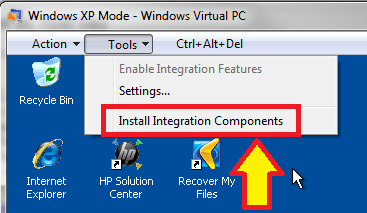
  • Choose Install Integration Features from Tools menu:
    .
    XPM_Integration1.png
    .
  • Follow instructions on screen
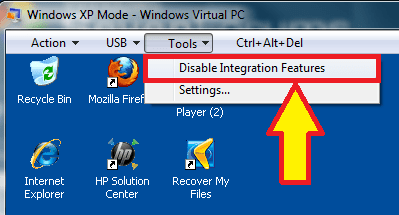
  • After reboot, you can enable or disable integration features from Tools menu:
    .
    XPM_Integration2.png
    .
    XPM_Integration3.png
    .
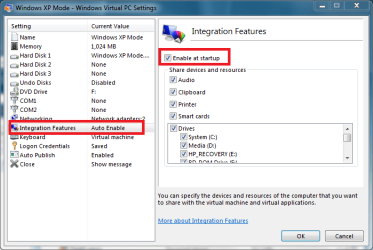
  • You can also enable or disable automatic integration from XP Mode's settings:
    .
    XPM_Integration4.png
    .
  • With automatic integration, also check the option Drives that I plug in later, to ensure all later connected external devices will be integrated and visible in XP Mode
    .
    XPM_Integration5.png
Now you should have 32-bit graphichs, and you can set XP Mode's resolution simply by resizing the window from it's handlers or clicking Maximize / restore button.

Remember that when integration features are enabled, all user accounts must have password. Logging in to an avvount without password is only allowed when integration is disabled. Also important to remember is that before a standard user can log in when integration is enabled, the account must have added to group Remote Desktop Users (tutorial).

Kari
 

My Computer

Computer type
Laptop
Computer Manufacturer/Model Number
HP ENVY 17-1150eg
OS
Windows 10 Pro x64 EN-GB
CPU
1.6 GHz Intel Core i7-720QM Processor
Memory
6 GB
Graphics Card(s)
ATI Mobility Radeon HD 5850 Graphics
Sound Card
Beats sound system with integrated subwoofer
Monitor(s) Displays
17" laptop display, 22" LED and 32" Full HD TV through HDMI
Screen Resolution
1600*900 (1), 1920*1080 (2&3)
Hard Drives
Internal: 2 x 500 GB SATA Hard Disk Drive 7200 rpm
External: 2TB for backups, 3TB USB3 network drive for media
Cooling
As Envy runs a bit warm, I have it on a Cooler Master pad
Keyboard
Logitech diNovo Media Desktop Laser (bluetooth)
Mouse
Logitech Performance Mouse MX
Internet Speed
50/10 Mbps VDSL
Antivirus
Windows Defender 4.3.9431.0
Browser
Maxthon 3.5.2., IE11
Argh, I knew I'd forgotten something. That's most likely it. Once I've finished installing the requisite 8 million updates (seems like) I will tackle that, thanks very much.

Edit: that is already enabled...oh dear!
 

My Computer

Computer type
PC/Desktop
Computer Manufacturer/Model Number
Alienware® ALX X58
OS
Win 7 Ult SP1/Win 10 Pro (all x64)
CPU
Intel® Core™ i7-975 Extreme O/C to 4.02 GHz, 8MB Cache
Motherboard
Asus® P6T Deluxe V2 X58 LGA1366
Memory
24GB Corsair Vengeance DDR3 SDRAM at 1600MHz - 6 x 4096MB
Graphics Card(s)
1792 MB NVIDIA® GeForce® GTX 295 Dual Core
Sound Card
Onboard Soundmax® High-Definition 7.1 Performance Audio
Monitor(s) Displays
Samsung XL2370 LED backlit 23" W/S 2ms response time
Screen Resolution
1920 X 1080
Hard Drives
2 x 500gb SATA II
1 x 1TB SATA II
1 external eSATA LaCie 3TB
(Non-RAID)
PSU
Alienware® 1200 Watt Multi-GPU
Case
Alienware® P2 ALX Chassis with AlienIce™ 3.0 Video Cooling
Cooling
Alienware® High-Perf. Liquid Cooling + Acoustic Dampening
Keyboard
Microsoft® Wireless Entertainment 8000 + Logitech® G15 Wired
Mouse
Microsoft® Wireless Laser 8000 + Logitech® G9 Wired
Internet Speed
1Gb/s
Antivirus
McAfee LiveSafe
Browser
Firefox - latest
Other Info
Using non-RAID on purpose as I find RAID to be too temperamental.
Now set to AHCI
MY BAD!

I have been today instructing someone here on SF how to change virtual machine's resolution on VirtualBox. I mixed VirtualBox and Virtual PC when answering you; in Virtual PC (inclusive XP Mode), you do not normally get more than 16-bits, although a member of ours has found the way to get 24-bits colors: http://www.sevenforums.com/virtualization/32942-i-got-xp-mode-display-24-bit-color-integration.html

When integration is disabled, you get the 32-bit.

The Advanced tab is disabled when integration is enabled, enabled and clickable when integration is is disabled. Resolution change from XP's own display properties when integration disabled, changing the window size manually when integration is enabled.

Kari
 

My Computer

Computer type
Laptop
Computer Manufacturer/Model Number
HP ENVY 17-1150eg
OS
Windows 10 Pro x64 EN-GB
CPU
1.6 GHz Intel Core i7-720QM Processor
Memory
6 GB
Graphics Card(s)
ATI Mobility Radeon HD 5850 Graphics
Sound Card
Beats sound system with integrated subwoofer
Monitor(s) Displays
17" laptop display, 22" LED and 32" Full HD TV through HDMI
Screen Resolution
1600*900 (1), 1920*1080 (2&3)
Hard Drives
Internal: 2 x 500 GB SATA Hard Disk Drive 7200 rpm
External: 2TB for backups, 3TB USB3 network drive for media
Cooling
As Envy runs a bit warm, I have it on a Cooler Master pad
Keyboard
Logitech diNovo Media Desktop Laser (bluetooth)
Mouse
Logitech Performance Mouse MX
Internet Speed
50/10 Mbps VDSL
Antivirus
Windows Defender 4.3.9431.0
Browser
Maxthon 3.5.2., IE11
Aha I was wondering why I couldn't get the required result. I'm at 24-bit now so it's sufficient. Thanks very much.
 

My Computer

Computer type
PC/Desktop
Computer Manufacturer/Model Number
Alienware® ALX X58
OS
Win 7 Ult SP1/Win 10 Pro (all x64)
CPU
Intel® Core™ i7-975 Extreme O/C to 4.02 GHz, 8MB Cache
Motherboard
Asus® P6T Deluxe V2 X58 LGA1366
Memory
24GB Corsair Vengeance DDR3 SDRAM at 1600MHz - 6 x 4096MB
Graphics Card(s)
1792 MB NVIDIA® GeForce® GTX 295 Dual Core
Sound Card
Onboard Soundmax® High-Definition 7.1 Performance Audio
Monitor(s) Displays
Samsung XL2370 LED backlit 23" W/S 2ms response time
Screen Resolution
1920 X 1080
Hard Drives
2 x 500gb SATA II
1 x 1TB SATA II
1 external eSATA LaCie 3TB
(Non-RAID)
PSU
Alienware® 1200 Watt Multi-GPU
Case
Alienware® P2 ALX Chassis with AlienIce™ 3.0 Video Cooling
Cooling
Alienware® High-Perf. Liquid Cooling + Acoustic Dampening
Keyboard
Microsoft® Wireless Entertainment 8000 + Logitech® G15 Wired
Mouse
Microsoft® Wireless Laser 8000 + Logitech® G9 Wired
Internet Speed
1Gb/s
Antivirus
McAfee LiveSafe
Browser
Firefox - latest
Other Info
Using non-RAID on purpose as I find RAID to be too temperamental.
Now set to AHCI
Back
Top