Hi all,
i need your advise pls.
I have a Samsung series 7 laptop with 2 usb3 ports and 2 usb 2.0 ports. On the device manager i can see the installed driver Intel usb 3.0 root hub and intel usb 3.0 extensive host controller.
I also have purchased a Samsung 64GB sdxc card SDXC UHS (I), that according to manufacturer it can reach speeds "Transfer Speed: Up to 80 MB/s Read and up to 40 MB/s Write". I have enclosed this in a USPEED USB3 card reader, so that I use this as a 64Gb usb3 flash drive.
My problem is that everytime I connet this flash drive to my laptop's usb 3 ports, I get the message "This device can perform faster if you connect it to a superspeed usb 3 port" (!!) so I dont get it! What is wrong??
Actual writing speeds, when i copy large files (eg movie) this is done at 28 - 30 MB/s while speeds when copying many small files (folder with many smaller images) is done at 10 - 11.5 Mb/s.
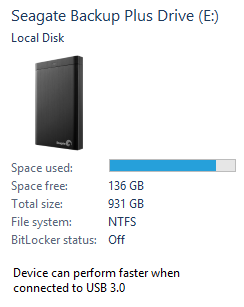
I also have a usb 3.0 Seagate hard drive but I dont see this message everytime I connect it. Also, the exact same test (with the exact same files beeing transferred) are: Large files (eg movie) at 90 - 95 MB/s while smaller files (folder with many smaller images) is done at 34 - 37.5 Mb/s
I know that the Samsung SD card can't achieve the same speeds, but I am mostly curious why this message comes up "This device can perform faster if you connect it to a superspeed usb 3 port" . Is my flash drive operating at usb 3.0?
Thank you for your help
Dionisis
i need your advise pls.
I have a Samsung series 7 laptop with 2 usb3 ports and 2 usb 2.0 ports. On the device manager i can see the installed driver Intel usb 3.0 root hub and intel usb 3.0 extensive host controller.
I also have purchased a Samsung 64GB sdxc card SDXC UHS (I), that according to manufacturer it can reach speeds "Transfer Speed: Up to 80 MB/s Read and up to 40 MB/s Write". I have enclosed this in a USPEED USB3 card reader, so that I use this as a 64Gb usb3 flash drive.
My problem is that everytime I connet this flash drive to my laptop's usb 3 ports, I get the message "This device can perform faster if you connect it to a superspeed usb 3 port" (!!) so I dont get it! What is wrong??
Actual writing speeds, when i copy large files (eg movie) this is done at 28 - 30 MB/s while speeds when copying many small files (folder with many smaller images) is done at 10 - 11.5 Mb/s.
I also have a usb 3.0 Seagate hard drive but I dont see this message everytime I connect it. Also, the exact same test (with the exact same files beeing transferred) are: Large files (eg movie) at 90 - 95 MB/s while smaller files (folder with many smaller images) is done at 34 - 37.5 Mb/s
I know that the Samsung SD card can't achieve the same speeds, but I am mostly curious why this message comes up "This device can perform faster if you connect it to a superspeed usb 3 port" . Is my flash drive operating at usb 3.0?
Thank you for your help
Dionisis
My Computer
At a glance
Windows 7 64 bitINTEL CORE I7 @ 2.90 gHZ8 GBASUS GEFORCE 570GTX
- Computer type
- PC/Desktop
- Computer Manufacturer/Model Number
- CUSTOM BUILD
- OS
- Windows 7 64 bit
- CPU
- INTEL CORE I7 @ 2.90 gHZ
- Motherboard
- GIGABYTE P55A
- Memory
- 8 GB
- Graphics Card(s)
- ASUS GEFORCE 570GTX
- Hard Drives
- 2XSSD APACER 128GB RAID 0
2X 750GB SEAGATE MOMENTUS 7200 RAID 0
4 OTHER GARD DRIVES (SEAGATE & HITACHI)
- Antivirus
- AVG FREE EDITION
- Browser
- IE9, CHROME, MOZILLA