Solved Your Location Has Been Accessed

bigmck

Very Senior Member
Guru
Gold Member
VIP
Local time
11:36 PM
Messages
4,745
Location
Houston, Texas
On the right side of the Task Bar next to the Flag Icon there is a Triange. There is an icon in it that has just appeared. It says "My Location Has Been Accessed". I am not sure what that means. I had just ran Windows Update before I noticed it. Can someone fill me in on what this means? Thanks,
 

My Computer

Computer type
PC/Desktop
Computer Manufacturer/Model Number
Custom Build
OS
Windows 7 Home Premium 32-Bit - Build 7600 SP1
CPU
Intel Core i3-2120 3.30Ghz
Motherboard
Asus P8Z68-V LX Intel Z68 Socket H2 ATX
Memory
Kingston 4 GB DDR3 1333 mhz
Graphics Card(s)
AMD Radeon HD6670
Sound Card
Sound Blaster Audigy SE 24-Bit
Monitor(s) Displays
Asus VE228
Screen Resolution
1440 X 900
Hard Drives
OCZ Vertex 3 120 GB Sata 3 SSD ==
Kingston SH103/S3 120 G Hyper X 120 GB SSD ==
Western Digital 500 GB Caviar Green 7200 RPM ==
PSU
Corsair CX600M == 600 Watt
Case
NZXT Apollo - Silver with Clear Side Panel
Cooling
Three 120 mm Fans
Keyboard
Microsoft Natural 4000
Mouse
Microsoft Custom Optical 3000
Internet Speed
AT&T Fiber Optic Wireless Network
Antivirus
Microsoft Security Essentials
Browser
Chrome
Other Info
120 mm Blue LED Fan -- Three Blue LED Lazer Light Sticks
"your location has been accessed"

I get the same thing periodically.
What does it mean?
Is it a problem?
 

My Computer

Computer type
PC/Desktop
Computer Manufacturer/Model Number
Home Build
OS
Microsoft Windows 7 Professional 64-bit 7601 Multiprocessor Free Service Pack 1
CPU
Intel(R) Core(TM) i5-3470 CPU @ 3.20GHz
Motherboard
ASUSTeK COMPUTER INC. H61M-K
Memory
8 GB DDR3 1600MHZ
Graphics Card(s)
AMD Radeon HD 6570
Sound Card
(1) AMD High Definition Audio Device (2) Realtek High Defi
Monitor(s) Displays
Dell 2407 WFP
Screen Resolution
1920x1080
Hard Drives
SAMSUNG HD103SJ ATA Device 1TB
ST31000524AS ATA Device 1TB
Keyboard
Logitech
Mouse
Logitech
Screen shot? I bet it is a third-party program like Google Desktop.
 

My Computer

Computer type
PC/Desktop
Computer Manufacturer/Model Number
Alienware Aurora ALX R4
OS
Windows 10 Pro (x64)
CPU
Intel Core i7-3930K (3.2GHz - 4.5GHz)
Motherboard
Alienware Aurora-R4 x79
Memory
4x Samsung 4GB PC3-12800 DDR3 (16GB 1600MHz)
Graphics Card(s)
Nvidia Geforce GTX 690
Sound Card
SteelSeries Siberia Elite
Monitor(s) Displays
Dell UltraSharp U3011
Screen Resolution
2560x1600
Hard Drives
Samsung 850 Pro 256 GB, Seagate 1TB Desktop Hybrid HDD, 2x Western Digital 4TB Green HDD
PSU
875W Some Dell PSU <.<
Case
Alienware Aurora ALX
Cooling
Custom Liquid Cooling (EK CPU & GPU blocks) dual EK 480RAD
Keyboard
Logitech G710+ Mechanical
Mouse
Logitech G700s
Internet Speed
Verizon Fios (50 mbps average)
Other Info
Server: Intel NUC D54250WYK: i5-4250U, 16GB, 256 GB mSATA, Windows Server 2012 R2
Screen shot? I bet it is a third-party program like Google Desktop.

It's definitely Windows.
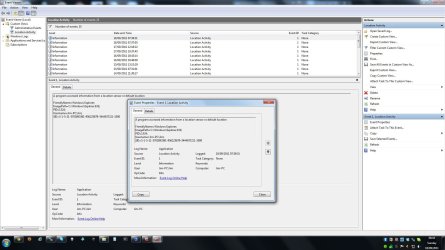
Don't have an example of the actual Icon and message at the moment, but it contains a link to the Event Viewer which shows the info in the attached screen shot.
There may be no problem but it is annoying to have this popping up at intervals.
 

Attachments

  • Event Viewer.jpg
    Event Viewer.jpg
    167.5 KB · Views: 197

My Computer

Computer type
PC/Desktop
Computer Manufacturer/Model Number
Home Build
OS
Microsoft Windows 7 Professional 64-bit 7601 Multiprocessor Free Service Pack 1
CPU
Intel(R) Core(TM) i5-3470 CPU @ 3.20GHz
Motherboard
ASUSTeK COMPUTER INC. H61M-K
Memory
8 GB DDR3 1600MHZ
Graphics Card(s)
AMD Radeon HD 6570
Sound Card
(1) AMD High Definition Audio Device (2) Realtek High Defi
Monitor(s) Displays
Dell 2407 WFP
Screen Resolution
1920x1080
Hard Drives
SAMSUNG HD103SJ ATA Device 1TB
ST31000524AS ATA Device 1TB
Keyboard
Logitech
Mouse
Logitech
@Harry,
The photo is rather impossible to read.

You will find that making a snippet with the snipping tool to be the preferred approach.

Snipping Tool
How to use the Snipping Tool in Vista and Windows 7
 

My Computer

Computer Manufacturer/Model Number
Toshiba Satellite S875D-S7239 laptop
OS
MS Windows 7 Ultimate SP1 64-bit
CPU
AMD A10-4600M
Motherboard
AMD Pumori (Socket FT1)
Memory
6.00 GB Dual-Channel DDR3 @ 798MHz (11-11-12-28)
Graphics Card(s)
AMD Radeon HD 7660G
Sound Card
High Definition Audio Device
Monitor(s) Displays
Generic PnP Monitor (1600x900@60Hz)
Screen Resolution
1600x900@60Hz
Hard Drives
SSD 119GB Corsair CSSD-V128GB2 ATA Device
Keyboard
Standard PS/2 Keyboard
Mouse
HP Wireless Optical Mobile Mouse Model FHA-3410
Internet Speed
What the local pub, local coffee shop offers.
Other Info
Optical Drive:MATSHITA BD-CMB UJ160B ATA Device


Also have an Asus ha1002xp netbook with Win 7 Ultimate installed.
On the right side of the Task Bar next to the Flag Icon there is a Triange. There is an icon in it that has just appeared. It says "My Location Has Been Accessed". I am not sure what that means. I had just ran Windows Update before I noticed it. Can someone fill me in on what this means? Thanks,

I've never seen the message. I also have a clean system and use Microsoft Security Essentials, and use Firefox with the NoScript add-on.

If it was my system then i would:
Immediately change all of my passwords,
run a full scan by MalwareBytes (link in my sig).
 

My Computer

Computer Manufacturer/Model Number
Toshiba Satellite S875D-S7239 laptop
OS
MS Windows 7 Ultimate SP1 64-bit
CPU
AMD A10-4600M
Motherboard
AMD Pumori (Socket FT1)
Memory
6.00 GB Dual-Channel DDR3 @ 798MHz (11-11-12-28)
Graphics Card(s)
AMD Radeon HD 7660G
Sound Card
High Definition Audio Device
Monitor(s) Displays
Generic PnP Monitor (1600x900@60Hz)
Screen Resolution
1600x900@60Hz
Hard Drives
SSD 119GB Corsair CSSD-V128GB2 ATA Device
Keyboard
Standard PS/2 Keyboard
Mouse
HP Wireless Optical Mobile Mouse Model FHA-3410
Internet Speed
What the local pub, local coffee shop offers.
Other Info
Optical Drive:MATSHITA BD-CMB UJ160B ATA Device


Also have an Asus ha1002xp netbook with Win 7 Ultimate installed.
As mentioned, Google Desktop.
Could also possibly be something like a Google Weather Gadget.
 

My Computer

Computer Manufacturer/Model Number
Custom (Self Build)
OS
Windows 7 Home Premium 64bit
CPU
Intel Core i7 2700k
Motherboard
eVGA P67 SLI
Memory
8GB Mushkin Redline Ridgebacks @1866
Graphics Card(s)
EVGA GTX570 SC
Sound Card
XiFi Titanium HD
Monitor(s) Displays
LG W2453V
Screen Resolution
1920x1080
Hard Drives
Intel 320 80GB -- Intel X25-V 40GB --WD Black 1TB x2 -- WD Blue 640GB
PSU
Seasonic x750
Case
Corsair 600T SE White
Cooling
eVGA Superclocked CPU Cooler
Keyboard
Saitek Cyborg
Antivirus
Kaspersky
Browser
IE
Other Info
LG BD/DVD
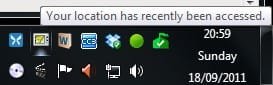
Shot of System Tray

This is what I see in the system tray.

The ICON is the second from left on top row.

.
 

Attachments

  • location.jpg
    location.jpg
    5.9 KB · Views: 978

My Computer

Computer type
PC/Desktop
Computer Manufacturer/Model Number
Home Build
OS
Microsoft Windows 7 Professional 64-bit 7601 Multiprocessor Free Service Pack 1
CPU
Intel(R) Core(TM) i5-3470 CPU @ 3.20GHz
Motherboard
ASUSTeK COMPUTER INC. H61M-K
Memory
8 GB DDR3 1600MHZ
Graphics Card(s)
AMD Radeon HD 6570
Sound Card
(1) AMD High Definition Audio Device (2) Realtek High Defi
Monitor(s) Displays
Dell 2407 WFP
Screen Resolution
1920x1080
Hard Drives
SAMSUNG HD103SJ ATA Device 1TB
ST31000524AS ATA Device 1TB
Keyboard
Logitech
Mouse
Logitech
I saw this on Windows 8 when I opened the weather application. Something is using your location and is updating information regularly
 

My Computer

Computer type
PC/Desktop
Computer Manufacturer/Model Number
Custom Built
OS
Windows 7 Professional x64 SP1 ; Windows Server 2012 R2 Standard
CPU
Intel Core i5 2400 @ 3.10GHz
Motherboard
Foxconn H67MP-S/-V/H67MP
Memory
8.0GB DDR3 @ 665MHz (2GBx4)
Graphics Card(s)
AMD Radeon HD 6870
Sound Card
Realtek High Definition Audio
Monitor(s) Displays
AOC 2243W & SMB1930NW
Screen Resolution
1440x900 & 1920x1080
Hard Drives
977GB Seagate ST31000524AS ATA Drive (SATA)
250GB WD iSCSI attached Drive
PSU
750W Gaming PSU
Case
Novatech Night
Cooling
Fan
Keyboard
Dell Standard PS/2 Keyboard
Mouse
R.A.T 07 Gaming Mouse
Internet Speed
Download: 10 Mbps Ping: 30ms Upload: 0.81 Mbps
Browser
Google Chrome
Other Info
Optiarc DVD RW AD-5260S ATA Device
@Harry,
The photo is rather impossible to read.

You will find that making a snippet with the snipping tool to be the preferred approach.

Snipping Tool
How to use the Snipping Tool in Vista and Windows 7

If you double click on the photo you will get an enlarged and readable version.

Thanks for the tip about the snipping tool. :)

I think it may be related to the Windows "Weather Gadget" which I started using recently.
 
Last edited:

My Computer

Computer type
PC/Desktop
Computer Manufacturer/Model Number
Home Build
OS
Microsoft Windows 7 Professional 64-bit 7601 Multiprocessor Free Service Pack 1
CPU
Intel(R) Core(TM) i5-3470 CPU @ 3.20GHz
Motherboard
ASUSTeK COMPUTER INC. H61M-K
Memory
8 GB DDR3 1600MHZ
Graphics Card(s)
AMD Radeon HD 6570
Sound Card
(1) AMD High Definition Audio Device (2) Realtek High Defi
Monitor(s) Displays
Dell 2407 WFP
Screen Resolution
1920x1080
Hard Drives
SAMSUNG HD103SJ ATA Device 1TB
ST31000524AS ATA Device 1TB
Keyboard
Logitech
Mouse
Logitech
I saw this on Windows 8 when I opened the weather application. Something is using your location and is updating information regularly

I think you have hit the culprit. I recently started using the weather gadget. :D
 

My Computer

Computer type
PC/Desktop
Computer Manufacturer/Model Number
Home Build
OS
Microsoft Windows 7 Professional 64-bit 7601 Multiprocessor Free Service Pack 1
CPU
Intel(R) Core(TM) i5-3470 CPU @ 3.20GHz
Motherboard
ASUSTeK COMPUTER INC. H61M-K
Memory
8 GB DDR3 1600MHZ
Graphics Card(s)
AMD Radeon HD 6570
Sound Card
(1) AMD High Definition Audio Device (2) Realtek High Defi
Monitor(s) Displays
Dell 2407 WFP
Screen Resolution
1920x1080
Hard Drives
SAMSUNG HD103SJ ATA Device 1TB
ST31000524AS ATA Device 1TB
Keyboard
Logitech
Mouse
Logitech
If you right click on the icon or the notification when it appears, does it give you any more information?
 

My Computer

Computer type
PC/Desktop
Computer Manufacturer/Model Number
Gateway DX4831-01e (Mid-Tower Desktop)
OS
Originally Win 7 Hm Prem x64 Ver 6.1.7600 Build 7601-SP1 | Upgraded to Windows 10 December 14, 2019
CPU
Intel i3 530 2.93GHz, 2933MHz 2 Cores 4 Logical Processors
Motherboard
Gateway H57M01 133 megahertz
Memory
6GB of 1,333MHz DDR3 SDRAM
Graphics Card(s)
32MB Intel Graphics Media Accelerator HD IGChip
Sound Card
Realtek High Definition Audio
Monitor(s) Displays
Gateway HX2000 20inch TFT active matrix TN
Screen Resolution
1600 x 900 x 59 hertz
Hard Drives
WDC WD10EADS-00M2B0 [HDD] (1000.20 GB) -- drive 0,
HL-DT-ST DVDRAM GH41N [CD-ROM dr]
Four card readers, and Four USB 2.0
PSU
300watts.
Case
Mid-Tower Desktop
Cooling
Stock from Gateway
Keyboard
Natural Ergonomic Keyboard 4000, see Other Info
Mouse
Orig. Gateway wore out now using Insignia USB wired optical
Internet Speed
Vz FIOS 10ms png 57.64Mbps down 65.53Mbps up Speedtest.org
Antivirus
Zamana Anti-logger with Anti-malware, MSE, Windows Firewall,
Browser
IE11.0.9600.19399-Upd ver11.0.135, Firefox 68.0.1 x64
Other Info
System Specs by Belarc.

BIOS: American Megatrends Inc. P01-A0 11/17/2009

Replaced the MS 'Natural' Standard PS/2 Enhanced 101-102 Keyboard with a new Natural Ergonomic Keyboard 4000 on August 1st 2014.

Canon Pixma MG3222 Printer.

Updated to IE11 on 12102015 | Fios Quantum Router g1100

Additional AV: SpywareBlaster, manual Mbam, SAS
If you right click on the icon or the notification when it appears, does it give you any more information?
Right click shows :-
Link to Default Location
Link to Event Viewer entry
 

My Computer

Computer type
PC/Desktop
Computer Manufacturer/Model Number
Home Build
OS
Microsoft Windows 7 Professional 64-bit 7601 Multiprocessor Free Service Pack 1
CPU
Intel(R) Core(TM) i5-3470 CPU @ 3.20GHz
Motherboard
ASUSTeK COMPUTER INC. H61M-K
Memory
8 GB DDR3 1600MHZ
Graphics Card(s)
AMD Radeon HD 6570
Sound Card
(1) AMD High Definition Audio Device (2) Realtek High Defi
Monitor(s) Displays
Dell 2407 WFP
Screen Resolution
1920x1080
Hard Drives
SAMSUNG HD103SJ ATA Device 1TB
ST31000524AS ATA Device 1TB
Keyboard
Logitech
Mouse
Logitech
Does it show the Default location? if not, can you click on the link to open the Default location?
 

My Computer

Computer type
PC/Desktop
Computer Manufacturer/Model Number
Gateway DX4831-01e (Mid-Tower Desktop)
OS
Originally Win 7 Hm Prem x64 Ver 6.1.7600 Build 7601-SP1 | Upgraded to Windows 10 December 14, 2019
CPU
Intel i3 530 2.93GHz, 2933MHz 2 Cores 4 Logical Processors
Motherboard
Gateway H57M01 133 megahertz
Memory
6GB of 1,333MHz DDR3 SDRAM
Graphics Card(s)
32MB Intel Graphics Media Accelerator HD IGChip
Sound Card
Realtek High Definition Audio
Monitor(s) Displays
Gateway HX2000 20inch TFT active matrix TN
Screen Resolution
1600 x 900 x 59 hertz
Hard Drives
WDC WD10EADS-00M2B0 [HDD] (1000.20 GB) -- drive 0,
HL-DT-ST DVDRAM GH41N [CD-ROM dr]
Four card readers, and Four USB 2.0
PSU
300watts.
Case
Mid-Tower Desktop
Cooling
Stock from Gateway
Keyboard
Natural Ergonomic Keyboard 4000, see Other Info
Mouse
Orig. Gateway wore out now using Insignia USB wired optical
Internet Speed
Vz FIOS 10ms png 57.64Mbps down 65.53Mbps up Speedtest.org
Antivirus
Zamana Anti-logger with Anti-malware, MSE, Windows Firewall,
Browser
IE11.0.9600.19399-Upd ver11.0.135, Firefox 68.0.1 x64
Other Info
System Specs by Belarc.

BIOS: American Megatrends Inc. P01-A0 11/17/2009

Replaced the MS 'Natural' Standard PS/2 Enhanced 101-102 Keyboard with a new Natural Ergonomic Keyboard 4000 on August 1st 2014.

Canon Pixma MG3222 Printer.

Updated to IE11 on 12102015 | Fios Quantum Router g1100

Additional AV: SpywareBlaster, manual Mbam, SAS
Does it show the Default location? if not, can you click on the link to open the Default location?

Yes, clicking on the link does open the default location.
The default location on my PC contains only the country. New Zealand.
The Event Viewer entries show that the default location was accessed by Windows programs explorer.exe and sidebar.exe

I would assume that these accesses would be OK so why would the warning popup be necessary.
 

My Computer

Computer type
PC/Desktop
Computer Manufacturer/Model Number
Home Build
OS
Microsoft Windows 7 Professional 64-bit 7601 Multiprocessor Free Service Pack 1
CPU
Intel(R) Core(TM) i5-3470 CPU @ 3.20GHz
Motherboard
ASUSTeK COMPUTER INC. H61M-K
Memory
8 GB DDR3 1600MHZ
Graphics Card(s)
AMD Radeon HD 6570
Sound Card
(1) AMD High Definition Audio Device (2) Realtek High Defi
Monitor(s) Displays
Dell 2407 WFP
Screen Resolution
1920x1080
Hard Drives
SAMSUNG HD103SJ ATA Device 1TB
ST31000524AS ATA Device 1TB
Keyboard
Logitech
Mouse
Logitech
The default location on my PC contains only the country. New Zealand.
The Event Viewer entries show that the default location was accessed by Windows programs explorer.exe and sidebar.exe
The event viewer is telling you that some program is accessing from the sidebar, and it naturally has to go through explorer to do it.
The program is localizing the area as NZ.

It does sound to me like it is your weather gadget.
I would assume that these accesses would be OK so why would the warning popup be necessary.
If you would like to modify its notifications see: http://www.sevenforums.com/tutorials/11442-notifications-enable-disable-message-balloons.html

Also check at the bottom of the tutorial for more Action Center customizations.
 

My Computer

Computer type
PC/Desktop
Computer Manufacturer/Model Number
Gateway DX4831-01e (Mid-Tower Desktop)
OS
Originally Win 7 Hm Prem x64 Ver 6.1.7600 Build 7601-SP1 | Upgraded to Windows 10 December 14, 2019
CPU
Intel i3 530 2.93GHz, 2933MHz 2 Cores 4 Logical Processors
Motherboard
Gateway H57M01 133 megahertz
Memory
6GB of 1,333MHz DDR3 SDRAM
Graphics Card(s)
32MB Intel Graphics Media Accelerator HD IGChip
Sound Card
Realtek High Definition Audio
Monitor(s) Displays
Gateway HX2000 20inch TFT active matrix TN
Screen Resolution
1600 x 900 x 59 hertz
Hard Drives
WDC WD10EADS-00M2B0 [HDD] (1000.20 GB) -- drive 0,
HL-DT-ST DVDRAM GH41N [CD-ROM dr]
Four card readers, and Four USB 2.0
PSU
300watts.
Case
Mid-Tower Desktop
Cooling
Stock from Gateway
Keyboard
Natural Ergonomic Keyboard 4000, see Other Info
Mouse
Orig. Gateway wore out now using Insignia USB wired optical
Internet Speed
Vz FIOS 10ms png 57.64Mbps down 65.53Mbps up Speedtest.org
Antivirus
Zamana Anti-logger with Anti-malware, MSE, Windows Firewall,
Browser
IE11.0.9600.19399-Upd ver11.0.135, Firefox 68.0.1 x64
Other Info
System Specs by Belarc.

BIOS: American Megatrends Inc. P01-A0 11/17/2009

Replaced the MS 'Natural' Standard PS/2 Enhanced 101-102 Keyboard with a new Natural Ergonomic Keyboard 4000 on August 1st 2014.

Canon Pixma MG3222 Printer.

Updated to IE11 on 12102015 | Fios Quantum Router g1100

Additional AV: SpywareBlaster, manual Mbam, SAS
The default location on my PC contains only the country. New Zealand.
The Event Viewer entries show that the default location was accessed by Windows programs explorer.exe and sidebar.exe
The event viewer is telling you that some program is accessing from the sidebar, and it naturally has to go through explorer to do it.
The program is localizing the area as NZ.

It does sound to me like it is your weather gadget.
I would assume that these accesses would be OK so why would the warning popup be necessary.
If you would like to modify its notifications see: http://www.sevenforums.com/tutorials/11442-notifications-enable-disable-message-balloons.html

Also check at the bottom of the tutorial for more Action Center customizations.

Thanks for the info Anak. :D
 

My Computer

Computer type
PC/Desktop
Computer Manufacturer/Model Number
Home Build
OS
Microsoft Windows 7 Professional 64-bit 7601 Multiprocessor Free Service Pack 1
CPU
Intel(R) Core(TM) i5-3470 CPU @ 3.20GHz
Motherboard
ASUSTeK COMPUTER INC. H61M-K
Memory
8 GB DDR3 1600MHZ
Graphics Card(s)
AMD Radeon HD 6570
Sound Card
(1) AMD High Definition Audio Device (2) Realtek High Defi
Monitor(s) Displays
Dell 2407 WFP
Screen Resolution
1920x1080
Hard Drives
SAMSUNG HD103SJ ATA Device 1TB
ST31000524AS ATA Device 1TB
Keyboard
Logitech
Mouse
Logitech
Your welcome.
 

My Computer

Computer type
PC/Desktop
Computer Manufacturer/Model Number
Gateway DX4831-01e (Mid-Tower Desktop)
OS
Originally Win 7 Hm Prem x64 Ver 6.1.7600 Build 7601-SP1 | Upgraded to Windows 10 December 14, 2019
CPU
Intel i3 530 2.93GHz, 2933MHz 2 Cores 4 Logical Processors
Motherboard
Gateway H57M01 133 megahertz
Memory
6GB of 1,333MHz DDR3 SDRAM
Graphics Card(s)
32MB Intel Graphics Media Accelerator HD IGChip
Sound Card
Realtek High Definition Audio
Monitor(s) Displays
Gateway HX2000 20inch TFT active matrix TN
Screen Resolution
1600 x 900 x 59 hertz
Hard Drives
WDC WD10EADS-00M2B0 [HDD] (1000.20 GB) -- drive 0,
HL-DT-ST DVDRAM GH41N [CD-ROM dr]
Four card readers, and Four USB 2.0
PSU
300watts.
Case
Mid-Tower Desktop
Cooling
Stock from Gateway
Keyboard
Natural Ergonomic Keyboard 4000, see Other Info
Mouse
Orig. Gateway wore out now using Insignia USB wired optical
Internet Speed
Vz FIOS 10ms png 57.64Mbps down 65.53Mbps up Speedtest.org
Antivirus
Zamana Anti-logger with Anti-malware, MSE, Windows Firewall,
Browser
IE11.0.9600.19399-Upd ver11.0.135, Firefox 68.0.1 x64
Other Info
System Specs by Belarc.

BIOS: American Megatrends Inc. P01-A0 11/17/2009

Replaced the MS 'Natural' Standard PS/2 Enhanced 101-102 Keyboard with a new Natural Ergonomic Keyboard 4000 on August 1st 2014.

Canon Pixma MG3222 Printer.

Updated to IE11 on 12102015 | Fios Quantum Router g1100

Additional AV: SpywareBlaster, manual Mbam, SAS
Back
Top