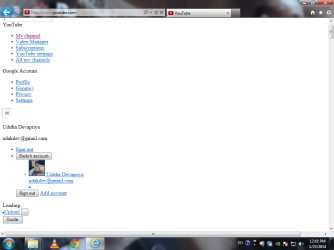
Hi, I just wanted to know as to why YouTube homepage looks like this on my browser. Note that this is a problem common to all three browsers I have - Chrome, IE 9 and Firefox.
Win-7-Pro64bit 7-H-Prem-64biti7-5930K 2nd i9-9940x both water blocked VRM'...Trident-z 3200C14 2nd Trident-z 3600C16EVGA 1080ti ftw3 2nd Titan Xp both water blocked
Computer type
PC/Desktop
Computer Manufacturer/Model Number
Custom assembled by me :}
OS
Win-7-Pro64bit 7-H-Prem-64bit
CPU
i7-5930K 2nd i9-9940x both water blocked VRM's too
2nd ASUS X299 Apex/Intel i9-9940x with Custom water loop/7H-Prem-x64/Corsair 450D case/Ram Trident-z 3600C16 4x8gb / Samsung970Evo plus 500gb SSD/Dual ssd EZ swap evo/PSU EVGA SuperNova 1200w-P2 80+Platinum/GPU Titan Xp /8-ML-140 on push-pull on 2-280GTX rads
i think it is the internet connection, i see this very occasionally when there is a speed issue.
try turning off the router for 10 seconds then power it up again see if that helps
its possible it is a isp issue and only temporary
My Computer
At a glance
Microsoft Windows 7 Home Premium 64-bit 7600IIx4 amd athelon 635 processor2x2gbati radeon HD 5450
Computer Manufacturer/Model Number
Hewlett packard/p6512uk
OS
Microsoft Windows 7 Home Premium 64-bit 7600
CPU
IIx4 amd athelon 635 processor
Motherboard
FOXCONN 2AA9
Memory
2x2gb
Graphics Card(s)
ati radeon HD 5450
Sound Card
(1) Realtek High Definition Audio (2) AMD High Definition
Monitor(s) Displays
samsung lcd tv 32"
Screen Resolution
1360x 768
Hard Drives
(1) WDC WD10 01FAES-60Z2A0 SATA Disk Device (2) Maxtor OneTouch USB Device (3) ST310003 33AS USB Device (4) WD My Book 1111 USB Device