
Flip 3D - Enable or Disable

How to Enable or Disable "Flip 3D" in Vista and Windows 7

   Information
This will show you how to enable or disable the ability to use Flip 3D (Switch between windows) for all users on the computer in Vista and Windows 7.

You will need to be logged in as an administrator to be able to do this tutorial.
   Note
Keyboard Shortcut Keys for Flip 3D

NOTE: Press the key combinations below in blue to activate.
  • Windows Key + Tab = Press and hold Windows Key, then press Tab (or roll mouse scroll wheel) to scroll through the open windows. Choose the open window you want by releasing the Windows Key when the window is at the front.
  • Ctrl + Windows Key + Tab = Scroll through the open windows by pressing the Tab key, arrow keys, or roll the mouse scroll wheel. Click on the window you want to see, or press Enter when it is up front.
   Warning
Aero Requirements to be Enabled in Windows 7:

NOTE: If Aero is not enabled, then Flip 3D will not work even if you have it set to be enabled in this tutorial.
  • 1 GHz 32-bit or 64-bit processor
  • 1 GB of system memory
  • A graphics card with support for DirectX 9 graphics with at least 128 MB of memory.
  • The graphics card must support Pixel Shader 2.0 and the Windows Display Driver Model (WDDM).
  • You must be have True Color (32 bit) set instead of High Color (16 bit).
  • The desktop composition and Animate controls and elements inside windows options enabled in Visual Effects.
  • The Desktop Window Manager Session Manager and Themes Services need to be set as Started and Automatic.
  • Refresh or update your WEI score.
  • Using a Aero theme.

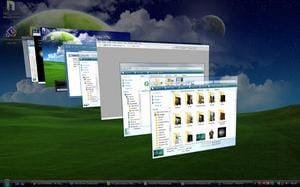
EXAMPLE: Switch Between Windows - Flip-3D Flip_3D.jpg


OPTION ONE

To Enable or Disable "Flip 3D" using a REG File Download

1. To Enable Flip 3D
NOTE: This is the default setting. A) Click on the Download button below to download the file below. Enable_Flip3D.reg

Download


B) Go to step 3.
2. To Disable Flip 3D A) Click on the Download button below to download the file below. Disable_Flip3D.reg

Download


3. Save the .reg file to the desktop.

4. Right click on the downloaded .reg file, and click on Merge.

5. Click on Run, Yes (UAC), Yes, and OK when prompted.

6. Log off and log on, or restart the computer to apply.

7. When done, you can delete the downloaded .reg file if you like.


OPTION TWO

To Enable or Disable "Flip 3D" in Local Group Policy Editor

1. Open the all users, specific users or groups, or all users except administrators Local Group Policy Editor for how you want this policy applied.

2. In the left pane, click on the arrow to expand User Configuration, Administrative Templates, Windows Components, then click on Desktop Window Manager. (see screenshot below) GPEDIT-1.jpg
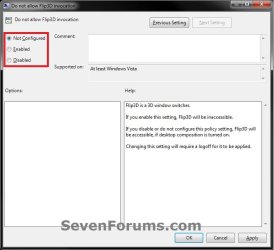
3. In the right pane, right click on Do not allow Flip 3D invocation and click on Edit. (see screenshot above)

4. To Enable Flip 3D
NOTE: This is the default setting. A) Select (dot) Not Configured or Disabled. (see screenshot below step 6)

B) Go to step 6.
5. To Disable Flip 3D A) Select (dot) Enabled. (see screenshot below step 6)
6. Click on OK. (see screenshot below) GPEDIT-2.jpg
7. Close the Local Group Policy Editor. (see screenshot below step 2)

8. Log off and log on, or restart the computer to apply.
That's it,
Shawn


Attachments

Last edited:
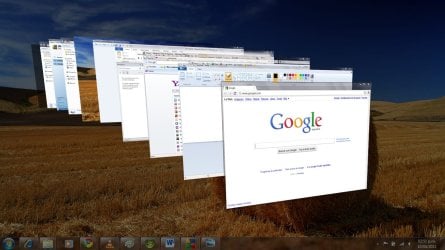
flip 3d in my computer
 

Attachments

  • FLIP 3D.jpg
    FLIP 3D.jpg
    118.3 KB · Views: 11,114

My Computer

Computer Manufacturer/Model Number
dell inspiron INSP1440
OS
windows 7 home premiun 64 bit
I use mouseflip3d to use flip3d. I just have to hit mouse button 1 and 2 to go into flip3d mode, and then select the window i want by scrolling the mouse wheel or clicking on it with the mouse.
 

My Computer

Computer Manufacturer/Model Number
HP dv6519tx
OS
Windows 7 Ultimate x64
CPU
1.80 GHz Intel Core 2 Duo processor T7100
Memory
3 gig ddr2
Graphics Card(s)
NVIDIA GeForce 8400M GS
Sound Card
Realtek High Definition Audio
Monitor(s) Displays
15.4” WXGA High Definition BrightView Widescreen
Screen Resolution
1280 x 800
Hard Drives
Hitachi 320 GB (5400 rpm)
PSU
90 W AC Power Adapter
Cooling
Kitchen plate under the lappy
Keyboard
101 key compatible
Mouse
Touch Pad with On/Off button and dedicated vertical Scroll
Internet Speed
Three Wireless internet prepaid using E160G USB dongle

My Computer

Computer type
PC/Desktop
Computer Manufacturer/Model Number
HP Pavilion p6565uk
OS
Windows 7 Home Premium 64bit
CPU
AMD Phenom II X6 1035T @2.6GHz (hexacore) (=15.6GHz)
Motherboard
FOXCONN (2AA9)
Memory
6GB DDR3-1333 (running at 1066)
Graphics Card(s)
NVIDIA/MSI GeForce GTX 770 (2GB)
Sound Card
Realtek HD Audio (with 5.1 surround sound always on)
Monitor(s) Displays
HP 2311x (secondary-workspace), Sharp LL-T1620-H (primary)
Screen Resolution
1924x1080
Hard Drives
480GB Crucial M500 SSD
1TB internal WD Caviar Black
3TB Seagate Barracude 7200rpm (for media storage)
4TB Seagate Desktop drive (mirrored backup)
2TB Apple AirPort Time Capsule
1TB Seagate FreeAgent Desk
500GB Seagate External Desktop Drive
PSU
XCase Dolphin, 700W
Case
Stock HP one that came with it, mid-size ATX
Cooling
Stock fans, they're fairly quiet.
Keyboard
Microsoft Wireless Keyboard 2000+ HP Media Centre Remote
Mouse
Microsoft Wireless Mouse 2000
Internet Speed
20 Mbps down, 50 Mbps up
Antivirus
MSE
Browser
Chrome Beta
Other Info
Also:
- 13" Apple MacBook Air, 2013, i7 @ 1.7GHz, 8GB DDR3, 256GB SSD
- HP Deskjet 3050A
- Two HP ZV5000 laptops (the better of the two recently broke)
- A Compaq Evo D310 (has 2GB RAM and a 2.53GHz P4 but is curiously extremely slow)
- A desk fan - this weather is warm ;)
- A fair few retro consoles
- Too many cables behind the desk, probably a fire hazard.
Hello Biggles,

None that I know of. :(
 

My Computer

Computer type
PC/Desktop
Computer Manufacturer/Model Number
Self built custom
OS
64-bit Windows 11 Pro for Workstations
CPU
Intel i7-8700K OC'd to 5 GHz
Motherboard
ASUS ROG Maximus XI Formula Z390
Memory
64 GB (4x16GB) G.SKILL TridentZ RGB DDR4 3600 MHz
Graphics Card(s)
ASUS ROG-STRIX-GTX1080TI-O11G-GAMING
Sound Card
Integrated
Monitor(s) Displays
2 x Samsung Odyssey G7 27"
Screen Resolution
2560x1440
Hard Drives
1TB Samsung 990 PRO M.2,
4TB Samsung 990 PRO PRO M.2,
TerraMaster F8 SSD Plus NAS
PSU
Seasonic Prime Titanium 850W
Case
Thermaltake Core P3
Cooling
Corsair Hydro H115i
Keyboard
Logitech wireless K800
Mouse
Logitech MX Master 4
Internet Speed
2 Gb/s Download and 100 Mb/s Upload
Antivirus
Malwarebyte Anti-Malware Premium
Browser
Google Chrome
Other Info
Logitech Z625 speaker system,
Logitech BRIO 4K Pro webcam,
HP Color LaserJet Pro MFP M477fdn,
APC SMART-UPS RT 1000 XL - SURT1000XLI,
Galaxy S23 Plus phone
thats a pity :/
thanks anyway :)
 

My Computer

Computer type
PC/Desktop
Computer Manufacturer/Model Number
HP Pavilion p6565uk
OS
Windows 7 Home Premium 64bit
CPU
AMD Phenom II X6 1035T @2.6GHz (hexacore) (=15.6GHz)
Motherboard
FOXCONN (2AA9)
Memory
6GB DDR3-1333 (running at 1066)
Graphics Card(s)
NVIDIA/MSI GeForce GTX 770 (2GB)
Sound Card
Realtek HD Audio (with 5.1 surround sound always on)
Monitor(s) Displays
HP 2311x (secondary-workspace), Sharp LL-T1620-H (primary)
Screen Resolution
1924x1080
Hard Drives
480GB Crucial M500 SSD
1TB internal WD Caviar Black
3TB Seagate Barracude 7200rpm (for media storage)
4TB Seagate Desktop drive (mirrored backup)
2TB Apple AirPort Time Capsule
1TB Seagate FreeAgent Desk
500GB Seagate External Desktop Drive
PSU
XCase Dolphin, 700W
Case
Stock HP one that came with it, mid-size ATX
Cooling
Stock fans, they're fairly quiet.
Keyboard
Microsoft Wireless Keyboard 2000+ HP Media Centre Remote
Mouse
Microsoft Wireless Mouse 2000
Internet Speed
20 Mbps down, 50 Mbps up
Antivirus
MSE
Browser
Chrome Beta
Other Info
Also:
- 13" Apple MacBook Air, 2013, i7 @ 1.7GHz, 8GB DDR3, 256GB SSD
- HP Deskjet 3050A
- Two HP ZV5000 laptops (the better of the two recently broke)
- A Compaq Evo D310 (has 2GB RAM and a 2.53GHz P4 but is curiously extremely slow)
- A desk fan - this weather is warm ;)
- A fair few retro consoles
- Too many cables behind the desk, probably a fire hazard.
De nada mate.
 

My Computer

Computer type
PC/Desktop
Computer Manufacturer/Model Number
Self built custom
OS
64-bit Windows 11 Pro for Workstations
CPU
Intel i7-8700K OC'd to 5 GHz
Motherboard
ASUS ROG Maximus XI Formula Z390
Memory
64 GB (4x16GB) G.SKILL TridentZ RGB DDR4 3600 MHz
Graphics Card(s)
ASUS ROG-STRIX-GTX1080TI-O11G-GAMING
Sound Card
Integrated
Monitor(s) Displays
2 x Samsung Odyssey G7 27"
Screen Resolution
2560x1440
Hard Drives
1TB Samsung 990 PRO M.2,
4TB Samsung 990 PRO PRO M.2,
TerraMaster F8 SSD Plus NAS
PSU
Seasonic Prime Titanium 850W
Case
Thermaltake Core P3
Cooling
Corsair Hydro H115i
Keyboard
Logitech wireless K800
Mouse
Logitech MX Master 4
Internet Speed
2 Gb/s Download and 100 Mb/s Upload
Antivirus
Malwarebyte Anti-Malware Premium
Browser
Google Chrome
Other Info
Logitech Z625 speaker system,
Logitech BRIO 4K Pro webcam,
HP Color LaserJet Pro MFP M477fdn,
APC SMART-UPS RT 1000 XL - SURT1000XLI,
Galaxy S23 Plus phone
Please help with 3D windows switcher!!!

I just got a windows 7 laptop, but I really miss the 3d screen flip on my vista. I followed the instructions below "Through a REG File Download ", downloaded it to my desktop, and then clicked "merge"...I restarted my pc, but still no 3D :( I'm no expert in pc matters, but I did what was suggested and it's not working. Can anyone suggest a fix for this? Thanks!
 

My Computer

Computer Manufacturer/Model Number
HP G72 Notebook PC
OS
Windows 7 Home Premium 64 bit
CPU
i3
Memory
4 gb
Graphics Card(s)
integrated
Sound Card
integrated
Hard Drives
500gb
Hello Zman, and welcome to Seven Forums.

Did you meet all the requirements in the red WARNING box at the top of the tutorial?

You will not be able to enable Aero for Flip 3D unless you do.
 

My Computer

Computer type
PC/Desktop
Computer Manufacturer/Model Number
Self built custom
OS
64-bit Windows 11 Pro for Workstations
CPU
Intel i7-8700K OC'd to 5 GHz
Motherboard
ASUS ROG Maximus XI Formula Z390
Memory
64 GB (4x16GB) G.SKILL TridentZ RGB DDR4 3600 MHz
Graphics Card(s)
ASUS ROG-STRIX-GTX1080TI-O11G-GAMING
Sound Card
Integrated
Monitor(s) Displays
2 x Samsung Odyssey G7 27"
Screen Resolution
2560x1440
Hard Drives
1TB Samsung 990 PRO M.2,
4TB Samsung 990 PRO PRO M.2,
TerraMaster F8 SSD Plus NAS
PSU
Seasonic Prime Titanium 850W
Case
Thermaltake Core P3
Cooling
Corsair Hydro H115i
Keyboard
Logitech wireless K800
Mouse
Logitech MX Master 4
Internet Speed
2 Gb/s Download and 100 Mb/s Upload
Antivirus
Malwarebyte Anti-Malware Premium
Browser
Google Chrome
Other Info
Logitech Z625 speaker system,
Logitech BRIO 4K Pro webcam,
HP Color LaserJet Pro MFP M477fdn,
APC SMART-UPS RT 1000 XL - SURT1000XLI,
Galaxy S23 Plus phone
3D flip

I wish I'd looked on microsoft.com first! I looked there and found out that I could enable flip 3D simply by depressing ctrl/ windows/tab! Now I'm just concerned about the changes made to the registry the other day...I haven't had any problems, and registry repair programs have found nothing, so I guess it's OK.
 

My Computer

Computer Manufacturer/Model Number
HP G72 Notebook PC
OS
Windows 7 Home Premium 64 bit
CPU
i3
Memory
4 gb
Graphics Card(s)
integrated
Sound Card
integrated
Hard Drives
500gb
Zman,

You have nothing to worry about. The enable REG file in this tutorial only enables the ability to use Flip 3D, which is the default setting.
 

My Computer

Computer type
PC/Desktop
Computer Manufacturer/Model Number
Self built custom
OS
64-bit Windows 11 Pro for Workstations
CPU
Intel i7-8700K OC'd to 5 GHz
Motherboard
ASUS ROG Maximus XI Formula Z390
Memory
64 GB (4x16GB) G.SKILL TridentZ RGB DDR4 3600 MHz
Graphics Card(s)
ASUS ROG-STRIX-GTX1080TI-O11G-GAMING
Sound Card
Integrated
Monitor(s) Displays
2 x Samsung Odyssey G7 27"
Screen Resolution
2560x1440
Hard Drives
1TB Samsung 990 PRO M.2,
4TB Samsung 990 PRO PRO M.2,
TerraMaster F8 SSD Plus NAS
PSU
Seasonic Prime Titanium 850W
Case
Thermaltake Core P3
Cooling
Corsair Hydro H115i
Keyboard
Logitech wireless K800
Mouse
Logitech MX Master 4
Internet Speed
2 Gb/s Download and 100 Mb/s Upload
Antivirus
Malwarebyte Anti-Malware Premium
Browser
Google Chrome
Other Info
Logitech Z625 speaker system,
Logitech BRIO 4K Pro webcam,
HP Color LaserJet Pro MFP M477fdn,
APC SMART-UPS RT 1000 XL - SURT1000XLI,
Galaxy S23 Plus phone
Back
Top