Open File - Security Warning : Allow or Prevent to Unblock File

Allow or Prevent to Unblock a File to Stop the "Open File - Security Warning" Prompt

   Information
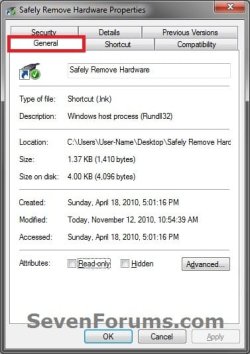
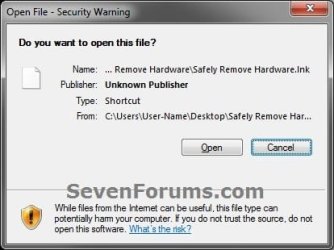
This will show you how to allow or prevent all users from being able to stop the Open File - Security Warning prompt by removing the unblock button and Always ask before opening this file check box for a downloaded or copied file from the internet or another computer.

The Open File - Security Warning prompt is a security measure in Vista, Windows 7, and Windows 8 to ask for your permission (like UAC) before allowing a downloaded or copied file from the internet or another computer to be opened or run on your computer.

You will need to be logged in as an administrator to be able to do this tutorial.
   Note
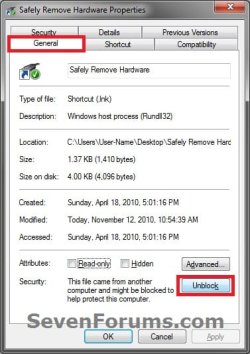
If allowed, users will be able to unblock a file that has been downloaded or copied from the internet or another computer to your computer to no longer get the Open File - Security Warning prompt when a user opens or runs that specific file anymore.

If prevented, users will not be able to unblock a file that has been downloaded or copied from the internet or another computer to your computer, and will always get the Open File - Security Warning prompt when a user opens or runs that specific file.

EXAMPLE: "Unblock" button Allowed or Prevented
Example-2.jpgExample-2B.jpg
EXAMPLE: "Always ask before opening this file" check box Allowed or Prevented
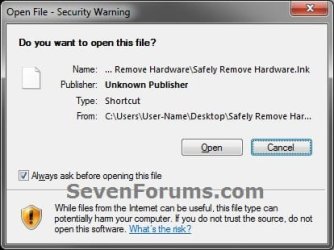
Example-1.jpgExample-1B.jpg


OPTION ONE

Using a REG File Download


1. Allow to Unblock File to Stop "Open File - Security Warning" Prompt for Only Current User
NOTE: This is the default setting.
A) Click on the Download button below to download the file below.
Enable_Unblock_Open_File_Security_Warning.reg

Download


B) Go to step 3.
2. Prevent to Unblock File to Always Have "Open File - Security Warning" Prompt for Only Current User
A) Click on the Download button below to download the file below.
Disable_Unblock_Open_File_Security_Warning.reg


Download


3. Click on Save, and save the .reg file to the desktop.

4. Right click on the downloaded .reg file and click on Merge.

5. Click on Run, Yes (Windows 7) or Continue (Vista), Yes, and OK when prompted.

6. Log off and log on, or restart the computer to apply.

7. When done, you can delete the downloaded .reg file if you like.


OPTION TWO

Through the Local Group Policy Editor


1. Open the all users, specific users or groups, or all users except administrators Local Group Policy Editor for how you want this policy applied.

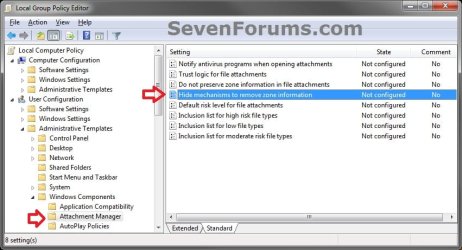
2. In the left pane, click on to expand User Configuration, Administrative Templates, Windows Components, and Attachment Manager. (see screenshot below)
GPEDIT-1.jpg
3. In the right pane, right click on Hide mechanisms to remove zone information and click on Edit. (see screenshot above)

4. Allow to Unblock File to Stop "Open File - Security Warning" Prompt
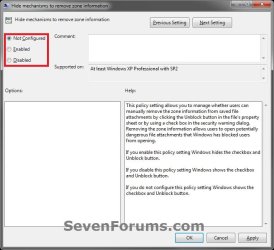
A) Select (dot) either Not Configured or Disabled. (see screenshot below step 6)
NOTE: Not Configured is the default setting.

B) Go to step 6.
5. Prevent to Unblock File to Always Have "Open File - Security Warning" Prompt
A) Select (dot) Enabled. (see screenshot below step 6)
6. Click on OK. (see screenshot below)
GPEDIT-2.jpg
7. Close the Local Group Policy Editor window.
That's it,
Shawn


Attachments

Last edited:
Thanks for this Shawn. Much appreciated. :thumbsup:

Take care and regards
 

My Computer My Computer

Computer Manufacturer/Model Number
Custom
OS
Win7 HP (x64)/Win7 Ultimate (x64)
CPU
Core i7 920
Motherboard
Intel X58
Memory
6 x 2GB Corsair XMS3
Graphics Card(s)
CF HD4890
Sound Card
Asus Xonar
Monitor(s) Displays
Dell 2408WFP
Screen Resolution
1920 x 1200
Hard Drives
2 x 150GB WDC Velociraptors (Raid 0)
1 x 1TB Seagate
1 x 1.5TB Seagate
PSU
Corsair HX1000W
Case
Antec 1200
Keyboard
Razer Lycosa/N52te
Mouse
Razer Lachesis
You're most welcome Lomai. Thank you, and take care as well. :)
 

My Computer My Computer

Computer type
PC/Desktop
Computer Manufacturer/Model Number
Self built custom
OS
64-bit Windows 11 Pro for Workstations
CPU
Intel i7-8700K OC'd to 5 GHz
Motherboard
ASUS ROG Maximus XI Formula Z390
Memory
64 GB (4x16GB) G.SKILL TridentZ RGB DDR4 3600 MHz
Graphics Card(s)
ASUS ROG-STRIX-GTX1080TI-O11G-GAMING
Sound Card
Integrated
Monitor(s) Displays
2 x Samsung Odyssey G7 27"
Screen Resolution
2560x1440
Hard Drives
1TB Samsung 990 PRO M.2,
4TB Samsung 990 PRO PRO M.2,
TerraMaster F8 SSD Plus NAS
PSU
Seasonic Prime Titanium 850W
Case
Thermaltake Core P3
Cooling
Corsair Hydro H115i
Keyboard
Logitech wireless K800
Mouse
Logitech MX Master 4
Internet Speed
2 Gb/s Download and 100 Mb/s Upload
Antivirus
Malwarebyte Anti-Malware Premium
Browser
Google Chrome
Other Info
Logitech Z625 speaker system,
Logitech BRIO 4K Pro webcam,
HP Color LaserJet Pro MFP M477fdn,
APC SMART-UPS RT 1000 XL - SURT1000XLI,
Galaxy S23 Plus phone
I cant add the file: Enable_Unblock_Open_File_Security_Warning.reg to my registry.
I clicked on it and look in the registry and its not there.
??
 

My Computer My Computer

Computer Manufacturer/Model Number
ME!
OS
Windows 7 SP1 Ultimate 64bit
CPU
AMD Phenom II X4 940
Motherboard
ASUS M4A79 Deluxe (BIOS 3603)
Memory
OCZ PC8500 Platinum 4GB
Graphics Card(s)
Sapphire HD4870 1GB 256-bit GDDR5
Sound Card
HT Omega Claro
Monitor(s) Displays
ViewSonic G220fb still rocks
Screen Resolution
1600x1200@85hz
Hard Drives
160GB Seagate 7200.10 Sata
150GB WD Raptor 10,000rpm Sata
PSU
Corsair TX950W
Cooling
Zalman 9700NT
Keyboard
Logitech Standard
Mouse
Microsoft SideWinder
Internet Speed
5.26MB down 0.86MB up
Other Info
APC BackUps 900VA
Hello Cartel,

The enable REG file download removes the registry entry to allow getting the prompt. If you wanted to stop the prompt, then you would want to use the disable REG download instead.

Hope this helps,
Shawn
 

My Computer My Computer

Computer type
PC/Desktop
Computer Manufacturer/Model Number
Self built custom
OS
64-bit Windows 11 Pro for Workstations
CPU
Intel i7-8700K OC'd to 5 GHz
Motherboard
ASUS ROG Maximus XI Formula Z390
Memory
64 GB (4x16GB) G.SKILL TridentZ RGB DDR4 3600 MHz
Graphics Card(s)
ASUS ROG-STRIX-GTX1080TI-O11G-GAMING
Sound Card
Integrated
Monitor(s) Displays
2 x Samsung Odyssey G7 27"
Screen Resolution
2560x1440
Hard Drives
1TB Samsung 990 PRO M.2,
4TB Samsung 990 PRO PRO M.2,
TerraMaster F8 SSD Plus NAS
PSU
Seasonic Prime Titanium 850W
Case
Thermaltake Core P3
Cooling
Corsair Hydro H115i
Keyboard
Logitech wireless K800
Mouse
Logitech MX Master 4
Internet Speed
2 Gb/s Download and 100 Mb/s Upload
Antivirus
Malwarebyte Anti-Malware Premium
Browser
Google Chrome
Other Info
Logitech Z625 speaker system,
Logitech BRIO 4K Pro webcam,
HP Color LaserJet Pro MFP M477fdn,
APC SMART-UPS RT 1000 XL - SURT1000XLI,
Galaxy S23 Plus phone
doh!

ok thanks for getting back to me.:zip:
 

My Computer My Computer

Computer Manufacturer/Model Number
ME!
OS
Windows 7 SP1 Ultimate 64bit
CPU
AMD Phenom II X4 940
Motherboard
ASUS M4A79 Deluxe (BIOS 3603)
Memory
OCZ PC8500 Platinum 4GB
Graphics Card(s)
Sapphire HD4870 1GB 256-bit GDDR5
Sound Card
HT Omega Claro
Monitor(s) Displays
ViewSonic G220fb still rocks
Screen Resolution
1600x1200@85hz
Hard Drives
160GB Seagate 7200.10 Sata
150GB WD Raptor 10,000rpm Sata
PSU
Corsair TX950W
Cooling
Zalman 9700NT
Keyboard
Logitech Standard
Mouse
Microsoft SideWinder
Internet Speed
5.26MB down 0.86MB up
Other Info
APC BackUps 900VA
LOL, you're most welcome. :)
 

My Computer My Computer

Computer type
PC/Desktop
Computer Manufacturer/Model Number
Self built custom
OS
64-bit Windows 11 Pro for Workstations
CPU
Intel i7-8700K OC'd to 5 GHz
Motherboard
ASUS ROG Maximus XI Formula Z390
Memory
64 GB (4x16GB) G.SKILL TridentZ RGB DDR4 3600 MHz
Graphics Card(s)
ASUS ROG-STRIX-GTX1080TI-O11G-GAMING
Sound Card
Integrated
Monitor(s) Displays
2 x Samsung Odyssey G7 27"
Screen Resolution
2560x1440
Hard Drives
1TB Samsung 990 PRO M.2,
4TB Samsung 990 PRO PRO M.2,
TerraMaster F8 SSD Plus NAS
PSU
Seasonic Prime Titanium 850W
Case
Thermaltake Core P3
Cooling
Corsair Hydro H115i
Keyboard
Logitech wireless K800
Mouse
Logitech MX Master 4
Internet Speed
2 Gb/s Download and 100 Mb/s Upload
Antivirus
Malwarebyte Anti-Malware Premium
Browser
Google Chrome
Other Info
Logitech Z625 speaker system,
Logitech BRIO 4K Pro webcam,
HP Color LaserJet Pro MFP M477fdn,
APC SMART-UPS RT 1000 XL - SURT1000XLI,
Galaxy S23 Plus phone
This tutorial is a life saver. Every time I tried to compute the MD5 Sum of a downloaded exe in W7 via context menu, it was triggering that security dialog. No fun if checking MD5 of 20 downloads! :)
 

My Computer My Computer

Computer Manufacturer/Model Number
HP Media Center
OS
Windows 7 32 bit
CPU
AMD 5200+ dual core
Memory
2 GB
Graphics Card(s)
NVidia GeForce 6150SE 128 MB
Monitor(s) Displays
CRT
Screen Resolution
1280x1024
Hard Drives
500 GB Sata internal :

SIIG USB 3.0 docking stations w/WD Caviar Black 6 Gb/s drives
Keyboard
PS/2
Mouse
PS/2 Wheel Mouse
Other Info
SIIG USB 3.0 PCIexpress card.
Brink,
I tried this and found that it worked on all files. I have one file that triggers the security warning on computer startup or reboot. I would like to disable the security warning on that file only. Can it be done?
 

My Computer My Computer

Computer type
Laptop
Computer Manufacturer/Model Number
Asus
OS
W7 Ultimate
CPU
2.2 bh Intel Core i3-2330M
Motherboard
Asustek Computer Inc. P53E 1.0
Memory
4MB
Graphics Card(s)
On Board
Sound Card
On Board
Monitor(s) Displays
On Board
Screen Resolution
1366 X 768
Hard Drives
ST9500423AS
ST2000DM USB Backup Drive External

My Computer My Computer

Computer type
PC/Desktop
Computer Manufacturer/Model Number
Self built custom
OS
64-bit Windows 11 Pro for Workstations
CPU
Intel i7-8700K OC'd to 5 GHz
Motherboard
ASUS ROG Maximus XI Formula Z390
Memory
64 GB (4x16GB) G.SKILL TridentZ RGB DDR4 3600 MHz
Graphics Card(s)
ASUS ROG-STRIX-GTX1080TI-O11G-GAMING
Sound Card
Integrated
Monitor(s) Displays
2 x Samsung Odyssey G7 27"
Screen Resolution
2560x1440
Hard Drives
1TB Samsung 990 PRO M.2,
4TB Samsung 990 PRO PRO M.2,
TerraMaster F8 SSD Plus NAS
PSU
Seasonic Prime Titanium 850W
Case
Thermaltake Core P3
Cooling
Corsair Hydro H115i
Keyboard
Logitech wireless K800
Mouse
Logitech MX Master 4
Internet Speed
2 Gb/s Download and 100 Mb/s Upload
Antivirus
Malwarebyte Anti-Malware Premium
Browser
Google Chrome
Other Info
Logitech Z625 speaker system,
Logitech BRIO 4K Pro webcam,
HP Color LaserJet Pro MFP M477fdn,
APC SMART-UPS RT 1000 XL - SURT1000XLI,
Galaxy S23 Plus phone
Brink,
I go to properties of the particular file and UNBLOCK it. The UNBLOCK box turns gray. I APPLY and then OK. Come back to properties and it is blocked again. Not gray anymore.
 

My Computer My Computer

Computer type
Laptop
Computer Manufacturer/Model Number
Asus
OS
W7 Ultimate
CPU
2.2 bh Intel Core i3-2330M
Motherboard
Asustek Computer Inc. P53E 1.0
Memory
4MB
Graphics Card(s)
On Board
Sound Card
On Board
Monitor(s) Displays
On Board
Screen Resolution
1366 X 768
Hard Drives
ST9500423AS
ST2000DM USB Backup Drive External
See if moving the file to your desktop first, unblock it there, then move it back will work.
 

My Computer My Computer

Computer type
PC/Desktop
Computer Manufacturer/Model Number
Self built custom
OS
64-bit Windows 11 Pro for Workstations
CPU
Intel i7-8700K OC'd to 5 GHz
Motherboard
ASUS ROG Maximus XI Formula Z390
Memory
64 GB (4x16GB) G.SKILL TridentZ RGB DDR4 3600 MHz
Graphics Card(s)
ASUS ROG-STRIX-GTX1080TI-O11G-GAMING
Sound Card
Integrated
Monitor(s) Displays
2 x Samsung Odyssey G7 27"
Screen Resolution
2560x1440
Hard Drives
1TB Samsung 990 PRO M.2,
4TB Samsung 990 PRO PRO M.2,
TerraMaster F8 SSD Plus NAS
PSU
Seasonic Prime Titanium 850W
Case
Thermaltake Core P3
Cooling
Corsair Hydro H115i
Keyboard
Logitech wireless K800
Mouse
Logitech MX Master 4
Internet Speed
2 Gb/s Download and 100 Mb/s Upload
Antivirus
Malwarebyte Anti-Malware Premium
Browser
Google Chrome
Other Info
Logitech Z625 speaker system,
Logitech BRIO 4K Pro webcam,
HP Color LaserJet Pro MFP M477fdn,
APC SMART-UPS RT 1000 XL - SURT1000XLI,
Galaxy S23 Plus phone
Brink,
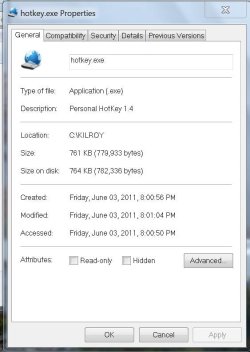
The problem was the Read Only attribute was set. Unchecked the RO attribute and the UNBLOCK worked. (see attached)

However, the User Account Control (UAC) comes up. Anyway to stop this on this file only? And still leave the security level at the recommended level.
 

Attachments

  • Capture.JPG
    Capture.JPG
    52.9 KB · Views: 396

My Computer My Computer

Computer type
Laptop
Computer Manufacturer/Model Number
Asus
OS
W7 Ultimate
CPU
2.2 bh Intel Core i3-2330M
Motherboard
Asustek Computer Inc. P53E 1.0
Memory
4MB
Graphics Card(s)
On Board
Sound Card
On Board
Monitor(s) Displays
On Board
Screen Resolution
1366 X 768
Hard Drives
ST9500423AS
ST2000DM USB Backup Drive External

My Computer My Computer

Computer type
PC/Desktop
Computer Manufacturer/Model Number
Self built custom
OS
64-bit Windows 11 Pro for Workstations
CPU
Intel i7-8700K OC'd to 5 GHz
Motherboard
ASUS ROG Maximus XI Formula Z390
Memory
64 GB (4x16GB) G.SKILL TridentZ RGB DDR4 3600 MHz
Graphics Card(s)
ASUS ROG-STRIX-GTX1080TI-O11G-GAMING
Sound Card
Integrated
Monitor(s) Displays
2 x Samsung Odyssey G7 27"
Screen Resolution
2560x1440
Hard Drives
1TB Samsung 990 PRO M.2,
4TB Samsung 990 PRO PRO M.2,
TerraMaster F8 SSD Plus NAS
PSU
Seasonic Prime Titanium 850W
Case
Thermaltake Core P3
Cooling
Corsair Hydro H115i
Keyboard
Logitech wireless K800
Mouse
Logitech MX Master 4
Internet Speed
2 Gb/s Download and 100 Mb/s Upload
Antivirus
Malwarebyte Anti-Malware Premium
Browser
Google Chrome
Other Info
Logitech Z625 speaker system,
Logitech BRIO 4K Pro webcam,
HP Color LaserJet Pro MFP M477fdn,
APC SMART-UPS RT 1000 XL - SURT1000XLI,
Galaxy S23 Plus phone
Brink,
Still having trouble.
It runs correctly if I initiate RUN from the task scheduler. So I figure it's something wrong with the shortcut which I placed in the folder C:\Program Data\Microsoft\Windows\start Menu\Programs\startup\.
Shortcut name is "kilroyhotkey" I would attach it but it has wrong .ext. Can I do anything to it so I can send to you to look at it. I can't find anything wrong.
However, when I double click the shortcut, the UAC is displayed, I answer YES and the file opens as it should. I do have ADMIN privileges.
 

My Computer My Computer

Computer type
Laptop
Computer Manufacturer/Model Number
Asus
OS
W7 Ultimate
CPU
2.2 bh Intel Core i3-2330M
Motherboard
Asustek Computer Inc. P53E 1.0
Memory
4MB
Graphics Card(s)
On Board
Sound Card
On Board
Monitor(s) Displays
On Board
Screen Resolution
1366 X 768
Hard Drives
ST9500423AS
ST2000DM USB Backup Drive External

My Computer My Computer

Computer type
PC/Desktop
Computer Manufacturer/Model Number
Self built custom
OS
64-bit Windows 11 Pro for Workstations
CPU
Intel i7-8700K OC'd to 5 GHz
Motherboard
ASUS ROG Maximus XI Formula Z390
Memory
64 GB (4x16GB) G.SKILL TridentZ RGB DDR4 3600 MHz
Graphics Card(s)
ASUS ROG-STRIX-GTX1080TI-O11G-GAMING
Sound Card
Integrated
Monitor(s) Displays
2 x Samsung Odyssey G7 27"
Screen Resolution
2560x1440
Hard Drives
1TB Samsung 990 PRO M.2,
4TB Samsung 990 PRO PRO M.2,
TerraMaster F8 SSD Plus NAS
PSU
Seasonic Prime Titanium 850W
Case
Thermaltake Core P3
Cooling
Corsair Hydro H115i
Keyboard
Logitech wireless K800
Mouse
Logitech MX Master 4
Internet Speed
2 Gb/s Download and 100 Mb/s Upload
Antivirus
Malwarebyte Anti-Malware Premium
Browser
Google Chrome
Other Info
Logitech Z625 speaker system,
Logitech BRIO 4K Pro webcam,
HP Color LaserJet Pro MFP M477fdn,
APC SMART-UPS RT 1000 XL - SURT1000XLI,
Galaxy S23 Plus phone
IE8 Windows 7 - Always ask before opening ........

Hi guys,
I tried your solution via 'gpedit.msc' but it didn't work. Please see attachment
 

Attachments

My Computer My Computer

Computer type
PC/Desktop
Computer Manufacturer/Model Number
Dell
OS
Windows 7 Professional 64
CPU
Intel(R) Core(TM) i5 CPU 750 @2.67GHz 2.67 GHz
Memory
4.00 GB
Browser
IE8, Chrome 26.0.1410.64 m, Firefox 20.0.1
Hello Tony, and welcome to Seven Forums.

In your attached screenshot, that it for a "File Download" dialog box instead. That is not the same as an Open File - Security Warning dialog, and is why the tutorial didn't help for this.

If in Internet Explorer 9/10 you could set a default download location to help some, but you will always be asked where to save a file when downloading like that.

http://www.sevenforums.com/tutorials/112232-internet-explorer-change-default-download-location.html


Hope this helps some, :)
Shawn
 

My Computer My Computer

Computer type
PC/Desktop
Computer Manufacturer/Model Number
Self built custom
OS
64-bit Windows 11 Pro for Workstations
CPU
Intel i7-8700K OC'd to 5 GHz
Motherboard
ASUS ROG Maximus XI Formula Z390
Memory
64 GB (4x16GB) G.SKILL TridentZ RGB DDR4 3600 MHz
Graphics Card(s)
ASUS ROG-STRIX-GTX1080TI-O11G-GAMING
Sound Card
Integrated
Monitor(s) Displays
2 x Samsung Odyssey G7 27"
Screen Resolution
2560x1440
Hard Drives
1TB Samsung 990 PRO M.2,
4TB Samsung 990 PRO PRO M.2,
TerraMaster F8 SSD Plus NAS
PSU
Seasonic Prime Titanium 850W
Case
Thermaltake Core P3
Cooling
Corsair Hydro H115i
Keyboard
Logitech wireless K800
Mouse
Logitech MX Master 4
Internet Speed
2 Gb/s Download and 100 Mb/s Upload
Antivirus
Malwarebyte Anti-Malware Premium
Browser
Google Chrome
Other Info
Logitech Z625 speaker system,
Logitech BRIO 4K Pro webcam,
HP Color LaserJet Pro MFP M477fdn,
APC SMART-UPS RT 1000 XL - SURT1000XLI,
Galaxy S23 Plus phone
Ok, my turn.

Irrelevant backstory. I get this feedback hum from my 3.5 mic and it was suggested to use the front audio jack to defeat the hum caused by the power supply. The front jack is dead but the usb's work. It was suggested that Via's HDdeck has a setting to detect the front jack. After installing, it failed to make the front audio jack work. I think there is a short in the mic cable, as on one occasion after moving from front to back, the hum was eliminated. But only once and I have yet to duplicate the fix.

On to the current problem. HDdeck needs permission to run when I boot the machine. I have tried UNchecking "always ask to run this program" when it attempts to launch. I have tried right click+properties and to unblock, both from its current location in x86 AND after moving the exe to desktop. And yes, I clicked apply, then ok. No sale. I had also tried unchecking Read-only, but that did not seem to work.

After reading this particular thread, which was my 3rd at this site, Blockie reminded me about the Read-only setting, and combined with moving the exe. to desktop, I was able to make the unblock stick this time around. I rebooted but failed to see the icon in the taskbar. I rechecked the exe. and it was still unblocked, so I made a shortcut and placed it in the Startup folder. This time around HDdeck loaded without the prompt! I removed the shortcut in Startup and went for another boot...just to see, and to my surprise HDdeck loaded without the shortcut and has not failed to load since. My assumption is that I just did not see the icon in the taskbar on that first test.

Special thanks to Blockie and to Brink of course, for his countless hours spent helping people solve problems.
 

My Computer My Computer

Computer type
PC/Desktop
OS
Windows 7 Pro 64
I have been using a Skrommel AHK exe file since 2009(?) on a Win7 HP x86 laptop,
- the EXE file is portable and must be run at startup/boot to setup it simple feature.

ShiftOff by Skrommel - DonationCoder.com

But on a Win-7 HP x64 rig ...
ShiftOff.exe is in "Startup" folder and does not run on boot.
But when manually run shows this UAC alert
- I have a vague recollection that AHK exe files are not signed

UAC alert for ShiftOff_p.PNG

I have looked at all related tutorials on Open File - Security Warning : Allow or Prevent to Unblock File - Windows 7 Help Forums

Over the last few days somewhere on this forum (a Brink tute) mentioned placing a shortcut in C:\Windows to ShiftOff.exe ... or this is just wishful thinking on my part.
I have tested "ShiftOff folder" with ADS-Scanner no ADS file

Win-7 HP x86 has been happily booting ShiftOff.exe for years, but on a Win-7 HP x64 I cannot bypass UAC when running ShiftOff.exe manually nor will it run at startup.

I would appreciate some serious help ... thank you :)
 

My Computer My Computer

Computer type
PC/Desktop
Computer Manufacturer/Model Number
Toshiba, Lenovo (laptops) + 4 rigs
OS
XP Pro (x86) | 7 HP (x86) & (x64) | 7 Pro (x64)
Back
Top