URL Files - Add "Open with" to Context Menu

How to Add "Open with" to Context Menu of URL Files in Windows

   Information
A URL file is a internet shortcut. The Favorites in Internet Explorer, Bookmarks in Firefox, and favorites in your C:\Users\(user-name)\Favorites folder are all URL files as well.


This will show you how to add Open with to the right click context menu of URL files for all users in Vista, Windows 7 and Windows 8.

You must be logged in as an administrator to be able to do the steps in this tutorial.


EXAMPLE: "Open with" in URL Context Menu right-click.jpg
Here's How: 1. To Remove "Open with" from the Context Menu of URL Files
NOTE: This is the default setting. A) Click/tap on the Download button below to download the file below, and go to step 3 below. URL-remove_Open_with.reg

Download


2. To Add "Open with" to the Context Menu of URL Files A) Click/tap on the Download button below to download the file below, and go to step 3 below. URL-add_Open_with.reg

Download


3. Save the .reg file to your desktop.

4. Double click/tap on the downloaded .reg file to merge it.

5. When prompted, click/tap on Run, Yes (UAC-Windows 7/8) or Continue (UAC-Vista), Yes, and OK to approve merging the .reg file.

6. You can now delete the downloaded .reg file if you like.
That's it,
Shawn


Attachments

Last edited:
Thank you Shawn! Just what I've been wanting.

Been using "Send To" but always wanted a "Open with".

BTW, cute baby pictures! :)
 

My Computers My Computers

System One System Two

  • Computer type
    Laptop
    Computer Manufacturer/Model Number
    Dell Precision 7510
    OS
    W7PRO
    CPU
    Intel i7-6820HQ @ 2.7GHz
    Memory
    16GB
  • Computer type
    Laptop
    OS
    W7Pro
You're most welcome R A, and thank you. :p


My Computer My Computer

Computer type
PC/Desktop
Computer Manufacturer/Model Number
Self built custom
OS
64-bit Windows 11 Pro for Workstations
CPU
Intel i7-8700K OC'd to 5 GHz
Motherboard
ASUS ROG Maximus XI Formula Z390
Memory
64 GB (4x16GB) G.SKILL TridentZ RGB DDR4 3600 MHz
Graphics Card(s)
ASUS ROG-STRIX-GTX1080TI-O11G-GAMING
Sound Card
Integrated
Monitor(s) Displays
2 x Samsung Odyssey G7 27"
Screen Resolution
2560x1440
Hard Drives
1TB Samsung 990 PRO M.2,
4TB Samsung 990 PRO PRO M.2,
TerraMaster F8 SSD Plus NAS
PSU
Seasonic Prime Titanium 850W
Case
Thermaltake Core P3
Cooling
Corsair Hydro H115i
Keyboard
Logitech wireless K800
Mouse
Logitech MX Master 4
Internet Speed
2 Gb/s Download and 100 Mb/s Upload
Antivirus
Malwarebyte Anti-Malware Premium
Browser
Google Chrome
Other Info
Logitech Z625 speaker system,
Logitech BRIO 4K Pro webcam,
HP Color LaserJet Pro MFP M477fdn,
APC SMART-UPS RT 1000 XL - SURT1000XLI,
Galaxy S23 Plus phone
Not Working!

Hi guys, I tried to get this to work but it's not working at all. I checked within the Win 7 64bit Registry Editor and it did add the key as it should. But when I right click on a URL shortcut the "Open with" does not show. Does anyone have an idea as to why it's not working? :confused:
 

My Computer My Computer

OS
Windows 7 Ultimate x64
Hello Angel, and welcome to Seven Forums.

Are you right clicking on a URL shortcut from say your desktop? It will not work if you right clicking on them from within "Favorites" in Internet Explorer.

You might see if logging off and on may help.

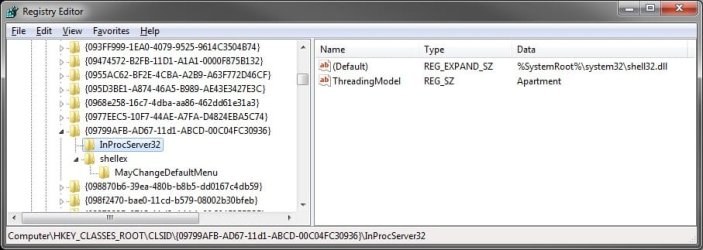
In addition, double check to make sure that you have the registry entries below for the "Open With Context Menu Handler". You should by default.

Code:
[HKEY_CLASSES_ROOT\CLSID\{09799AFB-AD67-11d1-ABCD-00C04FC30936}]
@="Open With Context Menu Handler"
"ContextMenuOptIn"=""
 
[HKEY_CLASSES_ROOT\CLSID\{09799AFB-AD67-11d1-ABCD-00C04FC30936}\InProcServer32]
@=hex(2):25,00,53,00,79,00,73,00,74,00,65,00,6d,00,52,00,6f,00,6f,00,74,00,25,\
  00,5c,00,73,00,79,00,73,00,74,00,65,00,6d,00,33,00,32,00,5c,00,73,00,68,00,\
  65,00,6c,00,6c,00,33,00,32,00,2e,00,64,00,6c,00,6c,00,00,00
"ThreadingModel"="Apartment"
 
[HKEY_CLASSES_ROOT\CLSID\{09799AFB-AD67-11d1-ABCD-00C04FC30936}\shellex]
 
[HKEY_CLASSES_ROOT\CLSID\{09799AFB-AD67-11d1-ABCD-00C04FC30936}\shellex\MayChangeDefaultMenu]

reg.jpg
 

My Computer My Computer

Computer type
PC/Desktop
Computer Manufacturer/Model Number
Self built custom
OS
64-bit Windows 11 Pro for Workstations
CPU
Intel i7-8700K OC'd to 5 GHz
Motherboard
ASUS ROG Maximus XI Formula Z390
Memory
64 GB (4x16GB) G.SKILL TridentZ RGB DDR4 3600 MHz
Graphics Card(s)
ASUS ROG-STRIX-GTX1080TI-O11G-GAMING
Sound Card
Integrated
Monitor(s) Displays
2 x Samsung Odyssey G7 27"
Screen Resolution
2560x1440
Hard Drives
1TB Samsung 990 PRO M.2,
4TB Samsung 990 PRO PRO M.2,
TerraMaster F8 SSD Plus NAS
PSU
Seasonic Prime Titanium 850W
Case
Thermaltake Core P3
Cooling
Corsair Hydro H115i
Keyboard
Logitech wireless K800
Mouse
Logitech MX Master 4
Internet Speed
2 Gb/s Download and 100 Mb/s Upload
Antivirus
Malwarebyte Anti-Malware Premium
Browser
Google Chrome
Other Info
Logitech Z625 speaker system,
Logitech BRIO 4K Pro webcam,
HP Color LaserJet Pro MFP M477fdn,
APC SMART-UPS RT 1000 XL - SURT1000XLI,
Galaxy S23 Plus phone
Thanks for responding Brink, I was right-clicking on URL links on my Desktop but it did not show the "Open with" menu. I check for the reg values that you specified and it seems to have them, see my reg export below. So I'm not sure why it's not working, by the way I rebooted my computer but still no luck. :confused:

PHP:
[HKEY_CLASSES_ROOT\CLSID\{09799AFB-AD67-11d1-ABCD-00C04FC30936}]
@="Open With Context Menu Handler"
"ContextMenuOptIn"=""

[HKEY_CLASSES_ROOT\CLSID\{09799AFB-AD67-11d1-ABCD-00C04FC30936}\InProcServer32]
@=hex(2):25,00,53,00,79,00,73,00,74,00,65,00,6d,00,52,00,6f,00,6f,00,74,00,25,\
  00,5c,00,73,00,79,00,73,00,74,00,65,00,6d,00,33,00,32,00,5c,00,73,00,68,00,\
  65,00,6c,00,6c,00,33,00,32,00,2e,00,64,00,6c,00,6c,00,00,00
"ThreadingModel"="Apartment"

[HKEY_CLASSES_ROOT\CLSID\{09799AFB-AD67-11d1-ABCD-00C04FC30936}\shellex]

[HKEY_CLASSES_ROOT\CLSID\{09799AFB-AD67-11d1-ABCD-00C04FC30936}\shellex\MayChangeDefaultMenu]
 

My Computer My Computer

OS
Windows 7 Ultimate x64
If the link is not sensitive, could you ZIP it and upload it here? I'll be happy to test it on my desktop to see what the issue may be. :)
 

My Computer My Computer

Computer type
PC/Desktop
Computer Manufacturer/Model Number
Self built custom
OS
64-bit Windows 11 Pro for Workstations
CPU
Intel i7-8700K OC'd to 5 GHz
Motherboard
ASUS ROG Maximus XI Formula Z390
Memory
64 GB (4x16GB) G.SKILL TridentZ RGB DDR4 3600 MHz
Graphics Card(s)
ASUS ROG-STRIX-GTX1080TI-O11G-GAMING
Sound Card
Integrated
Monitor(s) Displays
2 x Samsung Odyssey G7 27"
Screen Resolution
2560x1440
Hard Drives
1TB Samsung 990 PRO M.2,
4TB Samsung 990 PRO PRO M.2,
TerraMaster F8 SSD Plus NAS
PSU
Seasonic Prime Titanium 850W
Case
Thermaltake Core P3
Cooling
Corsair Hydro H115i
Keyboard
Logitech wireless K800
Mouse
Logitech MX Master 4
Internet Speed
2 Gb/s Download and 100 Mb/s Upload
Antivirus
Malwarebyte Anti-Malware Premium
Browser
Google Chrome
Other Info
Logitech Z625 speaker system,
Logitech BRIO 4K Pro webcam,
HP Color LaserJet Pro MFP M477fdn,
APC SMART-UPS RT 1000 XL - SURT1000XLI,
Galaxy S23 Plus phone
It does it with all links even the one for this topic. I'm using the Chrome browser as default, I'll switch to IE and see if that fixes anything. I'll also try the reg tweak on my other computers and see if it works on them.
 

Attachments

My Computer My Computer

OS
Windows 7 Ultimate x64
Yep, it works fine for with that one. I suppose that it may be some issue with Chrome set as the default browser. It'll be interesting to see what your findings are with IE as the default instead.
 

My Computer My Computer

Computer type
PC/Desktop
Computer Manufacturer/Model Number
Self built custom
OS
64-bit Windows 11 Pro for Workstations
CPU
Intel i7-8700K OC'd to 5 GHz
Motherboard
ASUS ROG Maximus XI Formula Z390
Memory
64 GB (4x16GB) G.SKILL TridentZ RGB DDR4 3600 MHz
Graphics Card(s)
ASUS ROG-STRIX-GTX1080TI-O11G-GAMING
Sound Card
Integrated
Monitor(s) Displays
2 x Samsung Odyssey G7 27"
Screen Resolution
2560x1440
Hard Drives
1TB Samsung 990 PRO M.2,
4TB Samsung 990 PRO PRO M.2,
TerraMaster F8 SSD Plus NAS
PSU
Seasonic Prime Titanium 850W
Case
Thermaltake Core P3
Cooling
Corsair Hydro H115i
Keyboard
Logitech wireless K800
Mouse
Logitech MX Master 4
Internet Speed
2 Gb/s Download and 100 Mb/s Upload
Antivirus
Malwarebyte Anti-Malware Premium
Browser
Google Chrome
Other Info
Logitech Z625 speaker system,
Logitech BRIO 4K Pro webcam,
HP Color LaserJet Pro MFP M477fdn,
APC SMART-UPS RT 1000 XL - SURT1000XLI,
Galaxy S23 Plus phone
Making IE the default browser did nothing so I then tested the reg tweak on another computer and it did work on that one. I guess the problem is hidden somewhere within my computer's registry but finding it will be like looking for a needle in a hey stack. So I'll have to just leave things the way they are, I don't want to do a re-install of Win7 just for this tweak to work. All other tweaks have worked though, so thanks Brink.
 

My Computer My Computer

OS
Windows 7 Ultimate x64
You're welcome Angel. If you run across the cause, then please post back to let us know.
 

My Computer My Computer

Computer type
PC/Desktop
Computer Manufacturer/Model Number
Self built custom
OS
64-bit Windows 11 Pro for Workstations
CPU
Intel i7-8700K OC'd to 5 GHz
Motherboard
ASUS ROG Maximus XI Formula Z390
Memory
64 GB (4x16GB) G.SKILL TridentZ RGB DDR4 3600 MHz
Graphics Card(s)
ASUS ROG-STRIX-GTX1080TI-O11G-GAMING
Sound Card
Integrated
Monitor(s) Displays
2 x Samsung Odyssey G7 27"
Screen Resolution
2560x1440
Hard Drives
1TB Samsung 990 PRO M.2,
4TB Samsung 990 PRO PRO M.2,
TerraMaster F8 SSD Plus NAS
PSU
Seasonic Prime Titanium 850W
Case
Thermaltake Core P3
Cooling
Corsair Hydro H115i
Keyboard
Logitech wireless K800
Mouse
Logitech MX Master 4
Internet Speed
2 Gb/s Download and 100 Mb/s Upload
Antivirus
Malwarebyte Anti-Malware Premium
Browser
Google Chrome
Other Info
Logitech Z625 speaker system,
Logitech BRIO 4K Pro webcam,
HP Color LaserJet Pro MFP M477fdn,
APC SMART-UPS RT 1000 XL - SURT1000XLI,
Galaxy S23 Plus phone
Solved: Not working!

Hello Brink,

Thank you very much for all of your great tutorials for using and tweaking Windows 7.

I've used your tweak URL-add_Open_with.reg but it didn't worked as happened with Angel213. I'm using Firefox as default browser, but I also use Internet Explorer and Google Chrome. I have investigated the problem and found a solution that works for me. I've changed the reg file from

[HKEY_CLASSES_ROOT\InternetShortcut\ShellEx\ContextMenuHandlers\Open With]
@="{09799AFB-AD67-11d1-ABCD-00C04FC30936}"

to

[HKEY_CLASSES_ROOT\IE.AssocFile.URL\ShellEx\ContextMenuHandlers\Open With]
@="{09799AFB-AD67-11d1-ABCD-00C04FC30936}"

If you consider this a general solution, please feel free to publish this in your tutorials.

I'm using Microsoft Windows 7 Home Premium (64 bits) SP1 with Region: Portugal
 

My Computer My Computer

Computer type
Laptop
Computer Manufacturer/Model Number
TOSHIBA
OS
Windows 7 Home Premium 64bit
CPU
Intel(R) Core(TM)2 Duo CPU P8700 @ 2.53GHz
Memory
6 GB
Antivirus
Norton Internet Security
Browser
Firefox, Internet Explorer
Thank you GeekUser, and welcome to Seven Forums. :)

That works much better. I cleaned it up a bit to be this instead, but does the same.


Code:
[HKEY_CLASSES_ROOT\IE.AssocFile.URL\ShellEx\ContextMenuHandlers\{09799AFB-AD67-11d1-ABCD-00C04FC30936}]
 

My Computer My Computer

Computer type
PC/Desktop
Computer Manufacturer/Model Number
Self built custom
OS
64-bit Windows 11 Pro for Workstations
CPU
Intel i7-8700K OC'd to 5 GHz
Motherboard
ASUS ROG Maximus XI Formula Z390
Memory
64 GB (4x16GB) G.SKILL TridentZ RGB DDR4 3600 MHz
Graphics Card(s)
ASUS ROG-STRIX-GTX1080TI-O11G-GAMING
Sound Card
Integrated
Monitor(s) Displays
2 x Samsung Odyssey G7 27"
Screen Resolution
2560x1440
Hard Drives
1TB Samsung 990 PRO M.2,
4TB Samsung 990 PRO PRO M.2,
TerraMaster F8 SSD Plus NAS
PSU
Seasonic Prime Titanium 850W
Case
Thermaltake Core P3
Cooling
Corsair Hydro H115i
Keyboard
Logitech wireless K800
Mouse
Logitech MX Master 4
Internet Speed
2 Gb/s Download and 100 Mb/s Upload
Antivirus
Malwarebyte Anti-Malware Premium
Browser
Google Chrome
Other Info
Logitech Z625 speaker system,
Logitech BRIO 4K Pro webcam,
HP Color LaserJet Pro MFP M477fdn,
APC SMART-UPS RT 1000 XL - SURT1000XLI,
Galaxy S23 Plus phone
Same problem

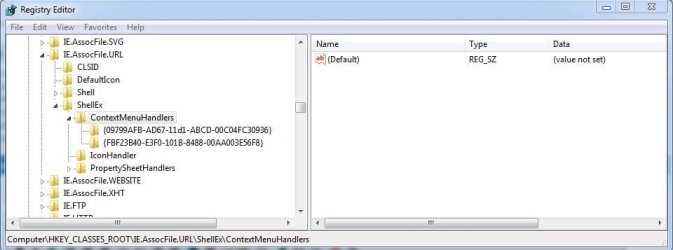
I, too, am having the same problem. I have two entries for ContextMenuHandlers in the registry as I have shown in the attached image. What can I do to add Open With in the context menu for .URL shortcuts?

Thank you.
 

Attachments

  • Capture.JPG
    Capture.JPG
    43.7 KB · Views: 300

My Computer My Computer

OS
Windows 7 Home Premium 64bit
Hello ubose,

I don't see anything wrong with your registry entries for this. You should see "Open with" when you right click on an internet shorcut (.url) file.

If not, then you might see if restarting the computer may apply if there was something else interfering.
 

My Computer My Computer

Computer type
PC/Desktop
Computer Manufacturer/Model Number
Self built custom
OS
64-bit Windows 11 Pro for Workstations
CPU
Intel i7-8700K OC'd to 5 GHz
Motherboard
ASUS ROG Maximus XI Formula Z390
Memory
64 GB (4x16GB) G.SKILL TridentZ RGB DDR4 3600 MHz
Graphics Card(s)
ASUS ROG-STRIX-GTX1080TI-O11G-GAMING
Sound Card
Integrated
Monitor(s) Displays
2 x Samsung Odyssey G7 27"
Screen Resolution
2560x1440
Hard Drives
1TB Samsung 990 PRO M.2,
4TB Samsung 990 PRO PRO M.2,
TerraMaster F8 SSD Plus NAS
PSU
Seasonic Prime Titanium 850W
Case
Thermaltake Core P3
Cooling
Corsair Hydro H115i
Keyboard
Logitech wireless K800
Mouse
Logitech MX Master 4
Internet Speed
2 Gb/s Download and 100 Mb/s Upload
Antivirus
Malwarebyte Anti-Malware Premium
Browser
Google Chrome
Other Info
Logitech Z625 speaker system,
Logitech BRIO 4K Pro webcam,
HP Color LaserJet Pro MFP M477fdn,
APC SMART-UPS RT 1000 XL - SURT1000XLI,
Galaxy S23 Plus phone
I restarted my Windows 7 Home 64-bit computer but I still don't see the Open With option in the context menu for internet shortcut (URL) icons on my desktop. Also, the URL icons are blank even though my default browser is Firefox. I have changed my default browser a few times in the last couple of years, and for sometime now the URL icons turned blank. I started looking around on this forum to see if I can find a way to get the URL icon back and landed on this thread after I saw that I have lost the Open With option in my context menu for URL icons as well.
 

My Computer My Computer

OS
Windows 7 Home Premium 64bit

My Computer My Computer

Computer type
PC/Desktop
Computer Manufacturer/Model Number
Self built custom
OS
64-bit Windows 11 Pro for Workstations
CPU
Intel i7-8700K OC'd to 5 GHz
Motherboard
ASUS ROG Maximus XI Formula Z390
Memory
64 GB (4x16GB) G.SKILL TridentZ RGB DDR4 3600 MHz
Graphics Card(s)
ASUS ROG-STRIX-GTX1080TI-O11G-GAMING
Sound Card
Integrated
Monitor(s) Displays
2 x Samsung Odyssey G7 27"
Screen Resolution
2560x1440
Hard Drives
1TB Samsung 990 PRO M.2,
4TB Samsung 990 PRO PRO M.2,
TerraMaster F8 SSD Plus NAS
PSU
Seasonic Prime Titanium 850W
Case
Thermaltake Core P3
Cooling
Corsair Hydro H115i
Keyboard
Logitech wireless K800
Mouse
Logitech MX Master 4
Internet Speed
2 Gb/s Download and 100 Mb/s Upload
Antivirus
Malwarebyte Anti-Malware Premium
Browser
Google Chrome
Other Info
Logitech Z625 speaker system,
Logitech BRIO 4K Pro webcam,
HP Color LaserJet Pro MFP M477fdn,
APC SMART-UPS RT 1000 XL - SURT1000XLI,
Galaxy S23 Plus phone
I merged the .reg file for the url option to restore the default association, but still no luck.
 

My Computer My Computer

OS
Windows 7 Home Premium 64bit
Do you have the "Open with" context menu for other files that should have it by default?

For example, .txt.
 

My Computer My Computer

Computer type
PC/Desktop
Computer Manufacturer/Model Number
Self built custom
OS
64-bit Windows 11 Pro for Workstations
CPU
Intel i7-8700K OC'd to 5 GHz
Motherboard
ASUS ROG Maximus XI Formula Z390
Memory
64 GB (4x16GB) G.SKILL TridentZ RGB DDR4 3600 MHz
Graphics Card(s)
ASUS ROG-STRIX-GTX1080TI-O11G-GAMING
Sound Card
Integrated
Monitor(s) Displays
2 x Samsung Odyssey G7 27"
Screen Resolution
2560x1440
Hard Drives
1TB Samsung 990 PRO M.2,
4TB Samsung 990 PRO PRO M.2,
TerraMaster F8 SSD Plus NAS
PSU
Seasonic Prime Titanium 850W
Case
Thermaltake Core P3
Cooling
Corsair Hydro H115i
Keyboard
Logitech wireless K800
Mouse
Logitech MX Master 4
Internet Speed
2 Gb/s Download and 100 Mb/s Upload
Antivirus
Malwarebyte Anti-Malware Premium
Browser
Google Chrome
Other Info
Logitech Z625 speaker system,
Logitech BRIO 4K Pro webcam,
HP Color LaserJet Pro MFP M477fdn,
APC SMART-UPS RT 1000 XL - SURT1000XLI,
Galaxy S23 Plus phone
Yes, I do have "Open with" in the context menu for other files such as .txt and .htm.
 

My Computer My Computer

OS
Windows 7 Home Premium 64bit
Back
Top