
User Account - Reset Password in Windows 7

How to Reset the Password of a User Account in Windows 7

   Information
This tutorial will help show you how to reset the password of a user account in Windows 7. This can be handy if the password was lost or forgotten to be able to regain access.

   Note

  • Password are case sensitive in Windows. Double check to make sure that you do not have the Caps Lock key on by mistake when typing it in.
  • If you did not create a password for the user account, then you can just click on the next arrow or pressing Enter with a blank password field to log on to that user account.
  • If you are using BitLocker Drive Encryption on your Windows 7 drive, then this will most likely not work.
  • If all options below fail to reset the password, then you may need to reinstall Windows 7.
   Warning
To avoid not being able to log on due to a forgotton or lost password, be sure to write down you user account's user name and password, then store it in a safe place for when needed. Another great option is to create a Password Reset Disk.


OPTION ONE

To Reset Password Using an Administrator Account


NOTE: This option will allow you to change or remove the password of a user account while logged in an administrator account.
1. Use either tutorial below to change or remove the password of the user account.
How to Change the Password for Your or Another User Account in Windows 7

OR

How to Change the User Account Password if Unable to Login to Windows

OR

How to Remove the Password for Your or Another User Account in Windows 7


OPTION TWO

To Reset your Password Using your Password Reset Disk


NOTE: This option will allow you to reset your password and create a new password using a Password Reset Disk that you previously created for your user account.
1. For how, see:
How to Create and Use a Windows 7 Password Reset Disk


OPTION THREE

To Reset Password Using System Restore


NOTE: This option will allow you to go back to a restore point to reset all user accounts passwords back to what they were at the date of the selected restore point.
1. For how, see:
How to Use System Restore to Change User Account Password


OPTION FOUR

To Reset Password Using Registry Editor at Boot


NOTE: This option will allow you to reset and create a new password for a user account in Registry Editor at boot.
1. For how, see:
How to Reset your Windows Password in Regedit at Boot

OR

How to Change the User Account Password if Unable to Login to Windows


OPTION FIVE

To Reset Password Using "Offline NT Password and Registry Editor"


1. For how, see this site: Offline NT Password and Registry Editor
NOTE: If you do not have access to your computer, then you can create the boot CD/DVD or USB key drive on another computer and use it on your computer.

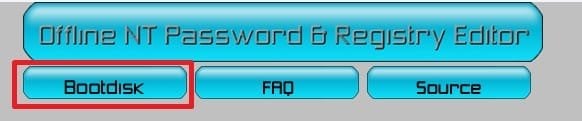
2. At that site, click the Bootdisk button at the top of that website. (see screenshot below)
Bootdisk_button.jpg
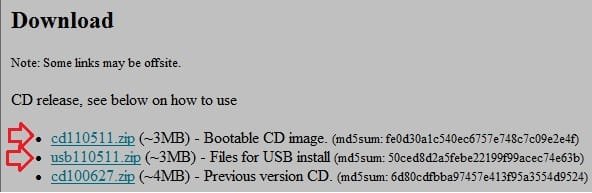
3. Scroll down to the Download section, and download the lastest ZIP file version for a bootable CD/DVD or USB image. (see screenshot below)
CD-USB_download.jpg
4. Extract (drag and drop) the .iso file from the downloaded ZIP file to your desktop, then use something like the Windows 7 USB/DVD Download Tool to create a bootable CD/DVD or USB flash drive with the ISO file.
NOTE: You can also use any ISO burner program you like. For example, ISO Recorder or ImgBurn.

5. Next, you would just need to follow the instructions from their website on how to use the bootable CD/DVD or USB flash drive to reset the user account's password at boot.
That's it,
Shawn


Last edited:
When you said "using BitLocker Drive Encryption on your Windows 7 drive", that means only the drive where I installed Windows Files, or it will also not work if I have other BitLocker-encrypted drive? I mean, if my Drive E is encrypted, can I still access it? Help.
 

My Computer My Computer

Computer Manufacturer/Model Number
Acer
OS
Windows 7 Ultimate x32
CPU
Intel® Core™ i3-370M processor
Motherboard
Acer Aspire 4741
Memory
1781 MB
Graphics Card(s)
Intel® HD Graphics with 128 MB of dedicated system memory
Sound Card
Realtek High Definition
Monitor(s) Displays
Raster Display
Hard Drives
500 GB
PSU
ACPI 3.0 CPU power management standard 3-pin 65 W AC adapter
Case
Plastic
Cooling
External fan
Hello hakibam,

That would only be for the Windows 7 drive that Windows 7 is installed on. Any other encrypted drive wouldn't matter. :)
 

My Computer My Computer

Computer type
PC/Desktop
Computer Manufacturer/Model Number
Self built custom
OS
64-bit Windows 11 Pro for Workstations
CPU
Intel i7-8700K OC'd to 5 GHz
Motherboard
ASUS ROG Maximus XI Formula Z390
Memory
64 GB (4x16GB) G.SKILL TridentZ RGB DDR4 3600 MHz
Graphics Card(s)
ASUS ROG-STRIX-GTX1080TI-O11G-GAMING
Sound Card
Integrated
Monitor(s) Displays
2 x Samsung Odyssey G7 27"
Screen Resolution
2560x1440
Hard Drives
1TB Samsung 990 PRO M.2,
4TB Samsung 990 PRO PRO M.2,
TerraMaster F8 SSD Plus NAS
PSU
Seasonic Prime Titanium 850W
Case
Thermaltake Core P3
Cooling
Corsair Hydro H115i
Keyboard
Logitech wireless K800
Mouse
Logitech MX Master 4
Internet Speed
2 Gb/s Download and 100 Mb/s Upload
Antivirus
Malwarebyte Anti-Malware Premium
Browser
Google Chrome
Other Info
Logitech Z625 speaker system,
Logitech BRIO 4K Pro webcam,
HP Color LaserJet Pro MFP M477fdn,
APC SMART-UPS RT 1000 XL - SURT1000XLI,
Galaxy S23 Plus phone
i am not able to download anything in my guest account, i am fairly knowledgeable of DOS..but i am scared of dos lol I'm just a granny who had a brain fart and lost my logon password...i have been searching for a 'fix' for 2 days. i find it nerve wrecking and frustrating that there are answers that would would help if i was more 'code savvy' lol please help
 

My Computer My Computer

Computer type
PC/Desktop
Computer Manufacturer/Model Number
hp pavillion
OS
windows home premium 64bit
CPU
amd
Antivirus
microsoft security essentials
Browser
firefox and ie
Hello quietsnature, and welcome to Seven Forums. :)

If you like, you could download and create the password reset disk from Option Five on another computer (ex: friends) to use on yours.
 

My Computer My Computer

Computer type
PC/Desktop
Computer Manufacturer/Model Number
Self built custom
OS
64-bit Windows 11 Pro for Workstations
CPU
Intel i7-8700K OC'd to 5 GHz
Motherboard
ASUS ROG Maximus XI Formula Z390
Memory
64 GB (4x16GB) G.SKILL TridentZ RGB DDR4 3600 MHz
Graphics Card(s)
ASUS ROG-STRIX-GTX1080TI-O11G-GAMING
Sound Card
Integrated
Monitor(s) Displays
2 x Samsung Odyssey G7 27"
Screen Resolution
2560x1440
Hard Drives
1TB Samsung 990 PRO M.2,
4TB Samsung 990 PRO PRO M.2,
TerraMaster F8 SSD Plus NAS
PSU
Seasonic Prime Titanium 850W
Case
Thermaltake Core P3
Cooling
Corsair Hydro H115i
Keyboard
Logitech wireless K800
Mouse
Logitech MX Master 4
Internet Speed
2 Gb/s Download and 100 Mb/s Upload
Antivirus
Malwarebyte Anti-Malware Premium
Browser
Google Chrome
Other Info
Logitech Z625 speaker system,
Logitech BRIO 4K Pro webcam,
HP Color LaserJet Pro MFP M477fdn,
APC SMART-UPS RT 1000 XL - SURT1000XLI,
Galaxy S23 Plus phone
hey Brink, it is possible to use the password reset disk to another laptop??? but same OS windows 7. im just confused if i make password reset disk to my laptop and do it to my another laptop? for password reset. i forgot my password to another laptop. thanks for you quick reply..
 

My Computer My Computer

Computer type
Laptop
Computer Manufacturer/Model Number
Dell,N4050
OS
windows 7 64bit, windows 7 ultimate 64bit
CPU
B970
Motherboard
Dell inc
Memory
8gb
Graphics Card(s)
intel R graphics Family
Hard Drives
500gb, western digital
Antivirus
Microsoft Essentials
Browser
Google Chrome
Hello Arvin,

Sorry, but no. The password reset disk will only work for the specific user account that it was created in on that specific computer.

You could use OPTION FIVE on any PC though.
 

My Computer My Computer

Computer type
PC/Desktop
Computer Manufacturer/Model Number
Self built custom
OS
64-bit Windows 11 Pro for Workstations
CPU
Intel i7-8700K OC'd to 5 GHz
Motherboard
ASUS ROG Maximus XI Formula Z390
Memory
64 GB (4x16GB) G.SKILL TridentZ RGB DDR4 3600 MHz
Graphics Card(s)
ASUS ROG-STRIX-GTX1080TI-O11G-GAMING
Sound Card
Integrated
Monitor(s) Displays
2 x Samsung Odyssey G7 27"
Screen Resolution
2560x1440
Hard Drives
1TB Samsung 990 PRO M.2,
4TB Samsung 990 PRO PRO M.2,
TerraMaster F8 SSD Plus NAS
PSU
Seasonic Prime Titanium 850W
Case
Thermaltake Core P3
Cooling
Corsair Hydro H115i
Keyboard
Logitech wireless K800
Mouse
Logitech MX Master 4
Internet Speed
2 Gb/s Download and 100 Mb/s Upload
Antivirus
Malwarebyte Anti-Malware Premium
Browser
Google Chrome
Other Info
Logitech Z625 speaker system,
Logitech BRIO 4K Pro webcam,
HP Color LaserJet Pro MFP M477fdn,
APC SMART-UPS RT 1000 XL - SURT1000XLI,
Galaxy S23 Plus phone
ah ok i thought it was work hehe by the way thanks for your quick reply brink. now i know what to do.
 

My Computer My Computer

Computer type
Laptop
Computer Manufacturer/Model Number
Dell,N4050
OS
windows 7 64bit, windows 7 ultimate 64bit
CPU
B970
Motherboard
Dell inc
Memory
8gb
Graphics Card(s)
intel R graphics Family
Hard Drives
500gb, western digital
Antivirus
Microsoft Essentials
Browser
Google Chrome
It's the Option Five in this tutorial. The links in it will give you more details about it. :)
 

My Computer My Computer

Computer type
PC/Desktop
Computer Manufacturer/Model Number
Self built custom
OS
64-bit Windows 11 Pro for Workstations
CPU
Intel i7-8700K OC'd to 5 GHz
Motherboard
ASUS ROG Maximus XI Formula Z390
Memory
64 GB (4x16GB) G.SKILL TridentZ RGB DDR4 3600 MHz
Graphics Card(s)
ASUS ROG-STRIX-GTX1080TI-O11G-GAMING
Sound Card
Integrated
Monitor(s) Displays
2 x Samsung Odyssey G7 27"
Screen Resolution
2560x1440
Hard Drives
1TB Samsung 990 PRO M.2,
4TB Samsung 990 PRO PRO M.2,
TerraMaster F8 SSD Plus NAS
PSU
Seasonic Prime Titanium 850W
Case
Thermaltake Core P3
Cooling
Corsair Hydro H115i
Keyboard
Logitech wireless K800
Mouse
Logitech MX Master 4
Internet Speed
2 Gb/s Download and 100 Mb/s Upload
Antivirus
Malwarebyte Anti-Malware Premium
Browser
Google Chrome
Other Info
Logitech Z625 speaker system,
Logitech BRIO 4K Pro webcam,
HP Color LaserJet Pro MFP M477fdn,
APC SMART-UPS RT 1000 XL - SURT1000XLI,
Galaxy S23 Plus phone
Great! I see the instructions. Thank you. :D
 

My Computer My Computer

Computer type
Laptop
Computer Manufacturer/Model Number
Dell,N4050
OS
windows 7 64bit, windows 7 ultimate 64bit
CPU
B970
Motherboard
Dell inc
Memory
8gb
Graphics Card(s)
intel R graphics Family
Hard Drives
500gb, western digital
Antivirus
Microsoft Essentials
Browser
Google Chrome

My Computer My Computer

Computer type
PC/Desktop
Computer Manufacturer/Model Number
Self built custom
OS
64-bit Windows 11 Pro for Workstations
CPU
Intel i7-8700K OC'd to 5 GHz
Motherboard
ASUS ROG Maximus XI Formula Z390
Memory
64 GB (4x16GB) G.SKILL TridentZ RGB DDR4 3600 MHz
Graphics Card(s)
ASUS ROG-STRIX-GTX1080TI-O11G-GAMING
Sound Card
Integrated
Monitor(s) Displays
2 x Samsung Odyssey G7 27"
Screen Resolution
2560x1440
Hard Drives
1TB Samsung 990 PRO M.2,
4TB Samsung 990 PRO PRO M.2,
TerraMaster F8 SSD Plus NAS
PSU
Seasonic Prime Titanium 850W
Case
Thermaltake Core P3
Cooling
Corsair Hydro H115i
Keyboard
Logitech wireless K800
Mouse
Logitech MX Master 4
Internet Speed
2 Gb/s Download and 100 Mb/s Upload
Antivirus
Malwarebyte Anti-Malware Premium
Browser
Google Chrome
Other Info
Logitech Z625 speaker system,
Logitech BRIO 4K Pro webcam,
HP Color LaserJet Pro MFP M477fdn,
APC SMART-UPS RT 1000 XL - SURT1000XLI,
Galaxy S23 Plus phone
Dear Brink How can I change the administrative password? I have a user account plus the administrative one. I have the windows 7 Home Premium 7601.I.d like to download windows 10 every time I try it asks for the administrative password and I don;t know it somebody set this up a longtime ago. thanks Rabbithole
 

My Computer My Computer

Computer type
PC/Desktop
Computer Manufacturer/Model Number
Gateway
OS
Windows home Premium 7
Browser
Chrome
Hello Rabbithole, and welcome to Seven Forums. :)

You should be able to use OPTION FOUR or OPTION FIVE to reset the password.
 

My Computer My Computer

Computer type
PC/Desktop
Computer Manufacturer/Model Number
Self built custom
OS
64-bit Windows 11 Pro for Workstations
CPU
Intel i7-8700K OC'd to 5 GHz
Motherboard
ASUS ROG Maximus XI Formula Z390
Memory
64 GB (4x16GB) G.SKILL TridentZ RGB DDR4 3600 MHz
Graphics Card(s)
ASUS ROG-STRIX-GTX1080TI-O11G-GAMING
Sound Card
Integrated
Monitor(s) Displays
2 x Samsung Odyssey G7 27"
Screen Resolution
2560x1440
Hard Drives
1TB Samsung 990 PRO M.2,
4TB Samsung 990 PRO PRO M.2,
TerraMaster F8 SSD Plus NAS
PSU
Seasonic Prime Titanium 850W
Case
Thermaltake Core P3
Cooling
Corsair Hydro H115i
Keyboard
Logitech wireless K800
Mouse
Logitech MX Master 4
Internet Speed
2 Gb/s Download and 100 Mb/s Upload
Antivirus
Malwarebyte Anti-Malware Premium
Browser
Google Chrome
Other Info
Logitech Z625 speaker system,
Logitech BRIO 4K Pro webcam,
HP Color LaserJet Pro MFP M477fdn,
APC SMART-UPS RT 1000 XL - SURT1000XLI,
Galaxy S23 Plus phone
Can I make a password on a normal computer and use it to reset password on a locked computer?

Hello protomilk, :)

If you mean using OPTION FIVE, then yes.
 

My Computer My Computer

Computer type
PC/Desktop
Computer Manufacturer/Model Number
Self built custom
OS
64-bit Windows 11 Pro for Workstations
CPU
Intel i7-8700K OC'd to 5 GHz
Motherboard
ASUS ROG Maximus XI Formula Z390
Memory
64 GB (4x16GB) G.SKILL TridentZ RGB DDR4 3600 MHz
Graphics Card(s)
ASUS ROG-STRIX-GTX1080TI-O11G-GAMING
Sound Card
Integrated
Monitor(s) Displays
2 x Samsung Odyssey G7 27"
Screen Resolution
2560x1440
Hard Drives
1TB Samsung 990 PRO M.2,
4TB Samsung 990 PRO PRO M.2,
TerraMaster F8 SSD Plus NAS
PSU
Seasonic Prime Titanium 850W
Case
Thermaltake Core P3
Cooling
Corsair Hydro H115i
Keyboard
Logitech wireless K800
Mouse
Logitech MX Master 4
Internet Speed
2 Gb/s Download and 100 Mb/s Upload
Antivirus
Malwarebyte Anti-Malware Premium
Browser
Google Chrome
Other Info
Logitech Z625 speaker system,
Logitech BRIO 4K Pro webcam,
HP Color LaserJet Pro MFP M477fdn,
APC SMART-UPS RT 1000 XL - SURT1000XLI,
Galaxy S23 Plus phone
I reset the password with Offline NT Password and Registry Editor. When I boot my computer, it still asks me for password.
 

My Computer My Computer

Computer type
PC/Desktop
Computer Manufacturer/Model Number
Unknown
OS
Windows 7
CPU
Intel i5
Motherboard
Asus
Memory
8G
Graphics Card(s)
AMD
Browser
Chrome
Hello mtrkonghi, and welcome to Seven Forums. :)

You might try resetting it again incase you may have a made a mistake the first round.
 

My Computer My Computer

Computer type
PC/Desktop
Computer Manufacturer/Model Number
Self built custom
OS
64-bit Windows 11 Pro for Workstations
CPU
Intel i7-8700K OC'd to 5 GHz
Motherboard
ASUS ROG Maximus XI Formula Z390
Memory
64 GB (4x16GB) G.SKILL TridentZ RGB DDR4 3600 MHz
Graphics Card(s)
ASUS ROG-STRIX-GTX1080TI-O11G-GAMING
Sound Card
Integrated
Monitor(s) Displays
2 x Samsung Odyssey G7 27"
Screen Resolution
2560x1440
Hard Drives
1TB Samsung 990 PRO M.2,
4TB Samsung 990 PRO PRO M.2,
TerraMaster F8 SSD Plus NAS
PSU
Seasonic Prime Titanium 850W
Case
Thermaltake Core P3
Cooling
Corsair Hydro H115i
Keyboard
Logitech wireless K800
Mouse
Logitech MX Master 4
Internet Speed
2 Gb/s Download and 100 Mb/s Upload
Antivirus
Malwarebyte Anti-Malware Premium
Browser
Google Chrome
Other Info
Logitech Z625 speaker system,
Logitech BRIO 4K Pro webcam,
HP Color LaserJet Pro MFP M477fdn,
APC SMART-UPS RT 1000 XL - SURT1000XLI,
Galaxy S23 Plus phone
Hello mtrkonghi, and welcome to Seven Forums. :)

You might try resetting it again incase you may have a made a mistake the first round.

Thanks, I did it agin and really worked.:D
 
Last edited:

My Computer My Computer

Computer type
PC/Desktop
Computer Manufacturer/Model Number
Unknown
OS
Windows 7
CPU
Intel i5
Motherboard
Asus
Memory
8G
Graphics Card(s)
AMD
Browser
Chrome
:thumbsup:
 

My Computer My Computer

Computer type
PC/Desktop
Computer Manufacturer/Model Number
Self built custom
OS
64-bit Windows 11 Pro for Workstations
CPU
Intel i7-8700K OC'd to 5 GHz
Motherboard
ASUS ROG Maximus XI Formula Z390
Memory
64 GB (4x16GB) G.SKILL TridentZ RGB DDR4 3600 MHz
Graphics Card(s)
ASUS ROG-STRIX-GTX1080TI-O11G-GAMING
Sound Card
Integrated
Monitor(s) Displays
2 x Samsung Odyssey G7 27"
Screen Resolution
2560x1440
Hard Drives
1TB Samsung 990 PRO M.2,
4TB Samsung 990 PRO PRO M.2,
TerraMaster F8 SSD Plus NAS
PSU
Seasonic Prime Titanium 850W
Case
Thermaltake Core P3
Cooling
Corsair Hydro H115i
Keyboard
Logitech wireless K800
Mouse
Logitech MX Master 4
Internet Speed
2 Gb/s Download and 100 Mb/s Upload
Antivirus
Malwarebyte Anti-Malware Premium
Browser
Google Chrome
Other Info
Logitech Z625 speaker system,
Logitech BRIO 4K Pro webcam,
HP Color LaserJet Pro MFP M477fdn,
APC SMART-UPS RT 1000 XL - SURT1000XLI,
Galaxy S23 Plus phone
I reset the password with Offline NT Password and Registry Editor. When I boot my computer, it still asks me for password.
There should be no such mistake if you use the Offline NT Password and Registry Editor , i used to try it , which can be used to deleted login password ,and when i can got into computer without entering password ,
Did you have an "Edit user data and password option" on your computer screen?
 
Last edited:

My Computer My Computer

Computer type
Laptop
Computer Manufacturer/Model Number
Dell
OS
Windows 7 Ultimate x64
Back
Top