
ULPS (Ultra Low Power State) - Disable for AMD CrossfireX

How to Disable ULPS (Ultra Low Power State) for Graphics Cards in AMD CrossfireX


   Information
ULPS stands for Ultra Low Power State for GPU's or graphic card adapters.

You may want to disable ULPS if you have an AMD CrossfireX configuration because the 2nd GPU installed will load 99% and causes overheating, crash, and possible GPU damage.

The point of this is to disable power draw from the 2nd card when not in gaming mode.

It has become a major issue when gaming or just plain web browsing. You'll notice an increase in GPU fan noise, and start to see artifacts because the 2nd GPU is at 100% load and will not stop unless you disable CrossFire or SLI.

These steps are here to help you at least keep the problem off until a proper driver or fix has been establish by AMD.

You must be logged in as an administrator to be able to do the steps in this tutorial.

   Warning
This is only a temporary fix. Each time that you update your AMD Catalyst drivers, you will need to do this tutorial again if you need to have ULPS disabled again.


OPTION ONE

Disable ULPS using ULPS Configuration Utility


   Note
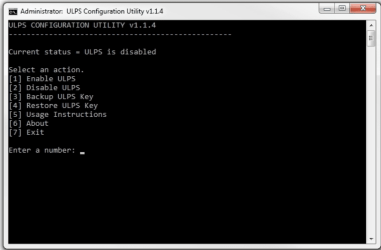
The ULPS Configuration Utility is used to enable or disable ULPS, or ultra-low power state, for AMD/ATI graphics cards in CrossfireX. The program will go to a specific string in the registry and change the hexadecimal value of the EnableULPS key to either 0 or 1, depending on whether it is being enabled or disabled.


#1 Go to the site below to download and run the latest version of the ULPS Configuration Utility v#.#.#.exe file.
ULPS CONFIGURATION UTILITY
#2 Enter the number of the option you want to do, and press Enter. (see screenshot below)
ul.PNG


OPTION TWO

Disable ULPS Manually in Registry Editor


#1 Press the Windows + R keys to open the Run dialog, type regedit, and click/tap on OK.

#2 If prompted by UAC, then click/tap on Yes.

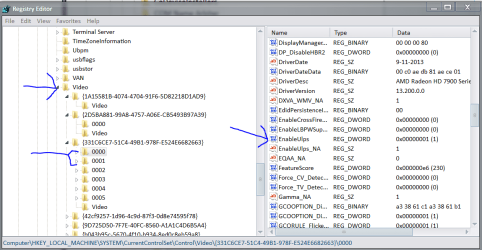
#3 In Registry Editor, navigate to the key location below. (see screenshot below)

Code:
HKEY_LOCAL_MACHINE\SYSTEM\CurrentControlSet\Control\Video\{331C6CE7-51C4-49B1-978F-E524E6682663}\0000
video 1.PNG
#4 In the right pane of 0000, double click/tap on the EnableUlps DWORD to modify it. (see screenshot below)
video2.PNG
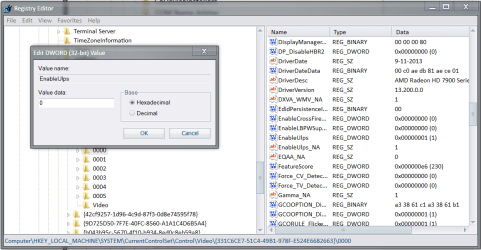
#5 Type 0 (zero), and click/tap on OK. (see screenshot below)
NOTE: 1 is the default setting to enable ULPS.
video3.PNG
#6 Repeat steps 4 and 5 above for each next 0001, 0002, 0003, 0004, and 0005 keys one at a time.

   Note
The keys 0000-0001-0002-0003-0004-0005 represent the Graphic Cards you have installed you will need to edit all keys in that area as in the screen shot in order for this fix to work.


#7 When finished, close Registry Editor, and restart the PC to apply.
 

Attachments

  • ulpsss.PNG
    ulpsss.PNG
    9.7 KB · Views: 11
Last edited by a moderator:
Good job Tommy. :)
 

My Computer My Computer

Computer type
PC/Desktop
Computer Manufacturer/Model Number
Self built custom
OS
64-bit Windows 11 Pro for Workstations
CPU
Intel i7-8700K OC'd to 5 GHz
Motherboard
ASUS ROG Maximus XI Formula Z390
Memory
64 GB (4x16GB) G.SKILL TridentZ RGB DDR4 3600 MHz
Graphics Card(s)
ASUS ROG-STRIX-GTX1080TI-O11G-GAMING
Sound Card
Integrated
Monitor(s) Displays
2 x Samsung Odyssey G7 27"
Screen Resolution
2560x1440
Hard Drives
1TB Samsung 990 PRO M.2,
4TB Samsung 990 PRO PRO M.2,
TerraMaster F8 SSD Plus NAS
PSU
Seasonic Prime Titanium 850W
Case
Thermaltake Core P3
Cooling
Corsair Hydro H115i
Keyboard
Logitech wireless K800
Mouse
Logitech MX Master 4
Internet Speed
2 Gb/s Download and 100 Mb/s Upload
Antivirus
Malwarebyte Anti-Malware Premium
Browser
Google Chrome
Other Info
Logitech Z625 speaker system,
Logitech BRIO 4K Pro webcam,
HP Color LaserJet Pro MFP M477fdn,
APC SMART-UPS RT 1000 XL - SURT1000XLI,
Galaxy S23 Plus phone

My Computer My Computer

Computer type
PC/Desktop
Computer Manufacturer/Model Number
CoreI7-6700K MrFingerIII Special Builds
OS
Windows 10 Home Premium 64bit sp1
CPU
Intel I7-6700K @ 4.6 Ghz 1.344 volts everyday OC
Motherboard
Asrock Fatality K6 Z170 Socket 1151
Memory
32GB G-Skill TridentZ 3200mhz 16-18-18-38 DDR4
Graphics Card(s)
Sli Gigabyte Windforce GTX 980 G1
Sound Card
AC97 Creative Rage Tactic 3D Headphones Bluetooth
Monitor(s) Displays
27" Asus ROG Swift PG278Q G-Sync 48" Vizio Smart HD TV
Screen Resolution
2560x1440p 27"- 48" Currently Gaming at 2560x1440p Res 2K
Hard Drives
250GB Samsung Evo840SSD Seagate baracuda 500 GB WD Mybook 500Gb 1TB Seagate Barracuda
PSU
HX1050w Corsair Silver 80plus certified crosfire/sli
Case
Enthod Pro Full Tower
Cooling
Corsair H110i GT 280 mm High Performance WaterBlock
Keyboard
Logitech wireless keyboard
Mouse
Logitech wireless mouse
Internet Speed
Cox Cable 100+ mb
Antivirus
WebRoot Spysweeper with Antivirus
Browser
IE-10, Chrome, Opera
Other Info
My Other Rig is a AMD FX8320E @4.6Ghz 16GB Ballistic Sport Ram
Mobo Asrock Fatality 990FX 120GB OCZ SSD 1TB Seagate Barracuda Corsair H75 Cooling PSU Corsair CX750
GPU GTX Gigabyte 970G1
Just an addition to OP.

{331C6CE7-51C4-49B1-978F-E524E6682663} may not exist in your video directory. In fact all entries under "Video" folder are completely different than those shown here on my PC.

However, the rest of the address "HKEY_LOCAL_MACHINE\SYSTEM\CurrentControlSet\Control\Video\" is correct. There will be two folders with 0000-0005 folders in them under "video" if you have two GPUs. Those are the ones you are looking for regardless of what numbers are present on the folders title under the video directory in the path shown in the OP.

All the other above steps apply.

On that note, I've only ever had to change the 0000 folder's ULPS setting in each of my two directories under video when I've updated CCC. The others remain set at "0".

It's a good idea to check anyway, I always do, but the other folder's settings [0001-0005] will probably remain set at 0 if you've done this before after updating CCC again. Just an interesting note there.

At any rate, don't think you've done something wrong just because the numbers of the folders in your video directory don't match the example above. You're still in the right place and just need to look for the two directories with six entries rather than two or three.
 

My Computer My Computer

Computer type
PC/Desktop
Computer Manufacturer/Model Number
Home built
OS
Windows 7 Home premium
CPU
I7 3770 3.4
Motherboard
Republic of Gamers Maximus V
Memory
Corsair Vengance ddr3 8gb x2 1600 [@ 2400]
Graphics Card(s)
AMD 7970 6GB x3 [currently x2 until x3 is actually useful]
Sound Card
N/A
Monitor(s) Displays
Visio 47" 3D/Acer 27" 3D
Screen Resolution
1920x1080 120mhz Passive 3D
Hard Drives
Samsung 830 series SSD 512gb x2
Seagate 2tb x2
Segate 750 Gb
PSU
1500w
Case
Coolermaster
Cooling
Noctua D14
Keyboard
Logitech g10
Mouse
Naga Razer
Internet Speed
30mb Cable
Antivirus
Like I'd tell.
Browser
Waterfox mostly.
{331C6CE7-51C4-49B1-978F-E524E6682663} does not exist. In fact all entries under "Video" folder are completely different than those shown here.


They do exist they came from my system and it works did you go to current control set then click control set then search for video
 

My Computer My Computer

Computer type
PC/Desktop
Computer Manufacturer/Model Number
CoreI7-6700K MrFingerIII Special Builds
OS
Windows 10 Home Premium 64bit sp1
CPU
Intel I7-6700K @ 4.6 Ghz 1.344 volts everyday OC
Motherboard
Asrock Fatality K6 Z170 Socket 1151
Memory
32GB G-Skill TridentZ 3200mhz 16-18-18-38 DDR4
Graphics Card(s)
Sli Gigabyte Windforce GTX 980 G1
Sound Card
AC97 Creative Rage Tactic 3D Headphones Bluetooth
Monitor(s) Displays
27" Asus ROG Swift PG278Q G-Sync 48" Vizio Smart HD TV
Screen Resolution
2560x1440p 27"- 48" Currently Gaming at 2560x1440p Res 2K
Hard Drives
250GB Samsung Evo840SSD Seagate baracuda 500 GB WD Mybook 500Gb 1TB Seagate Barracuda
PSU
HX1050w Corsair Silver 80plus certified crosfire/sli
Case
Enthod Pro Full Tower
Cooling
Corsair H110i GT 280 mm High Performance WaterBlock
Keyboard
Logitech wireless keyboard
Mouse
Logitech wireless mouse
Internet Speed
Cox Cable 100+ mb
Antivirus
WebRoot Spysweeper with Antivirus
Browser
IE-10, Chrome, Opera
Other Info
My Other Rig is a AMD FX8320E @4.6Ghz 16GB Ballistic Sport Ram
Mobo Asrock Fatality 990FX 120GB OCZ SSD 1TB Seagate Barracuda Corsair H75 Cooling PSU Corsair CX750
GPU GTX Gigabyte 970G1
Back
Top