
Taskbar Pinned Programs - Enable or Disable

How to Enable or Disable Windows 7 Taskbar Pinned Programs

   Information
This will allow you to enable and disable the ability for specific or all users to pin a program to the taskbar, and allow or prevent pinned programs from being shown on the taskbar for all users in Windows 7. Pin to Taskbar and pinned programs is enable by default in Windows 7.

EXAMPLE: Taskbar with Pinned Programs Enable and Disabled
NOTE: Top screenshot is enabled, and bottom screenshot is disabled.
6083d1237393630-taskbar-pinned-programs-enable-disable-enabled.jpg


6084d1237393630-taskbar-pinned-programs-enable-disable-disabled.jpg


OPTION ONE

Using a REG File Download


1. To Enable Taskbar Pinned Programs for Only Current User
A) Click on the Download button below to download the file below.
Enable_Taskbar_Pinned_Programs.reg

Download


B) Go to step 3.
2. To Disable Taskbar Pinned Programs for Only Current User
A) Click on the Download button below to download the file below.
Disable_Taskbar_Pinned_Programs.reg

Download


3. Click on Save, and save the .reg file to the desktop.

4.Right click on the downloaded .reg file and click on Merge.

5. Click on Run, Yes, Yes, and OK when prompted.

6. When done, you can delete the downloaded .reg file if you like.

7. Log off and log on, or restart the computer to apply.


OPTION TWO

Through the Local Group Policy Editor


1. Open the all users, specific users or groups, or all users except administrators Local Group Policy Editor for how you want this policy applied.

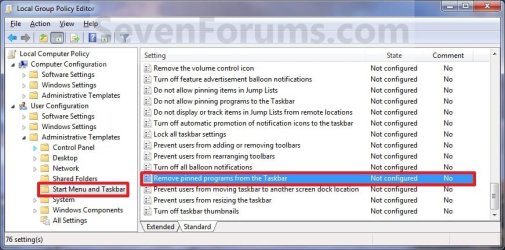
2. In the left pane, click on to expand User Configuration, Administrative Templates, and Start Menu and Taskbar. (See screenshot below)
Group_Policy.jpg
3. In the right pane, right click on Remove pinned programs from the taskbar and click on Edit. (See screenshot above)

4. To Enable Taskbar Pinned Programs
A) Select (dot) either Not Configured or Disabled. (See screenshot below step 6)

B) Go to step 6.
5. To Disable Taskbar Pinned Programs
A) Select (dot) Enabled. (See screenshot below step 6)
6. Click on OK. (See screenshot below)
Properties.jpg
7. Close the Local Group Policy Editor window.

8. Log off and log on, or restart the computer to apply.
That's it,
Shawn


Attachments

Last edited:
Hi...why i can't enable Windows 7 Taskbar Pinned Programs even that the Group Policy Editor are not set the 'remove pinned programs from the taskbar' to enable?
 
Last edited:

My Computer

OS
Windows 7
CPU
INTEL DUAL CORE E5500 2.8GHz
Motherboard
FOXCONN G41MX-K
Memory
VISIPRO DDR2 1GBX2 PC6400
Graphics Card(s)
ONBOARD
Sound Card
ONBOARD
Monitor(s) Displays
LG LCD 17" (L177WSB)
Screen Resolution
1440 X 900
Hard Drives
SEAGATE BARACUDA SATA 250GB 7200RPM
PSU
STANDARD (CASING BUILT-IN) 450W
Case
ADVANCE
Cooling
STANDARD (INTEL PROCESSOR HEATSHINK)
Keyboard
STANDARD
Mouse
OPTIC STANDARD
Hello Crossnet, and welcome to Seven Forums.

If you mean that you do not have the Pin to taskbar option in the context menu, then this is usually caused by using a XP method to remove the shortcut arrow icon instead of the proper Vista and Windows 7 method. If this may be the case, then try restoring the default shortcut arrow overlay icon using either method in the tutorial below, then see if you have the Pin to taskbar option afterwards.

http://www.sevenforums.com/tutorials/3606-shortcut-arrow-remove-restore.html

Hope this helps,
Shawn
 

My Computer

Computer type
PC/Desktop
Computer Manufacturer/Model Number
Self built custom
OS
64-bit Windows 11 Pro for Workstations
CPU
Intel i7-8700K OC'd to 5 GHz
Motherboard
ASUS ROG Maximus XI Formula Z390
Memory
64 GB (4x16GB) G.SKILL TridentZ RGB DDR4 3600 MHz
Graphics Card(s)
ASUS ROG-STRIX-GTX1080TI-O11G-GAMING
Sound Card
Integrated
Monitor(s) Displays
2 x Samsung Odyssey G7 27"
Screen Resolution
2560x1440
Hard Drives
1TB Samsung 990 PRO M.2,
4TB Samsung 990 PRO PRO M.2,
TerraMaster F8 SSD Plus NAS
PSU
Seasonic Prime Titanium 850W
Case
Thermaltake Core P3
Cooling
Corsair Hydro H115i
Keyboard
Logitech wireless K800
Mouse
Logitech MX Master 4
Internet Speed
2 Gb/s Download and 100 Mb/s Upload
Antivirus
Malwarebyte Anti-Malware Premium
Browser
Google Chrome
Other Info
Logitech Z625 speaker system,
Logitech BRIO 4K Pro webcam,
HP Color LaserJet Pro MFP M477fdn,
APC SMART-UPS RT 1000 XL - SURT1000XLI,
Galaxy S23 Plus phone
Thanx for the answer. Yes, i remove the shortcut arrow icon. But i do that since i installed windows 7 for the first time about six month ago...and there is no problem with taskbar pin. But now, suddenly the taskbar pin is disappear from my windows 7 taskbar and it can't to enable/show again.

and also i don't have the Pin to taskbar option in the context menu
 

My Computer

OS
Windows 7
CPU
INTEL DUAL CORE E5500 2.8GHz
Motherboard
FOXCONN G41MX-K
Memory
VISIPRO DDR2 1GBX2 PC6400
Graphics Card(s)
ONBOARD
Sound Card
ONBOARD
Monitor(s) Displays
LG LCD 17" (L177WSB)
Screen Resolution
1440 X 900
Hard Drives
SEAGATE BARACUDA SATA 250GB 7200RPM
PSU
STANDARD (CASING BUILT-IN) 450W
Case
ADVANCE
Cooling
STANDARD (INTEL PROCESSOR HEATSHINK)
Keyboard
STANDARD
Mouse
OPTIC STANDARD
Crossnet,

As a test, go ahead and restore the shortcut arrow using the tutorial link above to see if that restores your "pin to taskbar" option. If it does, then you can use the same tutorial to remove the shortcut arrow.

If you removed the shortcut arrow using one of these all-in-one type tune-up/customize programs, then be sure that you do not still have it set to not have a shortcut arrow.
 

My Computer

Computer type
PC/Desktop
Computer Manufacturer/Model Number
Self built custom
OS
64-bit Windows 11 Pro for Workstations
CPU
Intel i7-8700K OC'd to 5 GHz
Motherboard
ASUS ROG Maximus XI Formula Z390
Memory
64 GB (4x16GB) G.SKILL TridentZ RGB DDR4 3600 MHz
Graphics Card(s)
ASUS ROG-STRIX-GTX1080TI-O11G-GAMING
Sound Card
Integrated
Monitor(s) Displays
2 x Samsung Odyssey G7 27"
Screen Resolution
2560x1440
Hard Drives
1TB Samsung 990 PRO M.2,
4TB Samsung 990 PRO PRO M.2,
TerraMaster F8 SSD Plus NAS
PSU
Seasonic Prime Titanium 850W
Case
Thermaltake Core P3
Cooling
Corsair Hydro H115i
Keyboard
Logitech wireless K800
Mouse
Logitech MX Master 4
Internet Speed
2 Gb/s Download and 100 Mb/s Upload
Antivirus
Malwarebyte Anti-Malware Premium
Browser
Google Chrome
Other Info
Logitech Z625 speaker system,
Logitech BRIO 4K Pro webcam,
HP Color LaserJet Pro MFP M477fdn,
APC SMART-UPS RT 1000 XL - SURT1000XLI,
Galaxy S23 Plus phone
ok..i'm gonna to try it..thank you
 

My Computer

OS
Windows 7
CPU
INTEL DUAL CORE E5500 2.8GHz
Motherboard
FOXCONN G41MX-K
Memory
VISIPRO DDR2 1GBX2 PC6400
Graphics Card(s)
ONBOARD
Sound Card
ONBOARD
Monitor(s) Displays
LG LCD 17" (L177WSB)
Screen Resolution
1440 X 900
Hard Drives
SEAGATE BARACUDA SATA 250GB 7200RPM
PSU
STANDARD (CASING BUILT-IN) 450W
Case
ADVANCE
Cooling
STANDARD (INTEL PROCESSOR HEATSHINK)
Keyboard
STANDARD
Mouse
OPTIC STANDARD
You're welcome.

If it doesn't help, then you could do a system restore using a restore point dated before you got this issue to hopefully fix it instead.
 

My Computer

Computer type
PC/Desktop
Computer Manufacturer/Model Number
Self built custom
OS
64-bit Windows 11 Pro for Workstations
CPU
Intel i7-8700K OC'd to 5 GHz
Motherboard
ASUS ROG Maximus XI Formula Z390
Memory
64 GB (4x16GB) G.SKILL TridentZ RGB DDR4 3600 MHz
Graphics Card(s)
ASUS ROG-STRIX-GTX1080TI-O11G-GAMING
Sound Card
Integrated
Monitor(s) Displays
2 x Samsung Odyssey G7 27"
Screen Resolution
2560x1440
Hard Drives
1TB Samsung 990 PRO M.2,
4TB Samsung 990 PRO PRO M.2,
TerraMaster F8 SSD Plus NAS
PSU
Seasonic Prime Titanium 850W
Case
Thermaltake Core P3
Cooling
Corsair Hydro H115i
Keyboard
Logitech wireless K800
Mouse
Logitech MX Master 4
Internet Speed
2 Gb/s Download and 100 Mb/s Upload
Antivirus
Malwarebyte Anti-Malware Premium
Browser
Google Chrome
Other Info
Logitech Z625 speaker system,
Logitech BRIO 4K Pro webcam,
HP Color LaserJet Pro MFP M477fdn,
APC SMART-UPS RT 1000 XL - SURT1000XLI,
Galaxy S23 Plus phone
i'd tried the system restore 2 days ago....it's give back the taskbar pin. But yesterday it disappear again..
 

My Computer

OS
Windows 7
CPU
INTEL DUAL CORE E5500 2.8GHz
Motherboard
FOXCONN G41MX-K
Memory
VISIPRO DDR2 1GBX2 PC6400
Graphics Card(s)
ONBOARD
Sound Card
ONBOARD
Monitor(s) Displays
LG LCD 17" (L177WSB)
Screen Resolution
1440 X 900
Hard Drives
SEAGATE BARACUDA SATA 250GB 7200RPM
PSU
STANDARD (CASING BUILT-IN) 450W
Case
ADVANCE
Cooling
STANDARD (INTEL PROCESSOR HEATSHINK)
Keyboard
STANDARD
Mouse
OPTIC STANDARD
How did restoring the shortcut arrow work for you?
 

My Computer

Computer type
PC/Desktop
Computer Manufacturer/Model Number
Self built custom
OS
64-bit Windows 11 Pro for Workstations
CPU
Intel i7-8700K OC'd to 5 GHz
Motherboard
ASUS ROG Maximus XI Formula Z390
Memory
64 GB (4x16GB) G.SKILL TridentZ RGB DDR4 3600 MHz
Graphics Card(s)
ASUS ROG-STRIX-GTX1080TI-O11G-GAMING
Sound Card
Integrated
Monitor(s) Displays
2 x Samsung Odyssey G7 27"
Screen Resolution
2560x1440
Hard Drives
1TB Samsung 990 PRO M.2,
4TB Samsung 990 PRO PRO M.2,
TerraMaster F8 SSD Plus NAS
PSU
Seasonic Prime Titanium 850W
Case
Thermaltake Core P3
Cooling
Corsair Hydro H115i
Keyboard
Logitech wireless K800
Mouse
Logitech MX Master 4
Internet Speed
2 Gb/s Download and 100 Mb/s Upload
Antivirus
Malwarebyte Anti-Malware Premium
Browser
Google Chrome
Other Info
Logitech Z625 speaker system,
Logitech BRIO 4K Pro webcam,
HP Color LaserJet Pro MFP M477fdn,
APC SMART-UPS RT 1000 XL - SURT1000XLI,
Galaxy S23 Plus phone
wait momont please i can't reboot my pc now..cause i'm in doing some jobs on my pc
 

My Computer

OS
Windows 7
CPU
INTEL DUAL CORE E5500 2.8GHz
Motherboard
FOXCONN G41MX-K
Memory
VISIPRO DDR2 1GBX2 PC6400
Graphics Card(s)
ONBOARD
Sound Card
ONBOARD
Monitor(s) Displays
LG LCD 17" (L177WSB)
Screen Resolution
1440 X 900
Hard Drives
SEAGATE BARACUDA SATA 250GB 7200RPM
PSU
STANDARD (CASING BUILT-IN) 450W
Case
ADVANCE
Cooling
STANDARD (INTEL PROCESSOR HEATSHINK)
Keyboard
STANDARD
Mouse
OPTIC STANDARD
ok....it solved. But i just add the string value name IsShortcut in WSFILE key (HKEY_CLASSES_ROOT\WSHFile) and i can make a pin in the taskbar again. But in lnkfile key i keep to remove IsShortcut value for remove the arrow from the shortcut icon.

Many thanks to you Brink...But i still have more question about folder sharing in windows 7, where i can post it?
 

My Computer

OS
Windows 7
CPU
INTEL DUAL CORE E5500 2.8GHz
Motherboard
FOXCONN G41MX-K
Memory
VISIPRO DDR2 1GBX2 PC6400
Graphics Card(s)
ONBOARD
Sound Card
ONBOARD
Monitor(s) Displays
LG LCD 17" (L177WSB)
Screen Resolution
1440 X 900
Hard Drives
SEAGATE BARACUDA SATA 250GB 7200RPM
PSU
STANDARD (CASING BUILT-IN) 450W
Case
ADVANCE
Cooling
STANDARD (INTEL PROCESSOR HEATSHINK)
Keyboard
STANDARD
Mouse
OPTIC STANDARD
You're most welcome Crossnet. I'm happy to hear that you got it sorted. :)

Folder sharing issues can be posted in the "Network & Sharing" forum area.
 

My Computer

Computer type
PC/Desktop
Computer Manufacturer/Model Number
Self built custom
OS
64-bit Windows 11 Pro for Workstations
CPU
Intel i7-8700K OC'd to 5 GHz
Motherboard
ASUS ROG Maximus XI Formula Z390
Memory
64 GB (4x16GB) G.SKILL TridentZ RGB DDR4 3600 MHz
Graphics Card(s)
ASUS ROG-STRIX-GTX1080TI-O11G-GAMING
Sound Card
Integrated
Monitor(s) Displays
2 x Samsung Odyssey G7 27"
Screen Resolution
2560x1440
Hard Drives
1TB Samsung 990 PRO M.2,
4TB Samsung 990 PRO PRO M.2,
TerraMaster F8 SSD Plus NAS
PSU
Seasonic Prime Titanium 850W
Case
Thermaltake Core P3
Cooling
Corsair Hydro H115i
Keyboard
Logitech wireless K800
Mouse
Logitech MX Master 4
Internet Speed
2 Gb/s Download and 100 Mb/s Upload
Antivirus
Malwarebyte Anti-Malware Premium
Browser
Google Chrome
Other Info
Logitech Z625 speaker system,
Logitech BRIO 4K Pro webcam,
HP Color LaserJet Pro MFP M477fdn,
APC SMART-UPS RT 1000 XL - SURT1000XLI,
Galaxy S23 Plus phone
Brink...how i did not got any problem with taskbar pin for six month ago although i remove the icon arrow?
 

My Computer

OS
Windows 7
CPU
INTEL DUAL CORE E5500 2.8GHz
Motherboard
FOXCONN G41MX-K
Memory
VISIPRO DDR2 1GBX2 PC6400
Graphics Card(s)
ONBOARD
Sound Card
ONBOARD
Monitor(s) Displays
LG LCD 17" (L177WSB)
Screen Resolution
1440 X 900
Hard Drives
SEAGATE BARACUDA SATA 250GB 7200RPM
PSU
STANDARD (CASING BUILT-IN) 450W
Case
ADVANCE
Cooling
STANDARD (INTEL PROCESSOR HEATSHINK)
Keyboard
STANDARD
Mouse
OPTIC STANDARD
Hello Crossnet,

I suppose it depends on the program or method it/you used to do so. Usually when you removed the IsShortcut entry (improper XP method for Windows 7) in the registry, the results are immediate. I'm just happy that you got it sorted.
 

My Computer

Computer type
PC/Desktop
Computer Manufacturer/Model Number
Self built custom
OS
64-bit Windows 11 Pro for Workstations
CPU
Intel i7-8700K OC'd to 5 GHz
Motherboard
ASUS ROG Maximus XI Formula Z390
Memory
64 GB (4x16GB) G.SKILL TridentZ RGB DDR4 3600 MHz
Graphics Card(s)
ASUS ROG-STRIX-GTX1080TI-O11G-GAMING
Sound Card
Integrated
Monitor(s) Displays
2 x Samsung Odyssey G7 27"
Screen Resolution
2560x1440
Hard Drives
1TB Samsung 990 PRO M.2,
4TB Samsung 990 PRO PRO M.2,
TerraMaster F8 SSD Plus NAS
PSU
Seasonic Prime Titanium 850W
Case
Thermaltake Core P3
Cooling
Corsair Hydro H115i
Keyboard
Logitech wireless K800
Mouse
Logitech MX Master 4
Internet Speed
2 Gb/s Download and 100 Mb/s Upload
Antivirus
Malwarebyte Anti-Malware Premium
Browser
Google Chrome
Other Info
Logitech Z625 speaker system,
Logitech BRIO 4K Pro webcam,
HP Color LaserJet Pro MFP M477fdn,
APC SMART-UPS RT 1000 XL - SURT1000XLI,
Galaxy S23 Plus phone
An additional thing to check in the registry: Go to "HKEY_CURRENT_USER\Software\Policies\Microsoft\Windows\Explorer". If "NoPinningToTaskbar" exists there, delete it.
 

My Computer

Computer Manufacturer/Model Number
Toshiba
OS
Windows 7 Home Premium 64-Bit
CPU
Intel(R) Core(TM) i3 CPU M 350 @ 2.27GHz
Memory
4 GB
Graphics Card(s)
Intel(R) HD Graphics
Sound Card
Realtek High Definition Audio, Intel(R) Display Audio
Hard Drives
465 GB
Hello Mike, and welcome to Seven Forums.

Thank you. It had been added to the REG files to helps others that may have it. :)
 

My Computer

Computer type
PC/Desktop
Computer Manufacturer/Model Number
Self built custom
OS
64-bit Windows 11 Pro for Workstations
CPU
Intel i7-8700K OC'd to 5 GHz
Motherboard
ASUS ROG Maximus XI Formula Z390
Memory
64 GB (4x16GB) G.SKILL TridentZ RGB DDR4 3600 MHz
Graphics Card(s)
ASUS ROG-STRIX-GTX1080TI-O11G-GAMING
Sound Card
Integrated
Monitor(s) Displays
2 x Samsung Odyssey G7 27"
Screen Resolution
2560x1440
Hard Drives
1TB Samsung 990 PRO M.2,
4TB Samsung 990 PRO PRO M.2,
TerraMaster F8 SSD Plus NAS
PSU
Seasonic Prime Titanium 850W
Case
Thermaltake Core P3
Cooling
Corsair Hydro H115i
Keyboard
Logitech wireless K800
Mouse
Logitech MX Master 4
Internet Speed
2 Gb/s Download and 100 Mb/s Upload
Antivirus
Malwarebyte Anti-Malware Premium
Browser
Google Chrome
Other Info
Logitech Z625 speaker system,
Logitech BRIO 4K Pro webcam,
HP Color LaserJet Pro MFP M477fdn,
APC SMART-UPS RT 1000 XL - SURT1000XLI,
Galaxy S23 Plus phone
Happy to help save some time for someone in the future.
 

My Computer

Computer Manufacturer/Model Number
Toshiba
OS
Windows 7 Home Premium 64-Bit
CPU
Intel(R) Core(TM) i3 CPU M 350 @ 2.27GHz
Memory
4 GB
Graphics Card(s)
Intel(R) HD Graphics
Sound Card
Realtek High Definition Audio, Intel(R) Display Audio
Hard Drives
465 GB
Enable Pinning again

In our company this policies are in place:
Code:
[HKEY_CURRENT_USER\Software\Policies\Microsoft\Windows\Explorer]
"NoPinningToTaskbar"=dword:00000001
"TaskbarNoPinnedList"=dword:00000001

I tried the following RunKeys with this line:
"C:\Windows\regedit /s C:\_D\sources\pc\registry\pin.reg"
where pin.reg has set both values = 0.

[HKEY_CURRENT_USER\Software\Microsoft\Windows\CurrentVersion\Run]
[HKEY_LOCAL_MACHINE\SOFTWARE\Wow6432Node\Microsoft\Windows\CurrentVersion\Run]
[HKEY_LOCAL_MACHINE\SOFTWARE\Microsoft\Windows\CurrentVersion\Policies\Explorer\Run][HKEY_LOCAL_MACHINE\SOFTWARE\Microsoft\Windows\CurrentVersion\RunServices][HKEY_LOCAL_MACHINE\SOFTWARE\Wow6432Node\Microsoft\Windows\CurrentVersion\RunServices]

I also tried with a task at "System StartUp"

When I log on or restart the machine the keys are set OK, but the pinning is only possible after a new/next LogOn.

So where should I place the "C:\Windows\regedit /s C:\_D\sources\pc\registry\pin.reg" or what else do I have to do, to have the pinnend elements already at the first LogOn
 
Last edited:

My Computer

Computer Manufacturer/Model Number
hp-DV7 Notebook
OS
win7_home_64
CPU
i5
Motherboard
hp
Memory
6GB
Graphics Card(s)
HD6770
Hello 5ggggg,

You could also create a .bat file to do this, and have the .bat file restart explorer instead of having to log out/in or restart. This way you could have the .bat file run at startup instead. :)
 

My Computer

Computer type
PC/Desktop
Computer Manufacturer/Model Number
Self built custom
OS
64-bit Windows 11 Pro for Workstations
CPU
Intel i7-8700K OC'd to 5 GHz
Motherboard
ASUS ROG Maximus XI Formula Z390
Memory
64 GB (4x16GB) G.SKILL TridentZ RGB DDR4 3600 MHz
Graphics Card(s)
ASUS ROG-STRIX-GTX1080TI-O11G-GAMING
Sound Card
Integrated
Monitor(s) Displays
2 x Samsung Odyssey G7 27"
Screen Resolution
2560x1440
Hard Drives
1TB Samsung 990 PRO M.2,
4TB Samsung 990 PRO PRO M.2,
TerraMaster F8 SSD Plus NAS
PSU
Seasonic Prime Titanium 850W
Case
Thermaltake Core P3
Cooling
Corsair Hydro H115i
Keyboard
Logitech wireless K800
Mouse
Logitech MX Master 4
Internet Speed
2 Gb/s Download and 100 Mb/s Upload
Antivirus
Malwarebyte Anti-Malware Premium
Browser
Google Chrome
Other Info
Logitech Z625 speaker system,
Logitech BRIO 4K Pro webcam,
HP Color LaserJet Pro MFP M477fdn,
APC SMART-UPS RT 1000 XL - SURT1000XLI,
Galaxy S23 Plus phone
THX, how to kill / restart the exploerer ?
 

My Computer

Computer Manufacturer/Model Number
hp-DV7 Notebook
OS
win7_home_64
CPU
i5
Motherboard
hp
Memory
6GB
Graphics Card(s)
HD6770
Back
Top

