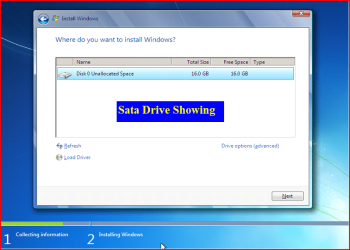
SATA Driver - Load in Windows 7 or Vista Setup

How to Load SATA Driver in Windows 7 or Vista Setup

When you install Vista or Win 7, setup can not find your Hard Drive.
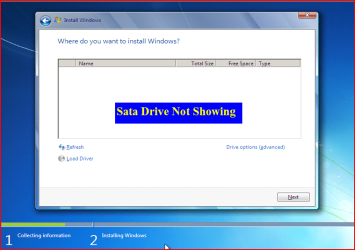

1.PNG


1) Copy your SATA drivers to a disk. (Floppy, CD, USB)
NOTE: Keep this disk in a safe place, as it will be need to use in the Recovery Console.
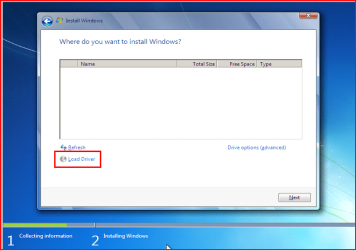
2.PNG

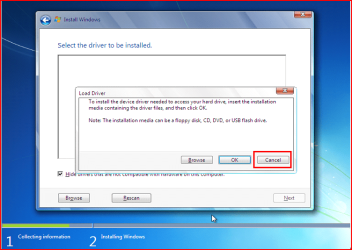
2) Click Load Drivers.
3.PNG
3) Click Cancel
4.PNG
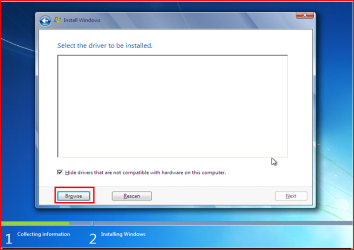
4) Click Browse.
5.PNG
6.PNG
7.PNG
8.PNG
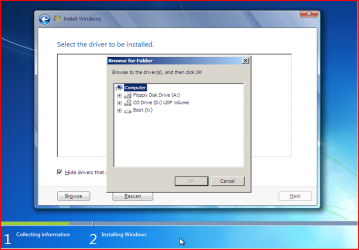
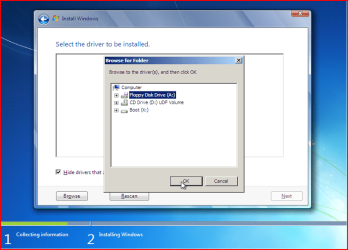
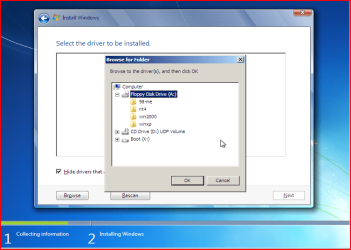
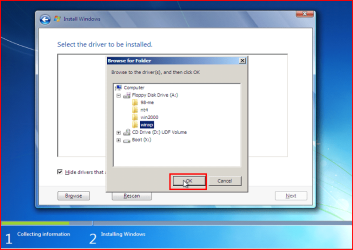
5) Choose your Sata Controller. Click OK
NOTE: for this example, I am using Promise Fastrak 376.
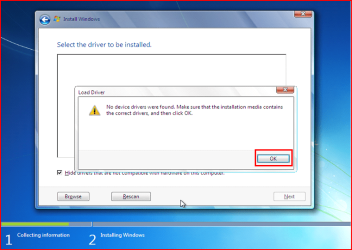
9.PNG
6) Click OK.
10.PNG
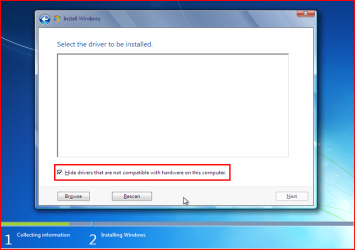
7) Click Unhide.
11.PNG
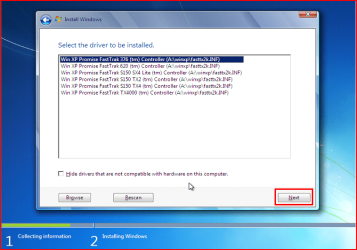
8) Choose your Sata Controller. Click Next.
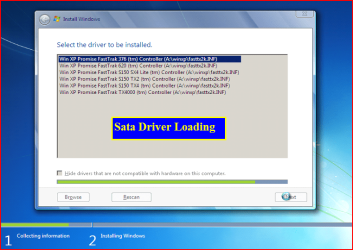
12.PNG
13.PNG
9) Continue with setup.


Last edited by a moderator:
This is great Just what i was looking for thanks much have a fast Question ??
Although i have windows 7 CD, do i need to Load only windows XP drives or this is only for Tutorial ur using XP ??? In other words if i have os 7 why do i only see windows 2000 and xp here on this post ?? thanks
 

My Computer My Computer

OS
Windows 7 64bit
why do i only see windows 2000 and xp here on this post ?? thanks

You are seeing DRIVERS for older PC's.
 

My Computer My Computer

OS
ME/XP/Vista/Win7
why do i only see windows 2000 and xp here on this post ?? thanks

You are seeing DRIVERS for older PC's.

Ok great so on windows 7 DVD i do the same thing ??
the biggest problem i have is backing up or locating my AHCI drivers can u direct me in the right way where i can find the right drivers and how to load then like how u show here in ur tutorial ??? hanks
 

My Computer My Computer

OS
Windows 7 64bit
the biggest problem i have is backing up

You can not backup Windows 7 before installing.

locating my AHCI drivers can u direct me in the right way where i can find the right drivers

You can download the drivers from the OEM manufacturer's website.

how to load then like how u show here in ur tutorial

http://www.sevenforums.com/tutorials/181058-sata-drivers-load-windows-system-image-recovery.html
http://www.sevenforums.com/tutorials/68942-sata-drivers-load-windows-recovery-options.html
 

My Computer My Computer

OS
ME/XP/Vista/Win7
Code:
You can not backup Windows 7 before installing.
this i know :) .. thanks for the help
 

My Computer My Computer

OS
Windows 7 64bit
Hi friends
I need your help, i couldn't find my sata controller
I was using my friend laptop... please help me
my laptop model : HP MINI 1000 series , 1109TU
Can you provide me the download link for sata controller??? i could't find it... pls...
thanks you


this is my problem

When first i boot window 7 install from usb it detected hard drives but when i install window 7...
during the part expanding files, then stuck and show error 0x800700003

then it go back to previous step, and the time the hard drive is missing until i turn my netbook off and on again...

not the pendrive problem... because i tried it on my friend netbook.


Specification
  • Intel® Atom™ Processor N270 (1.60GHz, 512KB L2, 533Mhz FSB)
  • 1024MB (533DDR2) Memory (1024 x 1 pcs)
  • 80GB 4200rpm Hard Disk Drive
  • 10.1-inch Diagonal WSVGA HP BrightView Infinity Display (1024 x 600)
  • Optical Drive: Nill
  • Bluetooth: Yes
  • Wireless: 802.11b/g
  • Genuine Windows® XP Home Service Pack 3
  • Intel GMA950 UMA Chipset
  • Intel Graphics Media Accelerator 950 (Shared)
  • External Card Expansion: None
  • High Definition Audio, Stereo Speakers with Built-in Mic
  • High speed 56K
  • Integrated 10/100 BASE-T Ethernet LAN
  • 92% Full-Sized Keyboard, Touchpad with Scroll Function, Left & Right Clicks
  • 2 USB 2.0, RJ-45/Ethernet, Headphone / Microphone Combo Jack, Expansion Port, AC Power
  • 2-in-1 Integrated Digital Media Reader for Secure Digital Cards & MultiMedia Cards (Supports Adapters)
  • 3-Cell (26Whr) Lithium Polymer Battery
  • 261.7mm (L) x 166.6mm (W) x 25.13mm (H)
  • starting from 1.09kg
  • One year limited warranty (parts / labor /carry-in)
  • Integrated HP Mini Webcam
Please help me...begging!!
 
Last edited by a moderator:

My Computer My Computer

Computer Manufacturer/Model Number
HP MINI 1109TU
OS
Windows 7 Ultimate x64
Hi,

Copy your SATA drivers to a disk. (Floppy, CD, USB)

Sorry for my newbie question but where do I get these Drives for a MB GA-EP45-UD3R Rev 1.1? The Gigabyte Web Site shows two SATA Drives.

Intel SATA Preinstall driver (For AHCI / RAID Mode) Note: Press F6 during Windows setup to read from floppy. OS: Windows XP 64bit, Windows Server 2003 64bit 8.9.0.1023 0.32 MB 2009/08/11

Intel SATA RAID/AHCI Driver OS:Windows XP 32bit,Windows XP 64bit,Windows Vista 32bit,Windows Vista 64bit,Windows 7 32bit,Windows 7 64bit,Windows Server 2003 32bit,Windows Server 2003 64bit
8.9.0.102313.10 MB2009/08/11

Which one of these do I use to perform a clean install of Win 7 Home Professional 64 Bit on a new RAID (1) Array of (2) new 500GB Seagate Drives?

How do I extract the correct drives for a Win 7 64 Bit OS, in order to follow your tutorial?:o

The first Driver listed extracts to a 64Bit Folder contain a number of files but the driver is specified for Win XP and Server 2003.

The second driver self extracts to a "iata_cd.exe" file which I can not extract any drives from.
 
Last edited:

My Computer My Computer

OS
Win 7 Home Premium 64 Bit
Memory
8 MB
Hard Drives
2 X Seagate 500GB in RAID Array
Antivirus
Emsisoft Anti-Malware & Online Armor Firewall
Hi,

Copy your SATA drivers to a disk. (Floppy, CD, USB)

Sorry for my newbie question but where do I get these Drives for a MB GA-EP45-UD3R Rev 1.1? The Gigabyte Web Site shows two SATA Drives.

Intel SATA Preinstall driver (For AHCI / RAID Mode) Note: Press F6 during Windows setup to read from floppy. OS: Windows XP 64bit, Windows Server 2003 64bit 8.9.0.1023 0.32 MB 2009/08/11

Intel SATA RAID/AHCI Driver OS:Windows XP 32bit,Windows XP 64bit,Windows Vista 32bit,Windows Vista 64bit,Windows 7 32bit,Windows 7 64bit,Windows Server 2003 32bit,Windows Server 2003 64bit
8.9.0.102313.10 MB2009/08/11

Which one of these do I use to perform a clean install of Win 7 Home Professional 64 Bit on a new RAID (1) Array of (2) new 500GB Seagate Drives?

How do I extract the correct drives for a Win 7 64 Bit OS, in order to follow your tutorial?:o

The first Driver listed extracts to a 64Bit Folder contain a number of files but the driver is specified for Win XP and Server 2003.

The second driver self extracts to a "iata_cd.exe" file which I can not extract any drives from.

The Intel SATA Preinstall driver.
 

My Computer My Computer

OS
ME/XP/Vista/Win7
Hi,

Thanks for all the help and your own work.

With my GA-EP45_UD3R Rev 1.1 Bios Version F6, Window 7 Home Premium 64 Bit Installed perfectly by itself on a SATA RAID (1) Array.

No requests for any SATA Driver and it recognized the RAID (1) Array without a problem.

Thanks again to all who helped solve this for me on the Gigabyte Community Form, TweakTown Forum, Seven Forum and Toms Hardware Forum (Storage).

No thanks to INTEL who never replied.

laopa
 

My Computer My Computer

OS
Win 7 Home Premium 64 Bit
Memory
8 MB
Hard Drives
2 X Seagate 500GB in RAID Array
Antivirus
Emsisoft Anti-Malware & Online Armor Firewall
Hi I'm having the same problem, but I don't know where to get my drivers.
My computer is a pc desk from HP, model: p6404y.
I downloaded a driver from the HP site, but it's a single .exe file. When I get to the point where I have to brows the files it doesn't show up there.

Please help ASAP.
Thank you very much!
 

My Computer My Computer

Computer type
PC/Desktop
Computer Manufacturer/Model Number
HP P76046y
OS
Windows 7 64bit

My Computer My Computer

OS
ME/XP/Vista/Win7
I also have the same issue... Been trying to reinstall Vista 64bit on my old Gateway P-7811 FX, and I can't seem to find the SATA drivers anywhere. I've tried the SATA AHCI drivers on this website:

Gateway Support - Downloads & Support Documents - Notebook / P Series / P-78

but when I load them onto an USB, the disk still doesn't show up.

thanks so much for the help!

Edit: Nevermind, figured it out, turned out the partitions were corrupt or something. Used the tool on the disc to fix it.
 
Last edited:

My Computer My Computer

Computer type
PC/Desktop
OS
Windows 7 Home Premium 64bit
Back
Top