Aero Peek - Turn On or Off

How to Turn Aero Peek On or Off in Windows 7


   Information
This will show you how to turn Windows 7 Aero Peek, also known as Desktop Preview, On or Off to temporarily make all open windows on the desktop transparent when you place the mouse pointer on the button at the far right end of the taskbar.
   Warning

  • When turned on, Desktop Preview will only work if you have more than one window opened.
  • You will need to have a Aero Theme selected and not one of the Basic and High Contrast Themes for Desktop Preview to work.
Aero Requirements to be Enabled in Windows 7

NOTE: If Aero is not enabled, then Aero Peek will not work even when turned on.
  • Aero is not included in Windows 7 Home Basic or Windows 7 Starter editions.
  • 1 GHz 32-bit or 64-bit processor
  • 1 GB of system memory
  • Support for DirectX 9 graphics with 128 MB memory (in order to enable Aero theme)
  • You must be have True Color (32 bit) set instead of High Color (16 bit).
  • The Desktop Window Manager Session Manager and Themes Services need to be set as Started and Automatic.
  • Refresh or update your WEI score. You will need an WEI score minimum of 2.0 in both Graphics & Gaming graphics in order for Aero to be activated.
  • The desktop composition and Animate controls and elements inside windows options need to be enabled in Visual Effects.

EXAMPLE: Aero Peek
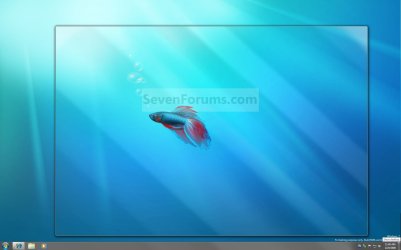
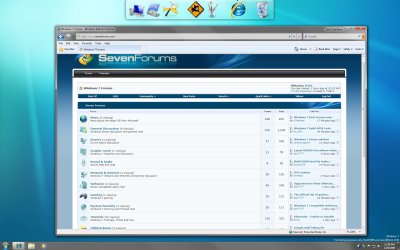
NOTE: This is before (left screenshot) and after (right screenshot) hovering the mouse pointer over the Show Desktop button on the taskbar, or pressing the Windows Key + Spacebar. Before.jpg
Preview.jpg


OPTION ONE

Turn Aero Peek On or Off in Taskbar and Start Menu Properties

1. Right click on the Start button and click on Properties. A) Go to step 3.
OR

2. Right click on a empty area on the taskbar and click on Properties.

3. Click on the Taskbar tab. (See screenshot below) Properties.jpg
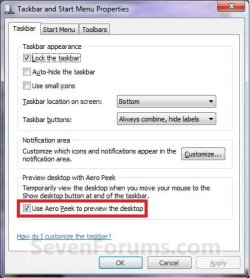
4. To Turn Off Aero Peek A) Uncheck the Use Aero Peek to preview the desktop box. (See screenshot above)

B) Go to step 6.
5. To Turn On Aero Peek
NOTE: By default, Desktop is turned on in Windows 7. A) Check the Use Aero Peek to preview the desktop box. (See screenshot below step 3)
6. Click on OK. (See screenshot below step 3)


OPTION TWO

Turn Aero Peek On or Off with Show Desktop Button on Taskbar
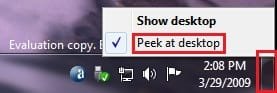
1. Right click on the button at the far right of the taskbar. (See screenshot below) Taskbar-2.jpg
2. To Turn Off Aero Peek A) Right click on the far right taskbar button and select Peek at desktop to uncheck it. (See screenshot above)
3. To Turn On Aero Peek
NOTE: By default, Preview desktop is checked in Windows 7. A) Right click on the far right taskbar button and select Peek at desktop to check it. (See screenshot below step 1)


OPTION THREE

Turn Aero Peek On or Off in Visual Effects


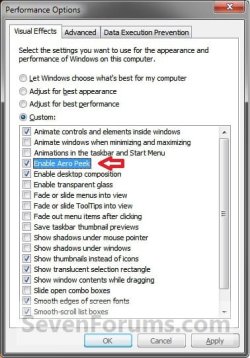
NOTE: This option will also enable or disable taskbar thumbnail live previews. 1. Open the Visual Effects settings.

2. To Enable Areo Peek A) Check the Enable Aero Peek box. (See screenshot below step 4)

B) Go to step 4.
3. To Disable Areo Peek
NOTE: This will gray out the settings in OPTION ONE and OPTION TWO above. A) Uncheck the Enable Aero Peek box. (See screenshot below step 4)
4. Click on OK. Visual_Effects.jpg


OPTION FOUR

Turn Aero Peek On or Off Using a REG File Download


NOTE: This option will not work if Aero Peek was disabled using OPTION THREE above. 1. To Enable Aero Peek A) Click on the Download button below to download the file below. Enabled_Aero_Peek.reg

Download


B) Go to step 3.
2. To Disable Aero Peek A) Click on the Download button below to download the file below. Disabled_Aero_Peek.reg


Download


3. Click on Save, and save the .reg file to the desktop.

4. Right click on the downloaded .reg file and click on Merge.

5. Click on Run, Yes, Yes, and OK when prompted.

6. Log off and log on, or restart the computer.

7. When done, you can delete the downloaded .reg file if you like.
That's it,
Shawn


Attachments

Last edited:
when i rightclick mine is greyed out:

io466b.jpg


and when i hover my mouse, my windows dont go translucent, is it because i have dual screens?
 
Last edited by a moderator:

My Computer My Computer

OS
Windows 7 Ultimate Build 6956 x32
Hello Kryptonit3,

Does the WARNING box at the top of the tutorial apply to you? ;)

Shawn
 

My Computer My Computer

Computer type
PC/Desktop
Computer Manufacturer/Model Number
Self built custom
OS
64-bit Windows 11 Pro for Workstations
CPU
Intel i7-8700K OC'd to 5 GHz
Motherboard
ASUS ROG Maximus XI Formula Z390
Memory
64 GB (4x16GB) G.SKILL TridentZ RGB DDR4 3600 MHz
Graphics Card(s)
ASUS ROG-STRIX-GTX1080TI-O11G-GAMING
Sound Card
Integrated
Monitor(s) Displays
2 x Samsung Odyssey G7 27"
Screen Resolution
2560x1440
Hard Drives
1TB Samsung 990 PRO M.2,
4TB Samsung 990 PRO PRO M.2,
TerraMaster F8 SSD Plus NAS
PSU
Seasonic Prime Titanium 850W
Case
Thermaltake Core P3
Cooling
Corsair Hydro H115i
Keyboard
Logitech wireless K800
Mouse
Logitech MX Master 4
Internet Speed
2 Gb/s Download and 100 Mb/s Upload
Antivirus
Malwarebyte Anti-Malware Premium
Browser
Google Chrome
Other Info
Logitech Z625 speaker system,
Logitech BRIO 4K Pro webcam,
HP Color LaserJet Pro MFP M477fdn,
APC SMART-UPS RT 1000 XL - SURT1000XLI,
Galaxy S23 Plus phone
No, cuz im running 6956

but i disabled UAC if that makes any difference
 

My Computer My Computer

OS
Windows 7 Ultimate Build 6956 x32
I do not believe it would, but you might turn it on to just to test.

Do you have a Windows (Aero) theme running and not one of the Ease of Access themes?
 

My Computer My Computer

Computer type
PC/Desktop
Computer Manufacturer/Model Number
Self built custom
OS
64-bit Windows 11 Pro for Workstations
CPU
Intel i7-8700K OC'd to 5 GHz
Motherboard
ASUS ROG Maximus XI Formula Z390
Memory
64 GB (4x16GB) G.SKILL TridentZ RGB DDR4 3600 MHz
Graphics Card(s)
ASUS ROG-STRIX-GTX1080TI-O11G-GAMING
Sound Card
Integrated
Monitor(s) Displays
2 x Samsung Odyssey G7 27"
Screen Resolution
2560x1440
Hard Drives
1TB Samsung 990 PRO M.2,
4TB Samsung 990 PRO PRO M.2,
TerraMaster F8 SSD Plus NAS
PSU
Seasonic Prime Titanium 850W
Case
Thermaltake Core P3
Cooling
Corsair Hydro H115i
Keyboard
Logitech wireless K800
Mouse
Logitech MX Master 4
Internet Speed
2 Gb/s Download and 100 Mb/s Upload
Antivirus
Malwarebyte Anti-Malware Premium
Browser
Google Chrome
Other Info
Logitech Z625 speaker system,
Logitech BRIO 4K Pro webcam,
HP Color LaserJet Pro MFP M477fdn,
APC SMART-UPS RT 1000 XL - SURT1000XLI,
Galaxy S23 Plus phone
I do not believe it would, but you might turn it on to just to test.

Do you have a Windows (Aero) theme running and not one of the Ease of Access themes?

Sure didnt, LoL, Thank you, it works now :-P
 

My Computer My Computer

OS
Windows 7 Ultimate Build 6956 x32
You're welcome Kryptonit3,

LOL, that's good to hear. I'll add a note about the theme to help others with the same problem.
 

My Computer My Computer

Computer type
PC/Desktop
Computer Manufacturer/Model Number
Self built custom
OS
64-bit Windows 11 Pro for Workstations
CPU
Intel i7-8700K OC'd to 5 GHz
Motherboard
ASUS ROG Maximus XI Formula Z390
Memory
64 GB (4x16GB) G.SKILL TridentZ RGB DDR4 3600 MHz
Graphics Card(s)
ASUS ROG-STRIX-GTX1080TI-O11G-GAMING
Sound Card
Integrated
Monitor(s) Displays
2 x Samsung Odyssey G7 27"
Screen Resolution
2560x1440
Hard Drives
1TB Samsung 990 PRO M.2,
4TB Samsung 990 PRO PRO M.2,
TerraMaster F8 SSD Plus NAS
PSU
Seasonic Prime Titanium 850W
Case
Thermaltake Core P3
Cooling
Corsair Hydro H115i
Keyboard
Logitech wireless K800
Mouse
Logitech MX Master 4
Internet Speed
2 Gb/s Download and 100 Mb/s Upload
Antivirus
Malwarebyte Anti-Malware Premium
Browser
Google Chrome
Other Info
Logitech Z625 speaker system,
Logitech BRIO 4K Pro webcam,
HP Color LaserJet Pro MFP M477fdn,
APC SMART-UPS RT 1000 XL - SURT1000XLI,
Galaxy S23 Plus phone
Hey Shawn, when you hover over the icon to activate it, is the desktop supposed to have barely noticeable diagonal lines going across the desktop. Almost like rays of sunshine. It looks like your picture above has them too. Is this normal? :confused:
 

My Computer My Computer

Computer type
PC/Desktop
Computer Manufacturer/Model Number
Airbot 2.0
OS
Windows 7 Ultimate x64 SP1
CPU
Core i7 920 (D0) @ 4Ghz, *26c idle *65c full load on air
Motherboard
Asus P6X58D Premium - Sata 6Gb/s - USB 3.0
Memory
12GB DDR3 Corsair Dominator -CMD12GX3M6A1600C8 at 1600MHz
Graphics Card(s)
Zotac Geforce GTX 770
Sound Card
ASUS Xonar D2X
Monitor(s) Displays
1 LG 24" Flatron W2453V-PF 1 Samsung 24" P2450H both 2ms RT
Screen Resolution
1920x1080@60hz
Hard Drives
1 Samsung 250GB 840 Evo SSD
1 OCZ Vertex2 180GB SSD
1 TB Samsung Spinpoint F1 7200RPM 32MB cache
2 500GB WD Caviar Blacks 7200RPM 32MB cache (WD5001AALS)

Pioneer DVD Burner DVR-S18M
PSU
Corsair HX1000W
Case
Cooler Master HAF 932
Cooling
Case Fans *3 230mm, *1 140mm/CPU - *Tuniq Tower 120 Extreme
Keyboard
Logitech Wireless MK700
Mouse
Logitech Wireless MK700
Internet Speed
DL 15 Mbps UL 0.98 Mbps
Antivirus
None
Browser
Firefox Nightly
Other Info
Processor-7.7 *RAM- 7.9 *Graphics-7.9 *Gaming Graphics- 7.9 *SSD- 7.8 W.E.I final score= 7.7
*Phone- LG Nexus 5
I beleive that is meant to resemble a pane of glass.
 

My Computer My Computer

Computer Manufacturer/Model Number
Home Brew
OS
Windows 7 Ultimate Vista Ultimate x64
CPU
Core 2 Duo E8500 3.16Ghz @ 3.8Ghz
Motherboard
eVGA 750i FTW
Memory
2x2Gigs Patriot PC2-6400 LL
Graphics Card(s)
Inno3D GeForce GTX260 216 SP
Monitor(s) Displays
ASUS VW222U 22" 2ms Response time
Screen Resolution
1680x1050
Hard Drives
SATA 150GB
SATA II 250GB
USB IDE 750GB Ext.
PSU
HYTEC 600W & Thermaltake 650W Toughpower Power Exp
Case
Thermaltake Armor LCS (Liquid Cooling System)
Cooling
Liquid Cooling System
Keyboard
Logitech G15 Gaming Keyboard
Mouse
Logitech G9 Gaming Mouse
Hi Aaron,

Mr GRiM is correct. It is suppose to look like a pane of glass with a bit of light reflection. :)
 

My Computer My Computer

Computer type
PC/Desktop
Computer Manufacturer/Model Number
Self built custom
OS
64-bit Windows 11 Pro for Workstations
CPU
Intel i7-8700K OC'd to 5 GHz
Motherboard
ASUS ROG Maximus XI Formula Z390
Memory
64 GB (4x16GB) G.SKILL TridentZ RGB DDR4 3600 MHz
Graphics Card(s)
ASUS ROG-STRIX-GTX1080TI-O11G-GAMING
Sound Card
Integrated
Monitor(s) Displays
2 x Samsung Odyssey G7 27"
Screen Resolution
2560x1440
Hard Drives
1TB Samsung 990 PRO M.2,
4TB Samsung 990 PRO PRO M.2,
TerraMaster F8 SSD Plus NAS
PSU
Seasonic Prime Titanium 850W
Case
Thermaltake Core P3
Cooling
Corsair Hydro H115i
Keyboard
Logitech wireless K800
Mouse
Logitech MX Master 4
Internet Speed
2 Gb/s Download and 100 Mb/s Upload
Antivirus
Malwarebyte Anti-Malware Premium
Browser
Google Chrome
Other Info
Logitech Z625 speaker system,
Logitech BRIO 4K Pro webcam,
HP Color LaserJet Pro MFP M477fdn,
APC SMART-UPS RT 1000 XL - SURT1000XLI,
Galaxy S23 Plus phone
Oh ok, I thought I was seeing things. :geek:
Thanks Shawn, MR. Grim
 

My Computer My Computer

Computer type
PC/Desktop
Computer Manufacturer/Model Number
Airbot 2.0
OS
Windows 7 Ultimate x64 SP1
CPU
Core i7 920 (D0) @ 4Ghz, *26c idle *65c full load on air
Motherboard
Asus P6X58D Premium - Sata 6Gb/s - USB 3.0
Memory
12GB DDR3 Corsair Dominator -CMD12GX3M6A1600C8 at 1600MHz
Graphics Card(s)
Zotac Geforce GTX 770
Sound Card
ASUS Xonar D2X
Monitor(s) Displays
1 LG 24" Flatron W2453V-PF 1 Samsung 24" P2450H both 2ms RT
Screen Resolution
1920x1080@60hz
Hard Drives
1 Samsung 250GB 840 Evo SSD
1 OCZ Vertex2 180GB SSD
1 TB Samsung Spinpoint F1 7200RPM 32MB cache
2 500GB WD Caviar Blacks 7200RPM 32MB cache (WD5001AALS)

Pioneer DVD Burner DVR-S18M
PSU
Corsair HX1000W
Case
Cooler Master HAF 932
Cooling
Case Fans *3 230mm, *1 140mm/CPU - *Tuniq Tower 120 Extreme
Keyboard
Logitech Wireless MK700
Mouse
Logitech Wireless MK700
Internet Speed
DL 15 Mbps UL 0.98 Mbps
Antivirus
None
Browser
Firefox Nightly
Other Info
Processor-7.7 *RAM- 7.9 *Graphics-7.9 *Gaming Graphics- 7.9 *SSD- 7.8 W.E.I final score= 7.7
*Phone- LG Nexus 5
You're welcome Aaron. :)
 

My Computer My Computer

Computer type
PC/Desktop
Computer Manufacturer/Model Number
Self built custom
OS
64-bit Windows 11 Pro for Workstations
CPU
Intel i7-8700K OC'd to 5 GHz
Motherboard
ASUS ROG Maximus XI Formula Z390
Memory
64 GB (4x16GB) G.SKILL TridentZ RGB DDR4 3600 MHz
Graphics Card(s)
ASUS ROG-STRIX-GTX1080TI-O11G-GAMING
Sound Card
Integrated
Monitor(s) Displays
2 x Samsung Odyssey G7 27"
Screen Resolution
2560x1440
Hard Drives
1TB Samsung 990 PRO M.2,
4TB Samsung 990 PRO PRO M.2,
TerraMaster F8 SSD Plus NAS
PSU
Seasonic Prime Titanium 850W
Case
Thermaltake Core P3
Cooling
Corsair Hydro H115i
Keyboard
Logitech wireless K800
Mouse
Logitech MX Master 4
Internet Speed
2 Gb/s Download and 100 Mb/s Upload
Antivirus
Malwarebyte Anti-Malware Premium
Browser
Google Chrome
Other Info
Logitech Z625 speaker system,
Logitech BRIO 4K Pro webcam,
HP Color LaserJet Pro MFP M477fdn,
APC SMART-UPS RT 1000 XL - SURT1000XLI,
Galaxy S23 Plus phone
Ok I am a little lost here. On older builds of Win 7 when I moved mouse over bottom right button I am sure the windows used to go transparrent but since having the latest build 7000 instyalled it no longer does that. All that happens is desktop is shown if I click on it. I get exactly the same response if I activate or deactivate the preview desktop option.
I am using Aero themes and changing them makes no difference.

Am I missing something?
 

My Computer My Computer

Computer Manufacturer/Model Number
Home Built / Acer Aspire 7720G Laptop
OS
Windows 7 Build 7600 Laptop and desktop. Also OSX 10.5.7 and 10.6 Snow on Laptop
CPU
AMD Athlon64 Dual core 4200+ / Laptop T5750
Motherboard
Gigabyte / Acer Aspire
Memory
2 x 1Gb = 2 Gb / acer 3GB
Graphics Card(s)
Geforce 8600GT / Geforce 9300M G 256Mb
Sound Card
Terratec DMX 6fire for Music production and X-Fi Xtreme
Monitor(s) Displays
2 x 17" (Dell and Compaq) / 17" WXGA Laptop Screen
Screen Resolution
1280x1024 / 1440x900 (Full HD when conneced to 32" LCD)
Hard Drives
2x Sata 160GB 2x USB 300Gb 1x 160Gb IDE 1x USB 1TB / 250Gb Sata Laptop with Blu-ray drive
PSU
400W + Not 100% sure
Keyboard
Logitech Cordless Keyboard
Mouse
Logitech Mx 700
Internet Speed
20 Meg Down / 1 Meg up Cable
Other Info
Konica Minolta Colour Laser printer, Epson Stylus R360 (Mostly used for printing on CD's/DVD's), Cannon Scanner, Mercury surround system, about 6 external hard drives all 200Gb plus along with the normall home entertainment stuff attached.... DBox 2, XBox 360, etc. etc.
Hello Studulike,

The graphics card you have listed in your system specs is powerful enough for Aero, so you might check to make sure that you have your video drivers installed and that your WEI score is refreshed.


Hope this helps,
Shawn
 

My Computer My Computer

Computer type
PC/Desktop
Computer Manufacturer/Model Number
Self built custom
OS
64-bit Windows 11 Pro for Workstations
CPU
Intel i7-8700K OC'd to 5 GHz
Motherboard
ASUS ROG Maximus XI Formula Z390
Memory
64 GB (4x16GB) G.SKILL TridentZ RGB DDR4 3600 MHz
Graphics Card(s)
ASUS ROG-STRIX-GTX1080TI-O11G-GAMING
Sound Card
Integrated
Monitor(s) Displays
2 x Samsung Odyssey G7 27"
Screen Resolution
2560x1440
Hard Drives
1TB Samsung 990 PRO M.2,
4TB Samsung 990 PRO PRO M.2,
TerraMaster F8 SSD Plus NAS
PSU
Seasonic Prime Titanium 850W
Case
Thermaltake Core P3
Cooling
Corsair Hydro H115i
Keyboard
Logitech wireless K800
Mouse
Logitech MX Master 4
Internet Speed
2 Gb/s Download and 100 Mb/s Upload
Antivirus
Malwarebyte Anti-Malware Premium
Browser
Google Chrome
Other Info
Logitech Z625 speaker system,
Logitech BRIO 4K Pro webcam,
HP Color LaserJet Pro MFP M477fdn,
APC SMART-UPS RT 1000 XL - SURT1000XLI,
Galaxy S23 Plus phone
No Aero is working as windows are transparent wtc. It is just the button bottom right on bar only clears the desktop when I click on it but nothing when I just move mouse over it. People have suggested when you move mouse over it windows on desktop should just change to an outline. Mine does not.

Thanks anyway.
 

My Computer My Computer

Computer Manufacturer/Model Number
Home Built / Acer Aspire 7720G Laptop
OS
Windows 7 Build 7600 Laptop and desktop. Also OSX 10.5.7 and 10.6 Snow on Laptop
CPU
AMD Athlon64 Dual core 4200+ / Laptop T5750
Motherboard
Gigabyte / Acer Aspire
Memory
2 x 1Gb = 2 Gb / acer 3GB
Graphics Card(s)
Geforce 8600GT / Geforce 9300M G 256Mb
Sound Card
Terratec DMX 6fire for Music production and X-Fi Xtreme
Monitor(s) Displays
2 x 17" (Dell and Compaq) / 17" WXGA Laptop Screen
Screen Resolution
1280x1024 / 1440x900 (Full HD when conneced to 32" LCD)
Hard Drives
2x Sata 160GB 2x USB 300Gb 1x 160Gb IDE 1x USB 1TB / 250Gb Sata Laptop with Blu-ray drive
PSU
400W + Not 100% sure
Keyboard
Logitech Cordless Keyboard
Mouse
Logitech Mx 700
Internet Speed
20 Meg Down / 1 Meg up Cable
Other Info
Konica Minolta Colour Laser printer, Epson Stylus R360 (Mostly used for printing on CD's/DVD's), Cannon Scanner, Mercury surround system, about 6 external hard drives all 200Gb plus along with the normall home entertainment stuff attached.... DBox 2, XBox 360, etc. etc.
Have you right clicked on the button and check marked Preview Desktop?
 

My Computer My Computer

Computer type
PC/Desktop
Computer Manufacturer/Model Number
Airbot 2.0
OS
Windows 7 Ultimate x64 SP1
CPU
Core i7 920 (D0) @ 4Ghz, *26c idle *65c full load on air
Motherboard
Asus P6X58D Premium - Sata 6Gb/s - USB 3.0
Memory
12GB DDR3 Corsair Dominator -CMD12GX3M6A1600C8 at 1600MHz
Graphics Card(s)
Zotac Geforce GTX 770
Sound Card
ASUS Xonar D2X
Monitor(s) Displays
1 LG 24" Flatron W2453V-PF 1 Samsung 24" P2450H both 2ms RT
Screen Resolution
1920x1080@60hz
Hard Drives
1 Samsung 250GB 840 Evo SSD
1 OCZ Vertex2 180GB SSD
1 TB Samsung Spinpoint F1 7200RPM 32MB cache
2 500GB WD Caviar Blacks 7200RPM 32MB cache (WD5001AALS)

Pioneer DVD Burner DVR-S18M
PSU
Corsair HX1000W
Case
Cooler Master HAF 932
Cooling
Case Fans *3 230mm, *1 140mm/CPU - *Tuniq Tower 120 Extreme
Keyboard
Logitech Wireless MK700
Mouse
Logitech Wireless MK700
Internet Speed
DL 15 Mbps UL 0.98 Mbps
Antivirus
None
Browser
Firefox Nightly
Other Info
Processor-7.7 *RAM- 7.9 *Graphics-7.9 *Gaming Graphics- 7.9 *SSD- 7.8 W.E.I final score= 7.7
*Phone- LG Nexus 5
Have you right clicked on the button and check marked Preview Desktop?

Yep I have infact the button acts the same weather it is ticked or not. I keep it ticked anyway.
Really strange this. I seem to be the only person who cant get this to work. lol

Thanks again anyway
 

My Computer My Computer

Computer Manufacturer/Model Number
Home Built / Acer Aspire 7720G Laptop
OS
Windows 7 Build 7600 Laptop and desktop. Also OSX 10.5.7 and 10.6 Snow on Laptop
CPU
AMD Athlon64 Dual core 4200+ / Laptop T5750
Motherboard
Gigabyte / Acer Aspire
Memory
2 x 1Gb = 2 Gb / acer 3GB
Graphics Card(s)
Geforce 8600GT / Geforce 9300M G 256Mb
Sound Card
Terratec DMX 6fire for Music production and X-Fi Xtreme
Monitor(s) Displays
2 x 17" (Dell and Compaq) / 17" WXGA Laptop Screen
Screen Resolution
1280x1024 / 1440x900 (Full HD when conneced to 32" LCD)
Hard Drives
2x Sata 160GB 2x USB 300Gb 1x 160Gb IDE 1x USB 1TB / 250Gb Sata Laptop with Blu-ray drive
PSU
400W + Not 100% sure
Keyboard
Logitech Cordless Keyboard
Mouse
Logitech Mx 700
Internet Speed
20 Meg Down / 1 Meg up Cable
Other Info
Konica Minolta Colour Laser printer, Epson Stylus R360 (Mostly used for printing on CD's/DVD's), Cannon Scanner, Mercury surround system, about 6 external hard drives all 200Gb plus along with the normall home entertainment stuff attached.... DBox 2, XBox 360, etc. etc.
That is strange. Have you tried toggling it off and on through the taskbar properties, or restart the computer to see if that may reset it?

You might also run a sfc /scannow command to see if it can find and fix any bad system files that may be responsible.
 

My Computer My Computer

Computer type
PC/Desktop
Computer Manufacturer/Model Number
Self built custom
OS
64-bit Windows 11 Pro for Workstations
CPU
Intel i7-8700K OC'd to 5 GHz
Motherboard
ASUS ROG Maximus XI Formula Z390
Memory
64 GB (4x16GB) G.SKILL TridentZ RGB DDR4 3600 MHz
Graphics Card(s)
ASUS ROG-STRIX-GTX1080TI-O11G-GAMING
Sound Card
Integrated
Monitor(s) Displays
2 x Samsung Odyssey G7 27"
Screen Resolution
2560x1440
Hard Drives
1TB Samsung 990 PRO M.2,
4TB Samsung 990 PRO PRO M.2,
TerraMaster F8 SSD Plus NAS
PSU
Seasonic Prime Titanium 850W
Case
Thermaltake Core P3
Cooling
Corsair Hydro H115i
Keyboard
Logitech wireless K800
Mouse
Logitech MX Master 4
Internet Speed
2 Gb/s Download and 100 Mb/s Upload
Antivirus
Malwarebyte Anti-Malware Premium
Browser
Google Chrome
Other Info
Logitech Z625 speaker system,
Logitech BRIO 4K Pro webcam,
HP Color LaserJet Pro MFP M477fdn,
APC SMART-UPS RT 1000 XL - SURT1000XLI,
Galaxy S23 Plus phone
Hi Shawn,

I found the registry entry for this.
HKEY_CURRENT_USER\Software\Microsoft\Windows\CurrentVersion\Explorer\Advanced\
DisablePreviewDesktop

0-Preview enabled
1-Preview disabled

Sorry, I've been snooping around in the registry. lol
 

My Computer My Computer

Computer type
PC/Desktop
Computer Manufacturer/Model Number
Airbot 2.0
OS
Windows 7 Ultimate x64 SP1
CPU
Core i7 920 (D0) @ 4Ghz, *26c idle *65c full load on air
Motherboard
Asus P6X58D Premium - Sata 6Gb/s - USB 3.0
Memory
12GB DDR3 Corsair Dominator -CMD12GX3M6A1600C8 at 1600MHz
Graphics Card(s)
Zotac Geforce GTX 770
Sound Card
ASUS Xonar D2X
Monitor(s) Displays
1 LG 24" Flatron W2453V-PF 1 Samsung 24" P2450H both 2ms RT
Screen Resolution
1920x1080@60hz
Hard Drives
1 Samsung 250GB 840 Evo SSD
1 OCZ Vertex2 180GB SSD
1 TB Samsung Spinpoint F1 7200RPM 32MB cache
2 500GB WD Caviar Blacks 7200RPM 32MB cache (WD5001AALS)

Pioneer DVD Burner DVR-S18M
PSU
Corsair HX1000W
Case
Cooler Master HAF 932
Cooling
Case Fans *3 230mm, *1 140mm/CPU - *Tuniq Tower 120 Extreme
Keyboard
Logitech Wireless MK700
Mouse
Logitech Wireless MK700
Internet Speed
DL 15 Mbps UL 0.98 Mbps
Antivirus
None
Browser
Firefox Nightly
Other Info
Processor-7.7 *RAM- 7.9 *Graphics-7.9 *Gaming Graphics- 7.9 *SSD- 7.8 W.E.I final score= 7.7
*Phone- LG Nexus 5
LOL, no problem Aaron. It's been added as Option Three.

Thank you. :)
 

My Computer My Computer

Computer type
PC/Desktop
Computer Manufacturer/Model Number
Self built custom
OS
64-bit Windows 11 Pro for Workstations
CPU
Intel i7-8700K OC'd to 5 GHz
Motherboard
ASUS ROG Maximus XI Formula Z390
Memory
64 GB (4x16GB) G.SKILL TridentZ RGB DDR4 3600 MHz
Graphics Card(s)
ASUS ROG-STRIX-GTX1080TI-O11G-GAMING
Sound Card
Integrated
Monitor(s) Displays
2 x Samsung Odyssey G7 27"
Screen Resolution
2560x1440
Hard Drives
1TB Samsung 990 PRO M.2,
4TB Samsung 990 PRO PRO M.2,
TerraMaster F8 SSD Plus NAS
PSU
Seasonic Prime Titanium 850W
Case
Thermaltake Core P3
Cooling
Corsair Hydro H115i
Keyboard
Logitech wireless K800
Mouse
Logitech MX Master 4
Internet Speed
2 Gb/s Download and 100 Mb/s Upload
Antivirus
Malwarebyte Anti-Malware Premium
Browser
Google Chrome
Other Info
Logitech Z625 speaker system,
Logitech BRIO 4K Pro webcam,
HP Color LaserJet Pro MFP M477fdn,
APC SMART-UPS RT 1000 XL - SURT1000XLI,
Galaxy S23 Plus phone
Back
Top