MTU Limit - Test and change your connection's MTU limit

An MTU limit that is set too high can cause fragmented packets and packet loss on your connection. This tutorial will explain how to test if your MTU limit is sending fragmented packets and will explain how to find what value you should be using.

1) Open an elevated command prompt and type:

netsh interface ipv4 show subinterfaces

and hit Enter.

You should get a list of all your network adapters installed on your PC. The MTU value is listed on the left.
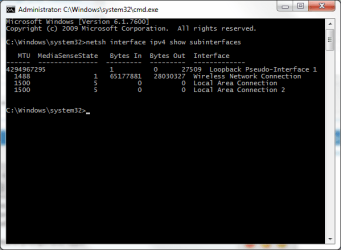
cmd1.png

All PPP connections (Point-to-Point Protocol) have a default MTU size of 1500 bytes and VPN connections have a defualt size of 1400. 28 bytes of this number is reserved for IP/ICMP overhead, so the effective MTU size here is 1472 (1500-28).

To work out if this MTU is too high for your connection, you need to ping with this amount of bytes. The best way to start is start with the default MTU and work your way down.

2) In an elevated command prompt, type the following to ping with an MTU size

ping google.com -f -l 1472

The -f marks packets that should not be fragmented in the ping. -l 1472 sets the size of the packet.
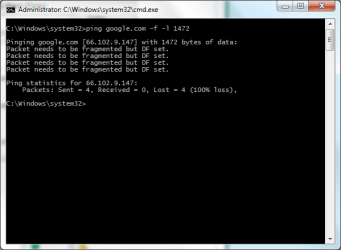
cmd2.png

If you get successful replies, then your current MTU is fine for your connection. If you receive error messages like in the above image, then your packets are getting fragmented.

Keep trying to ping until you get 4 successful replies. Keep decreasing the MTU by 10, so if 1472 fails, try 1462.

You shouldn't go below 1400.

When you find a value that is successful, start to increase that value by 1, so if 1462 is successful, for example, try again with 1463 etc until you get errors again.

3) When you find a successful value, you can then set a new MTU limit with this value.

You will need to add 28 back on to the value for IP/ICMP overheads, so if 1462 is successful, then 1490 is your MTU limit.

To set your new limit, in an elevated command prompt use the following command

For a wired connection use:

netsh interface ipv4 set subinterface "Local Area Connection" mtu=1490 store=persistent

(You can change the interface name to whatever you're using. If you're connected via "Local Area Connection 2" then use this instead and so on)

For a wireless connection use:

netsh interface ipv4 set subinterface "Wireless Network Connection" mtu=1490 store=persistent

Change the MTU value to whatever value you found yourself. Remember you need to add 28 on to the value you were using in your pings. So if you were using a value of 1460 to ping, add 28 on, and the MTU value to set in the above commands will be 1488.

Simply hit Enter and the MTU value will be set.

Restart your PC for the changes to be effective.

If your router also has an MTU value that can be set, such as Netgear routers can have an MTU value set in the WAN settings, then you can add your value here as well.

I've done these steps myself, and it did infact help connections in some online games where I was getting packet loss. After doing these, I now get 0% packet loss. Web browsing is also a lot smoother on my wireless network with this tweak.
 
Last edited:
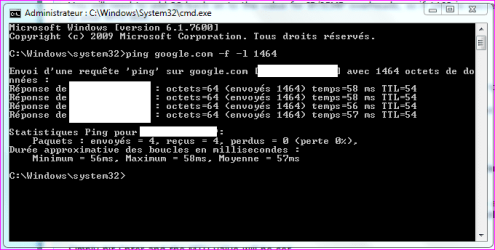
Very interresting...i mean the command...I done the ping and got the value 1464 then add 28 and got the original value i did settle since i've got XP = 1492...(the normal setting!)

Thank you it had confirm my first ping parameter i'd set online, few years ago with an optimizer tool.

What's about Default TTL in Windows 7... 64 or 128 in decimal?
 

Attachments

  • Capture.PNG
    Capture.PNG
    13.6 KB · Views: 360,157

My Computer My Computer

Computer type
PC/Desktop
Computer Manufacturer/Model Number
Custom Build
OS
Windows 7 Professional SP1 - x64 [Non-UEFI Boot]
CPU
Ivy Bridge Core i5 3570K (Delidded)
Motherboard
Asus P8Z77-V LE PLUS
Memory
G.Skill "Ares" DDR3 PC3-12800 - 1600MHz (16Gb)
Graphics Card(s)
Asus Dual-RX480-O4G
Sound Card
Creative Sound Blaster Z w/5.1 sound system
Monitor(s) Displays
Asus IPS 23"
Screen Resolution
16/9
Hard Drives
Internal:
500Go Sata 6Gb/s (x2)
500Go Sata 3Gb/s (x2)
SSD 60Go Sata 6Gb/s
PSU
In Win C 900W Series 80+ Platinum
Case
Thermaltake Chaser A71
Cooling
Custom Water Cooling Loop
Keyboard
Cooler Master QuickFire XTi
Mouse
Razer Imperator 2012 (4G)
Antivirus
MSE
Browser
IE 11.0.xxx Rtm
Other Info
"Raid0" with Intel Smart Response Technology (HDD/SSD)
thanks Everlong,

tried it and 1462\1490 was my magic number.

i wonder if this will improve my kdr in bf2bc? :)

now why can't the OS do this itself? :rolleyes:
 

My Computer My Computer

Computer Manufacturer/Model Number
mickey megabyte 1234
OS
ultimate 64 sp1
CPU
i5 2500K [email protected]
Motherboard
MSI P67A-GD53
Memory
8 gigs GSkill Ripjaws 1600
Graphics Card(s)
amd hd6950
Sound Card
creative x-fi gamer
Monitor(s) Displays
samsung 24"
Screen Resolution
1920x1080
Hard Drives
ocz vertex 2e 60 gig, samsung f3 1tb, buffalo 2tb ext
PSU
antec 550
Case
antec three hundred
Cooling
i'm a cooling fan
Keyboard
saitek eclipse ii
Mouse
logitech g3
Internet Speed
about 4 Mbps
Other Info
i love win7
Very interresting...i mean the command...I done the ping and got the value 1464 then add 28 and got the original value i did settle since i've got XP = 1492...(the normal setting!)

Thank you it had confirm my first ping parameter i'd set online, few years ago with an optimizer tool.

What's about Default TTL in Windows 7... 64 or 128 in decimal?

You don't need to change the TTL. That's the Time To Live and sets how long it takes a connection to timeout, in this case the ping. If you increase it then it takes longer to time out, and quicker to time out if you lower it.


thanks Everlong,

tried it and 1462\1490 was my magic number.

i wonder if this will improve my kdr in bf2bc? :)

now why can't the OS do this itself? :rolleyes:

I haven't tried BC2 since setting mine, but CSS certainly played smoother as well. Don't know why Windows sets such a high value though.
 

My Computer My Computer

Computer type
PC/Desktop
Computer Manufacturer/Model Number
Custom Built
OS
Windows 8.1 Pro x64
CPU
Intel Core i7 4790k
Motherboard
MSI Z97S Krait Edition
Memory
8GB Corsair Dominator 1600MHz
Graphics Card(s)
MSI TwinFrozr GeForce GTX770
Sound Card
ASUS Xonar DX/XD 7.1
Monitor(s) Displays
Dell 24" S2409W + Dell 20" E207WFP
Screen Resolution
1920x1080 + 1680x1050
Hard Drives
1x 120GB OCZ Agility 3, 1x 750GB Western Digital Caviar Black, 1x 1TB Western Digital Caviar Blue
PSU
Corsair HX850 modular
Case
Fractal Design Define R4
Cooling
Corsair H60 w/ twin Corsair SP120 fans
Keyboard
Logitech G510S Keyboard
Mouse
Logitech G500S Laser Mouse
Internet Speed
40Mbps
Antivirus
Microsoft Security Essentials
Browser
Google Chrome
Other Info
LG Blu-Ray player
Good post Everlong. Nice work.
 

My Computer My Computer

Computer Manufacturer/Model Number
Custom Hack job
OS
Windows 7 Ultimate 64 bit
CPU
Intel(R) Core(TM)2 Quad CPU Q8200 @ 2.33GHz
Motherboard
GigaByte EP45-UD3
Memory
8 GB Kingston
Graphics Card(s)
Nvidia GeForce 9600GT
Sound Card
Soundblaster Audigy
Monitor(s) Displays
AOC x2 22"
Hard Drives
2 x Samsung 500GB (RAID)
2 x Samsung 2TB
1 x WD Green 2TB
1 x Seagate 1TB
1 x Samsung 500GB
PSU
Thermaltake QFan 750W
Case
CM Scout Gaming
Cooling
Coolermaster V10
Keyboard
Microsoft Wireless Keyboard 1000
Mouse
Microsoft Wireless Optical 2000
Internet Speed
320
Other Info
Winfast PVR2000CP
LG DVD-RAM DVD/RW/DL Super Multi
Linksys WMP300Nx2 Wireless Adapter
Very interresting...i mean the command...I done the ping and got the value 1464 then add 28 and got the original value i did settle since i've got XP = 1492...(the normal setting!)

Thank you it had confirm my first ping parameter i'd set online, few years ago with an optimizer tool.

What's about Default TTL in Windows 7... 64 or 128 in decimal?

You don't need to change the TTL. That's the Time To Live and sets how long it takes a connection to timeout, in this case the ping. If you increase it then it takes longer to time out, and quicker to time out if you lower it.

Humm, well it is always on 64 decimal on my computers. tried 128 on 7 didn't much changes. Got that TCP Optimizer and created a .reg with it so i wouldn't bother recreate each time...so that why it is always set. Thanks anyway!
 

My Computer My Computer

Computer type
PC/Desktop
Computer Manufacturer/Model Number
Custom Build
OS
Windows 7 Professional SP1 - x64 [Non-UEFI Boot]
CPU
Ivy Bridge Core i5 3570K (Delidded)
Motherboard
Asus P8Z77-V LE PLUS
Memory
G.Skill "Ares" DDR3 PC3-12800 - 1600MHz (16Gb)
Graphics Card(s)
Asus Dual-RX480-O4G
Sound Card
Creative Sound Blaster Z w/5.1 sound system
Monitor(s) Displays
Asus IPS 23"
Screen Resolution
16/9
Hard Drives
Internal:
500Go Sata 6Gb/s (x2)
500Go Sata 3Gb/s (x2)
SSD 60Go Sata 6Gb/s
PSU
In Win C 900W Series 80+ Platinum
Case
Thermaltake Chaser A71
Cooling
Custom Water Cooling Loop
Keyboard
Cooler Master QuickFire XTi
Mouse
Razer Imperator 2012 (4G)
Antivirus
MSE
Browser
IE 11.0.xxx Rtm
Other Info
"Raid0" with Intel Smart Response Technology (HDD/SSD)

My Computer My Computer

Computer type
PC/Desktop
Computer Manufacturer/Model Number
Custom Built
OS
Windows 8.1 Pro x64
CPU
Intel Core i7 4790k
Motherboard
MSI Z97S Krait Edition
Memory
8GB Corsair Dominator 1600MHz
Graphics Card(s)
MSI TwinFrozr GeForce GTX770
Sound Card
ASUS Xonar DX/XD 7.1
Monitor(s) Displays
Dell 24" S2409W + Dell 20" E207WFP
Screen Resolution
1920x1080 + 1680x1050
Hard Drives
1x 120GB OCZ Agility 3, 1x 750GB Western Digital Caviar Black, 1x 1TB Western Digital Caviar Blue
PSU
Corsair HX850 modular
Case
Fractal Design Define R4
Cooling
Corsair H60 w/ twin Corsair SP120 fans
Keyboard
Logitech G510S Keyboard
Mouse
Logitech G500S Laser Mouse
Internet Speed
40Mbps
Antivirus
Microsoft Security Essentials
Browser
Google Chrome
Other Info
LG Blu-Ray player
...Don't know why Windows sets such a high value though.

a MTU of 1500 is the standard for Ethernet v2. 1492 is for the previous standard. Of course not everyone is using the new standard.
 

My Computer My Computer

Computer type
PC/Desktop
Computer Manufacturer/Model Number
Alienware Aurora ALX R4
OS
Windows 10 Pro (x64)
CPU
Intel Core i7-3930K (3.2GHz - 4.5GHz)
Motherboard
Alienware Aurora-R4 x79
Memory
4x Samsung 4GB PC3-12800 DDR3 (16GB 1600MHz)
Graphics Card(s)
Nvidia Geforce GTX 690
Sound Card
SteelSeries Siberia Elite
Monitor(s) Displays
Dell UltraSharp U3011
Screen Resolution
2560x1600
Hard Drives
Samsung 850 Pro 256 GB, Seagate 1TB Desktop Hybrid HDD, 2x Western Digital 4TB Green HDD
PSU
875W Some Dell PSU <.<
Case
Alienware Aurora ALX
Cooling
Custom Liquid Cooling (EK CPU & GPU blocks) dual EK 480RAD
Keyboard
Logitech G710+ Mechanical
Mouse
Logitech G700s
Internet Speed
Verizon Fios (50 mbps average)
Other Info
Server: Intel NUC D54250WYK: i5-4250U, 16GB, 256 GB mSATA, Windows Server 2012 R2
so I guess I'm fine;)
 
Last edited:

My Computer My Computer

Computer Manufacturer/Model Number
Gateway/NV7923u & NV79C52u Laptops
OS
windows 7 professional & ultimate 64bit laptops
CPU
2.27 boost to 2.53 & 2.53 boost to 2.80
Motherboard
Mobile Intel® HM55 Express Chipset ???
Memory
4GB
Graphics Card(s)
Intel® Graphics Media Accelerator HD
Sound Card
realtek High-definition audio support
Monitor(s) Displays
17.3 " HD 1600 x 900
Hard Drives
hatachi Travelstar 5400 500GB & west digital 500GB
Internet Speed
35MB fios

My Computer My Computer

Computer type
PC/Desktop
Computer Manufacturer/Model Number
Custom Built
OS
Windows 8.1 Pro x64
CPU
Intel Core i7 4790k
Motherboard
MSI Z97S Krait Edition
Memory
8GB Corsair Dominator 1600MHz
Graphics Card(s)
MSI TwinFrozr GeForce GTX770
Sound Card
ASUS Xonar DX/XD 7.1
Monitor(s) Displays
Dell 24" S2409W + Dell 20" E207WFP
Screen Resolution
1920x1080 + 1680x1050
Hard Drives
1x 120GB OCZ Agility 3, 1x 750GB Western Digital Caviar Black, 1x 1TB Western Digital Caviar Blue
PSU
Corsair HX850 modular
Case
Fractal Design Define R4
Cooling
Corsair H60 w/ twin Corsair SP120 fans
Keyboard
Logitech G510S Keyboard
Mouse
Logitech G500S Laser Mouse
Internet Speed
40Mbps
Antivirus
Microsoft Security Essentials
Browser
Google Chrome
Other Info
LG Blu-Ray player
thank you!
 

My Computer My Computer

Computer Manufacturer/Model Number
Gateway/NV7923u & NV79C52u Laptops
OS
windows 7 professional & ultimate 64bit laptops
CPU
2.27 boost to 2.53 & 2.53 boost to 2.80
Motherboard
Mobile Intel® HM55 Express Chipset ???
Memory
4GB
Graphics Card(s)
Intel® Graphics Media Accelerator HD
Sound Card
realtek High-definition audio support
Monitor(s) Displays
17.3 " HD 1600 x 900
Hard Drives
hatachi Travelstar 5400 500GB & west digital 500GB
Internet Speed
35MB fios
Thank you so much for this...finally I can connect to Xbox Live through my tethered EVO. :D +Rep
 

My Computer My Computer

Computer type
PC/Desktop
Computer Manufacturer/Model Number
SuperBeast
OS
Windows 10 Tech Preview 9926 x64
CPU
AMD FX-8350
Motherboard
Gigabyte GA-990FXA-UD3
Memory
16GB DDR3 1333
Graphics Card(s)
Asus R9 290 DirectCU II OC, Gigabyte Windforce R9 290 OC
Sound Card
Integrated w/ Creative A250 2.1 speakers
Monitor(s) Displays
Main: Asus VN289H 28" Secondary: Acer G246HL 24"
Screen Resolution
1920x1080
Hard Drives
128 GB SanDisk Ultra Plus (Windows drive)

240 GB Crucial M500 SSD (Games drive)

1 TB WDC WD10EACS 7200RPM HDD (Data drive)

2 TB Seagate Expansion Desktop external HDD (Backup drive)
PSU
900w Antec HCG-900
Case
Raidmax Agusta Full ATX
Cooling
Corsair H80
Keyboard
Cooler Master Devastator MB24
Mouse
Cooler Master Devastator MS2K 1000/1600/2000 DPI
Internet Speed
100Mbps cable
Antivirus
Avast!
Browser
Chrome

My Computer My Computer

Computer type
PC/Desktop
Computer Manufacturer/Model Number
Custom Built
OS
Windows 8.1 Pro x64
CPU
Intel Core i7 4790k
Motherboard
MSI Z97S Krait Edition
Memory
8GB Corsair Dominator 1600MHz
Graphics Card(s)
MSI TwinFrozr GeForce GTX770
Sound Card
ASUS Xonar DX/XD 7.1
Monitor(s) Displays
Dell 24" S2409W + Dell 20" E207WFP
Screen Resolution
1920x1080 + 1680x1050
Hard Drives
1x 120GB OCZ Agility 3, 1x 750GB Western Digital Caviar Black, 1x 1TB Western Digital Caviar Blue
PSU
Corsair HX850 modular
Case
Fractal Design Define R4
Cooling
Corsair H60 w/ twin Corsair SP120 fans
Keyboard
Logitech G510S Keyboard
Mouse
Logitech G500S Laser Mouse
Internet Speed
40Mbps
Antivirus
Microsoft Security Essentials
Browser
Google Chrome
Other Info
LG Blu-Ray player
Help me plz

Ok so i know that your optimal mtu size is not suppose to be under 1400 but mine is 900 what is going on here can anyone help me
 

My Computer My Computer

OS
Windows 7 professional
Ok so i know that your optimal mtu size is not suppose to be under 1400 but mine is 900 what is going on here can anyone help me

Is that what you've set, or is that the default of it in Windows?
 

My Computer My Computer

Computer type
PC/Desktop
Computer Manufacturer/Model Number
Custom Built
OS
Windows 8.1 Pro x64
CPU
Intel Core i7 4790k
Motherboard
MSI Z97S Krait Edition
Memory
8GB Corsair Dominator 1600MHz
Graphics Card(s)
MSI TwinFrozr GeForce GTX770
Sound Card
ASUS Xonar DX/XD 7.1
Monitor(s) Displays
Dell 24" S2409W + Dell 20" E207WFP
Screen Resolution
1920x1080 + 1680x1050
Hard Drives
1x 120GB OCZ Agility 3, 1x 750GB Western Digital Caviar Black, 1x 1TB Western Digital Caviar Blue
PSU
Corsair HX850 modular
Case
Fractal Design Define R4
Cooling
Corsair H60 w/ twin Corsair SP120 fans
Keyboard
Logitech G510S Keyboard
Mouse
Logitech G500S Laser Mouse
Internet Speed
40Mbps
Antivirus
Microsoft Security Essentials
Browser
Google Chrome
Other Info
LG Blu-Ray player
I have a D-Link DLG-4500 that allows the setting of the MTU and is set by default to 1500 (at max). My Windows interface connection was set to 1504. I used your tutorial to determine the appropriate MTU and it turned out to be 1476, with the extra 28 bytes that equals 1504. Should I decrease the value of the Windows interface to be equal to that of the router, and if not what problems could that cause?
 

My Computer My Computer

OS
Windows Vista Ultimate 64bit
Is that what you've set, or is that the default of it in Windows?

thats what i get when i do the mtu packet to like google and such i was trying to find my optimal through cmd prompt and i can't get above 900 or it says i have to defragment it more.
 

My Computer My Computer

OS
Windows 7 professional
I have a D-Link DLG-4500 that allows the setting of the MTU and is set by default to 1500 (at max). My Windows interface connection was set to 1504. I used your tutorial to determine the appropriate MTU and it turned out to be 1476, with the extra 28 bytes that equals 1504. Should I decrease the value of the Windows interface to be equal to that of the router, and if not what problems could that cause?

If it's too high then all you'll get is packet loss with your connection. Setting the correct MTU limit just offers a smoother connection. In a nutshell. You can decrease it to 1500 yea, it won't cause any problems.

Is that what you've set, or is that the default of it in Windows?

thats what i get when i do the mtu packet to like google and such i was trying to find my optimal through cmd prompt and i can't get above 900 or it says i have to defragment it more.

What's your current setup for your connection i.e. do you use wireless, or wired connection etc?
 

My Computer My Computer

Computer type
PC/Desktop
Computer Manufacturer/Model Number
Custom Built
OS
Windows 8.1 Pro x64
CPU
Intel Core i7 4790k
Motherboard
MSI Z97S Krait Edition
Memory
8GB Corsair Dominator 1600MHz
Graphics Card(s)
MSI TwinFrozr GeForce GTX770
Sound Card
ASUS Xonar DX/XD 7.1
Monitor(s) Displays
Dell 24" S2409W + Dell 20" E207WFP
Screen Resolution
1920x1080 + 1680x1050
Hard Drives
1x 120GB OCZ Agility 3, 1x 750GB Western Digital Caviar Black, 1x 1TB Western Digital Caviar Blue
PSU
Corsair HX850 modular
Case
Fractal Design Define R4
Cooling
Corsair H60 w/ twin Corsair SP120 fans
Keyboard
Logitech G510S Keyboard
Mouse
Logitech G500S Laser Mouse
Internet Speed
40Mbps
Antivirus
Microsoft Security Essentials
Browser
Google Chrome
Other Info
LG Blu-Ray player
q.gif
Quote: Originally Posted by toussaint89
Is that what you've set, or is that the default of it in Windows?

thats what i get when i do the mtu packet to like google and such i was trying to find my optimal through cmd prompt and i can't get above 900 or it says i have to defragment it more.


What's your current setup for your connection i.e. do you use wireless, or wired connection etc?

I have a wired connection i wont use a wireless. I think it is just my ISP they are complete crap. I pay 70 dollars a month for 1.5Mb and i usually get 400-500Kb which is ridiculous, its the only thing i can get here. But, other then that idk what it could be at all.
 

My Computer My Computer

OS
Windows 7 professional
mine was 1460 at its best i still kept getting 25% loss it was going back and forth with 0% loss and sometimes 50% loss and when i would switch to 1461 it was worst same with 1459 i ran each like 10 times before deciding which one was the best .
But i couldn't find one tha was 0% loss all the time ,is this normal?
 

My Computer My Computer

OS
windows7 sp1 home premium 64bit
Back
Top