
Check Disk (chkdsk) - Read Event Viewer Log

How to Read the Event Viewer Log for Check Disk (chkdsk) in Vista, Windows 7, and Windows 8

   Information
This will show you how to read the Event Viewer log to see the scan results of Check Disk (chkdsk) in Vista, Windows 7, and Windows 8.


OPTION ONE

To Read chkdsk Results Log Directly in Event Viewer


NOTE: You must be logged in as administrator to be able to open Event Viewer.
1. If you have not already, you will need to have ran Check Disk (chkdsk) in Vista/Windows 7 or Windows 8 prior before it will be in the Event Viewer System log.

2. Press the Windows + R keys to open the Run dialog, type eventvwr.msc, and press Enter.

3. If prompted by UAC, then click on Yes (Windows 7/8) or Continue (Vista).

4. In the left pane of Event Viewer, double click on Windows Logs to expand it, click on Application to select it, then right click on Application and click on Find. (see screenshot below)
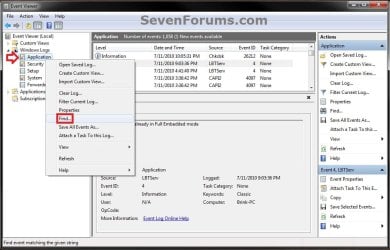
Step1.jpg
5. Copy and paste Chkdsk into the line, and click on Find Next. (see screenshot below)
NOTE: You can continue to click on Find Next to search for other older application logs (if available) for Check Disk (chkdsk) to see them as well.

Step2.jpg
6. You will now see the system log for the scan results of Check Disk (chkdsk). (see screenshot below)
NOTE: The log will have the Chkdsk tag if Check Disk is ran only from within Windows.
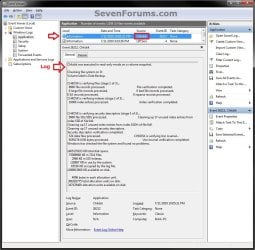
Step3.jpg
7. Go back to the top of the log file list in the middle pane of Event Viewer, then copy and paste Wininit into the line, and click on Find Next. (see screenshot below step 5)
NOTE: You can continue to click on Find Next to search for other older application logs (if available) for Check Disk (chkdsk) to see them as well.

8. You will now see the system log for the scan results of Check Disk (Wininit). (see screenshot below)
NOTE: The log will have the Wininit tag if the computer has to restart to run Check Disk at startup instead of within Windows.
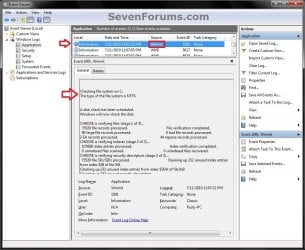
Wininit.jpg
9. When finished searching for Check Disk (chkdsk) application logs, you can close the Find window. (see screenshot below step 5)

10. When finished, you can close Event Viewer.


OPTION TWO

To Create .txt file on Desktop with chkdsk Results Log


   Note
This option is not available in Vista.


1. Press the Windows + R keys to open the Run dialog, type powershell.exe, and press Enter.

2. In PowerShell, copy and paste the command below, and press Enter. (see screenshot below)
NOTE: To paste the copied command into PowerShell, you will just need to right click in PowerShell.

Code:
[COLOR=black]get-winevent -FilterHashTable @{logname="Application"; id="1001"}| ?{$_.providername –match "wininit"} | fl timecreated, message | out-file Desktop\CHKDSKResults.txt[/COLOR]
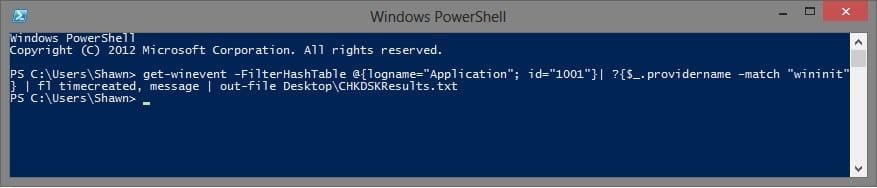
PowerShell.jpg
3. You will now have a CHKDSKResults.txt file created on your desktop that is the log file of your chkdsk scan results from Event Viewer.
That's it,
Shawn


Last edited:
Hi Shawn

Very nice tutorial, Shawn.

Just a thought, may be you could update the Disk Check tutorial to include Command Prompt as in Check Disk tutorial Vista x64forum.

Ray.
 

My Computer

OS
ME/XP/Vista/Win7
Last edited:

My Computer

Computer type
PC/Desktop
Computer Manufacturer/Model Number
Self built custom
OS
64-bit Windows 11 Pro for Workstations
CPU
Intel i7-8700K OC'd to 5 GHz
Motherboard
ASUS ROG Maximus XI Formula Z390
Memory
64 GB (4x16GB) G.SKILL TridentZ RGB DDR4 3600 MHz
Graphics Card(s)
ASUS ROG-STRIX-GTX1080TI-O11G-GAMING
Sound Card
Integrated
Monitor(s) Displays
2 x Samsung Odyssey G7 27"
Screen Resolution
2560x1440
Hard Drives
1TB Samsung 990 PRO M.2,
4TB Samsung 990 PRO PRO M.2,
TerraMaster F8 SSD Plus NAS
PSU
Seasonic Prime Titanium 850W
Case
Thermaltake Core P3
Cooling
Corsair Hydro H115i
Keyboard
Logitech wireless K800
Mouse
Logitech MX Master 4
Internet Speed
2 Gb/s Download and 100 Mb/s Upload
Antivirus
Malwarebyte Anti-Malware Premium
Browser
Google Chrome
Other Info
Logitech Z625 speaker system,
Logitech BRIO 4K Pro webcam,
HP Color LaserJet Pro MFP M477fdn,
APC SMART-UPS RT 1000 XL - SURT1000XLI,
Galaxy S23 Plus phone
Thank you. :)
 

My Computer

Computer type
PC/Desktop
Computer Manufacturer/Model Number
Self built custom
OS
64-bit Windows 11 Pro for Workstations
CPU
Intel i7-8700K OC'd to 5 GHz
Motherboard
ASUS ROG Maximus XI Formula Z390
Memory
64 GB (4x16GB) G.SKILL TridentZ RGB DDR4 3600 MHz
Graphics Card(s)
ASUS ROG-STRIX-GTX1080TI-O11G-GAMING
Sound Card
Integrated
Monitor(s) Displays
2 x Samsung Odyssey G7 27"
Screen Resolution
2560x1440
Hard Drives
1TB Samsung 990 PRO M.2,
4TB Samsung 990 PRO PRO M.2,
TerraMaster F8 SSD Plus NAS
PSU
Seasonic Prime Titanium 850W
Case
Thermaltake Core P3
Cooling
Corsair Hydro H115i
Keyboard
Logitech wireless K800
Mouse
Logitech MX Master 4
Internet Speed
2 Gb/s Download and 100 Mb/s Upload
Antivirus
Malwarebyte Anti-Malware Premium
Browser
Google Chrome
Other Info
Logitech Z625 speaker system,
Logitech BRIO 4K Pro webcam,
HP Color LaserJet Pro MFP M477fdn,
APC SMART-UPS RT 1000 XL - SURT1000XLI,
Galaxy S23 Plus phone
Brilliant

Hey Brink you're a legend mate I have been trying to find out 1) how to read the event viewer and 2) what my chkdsk's have come up with.

My local forum doesn't have such brilliant tutorials laid out like this format and I am one of those who need either an analogy or something like this to get it into the little bit of grey matter that's left you make it look so easy for silly old buggas like me:D:D
 

My Computer

Computer type
PC/Desktop
Computer Manufacturer/Model Number
Own build (new) Desk1 / Asus ROG Win 7 / Desk2 1st build
OS
Desk1 7 Home Prem / Desk2 10 Pro / Main lap Asus ROG 10 Pro 2 laptop Toshiba 7 Pro Asus P2520 7 & 10
CPU
Desk1 i5 3750K / Laptop i7 GTX 860M / Desk2 i5 2500
Motherboard
Desk1 Asus P877-V / Desk2 Gigabyte H67 UD3H / Laptop ?
Memory
Desk1 8GB (1866) / Desk2 16GB (1333) / Laptop 8Gb DDR3
Graphics Card(s)
Desk 1& 2NVidia GTX 650 & Laptops on board Intel
Sound Card
Desk 1 & 2 -XONAR DG Realtek High Def audio Laptop
Monitor(s) Displays
Desk 1 Benq HD 2450 / Desk2 Philips 24" / Laptop 17.5"
Screen Resolution
1920x1080 D1 & D2 & Laptop 1
Hard Drives
Desk1 Samsung 120GB 830 SSD
Asus ROG 256GB 850 Pro SSD
Desk2 Samsung 840 256 SSD
Toshiba 120GB EVO
PSU
Desk 1 Corsair HX 1050/ Laptop ? / Desk 2 Corsair HX 650
Case
Desk 1 Cooler HAF XM ? Toshiba laptop / Desk2 Coolermaster
Cooling
Fans on all Desk1 -2 Desk2 - all Coolermasters 5 Laptop ?
Keyboard
Desk 1 MS Sidewinder X6 Desk 2 MS Sidewinder X 4
Mouse
Desk 1&2 - Gigabyte MS 900 gamer - laptop - Logitec wireless
Internet Speed
ADSL2+
Other Info
One other Desktop (tester) and spare Toshba laptop both with SSD's
Running Kaspersky 2016 ISS on all machines config'd identically
Logitec audio stereo systems on each machine (x3)
Canon MG5250MFC
Router/modem TP-Link running WPA2SK
Thank you for the kind words John. It's always great to know that the tutorials are helpful for everyone. :)
 

My Computer

Computer type
PC/Desktop
Computer Manufacturer/Model Number
Self built custom
OS
64-bit Windows 11 Pro for Workstations
CPU
Intel i7-8700K OC'd to 5 GHz
Motherboard
ASUS ROG Maximus XI Formula Z390
Memory
64 GB (4x16GB) G.SKILL TridentZ RGB DDR4 3600 MHz
Graphics Card(s)
ASUS ROG-STRIX-GTX1080TI-O11G-GAMING
Sound Card
Integrated
Monitor(s) Displays
2 x Samsung Odyssey G7 27"
Screen Resolution
2560x1440
Hard Drives
1TB Samsung 990 PRO M.2,
4TB Samsung 990 PRO PRO M.2,
TerraMaster F8 SSD Plus NAS
PSU
Seasonic Prime Titanium 850W
Case
Thermaltake Core P3
Cooling
Corsair Hydro H115i
Keyboard
Logitech wireless K800
Mouse
Logitech MX Master 4
Internet Speed
2 Gb/s Download and 100 Mb/s Upload
Antivirus
Malwarebyte Anti-Malware Premium
Browser
Google Chrome
Other Info
Logitech Z625 speaker system,
Logitech BRIO 4K Pro webcam,
HP Color LaserJet Pro MFP M477fdn,
APC SMART-UPS RT 1000 XL - SURT1000XLI,
Galaxy S23 Plus phone
Thanks for the tutorial. It enables me to illustrate but not solve my problem. The log found is

CHKDSK is verifying files (stage 1 of 3)...
207616 file records processed. File verification completed.
185 large file records processed. 0 bad file records processed. 2 EA records processed. 109 reparse records processed. CHKDSK is verifying indexes (stage 2 of 3)...
283042 index entries processed. Index verification completed.
CHKDSK is scanning unindexed files for reconnect to their original directory.
Recovering orphaned file Chkdsk20110703093010.log (68213) into directory file 68197.
Recovering orphaned file Chkdsk20110709165629.log (68214) into directory file 68197.
Recovering orphaned file Chkdsk20110714133433.log (68215) into directory file 68197.
Recovering orphaned file Chkdsk20110722172351.log (68216) into directory file 68197.
Recovering orphaned file Chkdsk20110722173123.log (68217) into directory file 68197.
Recovering orphaned file Chkdsk20110725194533.log (68218) into directory file 68197.
Recovering orphaned file Chkdsk20110727084051.log (68219) into directory file 68197.
Recovering orphaned file Chkdsk20110727120925.log (68220) into directory file 68197.
Recovering orphaned file Chkdsk20110805083128.log (77448) into directory file 68197.
10 unindexed files scanned. Recovering orphaned file Chkdsk20110806090816.log (77450) into directory file 68197.

Unfortunately I cannot find file directory 68197: and when I run chkdsk again at the next boot chkds does the same thing. So I conclude it is NOT infact clearing the orphans. What more should I do or just leave it?
:(
 

My Computer

Computer Manufacturer/Model Number
ACPI Multiprocessor PC
OS
Win 7 Ultimate SP1
CPU
CPU Type QuadCore Intel Core i7 960, 3333 MHz (25 x 133)
Motherboard
Motherboard Name Asus P6T (2 PCI, 1 PCI-E x1, 3 PCI-E x16,
Memory
DIMMS: Kingston 99U5458-001.A00LF 6 GB DDR3-1333 DDR3 SDRAM
Graphics Card(s)
Video Adapter NVIDIA GeForce GTX 480 (1536 MB)
Sound Card
Audio Adapter Realtek ALC1200 @ Intel 82801JB ICH10 - High D
Monitor(s) Displays
Monitor Hannstar HZ281H [28" LCD] (015LM3AY00458)
Screen Resolution
1920X 1200
Hard Drives
586GB Western Digital WDC WD6000HLHX-01JJPV0 ATA Device (SATA)
1954GB Western Digital WDC WD20EARS-00MVWB0 ATA Device (SATA)
586GB Western Digital WDC WD6000HLHX-01JJPV0 ATA Device (SATA)
PSU
APC 650
Case
GameMaster
Cooling
8 fans
Keyboard
Logitech HID-Compliant Keyboard
Mouse
Logitech HID-compliant TrackMan Wheel Mouse
Internet Speed
Enabled via DHCP 30mbs
Other Info
Optical Drives
HL-DT-ST BD-RE BH10LS30 SCSI CdRom Device
Iomega RRD2 SCSI CdRom Device
ASUS DRW-20B1LT ATA Device
Hello John,

With it saying 0 bad file records processed., I would not worry about it. :)
 

My Computer

Computer type
PC/Desktop
Computer Manufacturer/Model Number
Self built custom
OS
64-bit Windows 11 Pro for Workstations
CPU
Intel i7-8700K OC'd to 5 GHz
Motherboard
ASUS ROG Maximus XI Formula Z390
Memory
64 GB (4x16GB) G.SKILL TridentZ RGB DDR4 3600 MHz
Graphics Card(s)
ASUS ROG-STRIX-GTX1080TI-O11G-GAMING
Sound Card
Integrated
Monitor(s) Displays
2 x Samsung Odyssey G7 27"
Screen Resolution
2560x1440
Hard Drives
1TB Samsung 990 PRO M.2,
4TB Samsung 990 PRO PRO M.2,
TerraMaster F8 SSD Plus NAS
PSU
Seasonic Prime Titanium 850W
Case
Thermaltake Core P3
Cooling
Corsair Hydro H115i
Keyboard
Logitech wireless K800
Mouse
Logitech MX Master 4
Internet Speed
2 Gb/s Download and 100 Mb/s Upload
Antivirus
Malwarebyte Anti-Malware Premium
Browser
Google Chrome
Other Info
Logitech Z625 speaker system,
Logitech BRIO 4K Pro webcam,
HP Color LaserJet Pro MFP M477fdn,
APC SMART-UPS RT 1000 XL - SURT1000XLI,
Galaxy S23 Plus phone
Yes but it is very annoying I have the same problem. I suspect Casper as the drive was cloned and re-created using Casper when the errors started appearing. Thye always relate to Chkdskxxx.log files.
 

My Computer

OS
Wundows 7 Home Premium 64
Found the fix it is not easy but it works (after a couple of chkdsk runs) Chkdsk logs won't go away - Microsoft Answers

"I have finally found the answer:

Cannot Delete or Repair Corrupted File on NTFS Volume
KB246026

"This behavior can occur if the NTFS volumes' Master File Table (MFT) is corrupted. The short and long file name pairs that are stored in the directory index record and the file names that are stored in the associated File Record Segment (FRS) contain case-sensitive characters that do not match.

NTFS supports case-sensitive (POSIX) file names, but Chkdsk does not check file names in case-sensitive mode.

For example, assume that the directory index record has a BADFILe.TXT entry but the FRS has a BADFILE.TXT entry
for the file name."

So I temporarily took ownership of "System Volume Information"
then turned off the hidden and system attributes for the Chkdsk folder and deleted the files there.
The bad files looked like this:
CHKDSK~2.LOG

Then I changed the attributes back and re-ran Chkdsk.

Problem solved.

It was not a drive error - I ran a surface scan - twice; and the Seagate long self-test - twice.

This is a 2 TB drive so that takes a LONG time.

I have no idea how the file case got mangled by Chkdsk originally, but anyway - if this ever happens to someone else, now you know what to do."
 

My Computer

OS
Wundows 7 Home Premium 64
When Chkdsk runs at bootup are these logs saved somewhere?
 

My Computer

Computer Manufacturer/Model Number
Sony Vaio VGN-NW120J/S
OS
Windows 7
CPU
Intel Core 2 T6500 / 2.10 Ghz
Memory
4gb
Graphics Card(s)
Mobile Intel Graphics Media Accelerator 4500MHD
Monitor(s) Displays
15.5 / 1366x768
Hard Drives
Western Digital Scorpio Black WD3200BEKT
Hello Tim,

They're saved at the same location. It may take a few minutes after it runs before it shows up though. :)
 

My Computer

Computer type
PC/Desktop
Computer Manufacturer/Model Number
Self built custom
OS
64-bit Windows 11 Pro for Workstations
CPU
Intel i7-8700K OC'd to 5 GHz
Motherboard
ASUS ROG Maximus XI Formula Z390
Memory
64 GB (4x16GB) G.SKILL TridentZ RGB DDR4 3600 MHz
Graphics Card(s)
ASUS ROG-STRIX-GTX1080TI-O11G-GAMING
Sound Card
Integrated
Monitor(s) Displays
2 x Samsung Odyssey G7 27"
Screen Resolution
2560x1440
Hard Drives
1TB Samsung 990 PRO M.2,
4TB Samsung 990 PRO PRO M.2,
TerraMaster F8 SSD Plus NAS
PSU
Seasonic Prime Titanium 850W
Case
Thermaltake Core P3
Cooling
Corsair Hydro H115i
Keyboard
Logitech wireless K800
Mouse
Logitech MX Master 4
Internet Speed
2 Gb/s Download and 100 Mb/s Upload
Antivirus
Malwarebyte Anti-Malware Premium
Browser
Google Chrome
Other Info
Logitech Z625 speaker system,
Logitech BRIO 4K Pro webcam,
HP Color LaserJet Pro MFP M477fdn,
APC SMART-UPS RT 1000 XL - SURT1000XLI,
Galaxy S23 Plus phone
they're in C:\System Volume Information\Chkdsk (replace C with whichever drive letter you are having problems with). You may find those directories hidden and you may not have permission to access them either, see my previous thread.
 

My Computer

OS
Wundows 7 Home Premium 64
Brink, i copy my chkdsk from Event Viewer can you check for me , anything wrong with my system / OS or my HDD?

Code:
Log Name: Application
Source: Chkdsk
Date: 5/20/2012 7:59:02 AM
Event ID: 26212
Task Category: None
Level: Information
Keywords: Classic
User: N/A
Computer: Frankz-PC
Description:
Chkdsk was executed in read-only mode on a volume snapshot. 
 
Checking file system on C:
The type of the file system is NTFS.
 
WARNING! F parameter not specified.
Running CHKDSK in read-only mode.
 
CHKDSK is verifying files (stage 1 of 3)...
221184 file records processed. 
 
File verification completed.
769 large file records processed. 
 
0 bad file records processed. 
 
0 EA records processed. 
 
60 reparse records processed. 
 
CHKDSK is verifying indexes (stage 2 of 3)...
277100 index entries processed. 
 
Index verification completed.
0 unindexed files scanned. 
 
0 unindexed files recovered. 
 
CHKDSK is verifying security descriptors (stage 3 of 3)...
221184 file SDs/SIDs processed. 
 
Cleaning up 8 unused index entries from index $SII of file 0x9.
Cleaning up 8 unused index entries from index $SDH of file 0x9.
Cleaning up 8 unused security descriptors.
Security descriptor verification completed.
27959 data files processed. 
 
CHKDSK is verifying Usn Journal...
34368664 USN bytes processed. 
 
Usn Journal verification completed.
Windows has checked the file system and found no problems.
 
686489599 KB total disk space.
151838580 KB in 113183 files.
84920 KB in 27960 indexes.
0 KB in bad sectors.
342699 KB in use by the system.
65536 KB occupied by the log file.
534223400 KB available on disk.
 
4096 bytes in each allocation unit.
171622399 total allocation units on disk.
133555850 allocation units available on disk.
 
Event Xml:
<Event xmlns="http://schemas.microsoft.com/win/2004/08/events/event">
<System>
<Provider Name="Chkdsk" />
<EventID Qualifiers="0">26212</EventID>
<Level>4</Level>
<Task>0</Task>
<Keywords>0x80000000000000</Keywords>
<TimeCreated SystemTime="2012-05-20T00:59:02.000000000Z" />
<EventRecordID>4766</EventRecordID>
<Channel>Application</Channel>
<Computer>Frankz-PC</Computer>
<Security />
</System>
<EventData>
<Data>
 
Checking file system on C:
The type of the file system is NTFS.
 
WARNING! F parameter not specified.
Running CHKDSK in read-only mode.
 
CHKDSK is verifying files (stage 1 of 3)...
221184 file records processed. 
 
File verification completed.
769 large file records processed. 
 
0 bad file records processed. 
 
0 EA records processed. 
 
60 reparse records processed. 
 
CHKDSK is verifying indexes (stage 2 of 3)...
277100 index entries processed. 
 
Index verification completed.
0 unindexed files scanned. 
 
0 unindexed files recovered. 
 
CHKDSK is verifying security descriptors (stage 3 of 3)...
221184 file SDs/SIDs processed. 
 
Cleaning up 8 unused index entries from index $SII of file 0x9.
Cleaning up 8 unused index entries from index $SDH of file 0x9.
Cleaning up 8 unused security descriptors.
Security descriptor verification completed.
27959 data files processed. 
 
CHKDSK is verifying Usn Journal...
34368664 USN bytes processed. 
 
Usn Journal verification completed.
Windows has checked the file system and found no problems.
 
686489599 KB total disk space.
151838580 KB in 113183 files.
84920 KB in 27960 indexes.
0 KB in bad sectors.
342699 KB in use by the system.
65536 KB occupied by the log file.
534223400 KB available on disk.
 
4096 bytes in each allocation unit.
171622399 total allocation units on disk.
133555850 allocation units available on disk.
</Data>
<Binary>0060030062270200AE0A040000000000D70000003C0000000000000000000000</Binary>
</EventData>
</Event>

and i want ask too , what's

Cleaning up 8 unused index entries from index $SII of file 0x9.
Cleaning up 8 unused index entries from index $SDH of file 0x9.
Cleaning up 8 unused security descriptors.

what's that mean?
 
Last edited by a moderator:

My Computer

OS
Windows 7 Home Premium 64bit
Hello sle3pingz,

I don't remember their exact definition, but they are just unused items that were cleaned up and are not important. The most important entries for chkdsk are: 0 KB in bad sectors and 0 bad file records processed.

It indicates that you do not have any bad sectors or file system errors on your C: drive. You got a clean bill of health on the C: drive. :)
 

My Computer

Computer type
PC/Desktop
Computer Manufacturer/Model Number
Self built custom
OS
64-bit Windows 11 Pro for Workstations
CPU
Intel i7-8700K OC'd to 5 GHz
Motherboard
ASUS ROG Maximus XI Formula Z390
Memory
64 GB (4x16GB) G.SKILL TridentZ RGB DDR4 3600 MHz
Graphics Card(s)
ASUS ROG-STRIX-GTX1080TI-O11G-GAMING
Sound Card
Integrated
Monitor(s) Displays
2 x Samsung Odyssey G7 27"
Screen Resolution
2560x1440
Hard Drives
1TB Samsung 990 PRO M.2,
4TB Samsung 990 PRO PRO M.2,
TerraMaster F8 SSD Plus NAS
PSU
Seasonic Prime Titanium 850W
Case
Thermaltake Core P3
Cooling
Corsair Hydro H115i
Keyboard
Logitech wireless K800
Mouse
Logitech MX Master 4
Internet Speed
2 Gb/s Download and 100 Mb/s Upload
Antivirus
Malwarebyte Anti-Malware Premium
Browser
Google Chrome
Other Info
Logitech Z625 speaker system,
Logitech BRIO 4K Pro webcam,
HP Color LaserJet Pro MFP M477fdn,
APC SMART-UPS RT 1000 XL - SURT1000XLI,
Galaxy S23 Plus phone
i see, but still don't know what's that cleaning , even after cleaning , next chkdsk still cleaning, that's not important? just ignored it?
 

My Computer

OS
Windows 7 Home Premium 64bit
Yep, it's nothing to worry about since it only cleans those when they are not needed.
 

My Computer

Computer type
PC/Desktop
Computer Manufacturer/Model Number
Self built custom
OS
64-bit Windows 11 Pro for Workstations
CPU
Intel i7-8700K OC'd to 5 GHz
Motherboard
ASUS ROG Maximus XI Formula Z390
Memory
64 GB (4x16GB) G.SKILL TridentZ RGB DDR4 3600 MHz
Graphics Card(s)
ASUS ROG-STRIX-GTX1080TI-O11G-GAMING
Sound Card
Integrated
Monitor(s) Displays
2 x Samsung Odyssey G7 27"
Screen Resolution
2560x1440
Hard Drives
1TB Samsung 990 PRO M.2,
4TB Samsung 990 PRO PRO M.2,
TerraMaster F8 SSD Plus NAS
PSU
Seasonic Prime Titanium 850W
Case
Thermaltake Core P3
Cooling
Corsair Hydro H115i
Keyboard
Logitech wireless K800
Mouse
Logitech MX Master 4
Internet Speed
2 Gb/s Download and 100 Mb/s Upload
Antivirus
Malwarebyte Anti-Malware Premium
Browser
Google Chrome
Other Info
Logitech Z625 speaker system,
Logitech BRIO 4K Pro webcam,
HP Color LaserJet Pro MFP M477fdn,
APC SMART-UPS RT 1000 XL - SURT1000XLI,
Galaxy S23 Plus phone
brink, i want ask, if we run chkdsk /f , can detect the Bad Sector? or we must run chkdsk /r to detect the bad sector, if we only run fix, that can detect the bad sector?

I mean chkdsk /f can detect the bad sector or not ? And what happend if our notebook harddisk have bad sector, what's the problem?
 
Last edited:

My Computer

OS
Windows 7 Home Premium 64bit
Back
Top