I am utterly dissapointed with Microsoft...

Ya tienes la ultima revision del BIOS de tu GA-H55M-USB3 y cargados los valores predeterminados? Tambien revisa los voltages de las memorias ram, si son 1.5v o 1.65v. Y revisaste con un multimetro digital la fuente de poder que esté dentro del + - 5% en las lineas de +12v +5v +3v?
 

My Computer My Computer

Computer type
PC/Desktop
OS
Microsoft Windows 10 Professional / Windows 7 Professional
CPU
Intel i5-3570
Motherboard
Lenovo Mahobay
Memory
16GB DDR3
Graphics Card(s)
AMD Radeon HD 7850 2GB
Sound Card
(1) Realtek HD Audio (2) AMD HD Audio
Monitor(s) Displays
LG LS192WS
Screen Resolution
1440 x 900 @ 32bit color
Hard Drives
(1) SUV300S37A/120G (2) ST3500413AS SATA Disk Device AHCI mode enabled.
PSU
Corsair HX620
Case
Thermaltake V4 Black Edition
Cooling
Cooler Master Hyper 212 + Artic Silver 5 on CPU/GPU
Keyboard
Dell SK-8115
Mouse
Razer Copperhead with MAPED mat (awesome!)
Internet Speed
100 Mbps up/down
Browser
Chrome
I didn't read the whole thread, but you posted a screenshot saying you have bad sectors, a Full Hard drive wipe will fix that like 1% of the time, all the hard drive regenerator programs can fix that to a certain extent but usualy don't. Im saying get a new hard drive, I had very similiar if not the same problems as you and it actualy turned out to be the hard drive and what's interesting a damaged cord inside the SATA cable, which caused random blue screens and other problems which you wouldn't even relate to the harddrive or it's cable...

but as I said I didn't read the whole thread so if you already replaced your hard drive and the SATA cable then sorry...
 

My Computer My Computer

Computer Manufacturer/Model Number
Me
OS
Windows 7 Ultimate 64bit
CPU
AMD Athlon 630 X4 @ 3.22GHz
Motherboard
AsRock 870 Extreme 3 R2.0
Memory
4GB DDR3 RAM
Graphics Card(s)
XFX HD4890 OC XXX Edition
Sound Card
Onboard
Monitor(s) Displays
Single 22" Samsung SyncMaster 2232BW
Screen Resolution
1680*1050
Hard Drives
64GB Crucial M4 SSD

2 x WD Caviar Blue 500GB in a RAID 0 Array using onboard controller
PSU
Cooler Master GX 550W
Case
Very nice black gaming case with 25cm side fan
Cooling
3 x 120mm Silent red fans, 1 x 250mm side fan
Internet Speed
1.5Mb/s
Ya tienes la ultima revision del BIOS de tu GA-H55M-USB3 y cargados los valores predeterminados? Tambien revisa los voltages de las memorias ram, si son 1.5v o 1.65v. Y revisaste con un multimetro digital la fuente de poder que esté dentro del + - 5% en las lineas de +12v +5v +3v?
I agree
That is:
"Already have the latest BIOS revision of your GA-H55M-USB3 and loaded the defaults? Also check the voltages on the RAM, if 1.5vo 1.65v. And checked with a digital multimeter the power that is within + - 5% lines +12 v +5 v +3 v?"

I suggest again check your PSU. A program like SIW should enable you to monitor your voltages. Not 100% reliable though.
 

My Computer My Computer

Computer type
PC/Desktop
Computer Manufacturer/Model Number
Own build
OS
Windows 7x64 Home Premium SP1
CPU
Intel i7 2600k
Motherboard
ASUS P8Z68 Deluxe
Memory
G.Skill Ripjaws (DDR3-1600) 2x4GB
Graphics Card(s)
Nvidia GeForce GTS 450; Intel HD Graphics 3000(GT2+)
Monitor(s) Displays
Dell Ultrasharp IPS panel U2311H, Samsung SyncMaster P2350
Screen Resolution
1920x1080
Hard Drives
Samsung 850 Pro SSD 256GB, Samsung SSD 840 120GB, Seagates 1TB Barracuda ST31000528AS x2
PSU
Seasonic M12II 520W
Case
Lian Li Lancool PC-K60
Cooling
Case: 1x120mm, 3x140mm CPU: Hyper 212+
Keyboard
Logitech MK520 (wireless)
Mouse
Logitech MK520
Internet Speed
6-7 Mbps
Antivirus
Norton Security Premium, Malwarebytes on 2 (MSE on 3rd PC)
Browser
FireFox
Other Info
Audio: Logitech Z523 2.1
Ya tienes la ultima revision del BIOS de tu GA-H55M-USB3 y cargados los valores predeterminados? Tambien revisa los voltages de las memorias ram, si son 1.5v o 1.65v. Y revisaste con un multimetro digital la fuente de poder que esté dentro del + - 5% en las lineas de +12v +5v +3v?
I agree
That is:
"Already have the latest BIOS revision of your GA-H55M-USB3 and loaded the defaults? Also check the voltages on the RAM, if 1.5vo 1.65v. And checked with a digital multimeter the power that is within + - 5% lines +12 v +5 v +3 v?"

I suggest again check your PSU. A program like SIW should enable you to monitor your voltages. Not 100% reliable though.

Yeap, I've double checked memory timings and voltage, set at 1.5v.
I have the latest BIOS revision too.

I dont have a multimeter :( I'll ask those things to the technicias after all the other options are out.
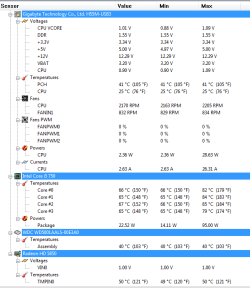
About bad sectors, This install has been made on a wiped clean HD with DISKPART and CLEAN ALL.
 

Attachments

  • hopeitsright.PNG
    hopeitsright.PNG
    15.6 KB · Views: 9

My Computer My Computer

Computer Manufacturer/Model Number
Self-Made
OS
W7 ULTIMATE 64b
CPU
Intel i5 750 2.6GHZ
Motherboard
GIGABYTE H55M-USB3 REV 1.0
Memory
G.SKILL RIPJAWS 2GB 1333MHZ 8-8-8-24 4GB (2x2)
Graphics Card(s)
XFX HD5850 XXX (Factory OC'ed) @ 1150/750
Sound Card
On Board
Monitor(s) Displays
Ehhhh,one of those Toshiba '17 LCD
Hard Drives
1x old samsung 120 gb 7200
1x WD BLACK 500 GB 7200
PSU
Thermaltake 600W TR2-600
Case
CM690
Cooling
Geez,3 80mm (back,side,front)
Actual real bad sectors and not just software issues won't be fixed by low level formatting, becuase the drive is physicaly damaged, scratch from the head or whatever...
 

My Computer My Computer

Computer Manufacturer/Model Number
Me
OS
Windows 7 Ultimate 64bit
CPU
AMD Athlon 630 X4 @ 3.22GHz
Motherboard
AsRock 870 Extreme 3 R2.0
Memory
4GB DDR3 RAM
Graphics Card(s)
XFX HD4890 OC XXX Edition
Sound Card
Onboard
Monitor(s) Displays
Single 22" Samsung SyncMaster 2232BW
Screen Resolution
1680*1050
Hard Drives
64GB Crucial M4 SSD

2 x WD Caviar Blue 500GB in a RAID 0 Array using onboard controller
PSU
Cooler Master GX 550W
Case
Very nice black gaming case with 25cm side fan
Cooling
3 x 120mm Silent red fans, 1 x 250mm side fan
Internet Speed
1.5Mb/s
If the PC from hell hasn't gone off to the workshop yet. Another idea:
download a live linux CD/DVD. For example "linux mint" or the even much lighter "puppy linux". This will bypass the HDD and anything Windows related. See if these OSs are stable for a few hours.
 

My Computer My Computer

Computer type
PC/Desktop
Computer Manufacturer/Model Number
Own build
OS
Windows 7x64 Home Premium SP1
CPU
Intel i7 2600k
Motherboard
ASUS P8Z68 Deluxe
Memory
G.Skill Ripjaws (DDR3-1600) 2x4GB
Graphics Card(s)
Nvidia GeForce GTS 450; Intel HD Graphics 3000(GT2+)
Monitor(s) Displays
Dell Ultrasharp IPS panel U2311H, Samsung SyncMaster P2350
Screen Resolution
1920x1080
Hard Drives
Samsung 850 Pro SSD 256GB, Samsung SSD 840 120GB, Seagates 1TB Barracuda ST31000528AS x2
PSU
Seasonic M12II 520W
Case
Lian Li Lancool PC-K60
Cooling
Case: 1x120mm, 3x140mm CPU: Hyper 212+
Keyboard
Logitech MK520 (wireless)
Mouse
Logitech MK520
Internet Speed
6-7 Mbps
Antivirus
Norton Security Premium, Malwarebytes on 2 (MSE on 3rd PC)
Browser
FireFox
Other Info
Audio: Logitech Z523 2.1
If the PC from hell hasn't gone off to the workshop yet. Another idea:
download a live linux CD/DVD. For example "linux mint" or the even much lighter "puppy linux". This will bypass the HDD and anything Windows related. See if these OSs are stable for a few hours.

That's actualy a good idea, I know on ubuntu when you start from the CD without installing there are actualy programs preloaded that you can check the whole harddrive for real bad sectors/problems with, so probs the same with other distros of Linux but I would try Ubuntu to make sure, and then if its stable on ubuntu linux from the cd as well as no problems with the hdd are found we'll know it's somewhat Windows related, and if there is a hard drive problem you'll know for sure it needs replaced...
 

My Computer My Computer

Computer Manufacturer/Model Number
Me
OS
Windows 7 Ultimate 64bit
CPU
AMD Athlon 630 X4 @ 3.22GHz
Motherboard
AsRock 870 Extreme 3 R2.0
Memory
4GB DDR3 RAM
Graphics Card(s)
XFX HD4890 OC XXX Edition
Sound Card
Onboard
Monitor(s) Displays
Single 22" Samsung SyncMaster 2232BW
Screen Resolution
1680*1050
Hard Drives
64GB Crucial M4 SSD

2 x WD Caviar Blue 500GB in a RAID 0 Array using onboard controller
PSU
Cooler Master GX 550W
Case
Very nice black gaming case with 25cm side fan
Cooling
3 x 120mm Silent red fans, 1 x 250mm side fan
Internet Speed
1.5Mb/s
Actual real bad sectors and not just software issues won't be fixed by low level formatting, becuase the drive is physicaly damaged, scratch from the head or whatever...

How come an extended test with Western Digital Diagnosis tool came up perfectly? No problems?.

That's actualy a good idea, I know on ubuntu when you start from the CD without installing there are actualy programs preloaded that you can check the whole harddrive for real bad sectors/problems with, so probs the same with other distros of Linux but I would try Ubuntu to make sure, and then if its stable on ubuntu linux from the cd as well as no problems with the hdd are found we'll know it's somewhat Windows related, and if there is a hard drive problem you'll know for sure it needs replaced...

But, can, somehow, a FUBAR Motherboard, mess up a Hard Drive?
 

My Computer My Computer

Computer Manufacturer/Model Number
Self-Made
OS
W7 ULTIMATE 64b
CPU
Intel i5 750 2.6GHZ
Motherboard
GIGABYTE H55M-USB3 REV 1.0
Memory
G.SKILL RIPJAWS 2GB 1333MHZ 8-8-8-24 4GB (2x2)
Graphics Card(s)
XFX HD5850 XXX (Factory OC'ed) @ 1150/750
Sound Card
On Board
Monitor(s) Displays
Ehhhh,one of those Toshiba '17 LCD
Hard Drives
1x old samsung 120 gb 7200
1x WD BLACK 500 GB 7200
PSU
Thermaltake 600W TR2-600
Case
CM690
Cooling
Geez,3 80mm (back,side,front)
But, can, somehow, a FUBAR Motherboard, mess up a Hard Drive?

something wrong with the HDD SATA/IDE controler, possibly?
 

My Computer My Computer

Computer Manufacturer/Model Number
Me
OS
Windows 7 Ultimate 64bit
CPU
AMD Athlon 630 X4 @ 3.22GHz
Motherboard
AsRock 870 Extreme 3 R2.0
Memory
4GB DDR3 RAM
Graphics Card(s)
XFX HD4890 OC XXX Edition
Sound Card
Onboard
Monitor(s) Displays
Single 22" Samsung SyncMaster 2232BW
Screen Resolution
1680*1050
Hard Drives
64GB Crucial M4 SSD

2 x WD Caviar Blue 500GB in a RAID 0 Array using onboard controller
PSU
Cooler Master GX 550W
Case
Very nice black gaming case with 25cm side fan
Cooling
3 x 120mm Silent red fans, 1 x 250mm side fan
Internet Speed
1.5Mb/s
Double check your SATA/IDE controller drivers to make sure you have the latest from Support Downloads webpage for make/model. If it changes, watch optional Windows Updates to see if it offers another choice.

Have you been watching for optional driver Updates? Very important with Win7 which is the authority on its own drivers, unlike XP.
 
You are best to attack these problems methodically not jump all over the place. Again do a live CD boot. Apart from the linux distros use the Hirens Boot CD it has its own DOS, mini XP and linux. Plus it has just about every diagnostic tool out there.

Note: Hirens is a 500MB download.
 

My Computer My Computer

Computer type
PC/Desktop
Computer Manufacturer/Model Number
Own build
OS
Windows 7x64 Home Premium SP1
CPU
Intel i7 2600k
Motherboard
ASUS P8Z68 Deluxe
Memory
G.Skill Ripjaws (DDR3-1600) 2x4GB
Graphics Card(s)
Nvidia GeForce GTS 450; Intel HD Graphics 3000(GT2+)
Monitor(s) Displays
Dell Ultrasharp IPS panel U2311H, Samsung SyncMaster P2350
Screen Resolution
1920x1080
Hard Drives
Samsung 850 Pro SSD 256GB, Samsung SSD 840 120GB, Seagates 1TB Barracuda ST31000528AS x2
PSU
Seasonic M12II 520W
Case
Lian Li Lancool PC-K60
Cooling
Case: 1x120mm, 3x140mm CPU: Hyper 212+
Keyboard
Logitech MK520 (wireless)
Mouse
Logitech MK520
Internet Speed
6-7 Mbps
Antivirus
Norton Security Premium, Malwarebytes on 2 (MSE on 3rd PC)
Browser
FireFox
Other Info
Audio: Logitech Z523 2.1
Sorry to revive the dead...but people...look...there's people WITH i5 750 PLUS Gskill ram PLUS Gygabite mobos...having the same exact issue as me:
Memory Errors and BSOD's on Cold Startup - AnandTech Forums
Asus P7P55D + Ripjaw DDR3-2000 (F3-16000CL9D) - GSKILL TECH FORUM

I'll try to get some other ram and then I'll see....By the way, today, Windows came up asking me to activate (notice, that I've already activated it when I reformated the HD) Windows (again)....I activated it (again) with no problems...but why did that happen?
 

My Computer My Computer

Computer Manufacturer/Model Number
Self-Made
OS
W7 ULTIMATE 64b
CPU
Intel i5 750 2.6GHZ
Motherboard
GIGABYTE H55M-USB3 REV 1.0
Memory
G.SKILL RIPJAWS 2GB 1333MHZ 8-8-8-24 4GB (2x2)
Graphics Card(s)
XFX HD5850 XXX (Factory OC'ed) @ 1150/750
Sound Card
On Board
Monitor(s) Displays
Ehhhh,one of those Toshiba '17 LCD
Hard Drives
1x old samsung 120 gb 7200
1x WD BLACK 500 GB 7200
PSU
Thermaltake 600W TR2-600
Case
CM690
Cooling
Geez,3 80mm (back,side,front)

My Computer My Computer

Computer type
PC/Desktop
Computer Manufacturer/Model Number
Own build
OS
Windows 7x64 Home Premium SP1
CPU
Intel i7 2600k
Motherboard
ASUS P8Z68 Deluxe
Memory
G.Skill Ripjaws (DDR3-1600) 2x4GB
Graphics Card(s)
Nvidia GeForce GTS 450; Intel HD Graphics 3000(GT2+)
Monitor(s) Displays
Dell Ultrasharp IPS panel U2311H, Samsung SyncMaster P2350
Screen Resolution
1920x1080
Hard Drives
Samsung 850 Pro SSD 256GB, Samsung SSD 840 120GB, Seagates 1TB Barracuda ST31000528AS x2
PSU
Seasonic M12II 520W
Case
Lian Li Lancool PC-K60
Cooling
Case: 1x120mm, 3x140mm CPU: Hyper 212+
Keyboard
Logitech MK520 (wireless)
Mouse
Logitech MK520
Internet Speed
6-7 Mbps
Antivirus
Norton Security Premium, Malwarebytes on 2 (MSE on 3rd PC)
Browser
FireFox
Other Info
Audio: Logitech Z523 2.1
Hi there
You should be advised that while Hirens boot CD is found in loads of places it does contain some pirated software - espcially the earlier versions -- these are often marked as Hirens CD re-vamped or restored.

Your own conscience on this one -- but editons of this CD - especially earlier releases invariably contain commercial software like Acronis true image so over to you.

I downloaded a copy myself of one of these editions before I realized it contained this type of software so I don't use it anymore -- pity in a way as there were somee great FREE open source tools on it as well.


Just advising you of the possible pitfalls you might run into using this type of software.

Cheers
jimbo
 

My Computer My Computer

Computer type
PC/Desktop
Computer Manufacturer/Model Number
Custom built, several laptops HP/ASUS
OS
Linux CENTOS 7 / various Windows OS'es and servers
CPU
Intel i7 Intel i5
Memory
8GB, 16GB
Graphics Card(s)
On Motherboard
Sound Card
Realtek HD audio
Monitor(s) Displays
Apple Cinema display, Samsung LCD
Screen Resolution
1920 X 1080
Hard Drives
4 X 1TB SATA
Mouse
Toshiba wireless laser
Internet Speed
> 20MB up

My Computer My Computer

Computer type
Laptop
Computer Manufacturer/Model Number
ASUS G60-RBBX05
OS
Win7 Home Premium 64x
CPU
Intel Core 2 Duo P7450 / 2.13 GHz (2.29 with Extreme Turbo)
Memory
4 GB PC-6400 Hyundai (2X2) at 800Mhz
Graphics Card(s)
NVIDIA GeForce GTX 260M 1GB DDR3 VRAM
Monitor(s) Displays
16" LED Backlit
Screen Resolution
1366 x 768 on laptop 1600x1050 max res on 22" external mon
Hard Drives
OCZ Agility 3 60GB SSD / 320 GB - Serial ATA-150 - 7200 rpm
PSU
6-cell Lithium ion { lasts 1.5 hours }
Case
ASUS G60 Laptop
Keyboard
Chicklet type back-lit (white light) keyboard
Mouse
Logitech G9 Laser Mouse 3200dpi and 1000 reports per minute
Internet Speed
Comcast 8.60mb/s up - 3.11mb/s down
Antivirus
MSE
Browser
Firefox
Other Info
General mid-budget gaming Comp. Low batterylife - High FrameRates - currently overheating problems :(

2nd Rig: Case: Rosewill BLACKHAWK Gaming ATX Mid Tower Computer Case

Mobo: GIGABYTE GA-990FXA-UD3
CPU: AMD FX-6200 Zambezi 3.8GHz (4.1GHz Turbo)
Heatsink: COOLER MASTER V8 CPU Cooler
RAM: Patriot Viper 3 8GB (2 x 4GB) 240-Pin DDR3 SDRAM 1866 (PC3 15000)
GPU: SAPPHIRE Radeon HD 6850 1GB 2
Hi there
You should be advised that while Hirens boot CD is found in loads of places it does contain some pirated software - espcially the earlier versions -- these are often marked as Hirens CD re-vamped or restored.

Your own conscience on this one -- but editons of this CD - especially earlier releases invariably contain commercial software like Acronis true image so over to you.

I downloaded a copy myself of one of these editions before I realized it contained this type of software so I don't use it anymore -- pity in a way as there were somee great FREE open source tools on it as well.


Just advising you of the possible pitfalls you might run into using this type of software.

Cheers
jimbo
Thankyou

I don't deliberately promote the use of pirated software!!!
I am not aware of any pirated utilities in recent versions I have personally used. However, there are a large number of utilities I have never used. Most of what I find useful can be sourced individually for free with the exception of the mini XP environment. Collected in one place and regularly updated is useful. It has been my understanding that they are licensed to use the mini XP environment. It is essentially a PE environment. If MS minded I would have expected them to come down on Hirens like a ton of bricks.

There are free versions of Acronis for Seagate and WD HDDs. I don't use Acronis so maybe you could confirm if it isn't a free version on the Hirens CD. Likewise it is my understanding that Macrium is the free version.

Now you have raised the issue can you advise us of any "pirated" software on the current version. Then in good conscience I certainly will avoid use of that particular element of the CD.

Here is is as close to an unbiased comment as I could find
http://en.wikipedia.org/wiki/Hiren%27s_BootCD

I have already asked an Administrator about the mini XP environment and they were unsure what permissions, if any, exist for its use.
If the Administrators wish members not to refer to the Hirens boot disk then it is their call.
 
Last edited:

My Computer My Computer

Computer type
PC/Desktop
Computer Manufacturer/Model Number
Own build
OS
Windows 7x64 Home Premium SP1
CPU
Intel i7 2600k
Motherboard
ASUS P8Z68 Deluxe
Memory
G.Skill Ripjaws (DDR3-1600) 2x4GB
Graphics Card(s)
Nvidia GeForce GTS 450; Intel HD Graphics 3000(GT2+)
Monitor(s) Displays
Dell Ultrasharp IPS panel U2311H, Samsung SyncMaster P2350
Screen Resolution
1920x1080
Hard Drives
Samsung 850 Pro SSD 256GB, Samsung SSD 840 120GB, Seagates 1TB Barracuda ST31000528AS x2
PSU
Seasonic M12II 520W
Case
Lian Li Lancool PC-K60
Cooling
Case: 1x120mm, 3x140mm CPU: Hyper 212+
Keyboard
Logitech MK520 (wireless)
Mouse
Logitech MK520
Internet Speed
6-7 Mbps
Antivirus
Norton Security Premium, Malwarebytes on 2 (MSE on 3rd PC)
Browser
FireFox
Other Info
Audio: Logitech Z523 2.1
Hi there, its me again.
I've got help from the guys over at the GSKILL forums. They've told me to make some changes in the RAM voltages.
I decided to reformat the machine again in order to cross out any kind of system corruption posibility.
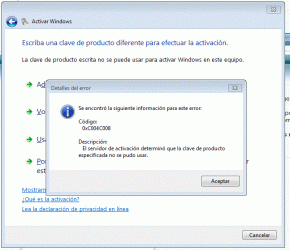
So...I've decided to activate Windows (again, for the 4th time, with the same key) and it comes with what's on the image.
Now, if I understood, I am entitled to install Windows as many times as I want on this motherboard with the same key.
Mein Gott.
 

Attachments

  • Captura.GIF
    Captura.GIF
    57.5 KB · Views: 10

My Computer My Computer

Computer Manufacturer/Model Number
Self-Made
OS
W7 ULTIMATE 64b
CPU
Intel i5 750 2.6GHZ
Motherboard
GIGABYTE H55M-USB3 REV 1.0
Memory
G.SKILL RIPJAWS 2GB 1333MHZ 8-8-8-24 4GB (2x2)
Graphics Card(s)
XFX HD5850 XXX (Factory OC'ed) @ 1150/750
Sound Card
On Board
Monitor(s) Displays
Ehhhh,one of those Toshiba '17 LCD
Hard Drives
1x old samsung 120 gb 7200
1x WD BLACK 500 GB 7200
PSU
Thermaltake 600W TR2-600
Case
CM690
Cooling
Geez,3 80mm (back,side,front)
Back
Top